Understanding SMS failure reasons and resolution steps
You will learn
Learn reasons why SMS message delivery can fail and best practices for avoiding failures.
Receiving an SMS error message
When sending SMS with Klaviyo, it is important to pay attention to your failed deliveries. Ideally, the failed delivery rate should be as low as possible. If you’re seeing a lot of failed deliveries, review the failure reasons and take action to prevent further delivery issues.
To view this information for a text message:
- Navigate to the SMS flow or campaign you want to look at.
- For flows, click the SMS message, then select View details in the Performance section.
- For campaigns, go directly to step 2.
- Select Recipient activity.
- Select Failed.
- Review the reason for the message’s failure in the Failed Reason column.
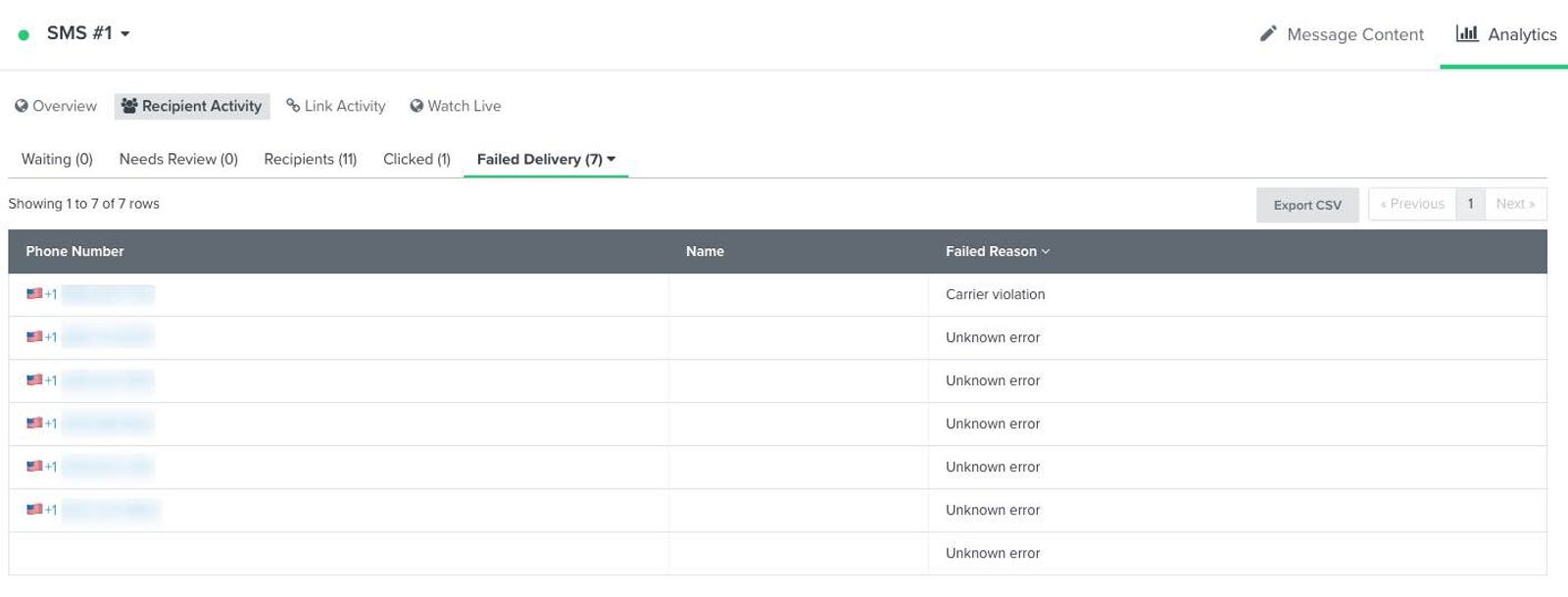
Device disconnected
The Device disconnected failure indicates that the recipient’s device is no longer in service.
If these errors exceed 5% of the total send, take the following resolution steps:
- Create an SMS error segment and exclude it from SMS campaigns. Continue allowing eligible subscribers to receive flows and SMS conversations.
Device unreachable
The Device unreachable failure indicates that the recipient’s device is not in a service area, not accepting messages, or the device is off and cannot receive SMS.
If these errors exceed 5% of the total send, take the following resolution steps:
- Create an SMS error segment and exclude it from SMS campaigns. Continue allowing eligible subscribers to receive flows and SMS conversations.
Carrier violation
The Carrier violation failure reason indicates that your send is failing due to mobile carrier filtering.
Mobile carriers filter SMS messages for 2 main reasons:
- Protect their customers from receiving spam messages.
- Meet regulations for sending SMS to phones in a specific country or on a certain mobile network.
SMS message filtering can vary by country and across different mobile networks (e.g., Verizon, AT&T, etc.)
Carriers filter prohibited content, including content related to sex, hate, alcohol, firearms, and tobacco (SHAFT), as well as profanity and controlled substances. Some restricted categories, such as alcohol, are permitted only in supported countries with the required age-gating and sending setup. Check the SMS and MMS prohibited content guide for the rules that apply to your business, including CBD restrictions. The CTIA is a wireless industry trade association that publishes messaging guidelines.
If you are seeing Carrier violation failures exceed 10% of your total send, take the following actions:
- Remove content prohibited for your business and the countries you send to.
- Ensure that the SMS message content does not resemble spam (e.g., contain many capital letters or include any bitly, tinyurl, or other third-party shortened links).
- Review your recent SMS campaign unsubscribe rates in relation to our campaign SMS and MMS benchmarks. If your unsubscribe rates are increasing or high, learn how to decrease your SMS unsubscribe rates.
- Enable double opt-in to ensure users are aware of what they are subscribing to. Confirmation texts are skipped in countries where you use a branded sender ID.
- Review SMS disclosure language to ensure consent is transparent to the end user.
Once you have completed the recommended resolution actions, test an SMS message through a preview.
Make sure to test this with a preview SMS, rather than a campaign.
If your delivery problems persist, you can reach out to Klaviyo’s support team.
Message blocked
The Message blocked failure reason indicates that a wireless carrier, Klaviyo, or the recipient has blocked the message. Klaviyo automatically removes SMS marketing consent from the affected profile when it receives this error.
If the same number repeatedly receives Message blocked errors, review whether list imports or integrations are restoring SMS consent after the profile was unsubscribed. Check the profile’s consent history before sending again. For example, someone who replied STOP must opt back in before you send them more SMS marketing messages.
If you are seeing Message blocked errors exceed 5% of your total send, take the following resolution steps:
- Use an SMS error segment to exclude subscribers with other recurring delivery errors from SMS campaigns.
- For countries where your sending number can receive replies, enable double opt-in to require customers to confirm subscriptions in order to prevent invalid numbers from entering subscriber lists.
- Refrain from uploading unknown SMS data.
Device incapable of receiving SMS
The Device incapable of receiving SMS failure reason relates to landlines or other devices that cannot receive SMS. Klaviyo automatically removes SMS marketing consent from the affected profile when it receives this error.
If you are seeing Device incapable of receiving SMS failures exceed 5% of your total send, take the following resolution steps:
- Use an SMS error segment to exclude subscribers with other recurring delivery errors from SMS campaigns.
- For countries where your sending number can receive replies, enable double opt-in to require customers to confirm subscriptions in order to prevent landlines or ineligible numbers from joining subscriber lists.
Number not registered or Toll Free Number Not Verified
The Number not registered and Toll Free Number Not Verified failure reasons indicate that your sending number has not completed the required registration or verification.
- Go to Settings > Text message > Sender information and check that your sending number is Active. Complete toll-free verification or branded sender ID registration as needed before sending campaigns or setting SMS flow messages live.
Once you have completed the recommended resolution actions, test an SMS message through a preview.
Make sure to test this with a preview SMS, rather than a campaign.
If delivery problems persist, reach out to Klaviyo’s support team.
Invalid Content Type
The Invalid Content Type error indicates that a carrier does not support the content format in your message, such as an image file type.
For example, WebP is not a supported MMS delivery format. Use a JPG, PNG, or GIF image instead. When you upload a static WebP file to Klaviyo’s image library, you can convert it to PNG; animated WebP files are not supported.
Unknown error
The Unknown error failure reason means no specific failure reason is available. This can happen when the wireless carrier does not provide one or when Klaviyo can no longer retrieve the failure details, such as after a profile is deleted.
If you are seeing Unknown error failures exceed 10% of your total send, you can reach out to Klaviyo’s support team.
Best practices for not being filtered
To help prevent carrier filtering and sending failures, it’s important to follow best practices for SMS messaging. Make sure you are personalizing your messages and providing value to your subscribers.
See our recommended SMS segments to better understand your audience and send more targeted messages with Klaviyo.
Following these best practices can also lead to better SMS delivery:
- Always provide a way for subscribers to easily opt out. Include STOP instructions when your sending number can receive replies. For branded sender IDs, use an unsubscribe link because recipients cannot reply.
- Enable double opt-in for SMS lists.
- Let subscribers know who is sending the message.
- Do not send SMS messages early in the morning or late at night, as a text message from a business during off-hours may be seen as intrusive.
- Take advantage of Smart Sending to avoid overloading SMS subscribers with messages.
- Use a personal tone to sound more human.
- Avoid content prohibited for your business and the countries you send to.
- Use a trusted sending number, such as a short code or verified toll-free number.
Additional resources
- Understanding SMS metrics
Learn about the SMS metrics that are pulled into Klaviyo, such as what they are, where to find them, and what they mean.
- Understanding SMS and MMS prohibited content
Learn about which content is not allowed for SMS marketing.