Understanding the double opt-in process
You will learn
Learn the difference between single and double opt-in, why double opt-in is important for both SMS and email, and how to update the opt-in settings for a list or keyword in Klaviyo.
What is double opt-in?
Double opt-in is a process through which a new subscriber must confirm their subscription before being subscribed to a given list. It applies to both email and SMS marketing, with the SMS exceptions described below. With single opt-in, subscribers do not need this additional confirmation.
Double opt-in can be set at the list level. If a list has double opt-in, everyone who subscribes to that list must confirm their interest before they're added through a confirmation message sent immediately after signing up. This message will prompt them to confirm their subscription. Only subscribers who confirm their subscription will be successfully added to the list, and get queued for a welcome series.
Double opt-in also exists for SMS keywords. For subscribers that opt in through an SMS keyword, the keyword’s opt-in settings will override the list’s.
You should always use double opt-in for SMS lists. Carriers often require it, particularly for abandoned cart messages.
How does double opt-in work with branded sender IDs?
Branded sender IDs cannot receive text messages, so there's no way for a subscriber to confirm that they want to opt in. Thus, for any country where you're using a branded sender ID, the double opt-in confirmation text is skipped automatically.
If you have a paid SMS plan, consider using Smart Opt-in to collect SMS consent in sign-up forms. Visitors confirm their consent by entering their phone number and then entering the one-time code they receive. Smart Opt-in requires this code even if the destination list uses single opt-in.
How does double opt-in work with SMS transactional?
Currently, double opt-in does not work with SMS transactional consent. Anyone who signs up for only transactional SMS will not get a confirmation message. Instead, transactional SMS consent is added immediately to the profile.
If someone opts in to both transactional and promotional SMS, transactional consent is added immediately to the profile, but the double opt-in text sends for promotional consent. In this case, you'll be able to send transactional SMS, but you cannot send promotional SMS until the profile confirms via double opt-in.
Why is double opt-in important?
When you add a signup form to your site, you are not able to control who decides to take advantage of this form. Even if you add an extra level of validation, it isn’t always possible to ensure subscribers only submit valid or accurate email addresses and phone numbers. Well-intentioned subscribers could simply type their email or phone number incorrectly, but spam-bots could also find your form and flood it with fake email addresses or phone numbers.
The double opt-in process helps you grow your list while also minimizing abuse and preventing the accumulation of invalid or mistyped emails and phone numbers. For email in particular, this is important because most major email clients (like Google and Yahoo) track how recipients interact with emails from your domain — how many are marked as spam, how many are opened, how many bounce, etc.
They use this information to determine whether your emails are classified as spam. Having a lot of uninterested people or a lot of invalid emails on your list will only hurt your efforts to reach those that actually want to receive your emails.
List imports do not trigger double opt-in.
Update opt-in settings
In some specific cases, you may want to remove double opt-in and make your list single opt-in. Most often, brands choose to implement single opt-in when they are using other third-party signup forms or tools and their customers are prompted with a double opt-in confirmation at some other point in the signup workflow. For example, if your third-party signup form has a double opt-in feature enabled, you might want to disable double opt-in on your Klaviyo list so customers don't experience multiple opt-in confirmation messages.
Single opt-in is not recommended for SMS, as double opt-in is required by some carriers and for abandoned cart messages (in the US and Canada).
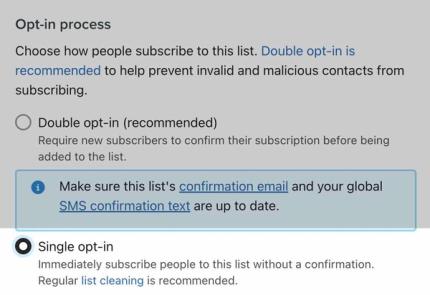
New lists are created with your default opt-in setting, except lists created for SMS or with “SMS” in their name, which use double opt-in. Changing the account default will not update existing lists. To enable single opt-in for a given list:
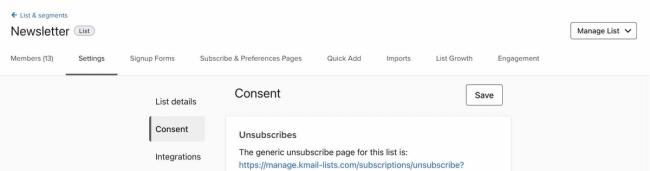
- Navigate to Audience > Lists & segments, then select the list you want to edit.
- Select Settings.
- Select Consent.
- Under Opt-in process, select Single opt-in.
- Click Save.
Once this setting changes, new email and SMS marketing subscribers using the list’s opt-in setting do not need to confirm their subscription. For instance, someone submitting a form to a single opt-in list is added immediately, unless the form uses Smart Opt-in for SMS. SMS keywords continue to use their own opt-in settings.
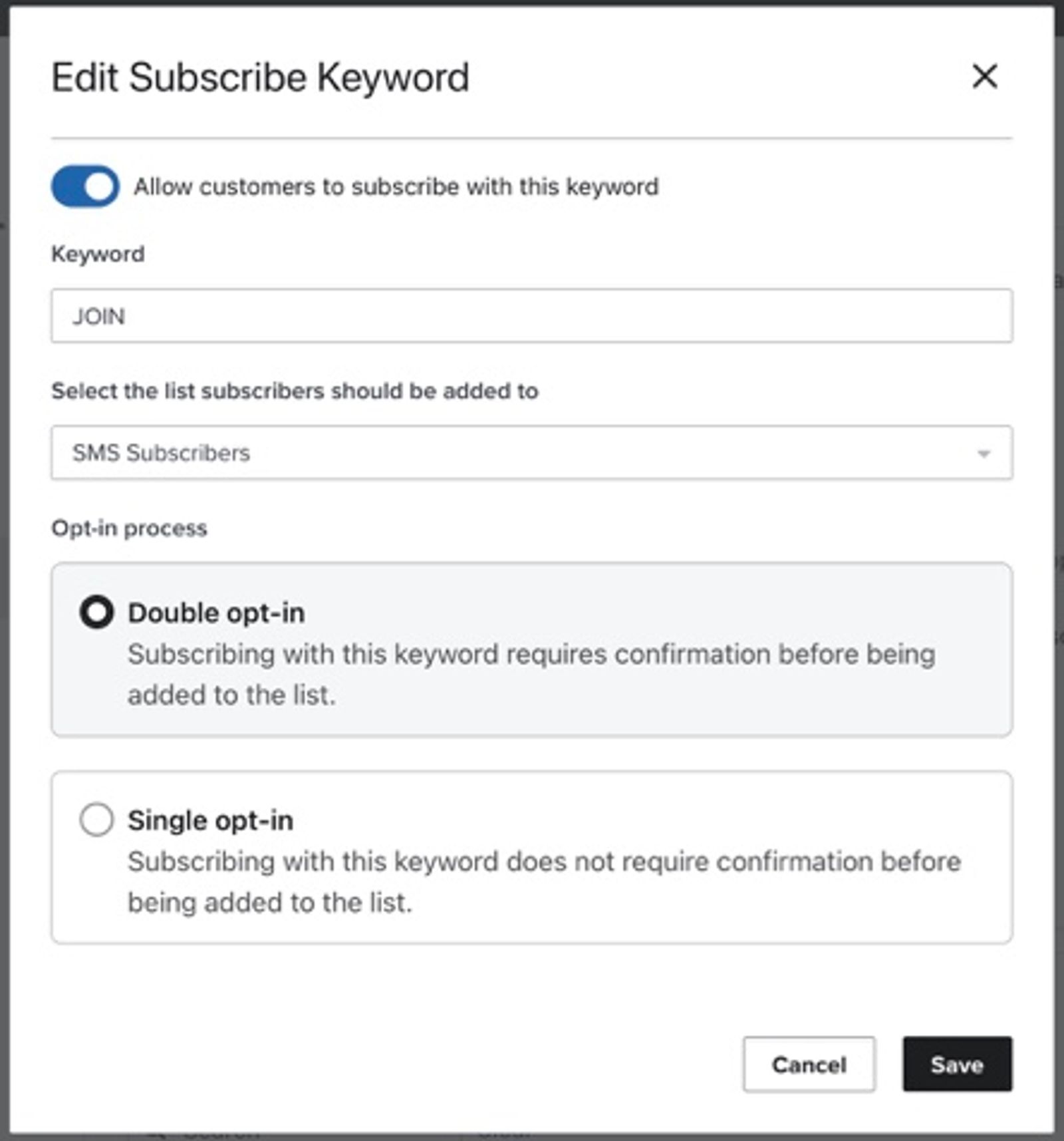
New custom SMS subscribe keywords default to double opt-in. You can change the opt-in setting for each keyword.
To change the opt-in settings for a keyword:
- Click your organization name in the lower left corner.
- Navigate to Settings > SMS > Keyword responses.
- Find the Subscribe keywords section.
- Open the menu for the keyword you want to change, then select Edit.
- Under Opt-in process, select Double opt-in or Single opt-in.
- Click Save.
API double opt-in settings
If you are collecting consent using Klaviyo’s APIs, the double opt-in behavior is based on whether a profile is being subscribed with or without a list.
With a list
When subscribing a profile via API with a list, the list’s opt-in settings determine the opt-in process used to subscribe the profile for that API call. The account's default opt-in settings will have no impact on the behavior here when a list is provided.
Without a list
When subscribing a profile via API without a list, the opt-in process used to subscribe the profile depends on the account's default opt-in settings.
What happens if someone does not confirm subscription
If someone subscribes to a list via a subscribe page with double opt-in enabled, a profile will not be created until the customer confirms their subscription.
If someone submits a Klaviyo sign-up form or sends an SMS keyword set to double opt-in, a profile can exist before they confirm their subscription. It can contain details collected by the form, such as first name, last name, email address, phone number, and custom properties, as well as tracked activity. Having a profile does not mean they have joined the list or confirmed marketing consent.
A double opt-in subscription request through Klaviyo’s API does not create a new profile until the subscriber confirms. However, a third-party form or integration can create or update a profile separately from the subscription request. An existing profile therefore does not show that double opt-in is complete.
At this stage, the contact may become cookied, meaning their future interactions with your brand can be tracked as events on their profile. This means that they can be added to behavior-based segments, even though they are not subscribed to any particular list. Website tracking does not confirm marketing consent. Klaviyo records whether an email subscription used double opt-in when the subscriber confirms.
Additional resources
- Getting started with consent pages
Learn about the different consent pages related to Klaviyo lists, including the preferences, subscribe, and unsubscribe pages, and how to customize them.
- Understanding the benefits of having a main list for each marketing channel
Learn about the benefits of using one main list per marketing channel (e.g., SMS and email) and how to organize your lists in Klaviyo. Additionally, see the tools you can use to identify and target subscribers based on their behavior or how they subscribed.