How to decrease SMS unsubscribe rates
You will learn
Learn how to improve your SMS unsubscribe rates and about performance benchmarks for campaigns and flows.
Having a high unsubscribe rate signals to wireless carriers that recipients are not interested in your content or that you are employing bad sending habits (e.g., sending too frequently or at odd times of the day).
Before you begin
In Klaviyo, unsubscribe rate is the number of people who unsubscribe after receiving your SMS divided by the number of SMS received.
Your unsubscribe rate for flows and campaigns should be less than 2%.
Decrease SMS unsubscribe rates
Adjust your engagement criteria
If your unsubscribe rate is high, this can indicate that you’re sending to those who have lost interest in your brand.
As a first step, create your SMS engagement segments, including an unengaged SMS segment. Exclude your unengaged SMS segment from all of your SMS campaign sends.
If you already set up your SMS engagement segments, adjust the conditions. For example, if your current unengaged SMS segment includes those who have not clicked an SMS in the last 60 days, shorten that timeframe to 45 days.
When using Clicked SMS to measure engagement, use Klaviyo-shortened links to track clicks. If your messages don't include tracked links, a lack of recorded SMS clicks alone does not show that a subscriber is unengaged.
Personalize the customer journey
When your SMS content resonates with recipients, they are much more likely to remain subscribers. Similar to how personalization increases conversion rates, targeting your messaging helps decrease your unsubscribe rate.
Personalization includes the content you show customers, the phrasing of your message, and whether you use emojis or images.
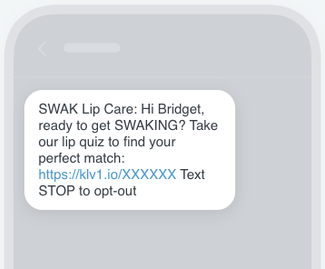
The easiest way to make your message feel more customized is by using personalization variables, such as the recipient’s name.
Another option is to target recipients by location. This can be as simple as using “Bostonian,” “New Yorker,” etc. or by referencing something specific about that area (e.g., “Celtics green”).
Change your sending schedule
A high unsubscribe rate can also indicate that you’re sending too often. As a rule of thumb, limit your SMS messages to between 2 and 6 per recipient per month. However, you might find that your subscribers require less contact, or less of a certain type of message.
Take a look at your sending schedule and how many messages subscribers get from flows. Turn on Smart Sending for any non-critical messages, or ones that are performing poorly. Smart Sending skips recipients who recently received another text message, based on your SMS Smart Sending settings.
Check your sign-up forms and messages
Your sign-up forms should set the right expectations. To decrease unsubscribe rates, check that:
- Your forms clearly explain:
- What kinds of messages subscribers will receive.
- How often subscribers will receive messages.
- What benefits there are to opting in.
- SMS consent is optional.
- You're using double opt-in.
As for your messages, make sure recipients:
- Know that the SMS and MMS messages are coming from your brand (e.g., via an organizational prefix).
- Get unique or better value from the messages, such as an exclusive offer or early access to a product launch.
Additional resources
- How to increase SMS click rates
Learn how to improve your SMS click rates as well as about performance benchmarks for campaigns and flows.
- How to increase SMS conversion rates
Learn how to improve your SMS conversion rates as well as about performance benchmarks for campaigns and flows.
- Understanding and reviewing your SMS deliverability
Learn the important aspects of SMS deliverability, including how to evaluate it and best practices.
- SMS marketing strategies for all levels [+12 Pro tips]