How to re-engage an old email list
You will learn
Learn how you can re-engage an old email list, with contacts that may no longer be active.
It is important to focus on engaged sending for your brand to maintain a strong sender reputation, but there may be cases where you want to reach out to an older, less-engaged list.
When reaching out to older lists, you may have the opportunity to win back profiles that have not engaged with your brand in some time; however, always be cautious when contacting older lists to protect your deliverability.
Before you begin
Only send re-engagement emails to contacts who opted in to email marketing. Being on a list or having placed an order does not establish email marketing consent.
If you are repairing your sender reputation, postpone re-engagement sends and follow the sender reputation repair guidance to focus on engaged subscribers.
Before sending to an old list, you should consider:
- Whether you need to send to this list
- Why your brand is choosing to do this now
- Who exactly you’re engaging with
Profiles that have not engaged for over a year are generally considered unengaged, and sending to them can put your deliverability at risk. The steps outlined in this guide help minimize the impact of re-engaging old profiles on your deliverability, but consider suppressing or deleting these profiles if it is not necessary to contact them.
Identify profiles that may not be worth reaching out to
With old email lists, it is important to use the data you have available to determine whether contacts are worth attempting to win back. If a contact has not interacted with your brand in over a year, it may not be worth sending to them again. Attempting to re-engage high-risk contacts can lead to sender reputation and deliverability issues.
Use a segment to identify profiles on your old list with no recorded orders, site activity, email clicks, or email opens other than Apple privacy opens in the last 365 days. In the example below, replace Old Contact List with the name of your list and select the Placed Order metric for your store:
Check that your account has the engagement history needed for this segment. If you recently moved from another email service provider, review its open and click data too, and include imported or integrated historical metrics in your segment where available. Missing history does not establish that someone has been inactive for 365 days.
- If someone is in or not in a list > is in Old Contact List
AND - What someone has done (or not done) > Placed Order 0 times in the last 365 days
AND - What someone has done (or not done) > Active on Site 0 times in the last 365 days
AND - What someone has done (or not done) > Opened Email 0 times in the last 365 days
where Apple Privacy Open = false
AND - What someone has done (or not done) > Clicked Email 0 times in the last 365 days
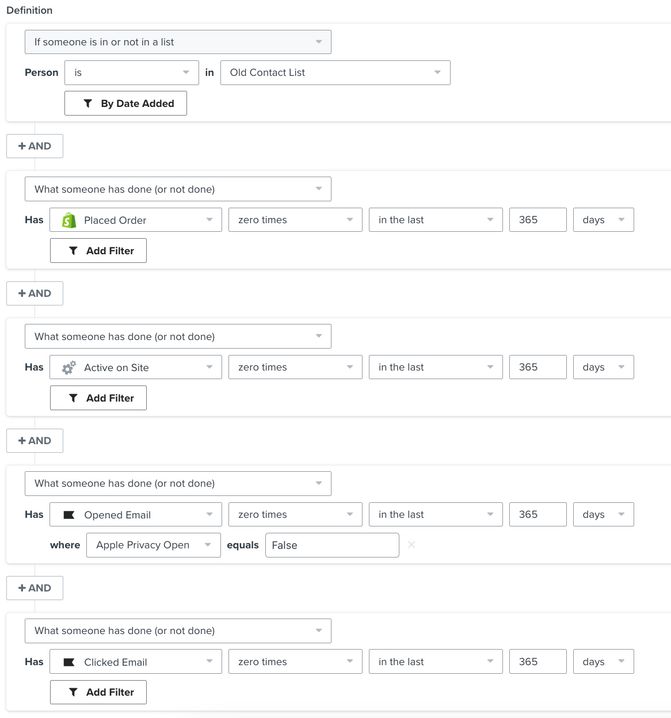
You can suppress these profiles if the available data confirms they have not interacted with your brand in a year. They are unlikely to engage with future sends.
Clean out any potentially invalid emails
If you plan on contacting an old list, you should remove any potentially invalid emails. Depending on how long it’s been since you last contacted this list, consider removing any organizational emails in the list as these emails are more likely to be inactive now.
Another way to clean out your list is to make use of a list cleaning service. We recommend third-party deliverability tools such as Kickbox for this.
Retarget these contacts through other means
Before you start sending to this list, you can make use of third-party targeted advertising channels to rebuild brand awareness. Klaviyo has integrations with advertisers like Facebook and Google Ads to facilitate this, where you can target older contacts through their services.
Split up your list
As the contacts in your list are old and have not engaged with your brand in a while, you should not contact them all at the same time.
Use Gradual send when scheduling your campaign to send to a percentage of recipients at a time. This option is not available for campaigns with an A/B test or an enabled follow-up campaign. For larger lists, break them down into multiple smaller lists, and include sends to engaged contacts in between re-engagement attempts.
You can export your old contact list so you can split it up, and then reupload the smaller lists into Klaviyo to create these smaller groups. Preserve each contact’s existing consent status when importing; splitting a list is not a reason to resubscribe someone who opted out.
Re-engage profiles
If you have an old list of contacts that have not heard from you in some time, they might have forgotten about your brand. The content you send to this old list should re-introduce your brand and try to grab the subscribers' attention.
You should not include your old contact list as part of your usual sends to engaged profiles, and instead focus on re-engagement efforts.
Sunset flow
You can use a sunset flow based on your old list as a final effort to re-engage profiles, and then delete or suppress anyone who is not responsive. Configure the flow’s filters to remove profiles who open or click an email after entering the flow, so engaged subscribers are not tagged for suppression. This gives interested subscribers an opportunity to show that they still want emails from your brand.
While sunset flows are typically triggered by a segment, you can use your old contact list as the flow trigger in this case to re-engage profiles on that specific list.
For an existing list, follow the sunset flow guide to configure the flow, then add past profiles so current list members can enter it. Use 1 small group at a time, as described above. If the flow contains dynamic coupons, replace them with static coupons before adding past profiles.
- Set the flow’s messages and profile update action to Live when you are ready to send to this group.
- Click the Add past profiles icon on the flow’s trigger card.
- Select At the beginning to start eligible existing members at the beginning of the flow, then click Add profiles.
The sunset flow described in the linked guide tags profiles that reach the end as Unengaged = True. This tag does not itself suppress them. Create a segment for the tagged profiles, then suppress that segment to stop future marketing emails. Repeat this cleanup as more profiles finish the flow.
Re-engagement campaign
A re-engagement campaign is similar to a sunset flow, but is a one-off email rather than a sequence of emails. You can send a re-engagement campaign to the customers on your old list to give them an opportunity to engage with your brand. After the campaign has finished sending and you have allowed time for recipients to respond, identify profiles who received it but did not engage, and suppress those profiles. Keep profiles who opened or clicked the campaign out of this suppression group.
Clean your list
After attempting to re-engage contacts on your list and suppressing the profiles that do not engage, you should periodically clean your list going forward as well. Regular list cleaning helps maintain good deliverability by focusing your sends on contacts who engage with your emails.
Additional resources
- Understanding email deliverability
Learn about email deliverability, including the steps you can take to establish a strong sender reputation so that your emails are delivered to the inbox.
- How to repair your sender reputation
Learn steps you can take to repair your sender reputation if you are facing email deliverability issues and seeing a dip in performance. Sender reputation refers to your ability to successfully land in your customers' inboxes.
- Email list hygiene: Best practices for a clean subscriber list