How to repair your sender reputation
You will learn
Learn steps you can take to repair your sender reputation if you are facing email deliverability issues and seeing a dip in performance. Sender reputation refers to your ability to successfully land in your customers' inboxes.
Pause lower-engagement email sends
Winback flows, re-engagement campaigns, and sunset flows can have lower engagement rates and put your sender reputation at risk. Pause these sends while you repair your reputation. For active winback and sunset flows, set their actions to Draft. Avoid sending re-engagement campaigns during the repair process.
Discontinue any third-party marketing
While repairing your sender reputation, you’ll want to discontinue any third-party marketing being done for your brand, whether it is through Klaviyo or another marketing group or email service provider (ESP).
You can collect and analyze first-party data in Klaviyo and use it to build campaigns or flows. For example, collect email addresses directly from subscribers through sign-up forms.
Send following the appropriate re-warm schedule
When repairing your sender reputation, it is important to make sure you are contacting the right engagement cohort based on your preferred sending frequency. Keep in mind the frequency does not include flows that are sent in response to an action taken by the subscriber.
Select the appropriate schedule for your sending frequency to determine the timeframe and count of engagements on your engaged segments. You’ll want to avoid going beyond the recommended engagement window for your sending frequency.
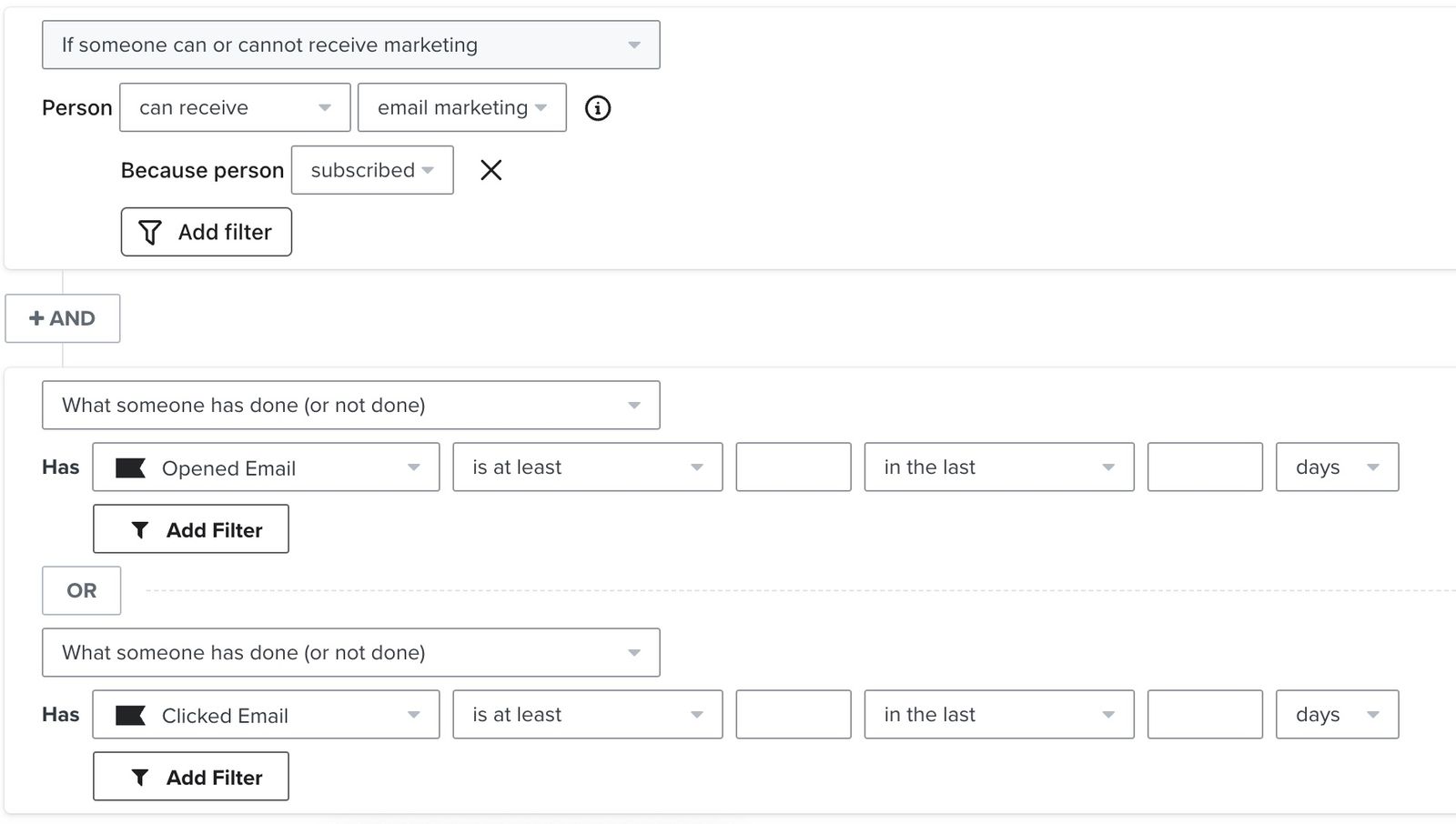
Use the same segment structure for each schedule below, changing the engagement count and time window for each week:
- Require that profiles can receive email marketing and are subscribed to email marketing.
- Add an AND condition requiring the recommended number of Opened Email events OR Clicked Email events within the recommended window. Apply the subscription requirement to both alternatives. For example, week 1 of the daily schedule includes subscribers with at least 5 opens OR at least 5 clicks in the last 30 days.
On the Opened Email condition, add a filter where Apple Privacy Open equals False. Apple Mail Privacy Protection (MPP) can record an open without the recipient opening the email, so these opens should not determine who qualifies for re-warming.
If you send daily
Week 1
Send to very highly engaged users with 5 or more engagements in the last 30 days
Week 2
Send to highly engaged users with 3 or more engagements in the last 30 days
Week 3
Send to engaged users with 1 or more engagements in the last 30 days
If you send 3 times per week
Week 1
Send to very highly engaged users with 5 or more engagements in the last 60 days
Week 2
Send to highly engaged users with 3 or more engagements in the last 60 days
Week 3
Send to engaged users with 1 or more engagements in the last 60 days
If you send 2 times per week
Week 1
Send to very highly engaged users with 5 or more engagements in the last 90 days
Week 2
Send to highly engaged users with 3 or more engagements in the last 90 days
Week 3
Send to engaged users with 1 or more engagements in the last 90 days
If you send weekly
Week 1
Send to very highly engaged users with 5 or more engagements in the last 180 days
Week 2
Send to highly engaged users with 3 or more engagements in the last 180 days
Week 3
Send to engaged users with 1 or more engagements in the last 180 days
If you send monthly
Week 1
Send to very highly engaged users with 5 or more engagements in the last 275 days
Week 2
Send to highly engaged users with 3 or more engagements in the last 275 days
Week 3
Send to engaged users with 1 or more engagements in the last 275 days
Going forward, if you see a drop in opens excluding MPP again, return to sending to highly or very highly engaged users immediately to repair your reputation.
Remove unengaged subscribers
When repairing your sender reputation, it is important to identify your least engaged email subscribers so you can avoid contacting them. Once you've identified your unengaged subscribers, consider excluding them from your marketing initiatives, or suppressing them during list cleaning.
Also, suppress email profiles that have not opened or clicked a message in 365 days, and do not send to them unless they resubscribe. Removing someone from a list alone does not prevent them from receiving other marketing emails. Never attempt to re-engage subscribers after 365 days of non-engagement.
Set up dedicated infrastructure
Branded sending domain setup and warming
A branded sending domain (also known as a dedicated sending domain) allows you to send emails that appear to be coming from your brand and have better overall control of your sender reputation. It also allows you to build a sending reputation on your domain to limit any negative impact to your deliverability from other senders on a shared domain.
If you are on a new Klaviyo account starting with a branded sending domain, or are setting up a newly registered domain (registered within the last 30 days), it is essential to warm your sending infrastructure in the first 2 to 4 weeks after applying your sending domain. Warming your domain strengthens your sender reputation. Depending on what data you are bringing over to Klaviyo and the use cases you have, you will need to follow the warming or platform introduction process applicable to you.
Dedicated IP
Most small businesses or those just starting out with Klaviyo will be on shared IPs. Depending on your email practices and volumes, a shared IP should suffice for your sending and reputation needs. However, if you use a dedicated IP address, its IP reputation is influenced by your account’s sends rather than other accounts sharing the IP. You control the sending volume on that IP and avoid the impact of other senders’ volume spikes during busy times of year. This can also make it easier to identify the causes of deliverability issues. A dedicated IP gives you control over your IP reputation. Your domain reputation and recipient engagement still affect inbox placement.
Dedicated click tracking
Dedicated click tracking allows you to display your own domain on click tracking links rather than the default Klaviyo encoding.
This is beneficial because it allows your customers to further trust the emails coming from your brand, as the links will be easily recognizable. Instead of a long string of letters and numbers from a trk.klaviyomail encoded link, they will see your brand’s name when hovering over links in your email. This can increase the chances that they will click on your links.
If Klaviyo hosts your click-tracking DNS record or its CNAME points to a klaviyodns.com address, Klaviyo provisions and renews the SSL/TLS certificate for you. For a legacy click-tracking domain, follow the guide on configuring SSL/TLS on a legacy click-tracking domain to keep your tracking links secure.
Domain alignment
If the root domain used in your sender email address (i.e., your friendly-from address) does not align with the root domain used in the branded sending domain, this can impact inbox placement.
DMARC is a protocol designed to give domain owners the ability to protect their domain from unauthorized users sending emails, commonly known as email spoofing.
Misalignments typically impact accounts using Klaviyo’s default shared sending domain to send emails that have a from-address domain with a DMARC policy on it. You’ll want to make sure that there is alignment between your sending domain, and your from-address in Klaviyo. For example, if you send an email using sales@example.com as the from-address, where example.com is protected by DMARC, your account will need to use a branded sending domain like send.example.com for all emails sent from Klaviyo to meet DMARC authentication requirements. That said, accounts with branded sending domains may also be impacted if there is not alignment with the sender email address.
Without DMARC your brand is more vulnerable to email fraud, but it is important to ensure alignment to prevent deliverability issues.
BIMI
If your brand uses an enforced DMARC policy, you can also set up BIMI (Brand Indicators for Message Identification) to display your brand’s logo in supported inboxes. Your DMARC policy must be set to p=quarantine or p=reject and apply to 100% of messages. BIMI uses your DNS settings to authenticate your visual brand identity and can help recipients recognize your emails. Each participating inbox provider has its own requirements for displaying a logo. For logo, certificate, and setup requirements, see our guide about BIMI.
Monitor performance
During re-warming and after you complete it, monitor your performance for key email metrics to check whether your audience is engaged and your deliverability is improving. Review opens excluding MPP, clicks, bounces, unsubscribes, and spam complaints.
Compare your performance with the recommended ranges for these metrics and watch for trends over several sends. If performance declines, return to a more engaged audience and review your sending strategy before expanding it again.
If you are not seeing an improvement after 4 weeks, please reach out on our Community or to our Support Team.
Additional resources
- Understanding which warming process to use in Klaviyo
Learn how to choose the right warming process in Klaviyo, so you can establish a strong initial sender reputation and be viewed favorably by inbox providers.
- Understanding email deliverability
Learn about email deliverability, including the steps you can take to establish a strong sender reputation so that your emails are delivered to the inbox.