Understanding branded vs. shared sending domains
You will learn
Learn more about branded sending domains (also known as dedicated sending domains), how they differ from shared sending domains, and when they may be beneficial for your business. In the world of email marketing, your sending infrastructure, including your sending domain, is a key part of how you build a positive sender reputation and how inbox providers verify your identity.
If you're ready to set up a branded sending domain, see How to set up a branded sending domain. Existing Klaviyo customers moving to a branded sending domain do not have to warm infrastructure again, as long as:
- The domain has been registered for at least 30 days, AND
- You have used the domain to send email already (for example, you used this domain with a prior email service provider or with Klaviyo in your from-address).
Klaviyo's default setup
When you first join Klaviyo, authentication records are already configured for Klaviyo's shared sending domains. These records help inbox providers verify where your emails come from, but do not guarantee delivery.
By default, you start out sending from a shared IP and shared Klaviyo domain. This domain appears in the sender information at the top of an email message (for example, "sent on behalf of" or "via klaviyomail.com"). In Gmail, your recipients see that your sender email address includes "via klaviyomail.com" because you are using a shared sending domain.
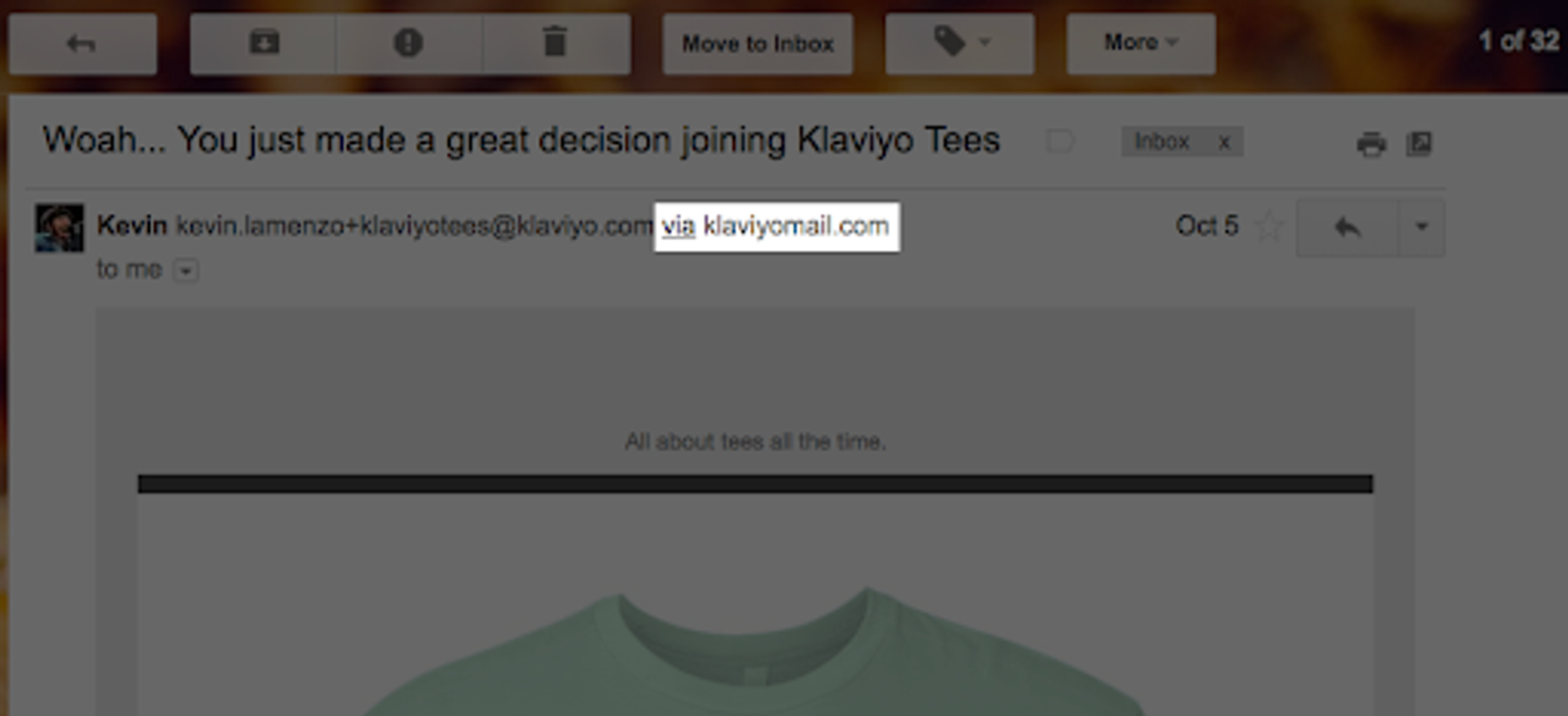
If you're interested in using a branded sending domain instead, see How to set up a branded sending domain.
What is a branded sending domain, and why would you use it?
A branded sending domain allows you to send emails that appear to be coming from your brand instead of Klaviyo. Any company is eligible to create a branded sending domain. This removes the "via klaviyomail.com" message displayed beside your sender email address.
Inbox providers such as Google enforce sender requirements for bulk senders, and setting up a branded sending domain is part of meeting those requirements. Google considers senders who send 5,000 or more emails to personal Gmail accounts per day to be bulk senders. All messages from the same root domain count toward this threshold, including transactional emails. If you're a new brand on Klaviyo but plan to send at this volume, you should set up a branded sending domain.
Benefits of a branded sending domain
Connecting a branded sending domain allows you to use your brand's domain name to send emails instead of a shared Klaviyo domain. It also allows you to build a sending reputation on your brand's own domain and reduce your reliance on a shared domain's reputation. A branded sending domain does not give you a dedicated IP. If you send from shared IPs, other senders can still affect those IPs' reputation and your deliverability.
Mailbox providers (MBPs) are always monitoring activity by reputation, including both domain and IP reputation. If these providers see that emails sent from a particular domain are often marked as spam, rarely opened, or quickly opened and then deleted, that domain may acquire a negative reputation over time.
If you are on a shared sending domain, other Klaviyo customers use the same sending domain, which means you can inherit those shared domains' reputations. Even though these domains are consistently reviewed and Klaviyo works to ensure accounts follow healthy list practices, you may want to use your own sending domain. With a branded domain you have more control over your own sender reputation.
Connecting a branded sending domain also allows you to take advantage of email authentication protocols like DMARC. Mail servers use these authentication protocols to verify that incoming emails are from legitimate senders, protecting your brand and your customers from malicious actors. In addition to preventing phishing and spoofing attempts, implementing these protocols can help improve deliverability. To use DMARC with your branded sending domain, publish a DMARC policy for your domain and use a sender email address with the same root domain as your branded sending domain. For example, sales@yourbrand.com aligns with send.yourbrand.com. Learn more about email authentication.
Send types: marketing, transactional, and service
A branded sending domain in Klaviyo has a send type that determines what kind of email traffic it carries. You can configure separate branded sending domains for each send type in the same account, so that each kind of traffic builds its own sender reputation.
- Marketing: campaigns and flow messages that have not been designated as transactional, including promotional or commercial messages. This is the default send type and what most accounts start with.
- Transactional: order confirmations, shipping updates, password resets, and other messages that respond to a customer action. Transactional sending domains can only be used by flow messages that have been designated as transactional. See Understanding transactional messages for details on designation.
- Service: customer service emails sent through Klaviyo Helpdesk (Klaviyo's customer service product) and Customer Agent, including ticket messages and customer satisfaction surveys. Enable inbound email in your email settings before adding a Service domain.
Most accounts only need a marketing branded sending domain. Transactional and service domains are useful when you want to isolate the reputation of those streams from your marketing sends, or when you specifically use Klaviyo Helpdesk. If you have not configured a transactional sending domain, designated transactional flow messages use your marketing sending domain, which can be shared or branded.
You can have 1 active branded sending domain per send type. When moving to a new subdomain, you can add a second domain and use domain warming to move traffic gradually. The original domain continues sending during warming and is removed when the transition finishes. For details on setup and moving to a new subdomain, see How to set up a branded sending domain.
Other considerations
If you have a brand-new sending domain or are new to email marketing altogether, your domain will not have an email sending reputation yet. Mailbox providers and filtering software may consider the age of your domain when determining your trustworthiness as a sender.
If you are a bulk sender, set up a branded sending domain to meet inbox providers' authentication requirements. This does not guarantee inbox placement. If you do not have prior sending history on your sending domain, follow the warming process to establish a strong initial sender reputation.
Only use a shared sending domain if you are not required to use a branded sending domain and your sender domain does not use a DMARC policy of p=quarantine or p=reject. Those stricter DMARC policies can cause email from a shared sending domain to be placed in spam or rejected. If you use a shared sending domain, you can develop a reputation on your brand's domain by using it in the "friendly from address" first. Once you have sent consistent messaging with positive results over 30 days, you can move to a branded sending domain. It is still important to follow best practices by not sending to unengaged or purchased lists, as your domain is still young and this can quickly damage your sending reputation.
Additional resources
- How to set up a branded sending domain
Learn how to set up a branded sending domain (also known as a dedicated sending domain) so that when emails reach inbox providers, they will appear to come from your brand instead of Klaviyo.
- Understanding which warming process to use in Klaviyo
Learn how to choose the right warming process in Klaviyo, so you can establish a strong initial sender reputation and be viewed favorably by inbox providers.