Frequently asked questions about Composer from Klaviyo
This article answers common questions about Composer from Klaviyo and lists fixes for common problems.
You will learn
- What the app costs and what it shares
- How to check your Composer credits
- What the app can and can't change in your account
- How to fix common problems
- How to get more help
Is the app free?
Yes. The app is free for anyone with a Klaviyo account. Each Composer request uses your account's Composer credits, the same as on Klaviyo web. You manage plans and extra credits on Klaviyo web, not in the app.
How do I check my Composer credits?
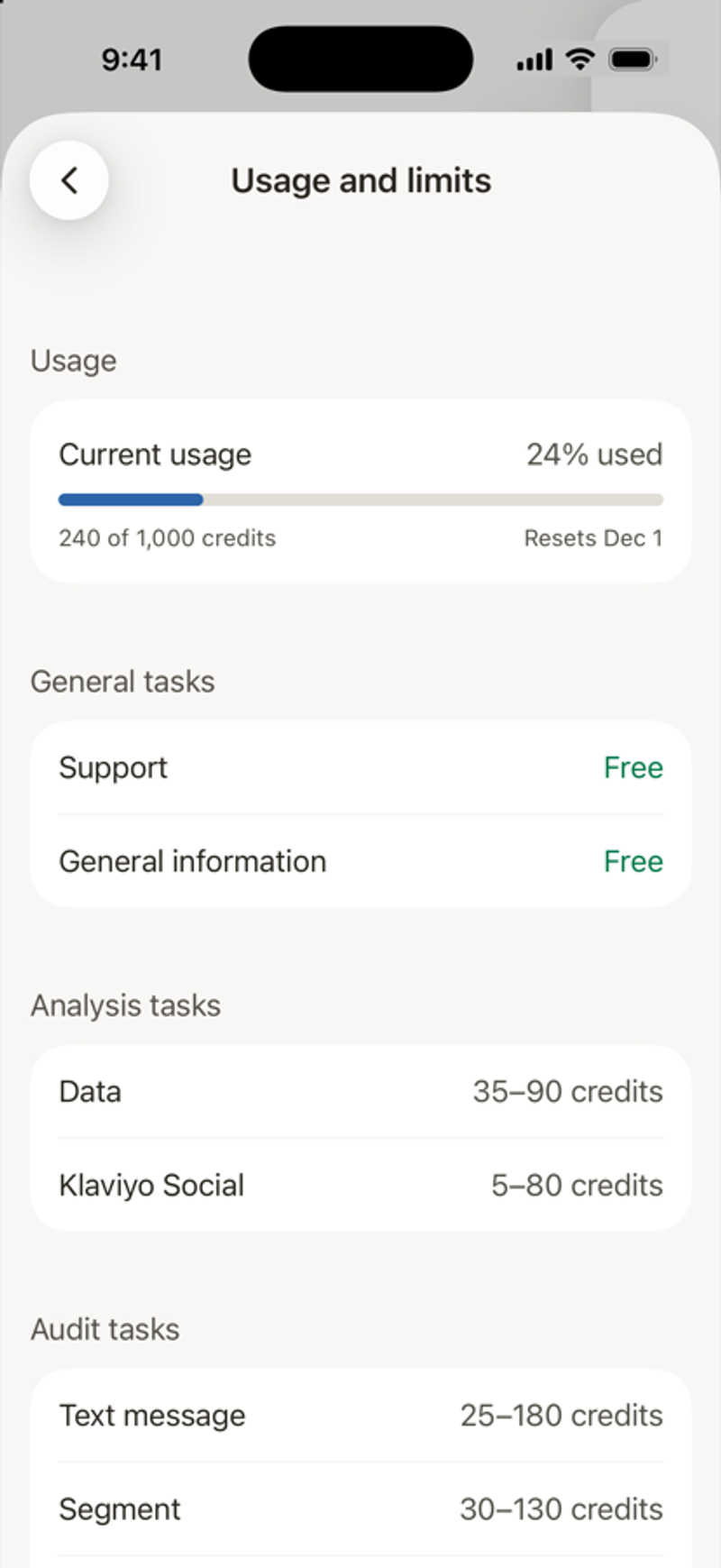
In Account, tap Usage and limits. You'll see how much of your credits you've used, when they reset, and a credit range for each kind of task. Some tasks, like support questions, are free.
A credit warning appears above the chat box as you approach or reach your limit. For example, 100% of Composer credits used means you have reached the limit. Manage additional credits on Klaviyo web.
What does Composer share, and with whom?
The first time you sign in on a device, the app shows Composer and your data. To answer your requests, Composer uses your messages, attached photos and files, and account details such as campaigns, flows, templates, and metrics. The disclosure identifies OpenAI, Anthropic, and Amazon Web Services as Klaviyo’s AI providers.
Providers use it only to create Composer's responses. Klaviyo's contracts don't let them train their models on it. Nothing is shared until you tap Allow.
Will Composer send or publish anything without asking me?
Composer shows proposed changes in a preview and asks for your approval. Review the preview before proceeding. Some approvals must be completed on Klaviyo web. See How to chat with Composer in the app.
Can I switch between Klaviyo accounts?
Yes, if the accounts share your login email. Accounts on a different email need you to log out and sign in with that email. See How to sign in, switch organizations, and log out.
Can I add or reconnect a connector in the app?
No. In Account, tap Connectors to see the ones turned on for your account. To add, set up, or reconnect a connector, use Klaviyo web. If Composer needs a connector for a request, it tells you. Connect it on Klaviyo web, and Composer picks up where it left off.
Fix common problems
What you see | What to do |
|---|---|
The app can't reach Klaviyo right now | Check your Wi-Fi or cell connection, then tap Try again. |
Your Klaviyo session ended | Sign in again. Your chats and tasks are saved in your Klaviyo account. |
Recent chats took too long to load | Tap Try again. If the list stays empty, your session may have ended. Close and reopen the app, then sign in if asked. |
Klaviyo took too long to return your organizations | Check your connection, or sign in again, then try again. |
Notifications don't arrive | In Account, tap Notifications and check that the alert is on. If a banner says notifications are off, tap Open Settings and allow them. |
A dashboard section is empty | Results show up once your campaigns and flows send. Try another conversion metric or time period. |
Klaviyo couldn't finish opening | Tap Try again. Your account is unchanged. If it keeps happening, tap Contact support. |
How do I get more help?
In Account, under Get help, tap Klaviyo support to open the Klaviyo Help Center. To reach a person, see How to contact support.