About Smart Translations
Smart Translations lets you send one campaign, flow or consent page in each recipient's preferred language.
You need a paid Klaviyo account to use Smart Translations.
Smart Translations uses machine translation and AI to generate translated content, which may contain errors. Review all translations before sending your message.
What Smart Translations is
Smart Translations translates a message into 70+ languages so you build it once instead of once per language. Klaviyo translates your content with AI, you review and edit each language, and every profile gets the version that matches its language when the message sends.
Because each language lives inside the same campaign, flow message or consent page, you don't need a separate message or a conditional split for every language.
Who can use it
Smart Translations is available on paid Klaviyo plans. Some free accounts can see a preview of Smart Translations in the app, but you need to upgrade to a paid plan to translate and send messages.
How it works
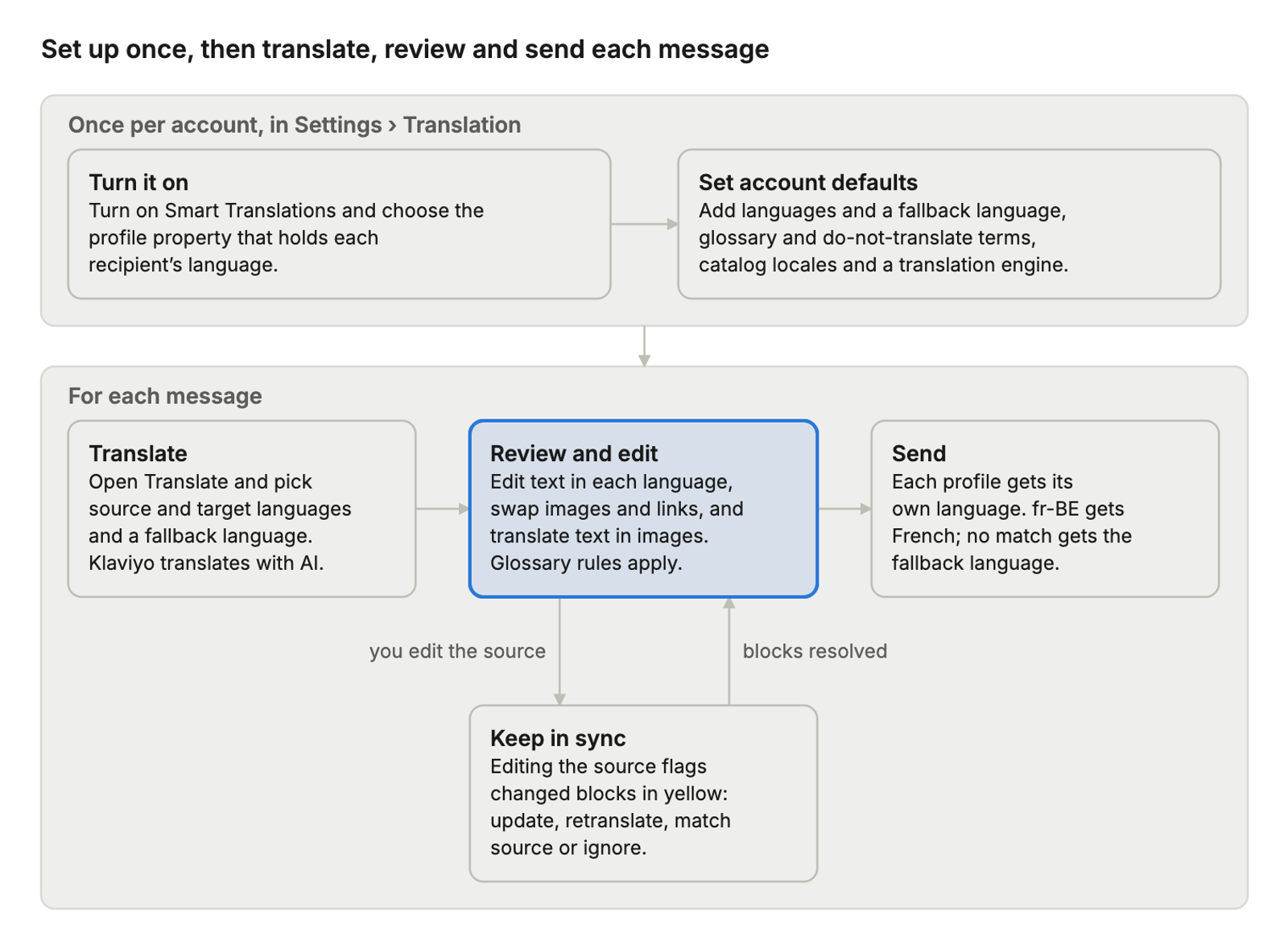
You set up your account once. After that, you translate, review and send each message, and editing the source sends you back to review the blocks that changed.
Where you can use it
You can translate email, SMS, push and WhatsApp messages in both campaigns and flows, plus Klaviyo-hosted consent pages. Sign-up forms aren't supported.
Channel or surface | Available | What to know |
|---|---|---|
Yes | Open Translate in the email editor, or open the translations overview from the Review step. | |
SMS: campaigns, flows | Yes | A translation can run longer than the source and use more segments, so check the length of each language. |
Yes | Each recipient gets the push text in their language. | |
WhatsApp: campaigns, flows | Yes | Meta must approve the template for each language before it can send. |
Yes | Covers Klaviyo-hosted subscribe, unsubscribe and preference pages, and the double opt-in email. | |
Email templates and Universal Content | Yes | Covers saved email templates, including custom HTML templates, and Universal Content blocks. A translation made in a Universal Content block replaces any translation of that block made inside a single template. |
Product blocks | Yes | Static blocks are translated with AI, and you can edit each item's fields per language. With Shopify Markets or a locale-aware catalog, static and dynamic blocks can pull translated product details automatically. |
Sign-up forms | No | See Limitations below for a workaround. |
What gets translated
Klaviyo translates the text in your message and inside your images, your glossary can point links to each language's site, and anything on your do-not-translate list stays exactly as written.
Content | How Smart Translations handles it |
|---|---|
Subject lines, and SMS, push and WhatsApp text | Translated with AI. You can edit any language by hand. |
Text blocks | Translated with AI, including text blocks saved as universal content. You can edit each language by hand. |
Images | Text inside images is translated with AI when you choose Translate images. Review each translated image before you send. You can also upload a different image for each language. |
Glossary terms | Always translated the way your glossary says. |
Links | Add URL entries to your glossary to send each language to its own web address, such as a localized version of your site. You can also change a link by hand for any language. |
Product blocks | Static blocks: each item's fields are translated with AI, and you can edit them for each language. With Shopify Markets or a locale-aware catalog, translated product details can also come from your catalog automatically: turn on Localize for recipient in a static block, and dynamic blocks use your catalog locale. |
Do-not-translate terms | Never translated. Brand names, product names and other terms on the list appear as written in every language. |
Glossary and do-not-translate terms apply everywhere Klaviyo translates, including subject lines, Universal Content and text inside images. Set them up in Settings › Translation › Glossary and Settings › Translation › Do not translate.
The translation engine at a glance
Smart Translations has two translation engines, and you choose one for your account in Settings › Translation › Enablement.
Engine | How it translates |
|---|---|
Standard | Protects links, codes and template tags, and translates each piece of text on its own. Limited context for translation. |
Beta (MT v2) | Also protects links, codes and template tags, and translates with the context of the whole message, adapts tone to the language, and checks the result. |
A change of engine applies only to new translations, not to translations you've already made. To learn more and turn on the beta engine, see How to enable the Smart Translations beta engine.
Limitations
- Sign-up forms. Smart Translations doesn't translate sign-up forms. Create one form per language, show each form on the matching language version of your site using URL targeting, and add a hidden field that saves the visitor's language to their profile.
- Reporting by language. Results by language appear for each message, as a language breakdown in campaign and flow message reports. You can't use language as a dimension in custom reports, so compare languages message by message in those reports.
Get started
- Turn on Smart Translations and set your account defaults: How to set up Smart Translations.
- Translate your first message: How to create a multilingual email campaign or How to create a multilingual email flow.