What Composer can analyze and create
Composer is Klaviyo's AI marketing agent, built right into the platform you already use. This article explains what Composer can analyze and audit for you and what it can create. Use it to understand where these capabilities fit into your workflow before you start prompting.
Composer recommends, drafts, audits, and QAs your work. You review, edit, and approve everything before it goes live. Composer does not make changes or send anything on its own.
You will learn
- The two ways to think about what Composer does: analyze and audit, versus create
- What parts of your account Composer can analyze and audit today
- What Composer can create for you today
- What Composer does not do
- A few example asks to get you started
How to think about Composer: analyze versus create
Composer's capabilities fall into two buckets, and keeping them straight makes it easier to know what to ask for. When Composer analyzes, it answers questions about your account data and performance. When it audits, it reviews work you have already built and tells you what's working, what's not, and what to fix. Analysis and audits are advisory: you decide which fixes to apply. When Composer creates, it drafts new content based on a goal you describe. You preview and refine the draft before saving or exporting it to Klaviyo for final review and approval. In all cases, you stay in control. Composer never sends or publishes customer-facing content without your approval.
Capability | What it does | Who makes the change | Example ask |
|---|---|---|---|
Audit a flow, form, or template | Reviews flow structure, trigger logic, and performance. It catches structural bugs, conflicts across flows that send overlapping messages, and high-impact opportunities. Also reviews signup forms for conversion blockers. Audit all flows at once or focus on one. | You apply the fixes in Klaviyo. | "Audit my flows and tell me what needs attention." |
Audit a campaign | Works through subject line, links and tracking, audience and exclusions, send configuration, A/B test setup, and compliance basics, then calls out the most important fixes first. | You apply the fixes in Klaviyo. | "QA this campaign before I send it." |
Audit email or text message content | Checks a single email or SMS/MMS message for compliance, deliverability, accessibility, design, and content quality, pinning each recommendation to the exact element that needs attention. | You apply the fixes in Klaviyo. | "Audit the SMS in my Welcome Flow." |
Audit a segment | Reviews your segment definitions for broken logic, duplicate or overlapping segments, coverage gaps, and deliverability or consent risks, with recommendations on what to clean up. | You apply the fixes in Klaviyo. | "Audit all my segments and tell me what to clean up." |
Create a campaign (email, push, SMS, MMS) | Drafts email, push, and SMS/MMS content from a goal you describe, reflecting your brand's voice and context. Start from a prompt, a template, or a screenshot. Generate multiple messages or variations in one conversation, and select the audience alongside the content. | Composer drafts. You review, edit, and approve before sending. | "Create a summer sale campaign for customers who bought in the last 90 days." |
Create a segment | Creates and iterates on a segment that you want to add to your account | Composer drafts. You review and save the segment into your account. | "Create a segment of all profiles with email marketing consent who made 1 purchase in the last 90 days and live within 10 miles of Boston." |
Create a flow and flow messages | Drafts a version of a new flow and the flow email, push, and SMS/MMS flow messages | Composer drafts. You review, edit, and approve before setting the flow live. | "Create a 3 email 2 SMS browser abandonment flow" |
What Composer can analyze and audit
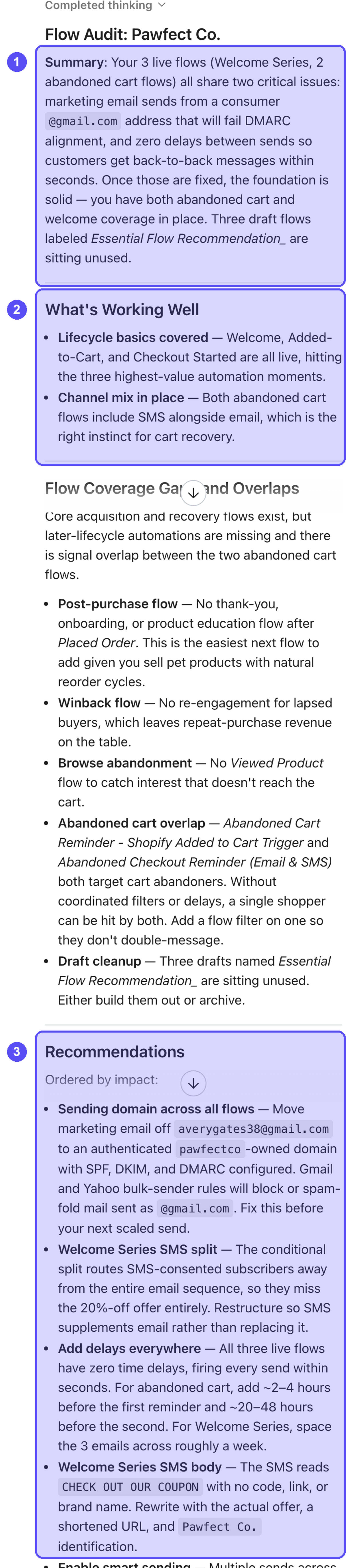
Ask Composer a question about your Klaviyo data, or ask it to review work you have already built. For an audit, Composer returns a plain-language list of findings and recommendations. You decide which changes to make. Composer points you to the problem and tells you why it matters, and you make the edit in Klaviyo. Composer can analyze and audit the following today:
- Account data: Ask questions about your account and performance in plain language. For example, ask about campaign history, audiences, segments, lists, or other Klaviyo data.
- Flows: Review flow structure, trigger logic, and performance, and catch issues like structural bugs, conflicts across flows that send overlapping messages, and high-impact opportunities. Audit all your flows at once or focus on a single flow.
- Campaigns: Audit a campaign before you send it. Composer works through subject line, links and tracking, audience and exclusions, send configuration, A/B test setup, and compliance basics, then calls out the most important fixes so you know what to handle first.
- Email and SMS templates and content: Check a single email or SMS/MMS message for compliance, deliverability, accessibility, design, and content quality before you send. Composer pins each recommendation to the exact element that needs attention.
- Segments: Review your segment definitions for broken logic, duplicate or overlapping segments, coverage gaps, and deliverability or consent risks, with recommendations on what to clean up.
- Forms: Review a signup form for conversion blockers, then get a prioritized list of concrete changes to design, copy, fields, trigger timing, and incentive.
Composer reads what you have built and recommends changes. It does not apply edits, rebuild your work, or change account settings for you. You make the changes yourself in Klaviyo.
When Composer returns an audit, you'll see a consistent structure: a summary, a list of what's working well, and numbered recommendations. Each recommendation explains why it matters and how to apply it. Composer calls out urgency in the recommendation wording so you can identify the most important fixes. To learn how to run an audit and read the findings, see How to audit with Composer.
What Composer can create
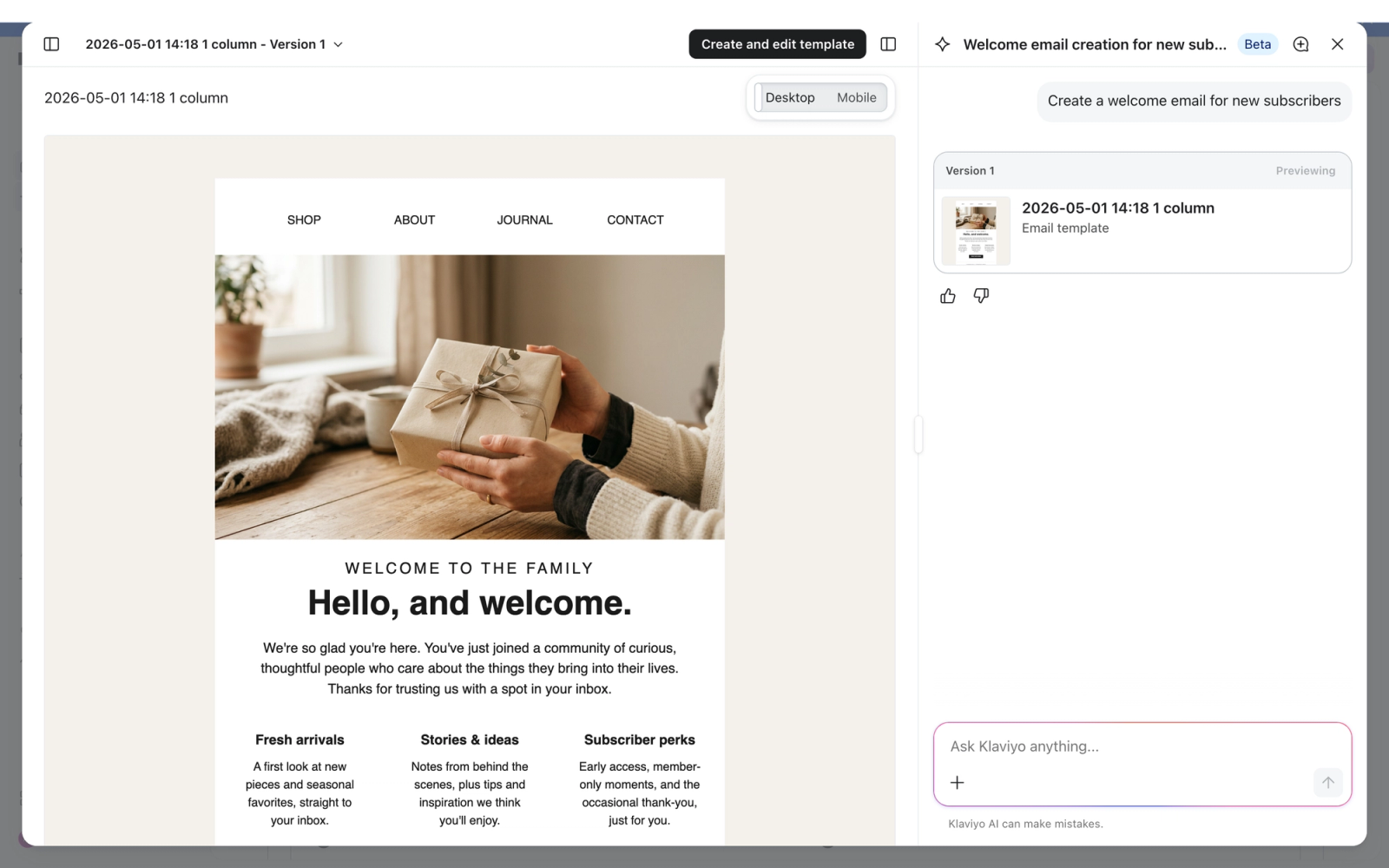
Describe what you want, and Composer drafts it for you. You can preview and refine the draft before saving or exporting it to Klaviyo, where you complete your review and edits before anything goes live. Composer can create the following today:
- Campaigns (email, push, SMS, and MMS): Create a campaign by describing your goal in plain language. Composer works to reflect your brand's voice and context as it drafts email, push, and SMS/MMS content. Start from a prompt, an existing template, or a screenshot. Generate multiple messages or variations in a single conversation, and select the audience alongside the content. The draft opens in Composer preview, where you can refine it before exporting it to the appropriate Klaviyo editor.
- Flows and flow messages (email, push, SMS, and MMS): Create versions of new flows by describing your goal in plain language. Composer will first reflect the structure of the flow that you are requesting and then generate the content for each of the messages within that new flow. You can then iterate on the flow and the flow messages reviewing the structure and content before setting it live.
- Segments: Create a segment by describing the audience you want in plain language. Composer drafts it for you to review, and you save it into your account. See How to create segments with Composer.
Important: Composer drafts content for you to review and edit. Never send a draft as-is. Because Composer uses large language models, generated content may not always be fully accurate, and you are responsible for reviewing and approving every message before it goes live.
Content generation works best on templates that combine text and images. It is weaker on image-heavy or fully image-based templates, so set your expectations accordingly and plan to do more editing on those.
To learn how to prompt Composer and refine a draft, see How to create campaigns with Composer and How to create flows with Composer.
What Composer does not do
To set the right expectations, here is what Composer does not do today:
- It does not auto-execute: Composer recommends, drafts, audits, and QAs. It does not send, publish, schedule, or change your account settings on its own. You apply every change and approve every send.
- It does not apply fixes from an audit for you: Audits are advisory. Composer tells you what to change, and you make the edit in Klaviyo.
- It does not guarantee accuracy: Composer's outputs can be wrong. Review and verify everything before you use it.
- It does not replace your judgment: Composer can flag things you chose to do on purpose. Use your own judgment on which recommendations to act on.
Example asks
Here are a few ways to put Composer to work. For more guidance on writing effective prompts, see Prompt best practices for Composer.
Analyze and audit
- "Audit my flows and tell me what needs attention."
- "Are any of my flows conflicting with each other?"
- "QA this campaign before I send it."
- "Audit this email for accessibility and compliance issues."
- "Audit the SMS in my Welcome Flow."
- "Audit all my segments and tell me what to clean up."
- "What's wrong with my welcome popup?"
Create
- "Create a summer sale campaign for customers who bought in the last 90 days."
- "Build an email and SMS campaign for lapsed customers with a 20% off offer."
- "Draft a Father's Day campaign for my VIP customers."
- "Create a push notification campaign announcing our flash sale."
- "Build a welcome flow with three emails and one SMS."
- "Create a segment of repeat purchasers who haven't ordered in 60 days."
Additional resources
Keep going with Composer:
- Getting started with Composer
Meet Composer, Klaviyo's AI marketing agent. See what it can analyze, audit, and create, including campaigns, flows, and segments, and how credits work.
- How to audit with Composer
Learn how to use Composer to audit your flows, campaigns, content, forms, and segments, read its findings, and apply the recommended fixes yourself.
- How to create campaigns with Composer
Create email, push, SMS, and MMS campaigns with Composer, Klaviyo's AI marketing agent. Brief a goal, review and edit the draft, and approve before sending.
- How Composer credits work (Legacy)
Learn how Composer credits work: your 90-day free access, what each action costs, how rollover works, and how to track usage in Klaviyo.