How to audit with Composer
Composer, Klaviyo's AI marketing agent, can review your existing work and tell you what to fix before you send or publish. You can audit your flows, campaigns, email content, text message content, signup forms, and segments, all from the same chat. This article shows you how to ask for an audit, how to read the findings, and how to act on them.
Composer is advisory. It reviews your work, recommends changes, and explains its reasoning, but it does not edit, send, publish, or change anything in your account. You review the findings and apply the fixes yourself.
You will learn
- What you can audit with Composer
- How to ask Composer for an audit
- How to read the findings and recommendations
- How to apply the fixes yourself
Before you begin
You need a Klaviyo account with Composer access and the asset you want to audit already built in Klaviyo. Composer audits real content, so the flow, campaign, template, form, or segment must exist (a live or draft version both work). Audits use your Composer plan's capacity, and cost varies by what you audit. See How your Composer plan works for estimated costs and usage details.
A few things help Composer give you a useful audit:
- Open the asset first where it makes sense: For email and text message content audits, open the template, campaign, or flow step you want reviewed so Composer can pick up the page context. For flows, campaigns, forms, and segments, you can ask from Composer chat and name what you want audited.
- Have something real to review: Composer audits the content and structure that exists. An empty draft or a near-empty segment library will not produce much to work with.
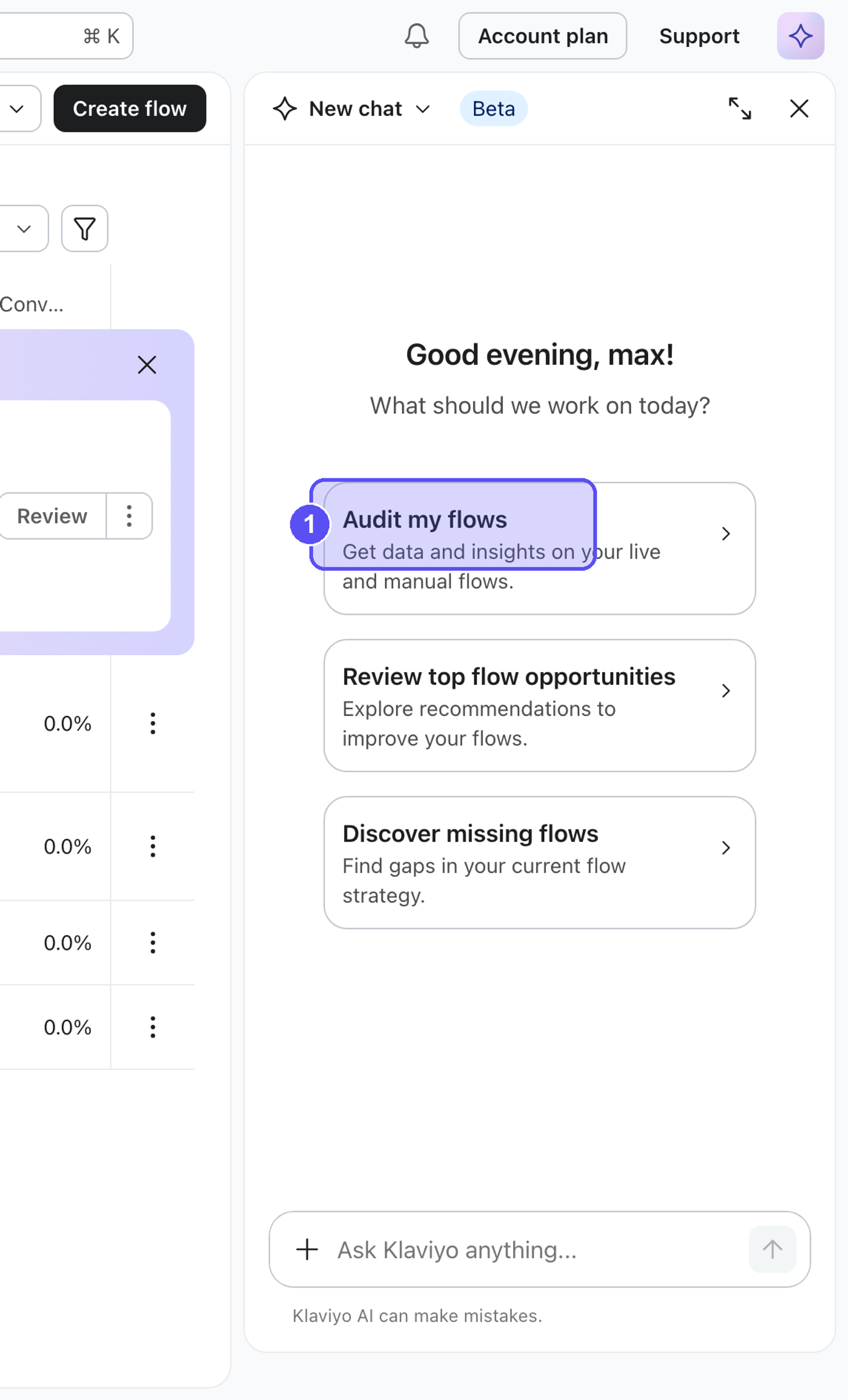
Ask Composer to audit
Open Composer from within Klaviyo and ask it to audit your work in plain language. Audit costs vary with the request and the content being reviewed; the estimates below are ranges, not fixed prices.
What you want to review | What to ask Composer | Estimated cost |
|---|---|---|
A flow, form, or email template | "Audit my flows," "Audit my welcome popup," "Audit this email" | $0.10–$4.50 |
A campaign (pre-send QA) | "QA this campaign" | $0.10–$0.50 |
Text message content (SMS or MMS) | "Audit this SMS," "Audit the SMS in my Welcome Flow" | $0.25–$1.80 |
A segment or your segment library | "Audit a segment," "Do a full audit on all my segments" | $0.30–$1.30 per segment audit; check your plan for other requests |
Audit costs may vary. The same type of audit can cost different amounts depending on the request and how much content there is to review. See How your Composer plan works for current-plan cost estimates and usage details.
Here is what each audit covers:
- Flows: Composer reviews your flow structure, trigger logic, and analytics across your flow portfolio, then flags structural issues, places where flows overlap or stack messages, and the highest-impact fixes. You can audit all your flows or a single flow.
- Campaigns: Composer runs a pre-send quality check on a single campaign: subject line, links and tracking, audience and exclusions, send configuration, A/B test setup, and compliance basics. Re-run it after you make edits, since it reviews the campaign as it is right now.
- Email and text message content: Composer reviews the email template or text message you are viewing for compliance and deliverability, accessibility, design, and content quality, and pins each finding to the exact element.
- Forms: Composer reviews a single signup form (pop-up, fly-out, embedded, full-screen, or banner) for conversion blockers across design, copy, fields, trigger timing, and incentive.
- Segments: Composer reviews your segment library for broken logic, duplicate or overlapping segments, coverage gaps, and deliverability or consent risks.
Composer audits one asset or library at a time and focuses on Klaviyo data.
Read the findings
Every audit returns findings in the same structure, so you always know where to look:
- Summary: A short, plain-language verdict on the overall health of what you audited.
- What's Working Well: The things that already look good, so you know what to leave alone.
- Recommendations: A numbered list of specific fixes. Each recommendation includes a justification that explains why it matters and a short how-to so you know how to apply it.
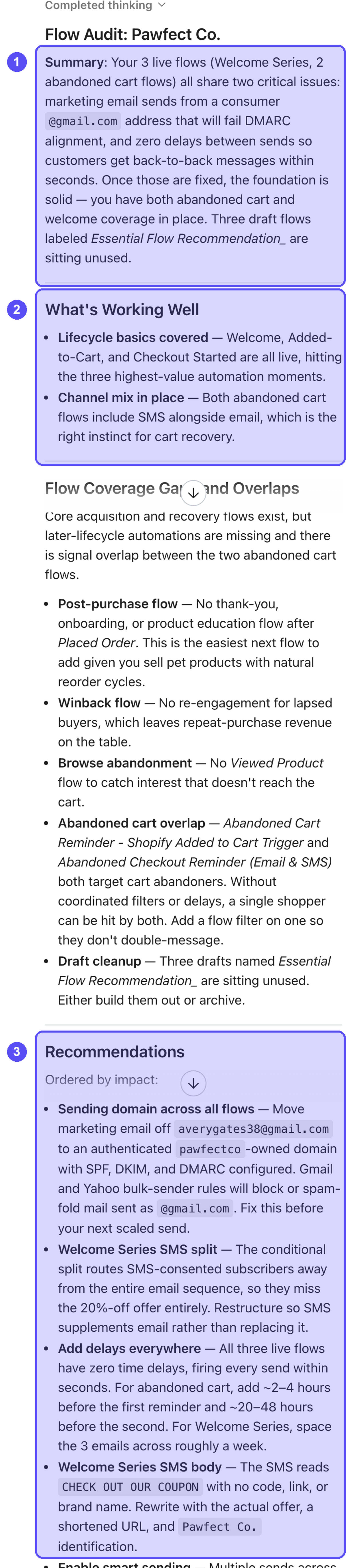
Understand how Composer prioritizes
Composer calls out the most important fixes so you know what to handle first. It does this in plain language inside the recommendations themselves, for example noting that a fix is critical for deliverability, rather than using a separate tag or label. Read the wording in each recommendation to gauge urgency.
You can also ask Composer to focus its findings, for example "Give me the top 5" or "What should I fix first?"
Composer reads structure and content, not your intent. It may flag something you set up on purpose. Use your judgment, and feel free to ask follow-up questions like "Why was this flagged?" to understand its reasoning before deciding.
Across all audit types, you can ask follow-up questions in the same chat to dig into any finding, get more detail, or understand the recommendation.
Apply fixes yourself
Composer recommends, it does not change anything for you. It will not edit your flow, fix your campaign, rewrite your content, update your form, or modify a segment. You make every change yourself in Klaviyo.
To act on an audit:
- Review the findings and decide which recommendations you agree with. You own the final call.
- Open the asset in the relevant Klaviyo editor (the flow builder, campaign editor, template editor, form editor, or segment builder).
- Make the changes Composer recommended, adjusting as needed for your brand and goals.
- Re-run the audit if you want to confirm your fixes. Composer reviews the asset as it currently is, so a fresh audit reflects your latest edits.
Because Composer's findings come from an AI model, they can occasionally be wrong or incomplete. Review and verify each recommendation before acting on it, and trust your knowledge of your own program.
FAQ
Does Composer fix the problems it finds?
No. Composer is advisory. It finds issues and recommends fixes, but you apply every change yourself in Klaviyo.
Can I audit everything at once?
Composer audits one asset or library at a time. For example, it can audit your full segment library or all your flows in one pass, but it reviews one campaign, one email, one text message, or one form at a time.
Why did Composer flag something I set up on purpose?
Composer reviews structure and content, not your strategy, so it can flag intentional choices. Use your judgment, ask why it was flagged, and move on if the choice was deliberate.
Do I need to re-audit after I make changes?
Yes, if you want Composer's findings to reflect your edits. Composer reviews the asset as it is at the moment you ask, so re-run the audit after making changes.
How much does an audit cost?
It depends on what you audit, and usage can vary. See How your Composer plan works for estimated costs and usage details.