Troubleshooting decreasing KPIs
You will learn
Learn how to adjust your strategy to improve important KPIs within Klaviyo. Key performance indicators (KPIs) are metrics that identify how successful your business is in achieving its goals and maintaining good deliverability practices. Some KPIs that measure your success are open rate, click rate, owned revenue, conversion rate, and more.
Owned revenue
Owned revenue includes any revenue attributed to the owned channels (e.g., email, SMS, push, and forms) sent through Klaviyo. For example, if a customer engages with your email and then makes a purchase within a set attribution window, that purchase is a part of your owned revenue.
If you see your owned revenue diminish over time, it may have to do with one or multiple of the following bullet points. Each is elaborated on in more depth in the next few sections.
- Successful deliveries are down, or you are sending fewer emails
- Unique opens are down
- Unique clicks are down, and fewer people navigate to your website
- Conversion rate is down, and thus fewer people are purchasing
- Form submission rate is down, and thus list growth rate is down
- Average order value (AOV) is down, and thus the monetary value of your customers’ carts and your total revenue are lower than usual
1. Successful deliveries
The successful deliveries metric is the total count and percentage of your emails that are delivered to your subscribers. Thus, these do not include emails that bounce, regardless of whether it’s a hard bounce (due to a permanent error such as a false email) or soft bounce (due to a temporary error such as a full inbox).
If your successful delivery rate drops below 99% and your bounce rate rises above 1%, review your sending practices and clean your lists. In addition, consider creating a segment of contacts who have experienced soft bounces 4 times.
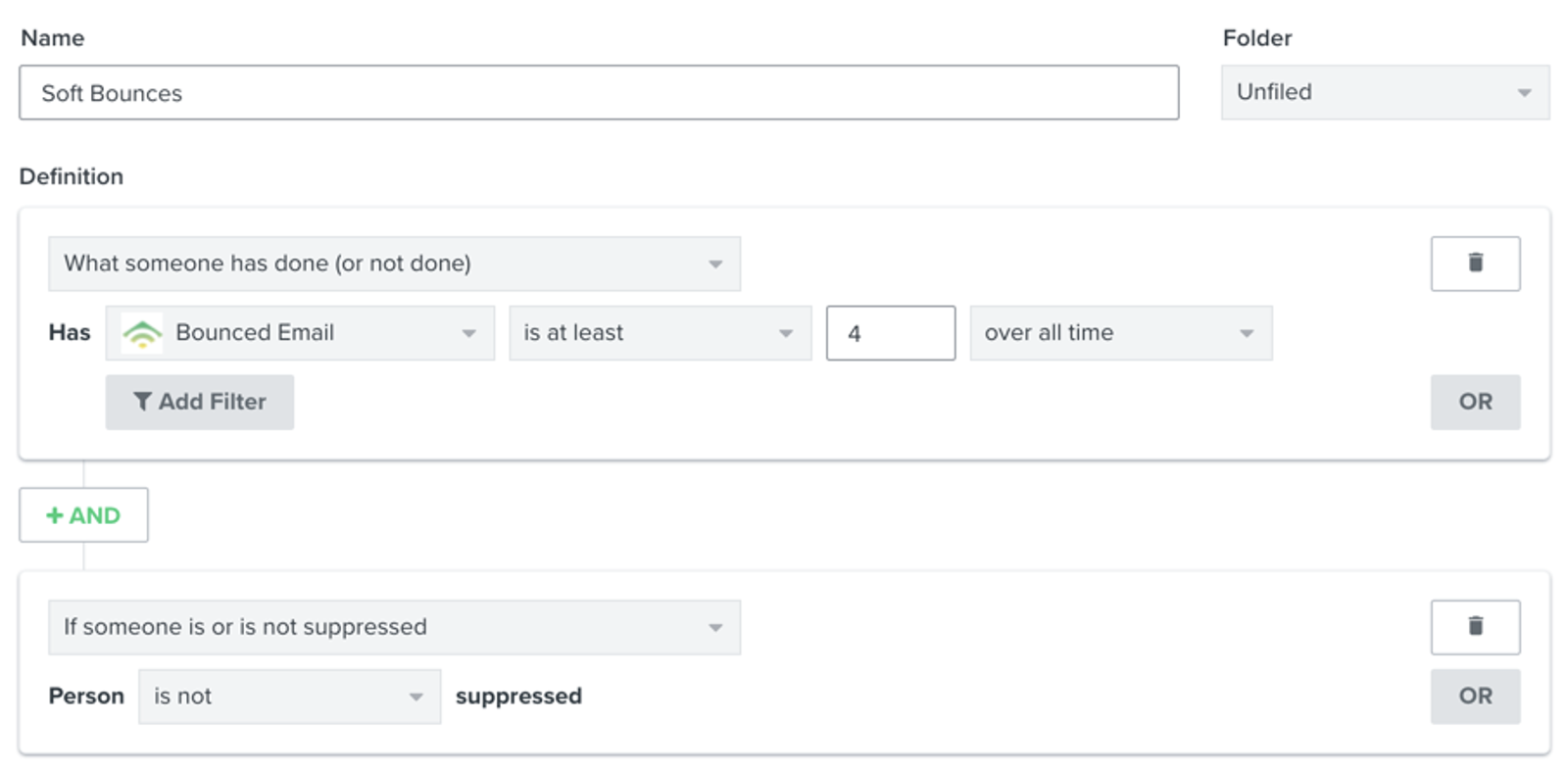
Emails to these subscribers are likely to keep soft bouncing. Klaviyo automatically suppresses a profile after 7 consecutive soft bounces within 2 years. You can review and suppress repeatedly bouncing profiles before they reach that threshold.
Something else to consider if you see a low number of successful deliveries is the quantity and frequency of your campaigns, as well as how many recipients you are sending to. Keep a regular email cadence with your subscribers, especially those who are most engaged. Don’t stop when you have momentum, as your goal should be to build a relationship and community around your brand that grows from your messaging. However, if you send too many campaigns over a short amount of time to the same recipients, it can overwhelm your subscribers and increase the likelihood of them unsubscribing or marking your emails as spam. This will shrink your list and affect the count of deliveries in subsequent sends. If you struggle with this cadence, consider creating a content calendar to keep track of your sending schedule.
If you have Smart Sending enabled for a campaign or flow message, Klaviyo may skip recipients who were sent another marketing email within the Smart Sending window. Check the affected message’s Smart Sending setting and your email Smart Sending window. Skipped messages do not count as successful deliveries.
For flows, if you see the deliveries decline, review all of your live flows and identify where the decline is stemming from. Check to ensure the flow is still triggering as expected and ensure that the data is syncing properly to Klaviyo. For example, if you recently updated your ecommerce store, but forgot to include viewed product tracking, your browse abandonment flow may have stopped sending, causing a decrease in successful deliveries.
Read Klaviyo's anti-abuse and campaign performance monitoring for more information around this metric for email. For SMS delivery reporting in flows, see Understanding flow analytics.
2. Open rate
Open rate is the percentage of delivered emails that were opened by unique recipients. Klaviyo monitors campaign performance and can send low open rate alerts. Investigate declining open rates promptly rather than waiting for an alert.
Apple Mail Privacy Protection (MPP) can record opens without a person reading your email. Review clicks and conversions alongside opens when assessing engagement, and compare reports with consistent MPP filtering settings.
If your open rate is critically low, take the following steps:
- Adjust your subject lines
- Create an engaged segment
- Target your engaged segment with applicable content
- Monitor deliverability going forward
Some other things to consider when you see low open rates are how often you send, who you send to, and what content you are creating at the time when your opens dipped. For example, perhaps a sudden change in list membership played a role in an open rate decrease. If you recently launched a giveaway campaign and gained unengaged profiles, then this may affect your typical metrics.
Consider whether any of the following changed when your open rates declined, or whether you need to adjust them:
- Your sending strategy
Have you been sending more or less frequently? For example, perhaps your subscribers are facing email fatigue if you send too often to the same profiles. Alternatively, do not send too infrequently for subscribers to forget about your brand. Consider trying out A/B testing for campaigns and flows, adjusting your Smart Sending settings, or changing the time of day you send emails. By monitoring your results, you can see what resonates best with your audience. - Subject line content
Are you offering fewer promotions, new arrivals, or back in stocks recently? Your subject lines should grab a reader's attention and encourage them to click to read your email content. This is directly in your control, so really personalize your subject lines to connect with your audience. - Your audience
Check the age of the profiles you are sending to—have they been in your account for a long time and are now unengaged subscribers? Refine your audience and create segments to make sure you are sending to people who are engaged and want to open your emails. Try to create more advanced segments to optimize your targeting. For example, include purchase history and on-site activity to gauge engagement. Alternatively, if you have men’s and women’s product lines, use predicted gender or product preferences in segmentation to personalize messaging. - Inbox placement and clipping
Are more emails landing in spam or being clipped? These issues can reduce recorded opens. A lower delivery count alone does not show that your open rate has fallen.
3. Click rate
Click rate is the percentage of people who clicked a link in your email out of the people who received your email. There are a variety of reasons why click rate may decline at different times as you send out campaigns and flows. Here is a list of potential reasons to look out for:
- Fewer incentives in your content
If you have recently increased the price of your products or offered fewer discounts, a drop in incentives may translate to a decrease in clicks. Alternatively, if customers are getting too much of the same content, they may be less likely to click into your emails. Avoid sending the same product offerings or message content to the same profiles. Instead, keep them engaged with new collections and creative content. - Rendering change
Always make sure to account for mobile versus desktop layouts for your emails. For example, if there is a rendering issue on one of the layouts, then customers using that device are less likely to click in your emails. - Broken or fewer links
Broken links can confuse or frustrate your customers, leading them to not open your emails in the future or mark them as spam which will harm your deliverability. Always make sure that your links are valid before sending or scheduling your emails. Moreover, include links where needed though always make sure to have one main CTA. Link to recommended products, more categories or collections to explore, or a navigation bar for your site. - Slower email load times and clipping
If your customers experience slower email load times or clipping, then click rate is likely to diminish for those email sends. Moreover, did you recently introduce new designs to your email templates?
4. Conversion rate
For email campaigns and flows, conversion rate is the number of unique recipients with an attributed conversion for the selected metric, divided by the number of delivered emails. If you select Placed Order, this includes both first-time and repeat customers. Your owned channels can help nurture customers from their first interaction with your brand through repeat purchases.
If you notice a dip in conversion rate, check that you are comparing the same conversion metric and attribution settings. For purchase conversions, consider why subscribers may not be placing a first or repeat order. Perhaps you need to focus on acquiring new subscribers who have never purchased before, or your email content is not effectively encouraging customers to purchase. Check for changes in the following areas:
- Links that do not match the offer
Choose destinations that make it easy to act on your email’s offer. Product and collection pages can both help customers find items to buy. If a home page, blog, or news article adds extra steps before a purchase, consider linking directly to the relevant products instead. Keep useful links, such as contact and unsubscribe links, and make featured items easy to find in your copy and design. - Changes in the checkout experience
If you have recently changed the checkout experience in any way (e.g., a pop-up triggered on checkout page, etc.), then this could also lead to a decrease in conversions. Likewise, if the price of your products or your shipping costs recently increased, this can affect conversions. If your prices have risen, you may want to re-think who you target in order to accommodate for slightly higher price points. For example, send new higher-priced promotion emails to a segment of high-CLV customers. In addition, make sure to have an abandoned cart flow set up to encourage purchases. Klaviyo’s 2026 abandoned cart benchmarks report found that abandoned cart flows had the highest average revenue per recipient among the flows compared. Use the report to compare performance and plan tests for your own audience. - Decline in open and click rate
A decline in open and click rates can contribute to fewer conversions, but does not automatically mean that conversion rate will fall. Compare conversions with delivered emails, especially if deliveries increased. Head to the designated sections on open rate and click rate for troubleshooting tips.
5. Form submission rate
Form submission rate is the number of submitted form events divided by the number of viewed form events. Klaviyo recommends aiming for about 3% or higher for pop-ups and flyouts. For forms that collect subscribers, a lower submission rate can slow list growth. Think about how you can make these forms better at catching someone’s attention and providing a clear and enticing CTA. Each form will differ depending on its purpose, and so will the metrics associated. For more information, review your sign-up form analytics.
With regard to list growth, check if you recently changed your lead-generation efforts. This can affect your rate of growth as well. Head to our article on getting started with signup forms and subscribe pages to learn how to grow your list strategically and enhance your form submit rate.
6. Revenue
Revenue is the value of sales before expenses, including your owned revenue in Klaviyo as well as revenue gained via channels not directly in your control. There are 3 key situations to monitor that may cause revenue to fall. In these scenarios, conversion rate refers to the share of website visitors who place an order:
- Traffic is the same, AOV is down, conversion rate is the same, total orders are the same:
A lower-than-usual AOV means that customers' carts are lower in price than normal, perhaps because of a sale or recent promotion. This may have to do with a decrease in average item price, a higher discount is applied to your products, or a lower amount of items in your customers’ carts. If the lower AOV is intentional, check whether total revenue still meets your goals. Otherwise, consider targeting your engaged customers with higher-value goods, or creating an upsell or cross-sell flow to encourage a second, potentially high-value, purchase. For VIP customers, introduce a loyalty program and create a VIP welcome flow to recognize their loyalty and drive repeat purchases. - Traffic is the same, AOV is the same, conversion rate is down, total orders are down:
Total orders are down as a result of a lower than usual conversion rate; if people convert at a lower rate, fewer orders are being placed and thus a loss in revenue is incurred. This may be because the average add to cart rate is low, average website bounce rate is high, or your cart abandonment rate is high. - Traffic is down, AOV is the same, conversion rate is the same, total orders are down:
In this case, total orders drop as a result of decreased traffic to your website, and thus, fewer orders are placed. Look to improve all of the channels that take customers on your site:- Direct
- Organic
- Social
- Referral
- Other
You can amplify awareness of your brand and continue leveraging your owned channels with exciting sales or promotions to re-engage subscribers. Also, create flows, such as winback and sunset, to prioritize who you can and cannot re-engage at this time. Moreover, use forms in creative ways to acquire subscribers and build relationships with returning customers over time.
Leverage your brand community to amplify your social media presence with unique hashtags and shareable content. Launch a VIP program to gain insight into how to improve upon your current ecommerce brand, and ask your VIPs to refer friends for an added incentive. Finally, if you have a brick-and-mortar location, use QR codes to direct traffic to your site as well.
Closely monitor your email deliverability performance, including opens, clicks, and successful deliveries. Separately, use UTM tracking to identify traffic from your messages in Google Analytics (GA). If GA reporting looks incomplete, use the checks below. Changing account defaults requires permission to edit account settings.
- Navigate to Settings > Other > UTM tracking and review the default parameters and their campaign and flow values.
- To add the default parameters automatically, turn on Automatically add UTM parameters to links and click Save.
- Check that UTM tracking is enabled for the affected campaign or flow message. If the message uses custom UTM values, review those values too: custom message settings override account defaults.
- Follow a link from a sent message and check that its UTM parameters remain in the landing-page URL. If a redirect removes them, update the redirect to preserve those parameters.
For SMS traffic reporting in Google Analytics, include UTM parameters in the links within SMS messages.
Additional resources
- Getting started with email deliverability monitoring and performance metrics
Learn what good email deliverability metrics look like by industry, and which strategies to use to help improve your email performance. In this guide, find out about the specific open and click rate, both for email campaign and flow messages, that you should strive for after depending on what vertical or industry you are in. Additionally, learn ways to help mitigate potential deliverability issues and how to continue to monitor these rates over time.
- Understanding Klaviyo's anti-abuse and campaign performance monitoring
Learn about Klaviyo's anti-abuse and campaign performance monitoring, and key performance metrics to focus on.
- Understanding UTM tracking in Klaviyo
Learn what UTM tracking is, how it works, and how you can use it in your Klaviyo messages to gain a deeper understanding of your marketing performance.
- How to increase campaign open rates
Learn best practices around improving low open rates so that you can grow as a brand without harming your sender reputation. Open rates allow you to measure customer engagement and monitor your deliverability and performance. When you send a campaign that results in a critically low open rate, Klaviyo will alert you, prompting you to refine your sending habits.