Tailor your SMS flow messages with Personalized Content in Flows
You will learn
- What Personalized Content in Flows is and how it changes your message copy.
- Who can use it, and which flows and channels it supports.
- How to turn it on for an SMS message in a flow.
- How Klaviyo decides what each message says.
- How to read your performance results and when they become reliable.
Advanced KDP and Personalization are not included in Klaviyo's standard marketing application, and a subscription is required to access the associated functionality. Head to our billing guide to learn about how to purchase these plans.
What is Personalized Content in Flows?
Personalized Content in Flows uses AI to adapt the copy of an SMS message in a flow to how engaged each customer is with your brand. Your existing baseline message is the starting point, so nothing is written from scratch.
Personalized Content adjusts the tone of your message and handles the product name, so the copy fits where each customer is in their shopping journey.
If your baseline message already includes a product name tag, Personalized Content uses that tag and rewrites the name so it reads naturally in the sentence. If your baseline message does not mention a product at all, Personalized Content can add one.
The product name comes from your own catalog. Personalized Content does not invent products. What changes is the wording: instead of the name appearing word for word, it is rewritten the way a shopper would say it, so a long or technical catalog name comes through shorter. A product listed as Heritage Trail 3-Inch Suspension Lift Kit, 2018-2024 may appear in the message as lift kit.
Some products fall into categories that carriers restrict for SMS, such as alcohol, firearms, or tobacco. When the product in question falls into one of those categories, Personalized Content does not personalize that message. Your baseline message sends instead, exactly as you wrote it.
This applies product by product rather than to your whole account, so a brand that sells both restricted and unrestricted products sees personalization on some messages and the baseline on others. See Understanding SMS and MMS prohibited content for the categories.
Your links, discounts, offers, and dynamic tags stay exactly as you set them up. Personalized Content changes what a message says. It does not change when a message sends, who receives it, or any of your targeting.
Who can use Personalized Content in Flows
Personalized Content in Flows is available with the following scope:
- Plans: Available to customers on the Personalization package, formerly Marketing Analytics.
- Channels: SMS and plain text RCS. Not RCS cards, MMS, email, or push.
- Flows: Added to Cart, Viewed Product, Started Checkout, Back in Stock, Price Drop, and Win Back.
- Content category: Personalized Content is not available to accounts in a prohibited content category, or to accounts that use age-gating. This is applied at the account level, so the option does not appear on any message. See Understanding SMS and MMS prohibited content and How to use age-gating with Klaviyo for which industries this covers.
Set your brand voice before you turn Personalized Content on. Navigate to Content > Media & brand, select the Brand tab, then Voice. Brand voice is made up of voice descriptors, which define your brand's personality, and writing rules, which cover things like emoji use, punctuation, and sentence length. Brand voice settings are available on all Klaviyo accounts and apply across channels, not only email.
Personalized Content works in all languages. It runs after your localization and Smart Translations settings, so a customer who would receive a localized message receives a personalized version in that same language.
How to turn on Personalized Content
- Navigate to Flows and open one of the 6 supported flows.
- Click the SMS message you want to personalize. The option appears on the message itself, not at the flow level.
- At the top of the message drawer, toggle on Personalize this message. You can do this on a flow that is already live. There is no need to set the flow back to draft first.
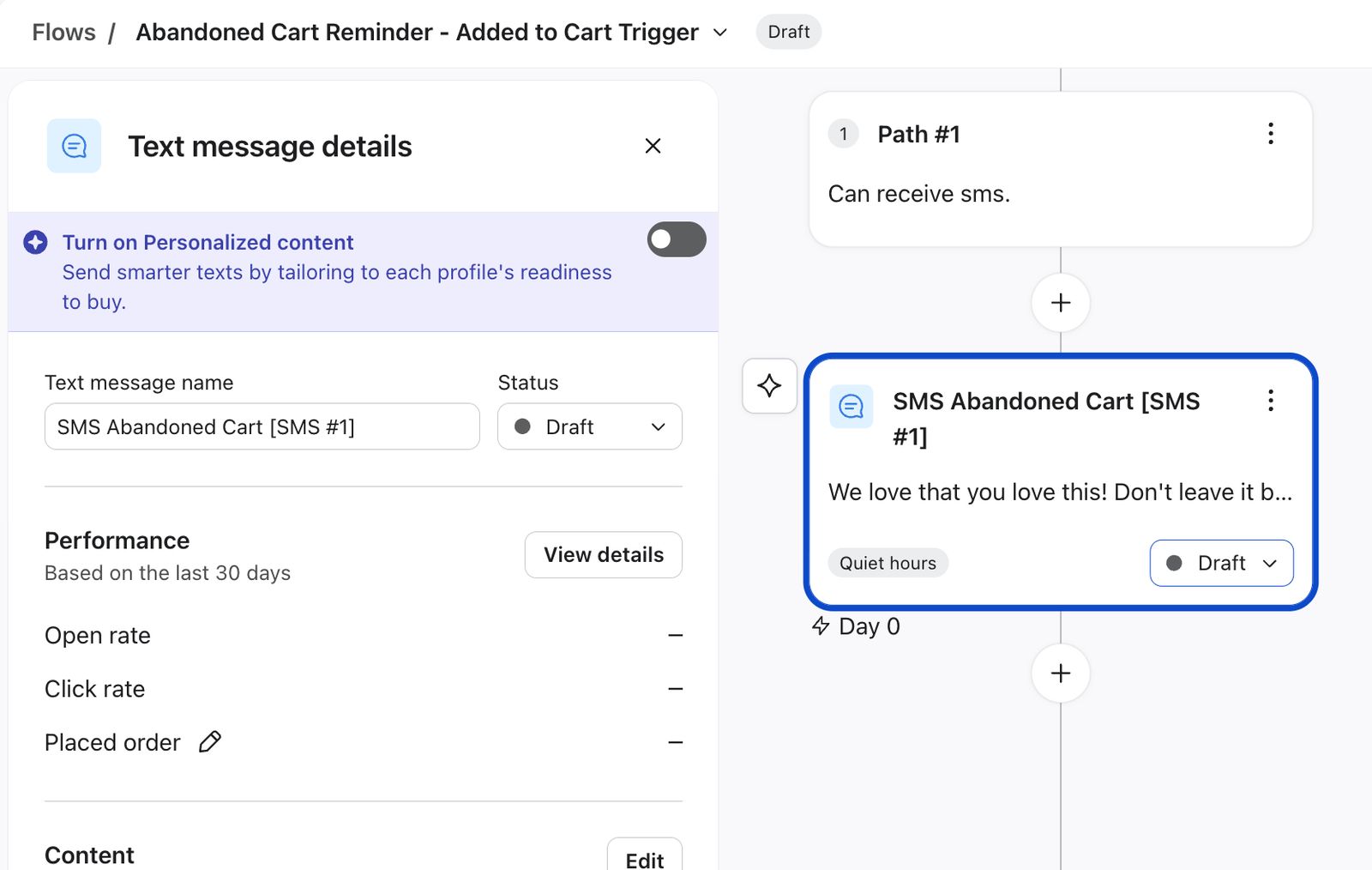
4. Optionally, review the sample messages that appear below the toggle.
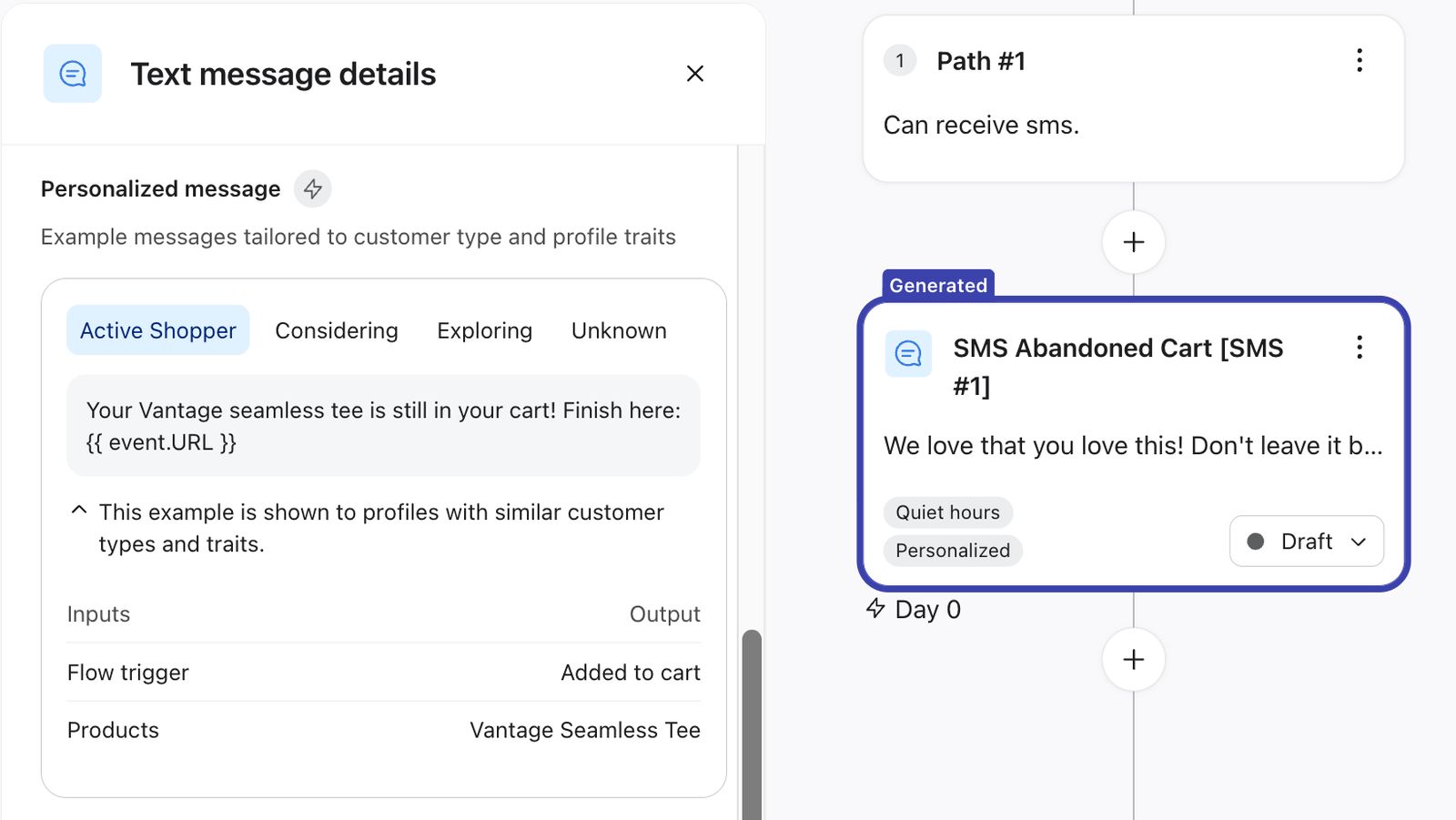
5. Save the message and keep the flow live.
The samples appear under Personalized message, with a tab for each customer type: Active Shopper, Considering, Exploring, and Unknown. Unknown covers customers Klaviyo does not have enough signal for. Each tab also lists the inputs behind that example, such as the flow trigger and the product.
The samples are examples shown to profiles with similar customer types and traits, not the exact copy any one customer receives.
The samples are the place to review personalized copy. Once the flow is sending, reporting shows how personalization is performing rather than the copy of individual messages.
Personalized Content applies to the message you turned it on for, not to the whole flow. Turn it on for each message you want personalized.
Personalized Content cannot be turned on for a message with an active A/B test. The toggle stays unavailable while a test is running. End the A/B test first in order to toggle Personalized Content.
How Personalized Content works
Personalized Content reads how engaged a customer is with your brand right now, and matches the tone of the message to that. Someone who has been actively shopping with you is ready for a direct nudge. Someone who has barely interacted is not, and a message that assumes otherwise reads as pushy.
Klaviyo estimates that engagement from a few signals, measured over the last 15 and 30 days:
- Products added to a cart recently, and how many
- Products browsed recently, and how many
- How often the customer has visited your site recently
Klaviyo also looks at the marketing messages you have sent that customer in the past week, across both campaigns and flows, and varies the wording so your messages do not start to sound repetitive. Conversational and transactional messages are not included.
A customer with many items in their cart gets more direct, action-oriented copy, because they are already deep in deciding. A customer who has only browsed lightly gets something softer that does not assume they are close to buying. What changes is the wording, not your offer: your discounts, links, and dynamic tags stay exactly as you set them.
When those signals are missing for a customer, Klaviyo does not guess. The message stays neutral and leans on the flow's own context instead, so a customer who has just abandoned a cart still gets a cart message.
When your original message sends instead
Every personalized message runs through an automatic A/B test against your baseline. Customers entering the flow are split evenly to start, so around half receive the personalized version and half receive your original. You do not set this up, and you do not need to create a separate test.
If Klaviyo cannot write a personalized version for a customer, your original message sends instead, exactly as you wrote it. A customer still receives your message either way. This also covers products in restricted categories, as described above.
Customers are assigned to a group when they enter the flow, and they stay in that group. So if personalization fails and your original sends instead, that customer still counts in the personalized group in reporting. This can understate the measured lift slightly, never overstate it, so treat the figure you see as a conservative one.
Klaviyo also aims to keep the personalized version within the same number of SMS segments as your original, so your credit usage stays close to what you would have spent anyway. This is a best effort rather than a guarantee, so a personalized message can occasionally run longer than your original, though this is rare.
Measure performance for Personalized Content
The Performance section appears on the message itself, not on the flow or in flow analytics, and is calculated across all sent messages. Each figure gives a rate for the personalized group, a rate for the control group, and the difference between them.
- Messages sent, split into Personalized and Control
- Click rate
- Placed order
If you send RCS, Open rate appears as well. It does not appear for SMS, because SMS does not have an Open rate metric.
The two groups are Personalized, which receives copy shaped by recent engagement, and Control, which receives the message exactly as you wrote it. A small difference in Messages sent between them is normal and does not mean anything is wrong.
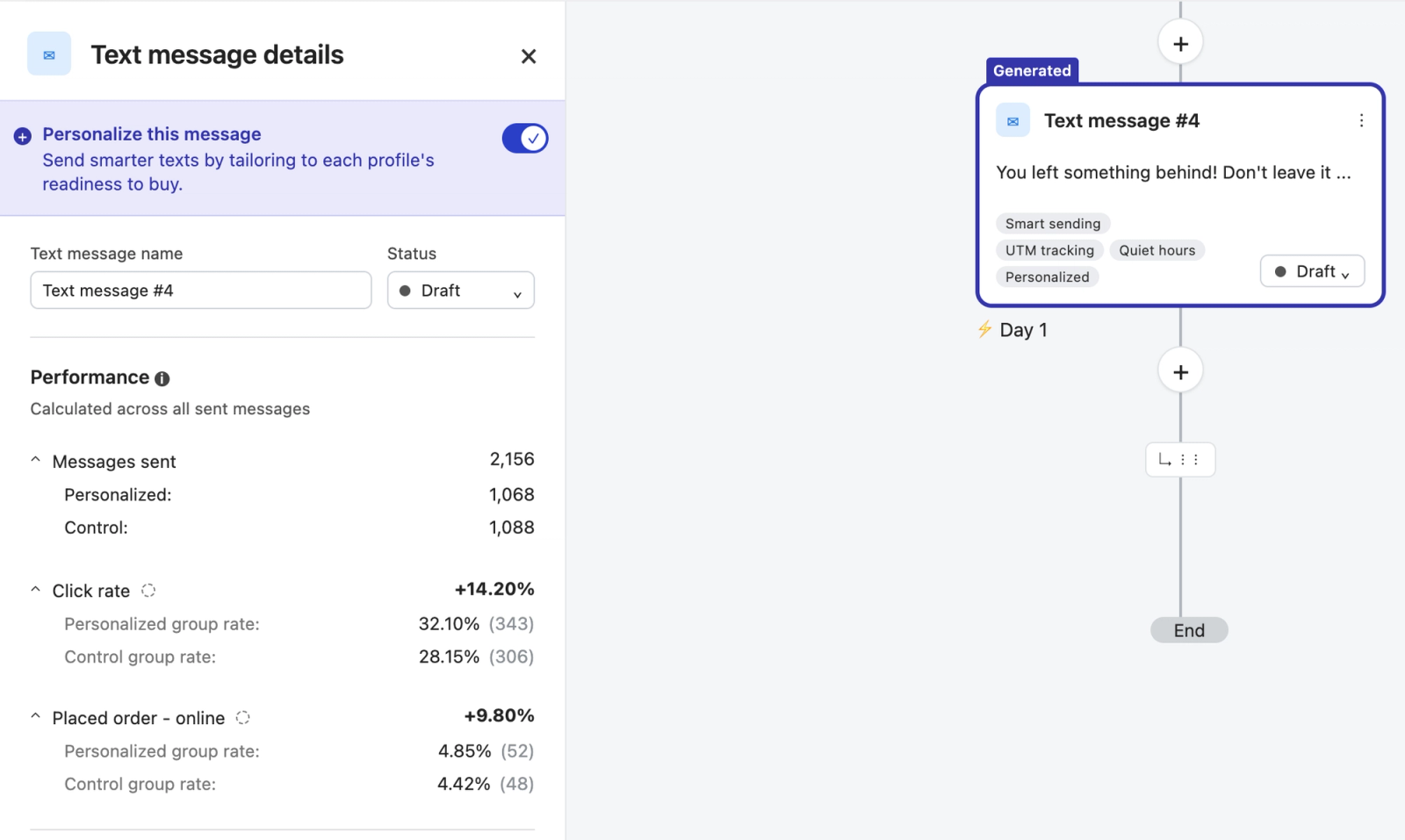
Click rate tells you whether more people engaged with the personalized version. It does not tell you whether more people bought. Read your usual flow reporting alongside it.
Why your numbers are greyed out
Each metric stays greyed out until it reaches 90% statistical significance, and Klaviyo marks the ones that have. Because each metric gets there on its own, you will often see click rate confirmed while placed order is still greyed out.
- Significance is calculated only on results collected since you turned Personalized Content on
- How quickly it is reached depends on how much your flow sends
Until a metric reaches significance, hovering over it shows Not enough data to determine significance yet. The number is visible so you can confirm the test is running, not so you can act on it. Once significance is reached, the number is no longer greyed out and is marked as confirmed.
A difference you see before a metric reaches significance may be noise rather than a real effect. Wait until it is marked as confirmed before you draw a conclusion or change your message.
How long it takes
How long depends largely on how much your flow sends. A high-volume abandoned cart flow may reach significance in a few weeks. A lower-volume flow can take months.
If a message has been running for a while and the numbers are still greyed out, the test is still collecting results. Leave it running, and avoid restarting it by toggling off and on.
How to read the comparison
The comparison tells you how the personalized group performed against the control group, at the group level. Read it as a verdict on personalization for that message as a whole, rather than on any particular wording.
Results also vary by brand and flow. A lift on one flow does not predict a lift on another, so read each message's result on its own.
Turn off Personalized Content
To stop, toggle Personalize this message off and confirm. Klaviyo stops generating and sending personalized messages, and profiles that have not already been sent a personalized message receive your baseline message instead. You can do this while the flow is live.
While Personalized Content is off, the Performance section disappears from the message. Your results are not deleted, and the section comes back with the data it already had if you turn Personalized Content on again.
Limitations and best practices
- Set your brand voice first. It is the main control you have over tone and over what the copy can say, and it applies to every personalized message in your account.
- Turn it on across all 6 supported flows. The more messages running, the sooner you build a picture of how personalization performs for your brand. Limiting it to one flow mostly means waiting longer for less.
- Turn it on for more than one SMS message per flow. Each message runs its own comparison, so broader coverage gives you more results to read rather than one slow test to wait on.
- Expect to wait. Results usually take several weeks to become reliable, which is the main reason to turn Personalized Content on broadly at the start rather than adding messages one at a time.
- Leave the baseline alone once the test is running. Editing the baseline copy, adding or removing offers and tags, or toggling off and on all reset what the comparison is measuring.
- Review the samples before you save. They are where you see how the copy reads for each customer type, and the inputs behind each example.
Personalized Content FAQs
Why is the option not on my message?
Work through these in order.
- Check you have the message open. The option appears on the SMS or RCS message itself, not on the flow.
- Check the message type. Personalized Content works on SMS and plain text RCS. It does not appear on RCS cards, MMS, email, or push.
- Check the flow. It works on 6 flows: Added to Cart, Viewed Product, Started Checkout, Back in Stock, Price Drop, and Win Back.
- Check for an active A/B test. The toggle is unavailable on a message with a test running, and hovering over it shows Personalization cannot be turned on with an active A/B test. End the test first.
- Check your plan. Personalized Content requires the Personalization package. If your account does not include it, the option does not appear at all.
- Check your content category. Personalized Content is not available to accounts in a prohibited content category or to accounts using age-gating. This applies to the whole account, so if this is the reason, the option will be missing from every message rather than just one.
If your flow is one of the 6 supported types but uses a custom trigger metric, the option may not appear. Klaviyo recognizes the common triggers used by major integrations, but cannot interpret a custom metric name on its own. Contact Klaviyo Support to have Personalized Content enabled for that flow. The flow still has to be one of the 6 supported types.
Does everyone receive a personalized message?
No. Half of everyone entering the flow receives your original message as the control side of the automatic A/B test. Your original also sends to any customer Klaviyo could not write a personalized version for, so they still receive your message.
In reporting, those customers still count in the personalized group, because group assignment happens when they enter the flow and does not change afterwards.
Where can I review personalized copy?
The sample messages next to the toggle are where you review personalized copy. They show how your message reads for each customer type, and each one lists the inputs behind it, so you can see what the copy is responding to.
Reporting works at the group level. It compares the personalized group against the control group, so it tells you how personalization is performing rather than showing the copy of individual sends.
Why do the samples not use our full product name?
This is expected. The name still comes from your own catalog, so no products are invented. If your baseline message includes a product name tag, Personalized Content uses that tag and rewrites the name the way a shopper would say it rather than using it word for word. That is what makes it read naturally in the sentence, and it is why a long or technical catalog name comes through shorter.
Klaviyo rewrites the name for readability on every personalized message, so a shortened name is the expected result rather than something to correct.
If the product falls into a category that carriers restrict for SMS, such as alcohol, firearms, or tobacco, Personalized Content does not personalize that message at all. Your baseline message sends instead.
How do I make sure the copy sounds like us?
Brand voice is your control, and it is worth setting before you turn Personalized Content on rather than after. Navigate to Content > Media & brand, select the Brand tab, then Voice. Use writing rules to rule out words, phrasing, or claims you do not want, and voice descriptors to define the personality you do.
Read the sample messages next to the toggle before you save. They show how the copy reads for each customer type, so this is the point at which to adjust your brand voice or your baseline wording. Brand voice applies account wide, so changing it affects every personalized message, and changes apply to messages sent after you save rather than to messages already sent.
What if my messages are in another language?
Personalized Content works in all languages. It runs after your localization and Smart Translations settings, so a customer who would receive a localized message receives a personalized version in that same language.
Why have my results not changed in weeks?
This is normal. Flows send steadily rather than all at once, so it takes time to collect enough results for the comparison to be reliable. The lower the volume your flow sends, the longer that takes.
Leave it running. Turning Personalized Content off and on, or moving it to another message, starts the comparison over and puts you further from a result rather than closer to one.
What if the personalized version is performing worse?
If a metric is marked as confirmed and the personalized group is behind your control group, check how much the message has sent. A result can reach significance on low volume and still be fragile.
If volume looks healthy and the result holds, turning Personalized Content off for that message is a reasonable call. Your baseline goes to everyone from that point on, and you can try Personalized Content on a different message instead.
I turned it off and the Performance section is gone. Where did my results go?
The Performance section only appears while Personalized Content is on. Your results are not deleted, and the section comes back with the data it already had if you turn Personalized Content back on.
Additional resources
- How to apply brand voice guidelines to AI-generated email content
Learn how to create and apply brand voice guidelines to ensure your AI-generated email content aligns with your brand identity. This helps drive consistency and reduce editing time when using Klaviyo’s generative AI features to create email content.
- Understanding SMS and MMS prohibited content
Learn about which content is not allowed for SMS marketing.
- How to use age-gating with Klaviyo
Learn about age-gating in Klaviyo, which may allow brands to send otherwise prohibited content via SMS in most countries where SMS is available.
- Drive performance with right time delivery using Personalized Send Time
Learn what Personalized Send Time is, how it helps optimize send timing for each recipient, and how it differs from Smart Send Time