Drive performance with right time delivery using Personalized Send Time
You will learn
- What Personalized Send Time is and how it differs from Smart Send Time.
- When to use Personalized Send Time in your campaigns.
- How to set up a campaign with Personalized Send Time.
- How to view and interpret Personalized Send Time performance reports.
- Eligibility, supported channels, and current limitations.
Advanced KDP and Personalization are not included in Klaviyo’s standard marketing application, and a subscription is required to access the associated functionality. Head to our billing guide to learn about how to purchase these plans.
What is Personalized Send Time?
Personalized Send Time automatically schedules each campaign message at every recipient’s predicted best time within a delivery window you choose. You set a send date and time window, and Klaviyo delivers in each recipient’s local time at the time most likely to drive engagement and conversions.
Unlike Smart Send Time, which finds a single optimal time for your entire audience, Personalized send time optimizes delivery at the profile level, so different recipients can receive the same campaign at different times within your window.
When you should use Personalized Send Time
Use Personalized Send Time when:
- You’re sending non-urgent campaigns where maximizing opens, clicks, or orders is more important than everyone receiving the message at the exact same moment.
- You’re comfortable delivering over a send window and in the recipient's local time zone rather than all at once.
Avoid Personalized send time for:
- Time-sensitive content, such as flash sales, expiring offers, or urgent announcements where all customers must receive the message by a specific clock time.
- Same-day sends, since same-day scheduling is not supported yet (only future dates starting tomorrow).
Who can use Personalized Send Time
Personalized Send Time is available with the following scope:
- Plans: Available to customers on the Personalization or Advanced KDP packages.
- Channels: Email, SMS, push, and WhatsApp campaigns. Personalized Send Time is not available yet in flows.
How to use Personalized Send Time in campaigns
Before you start, note that Personalized Send Time:
- Works in both single-channel and omnichannel campaigns
- Requires scheduling at least one day in advance (no same-day sending).
1. Create a single-channel campaign
- Create a campaign (email, SMS, push, or WhatsApp).
- Build your content as usual.
- Optional: include a content A/B test for a single-channel email or SMS campaign to evaluate content variations in addition to Personalized Send Time. Set your test size to 100% in Content test settings. If your test size is less than 100%, Personalized Send Time will not be available. Learn more about content A/B testing.
2. Go to Review & schedule
- From the campaign builder, proceed to the Review step.
- Click Schedule or send to open scheduling options.
3. Enable Personalized Send Time
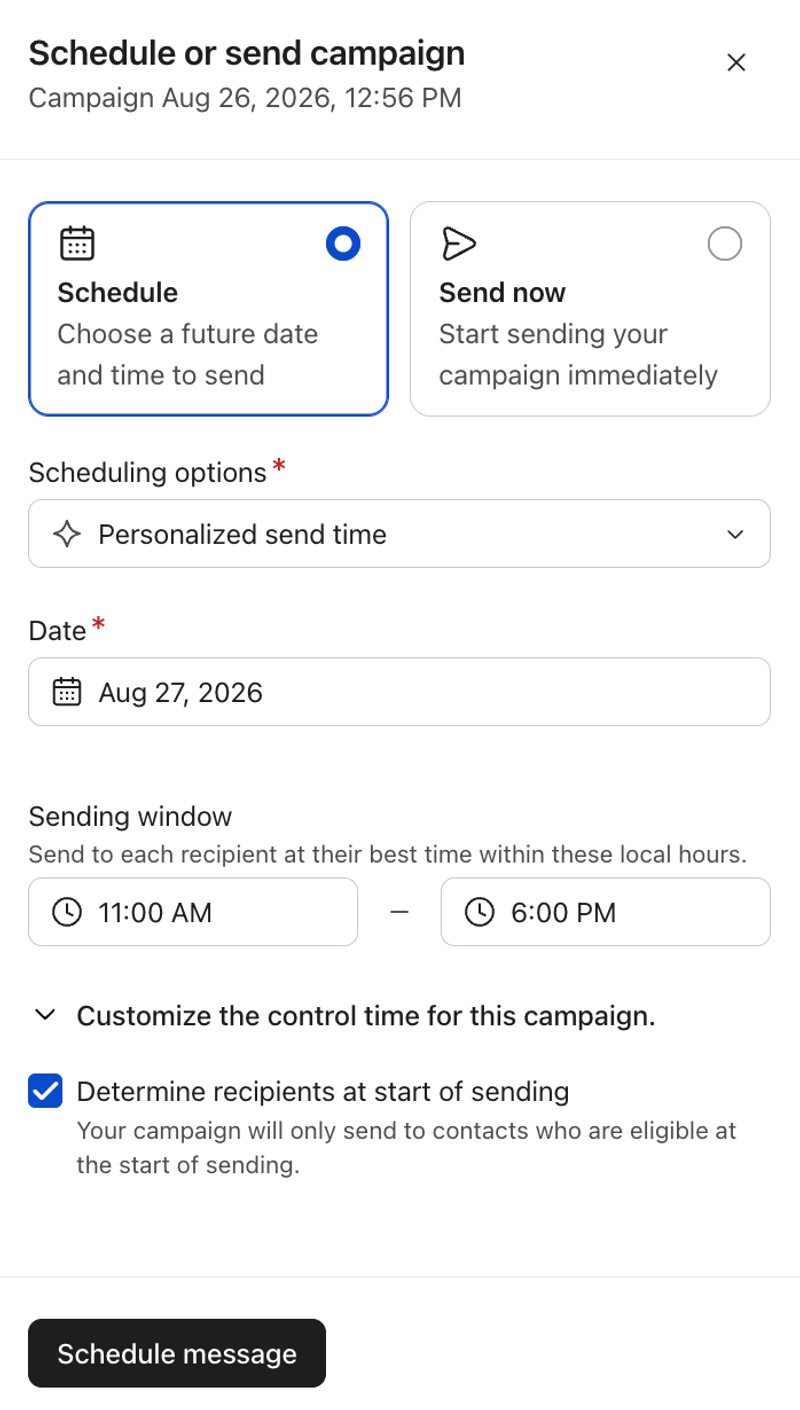
- In the scheduling options, open the send strategy dropdown and select Personalized send time.
- Choose the send date: Select any future date starting tomorrow in your account’s time zone. Same-day scheduling is not available currently.
- If a recipient cannot be scheduled on that date (for example, their valid time window has already passed), Klaviyo will send the next day during your defined window. See the FAQ section for details.
- Review the Sending window: The default is the full day for email, push, and WhatsApp, and 11:00 AM–8:00 PM for SMS, in each recipient’s local time. To narrow the window, select start and end times on the hour. SMS windows must stay within 11:00 AM–8:00 PM.
Klaviyo will determine each recipient’s best send time inside your chosen window.
4. Customize your control group
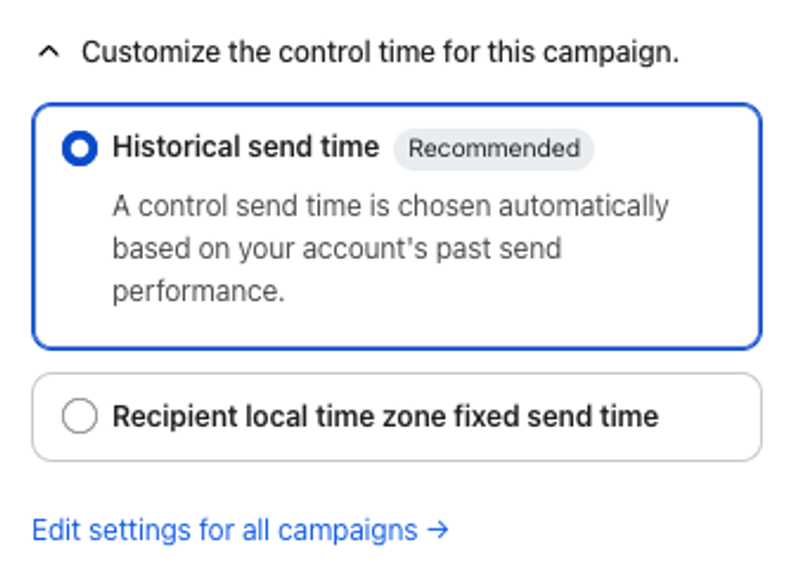
- Click on Customize the control time for this campaign to adjust the control group settings which will be used to measure baseline performance of the campaign against Personalized Send Time (learn more here).
- Choose your control group from the options below:
- Historical send time (recommended): A control send time is chosen automatically based on your account’s past send performance.
- Recipient local time zone fixed send time: Set a fixed send time for the control group, localized to each recipient’s time zone. Choose an hour within your sending window, before its end time.
- Optional: Select Edit settings for all messages to configure the default control time for future sends. Choose your settings and click Save, then return to the campaign and review its control settings. Already scheduled messages keep their existing control settings; to apply the new defaults, revert those messages to draft and reschedule them.
5. Schedule your message
- Review your settings and click Schedule message. Klaviyo will queue each recipient to send at their predicted best time within your window, in their local time zone.
How Personalized Send Time works
Behind the scenes, Personalized Send Time uses reinforcement learning to intelligently choose send times when each profile is most likely to open, click, or place an order, based on past engagement behavior and similar profiles.
- Each recipient is assigned a best send time within your defined delivery window, in their local time.
- If a recipient’s exact best time is not available (for example, it has already passed on the scheduled date), Klaviyo chooses another available time that still falls within your window that day.
Personalized send time uses the following signals and behavior:
- Engagement and profile property data in your account. The model looks at opens, clicks, and placed order events across your campaigns (and channels where available) to learn when similar recipients are most likely to respond.
- Hour-level predictions inside your window. For each recipient, Klaviyo chooses an hour within your delivery window in their local time. For SMS, Personalized Send Time respects SMS quiet hours, so sends may be further constrained to compliant hours.
- First Personalized Send Time in your account. When you use Personalized Send Time for the first time, the model starts from a pre‐tuned default send‐time pattern that has been calibrated through prior testing and analysis.
- New profiles. When a new profile is added and doesn’t yet have engagement history, we start by using send-time patterns from similar profiles in your account so they still receive messages at reasonable times. If we don’t have enough information about similar profiles in your account, we fall back to what’s generally best for your account. As each person interacts with your messages, recommendations will gradually adapt and become more individualized.
Time zone handling
- For email, push, and WhatsApp: Personalized Send Time uses the profile’s local time zone. If that time zone is unavailable, it uses your account’s time zone.
- For SMS: Personalized Send Time uses the recipient’s phone number and area code together to determine the local time zone.
Measure performance for Personalized Send Time
To help you understand long-term impact of Personalized Send Time, Klaviyo surfaces both campaign-level and aggregate-level performance views.
Campaigns sent with Personalized Send Time include a tile on their campaign overview page. To view detailed performance metrics, click on Overview > View impact in the Personalized send time tile. You can then toggle between This campaign (for individual campaign-level analytics) and All campaigns (for aggregate analytics).
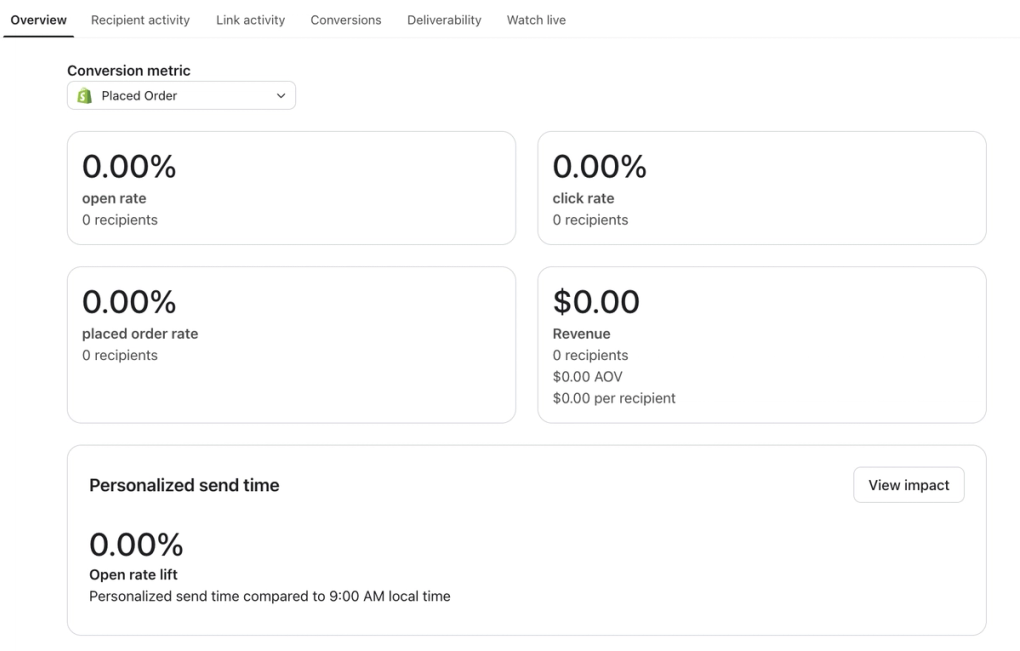
Allow about 24 hours after the last Personalized Send Time message is delivered for campaign analytics to become available. This buffer lets Klaviyo capture late engagement automatically, so you don’t need to take any extra steps before checking results.
Understanding the performance metrics
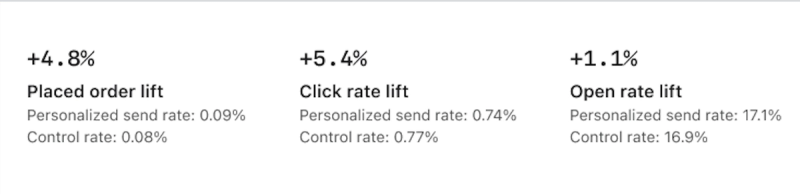
To evaluate performance of Personalized Send Time, Klaviyo compares results from recipients who received messages at their predicted best times with a control group, helping you evaluate performance lift across key metrics.
- For each campaign that uses Personalized Send Time, a randomly selected portion of eligible recipients is automatically held out in a control group. These recipients receive the same campaign on a non-personalized schedule that follows your configured control group settings (historical send time or recipient local time zone fixed send time).
- Everyone else in the campaign receives the Personalized Send Time treatment. When we report performance, we compare recipients who received Personalized Send Time against this control group.
- The control group size is automatically managed by Klaviyo and may change over time; you do not need to configure or maintain it.
- Metric-level lift is calculated as the relative difference between the Personalized Send Time group and the control group for a given metric. For example, if open rate is 20% with Personalized Send Time and 18% in control, lift in open rate is (20% − 18%) ÷ 18% ≈ 11%.
Open and click rates in Personalized Send Time reports exclude bot activity, including Apple Mail Privacy Protection (MPP) opens and automated bot clicks. Because of this, these metrics may differ from open and click rates shown in other areas of your account.
Campaign-level analytics
Select This campaign to view Personalized Send Time performance for an individual campaign, including send time distribution. If you have multiple campaigns using Personalized Send Time, open each campaign’s Overview page, click View impact in the Personalized send time tile, and select This campaign to view its results.
Here you can view open-rate and click-rate lift alongside send time distributions. Email and WhatsApp show both metrics; SMS shows click-rate lift, and push shows open-rate lift. Placed-order lift is not shown.
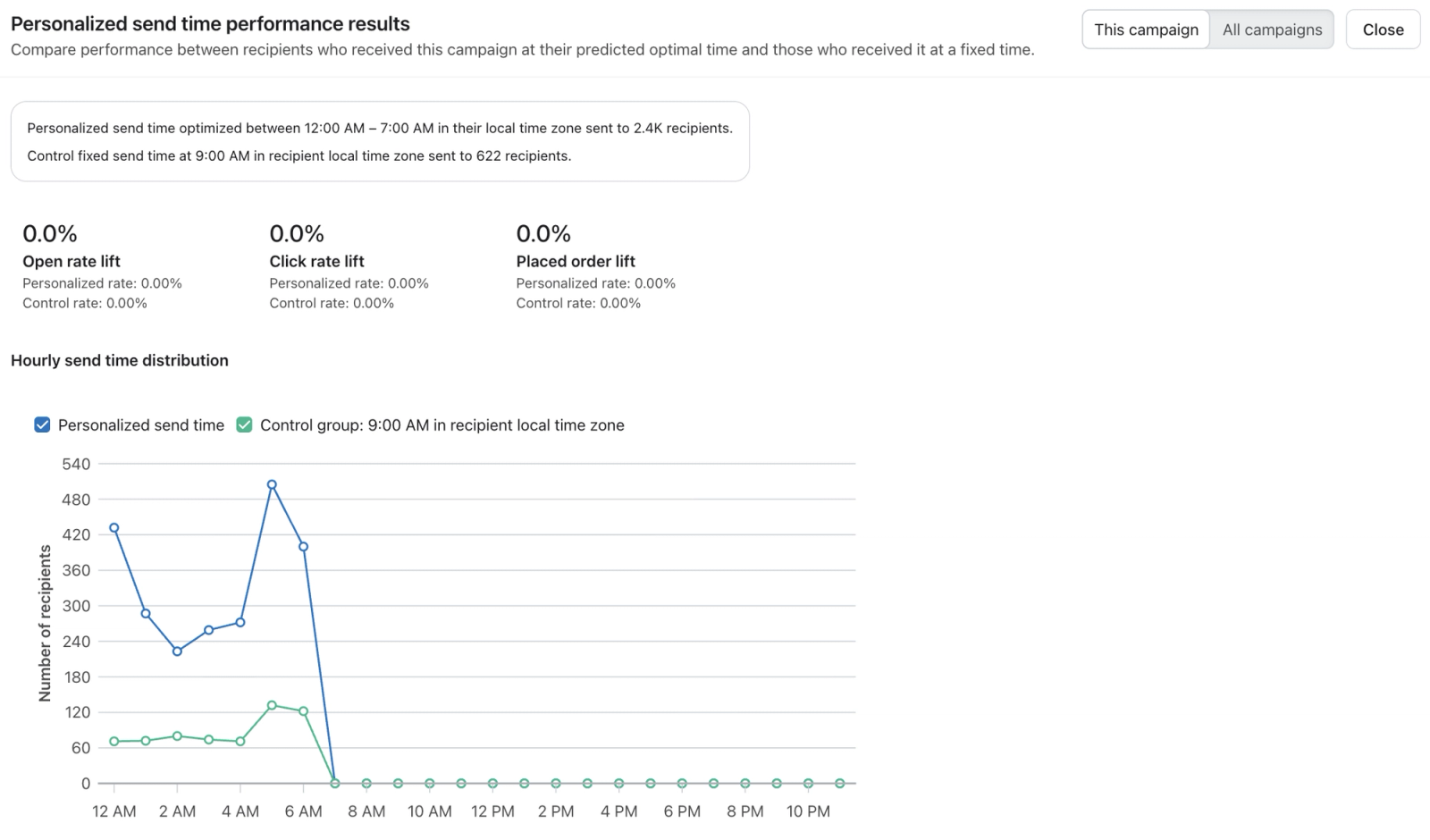
View send time distributions
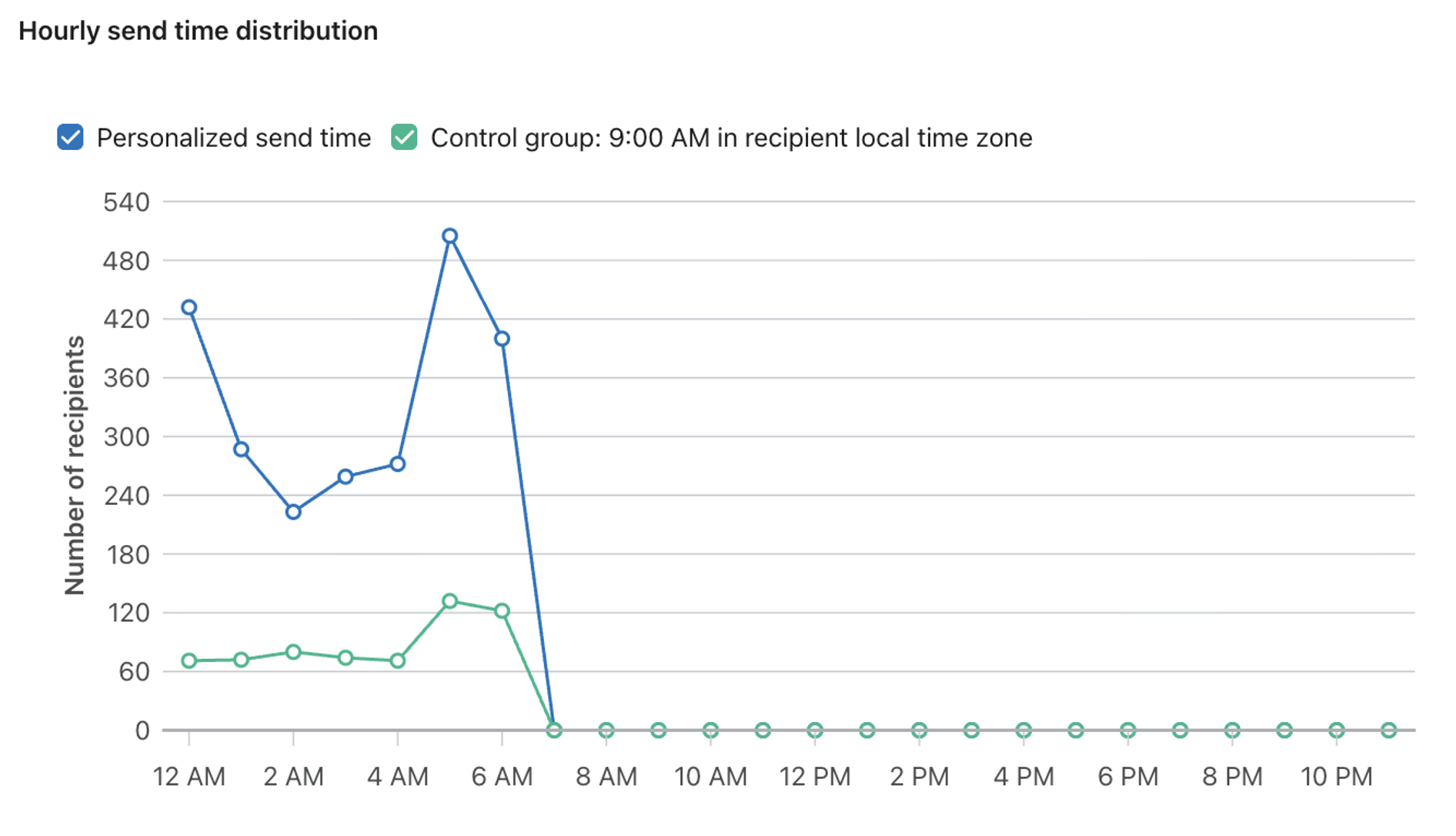
You can view a campaign’s send time distribution to understand when messages were delivered across your audience. Send time distributions show:
- The number of recipients who received a message at each hour
- Send times based on each recipient’s local time zone
- The time window (time restrictions) selected when scheduling the campaign
This helps you visualize how messages were distributed within your selected send window.
Use the distribution to compare:
- Personalized recipients, who received messages at their individually optimized times
- Control recipients, who received messages based on the control group timing
This makes it easier to understand how send times differ between groups and how Personalized Send Time used your selected time restrictions.
To view the distribution, click View impact in the Personalized send time tile on the campaign’s Overview page. Select This campaign, then find Hourly send time distribution.
Aggregate analytics
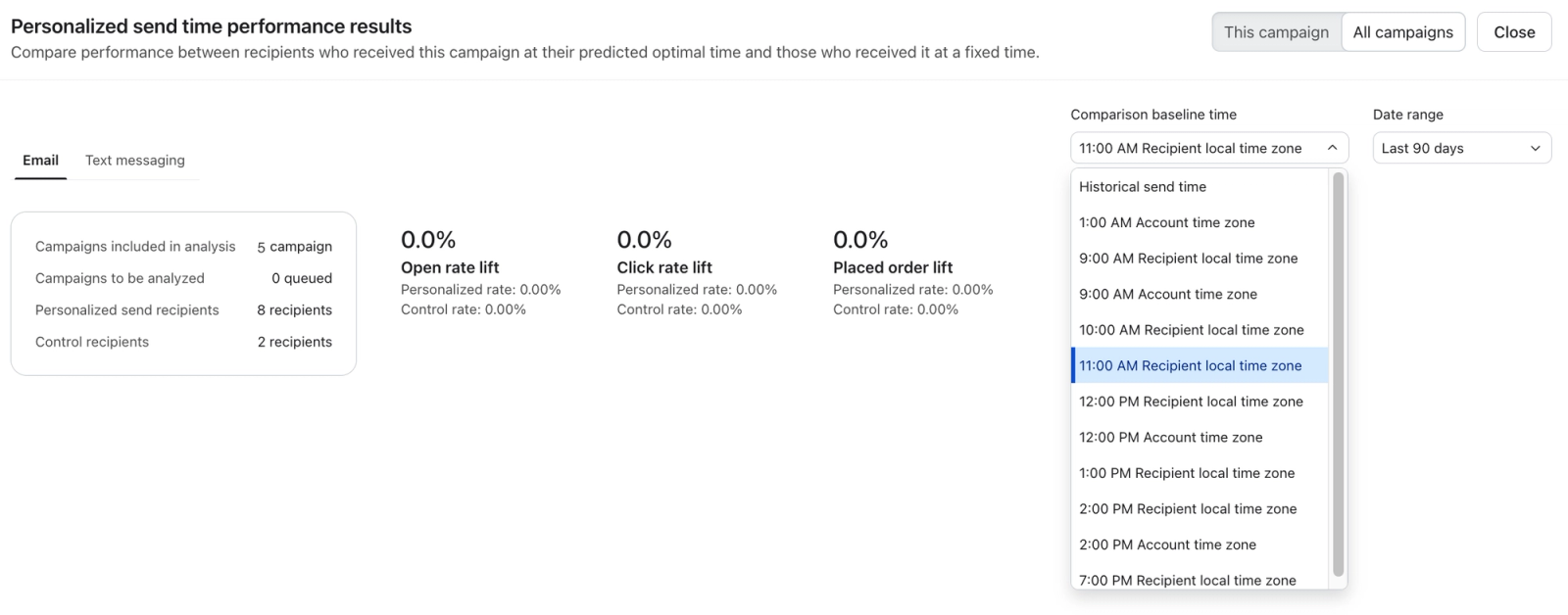
Select All campaigns to view aggregate Personalized Send Time performance across campaigns. Choose the channel and date range you want to analyze. The aggregate view groups campaigns that use the same control send time, so you can evaluate performance across campaigns with a consistent comparison baseline.
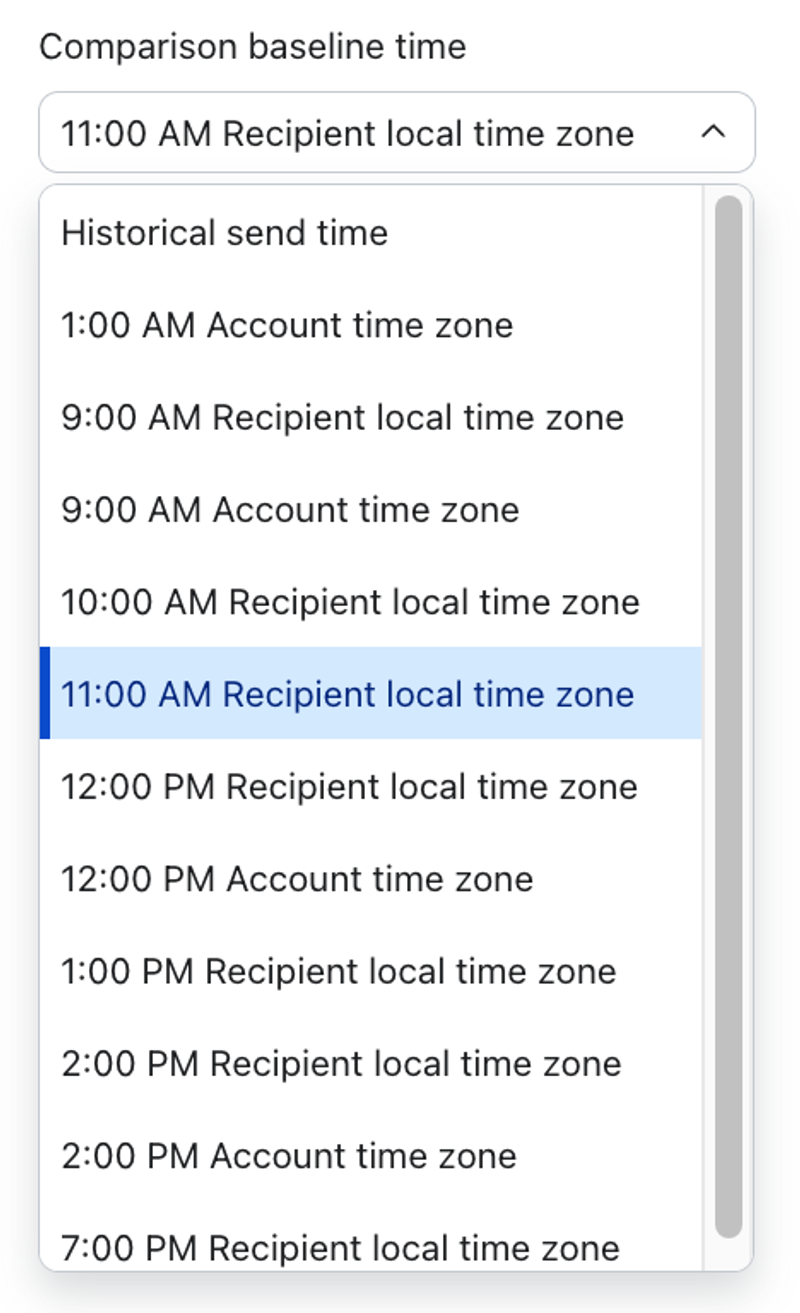
Use the Comparison baseline time options to choose the control configuration you want to analyze:
- Historical send time: A control send time is chosen automatically based on your account’s past send time.
- Recipient local time zone: Select a listed fixed time to analyze campaigns that used that control send time.
For example, you can analyze the combined performance of 5 campaigns that used an 11:00 AM control send time in the recipient’s local time zone. Grouping campaigns with the same control send time makes the comparison easier to interpret: you can evaluate whether Personalized Send Time improves performance compared with sending campaigns at 11:00 AM in each recipient’s local time zone, across multiple campaigns rather than one campaign at a time. The aggregate view shows open-rate and click-rate lift for email and WhatsApp, click-rate lift for SMS, and open-rate lift for push. Placed-order lift is not shown.
Identify Personalized Send Time campaigns
You can quickly identify and filter campaigns that used Personalized Send Time from the campaign list.
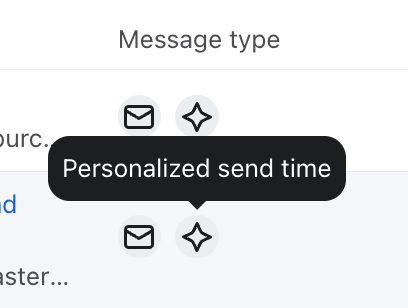
- Look for the Personalized send time label on campaigns that use this sending strategy.
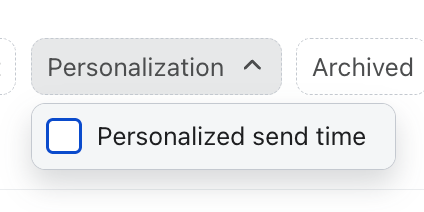
- In the campaign list, open the Personalization filter and select Personalized send time to view campaigns that use it.
Limitations and best practices
Use these guidelines to get the most from Personalized Send Time:
- Campaign types and channels. Personalized send time works for email, SMS, push, and WhatsApp campaigns. It is not available for flows yet.
- Scheduling. You must schedule campaigns at least one day in advance. Same-day scheduling is not supported; choose a future date starting tomorrow.
- Smart Sending. Smart Sending is evaluated at the actual send time for each message, just like standard campaigns. If a recipient has already received another message on the same channel within your Smart Sending window, they may be skipped from a Personalized Send Time campaign.
- SMS quiet hours. For SMS, Personalized Send Time follows a more restricted sending window to respect SMS quiet hours.
Personalized send time FAQs
What does Personalized Send Time optimize for?
Personalized send time optimizes for opens, clicks, and placed order rate, using these signals to determine the best time to send to each recipient.
Note: Personalized Send Time uses standard placed order events for optimization and does not support custom or combined placed order metrics.
Can I schedule a Personalized Send Time campaign for the same day?
No. Currently, same-day scheduling is unavailable. You must schedule a future date starting tomorrow.
What happens if a recipient’s best time has already passed on the scheduled date?
If a recipient’s best time within your delivery window has already passed by the time the campaign is scheduled, Klaviyo will send at another available time within your window that day.
What if no valid time remains for a recipient on the scheduled date?
If there are no valid times left for a recipient in their local time on the scheduled date (for example, the campaign is scheduled late in the day and the window has already passed), Klaviyo will deliver the campaign the next day during your configured window.
Can I use Personalized Send Time with A/B testing?
Yes. Personalized Send Time supports content A/B tests in single-channel email and SMS campaigns when the content test size is set to 100%.
How does Personalized Send Time work with Smart Sending?
Smart Sending is evaluated at the moment each message is sent, just like standard campaigns. If a recipient has already received another message on the same channel within your Smart Sending window, they may be skipped from that Personalized Send Time campaign.
Does Personalized Send Time respect SMS quiet hours?
Yes. For SMS, Personalized Send Time uses a more restricted sending window to respect SMS quiet hours.
Can I use Personalized Send Time on multiple campaigns or channels in the same day?
Yes. For overlapping audiences, keep in mind Personalized Send Time delivers recipients at different times of day, which can cause messages to land close together or be affected by Smart Sending. When possible, leave a modest gap between campaigns to reduce this risk. If Smart Sending is enabled, it may skip messages on the same channel that arrive too close together. Skipped messages are not automatically rescheduled. These are recommendations, not hard requirements.
Are Apple Privacy Opens / Bot Clicks used when determining the best send time?
No - we remove bot events when training our models.
Additional resources
- How to create and send an email campaign
Learn about the basics of email campaigns, including what they are and how to send them in Klaviyo.
- Understanding Smart Send Time in Klaviyo
Learn how Smart Send Time uses your business' data to find the optimal time for you to email your customers, maximizing open and click rates as well as helping you to better understand your customers.
- Understanding Smart Sending in Klaviyo
Learn about Smart Sending, which allows you to limit the number of emails, SMS messages, or push notifications someone can receive within a set period of time.