How to create a sending schedule based on SMS engagement
You will learn
Learn how to create engagement tracks based on your sending schedule for your SMS subscribers.
The advice in this article is simply a starting point. Your ideal sending frequency, engagement, etc. all depend on a number of factors, including industry, audience, and the types of messages you send.
Sending schedule best practices
For those first starting out with SMS, we recommend sending between 2-4 times a month. Then, slowly ramp up your sending to between 4-7 times per month, depending on your desired sending schedule.
The following are all best practices for creating your sending schedule:
- For highly engaged subscribers, build toward 1 to 2 sends a week as your SMS program grows. Regular sends create more opportunities for subscribers to shop.
- Do not send SMS every day unless the subscriber knowingly opted in to daily reminders (e.g., for taking medicine).
- If you explicitly collect your customers’ communication frequency or content preferences, tailor your communications to those preferences.
- For instance, if someone asked to only receive information about events, do not send them promotional material. After some time, and if they are highly engaged, ask if they’d like to update their preferences to receive more information.
- Monitor your unsubscribe rate to make sure it doesn’t rise above 2% per campaign.
- Use Smart Sending and send in the recipient’s local times to avoid over-messaging or sending at odd times of day.
- Build familiarity into your sending schedule, such as by:
- Sending at a certain time and day each week, so subscribers know when to expect your message
Or - Establishing a pattern when you send certain content, so subscribers know what they can expect (e.g., Promotion Tuesdays or launching products the last week of the month)
- Sending at a certain time and day each week, so subscribers know when to expect your message
- Provide a variety of different types of SMS messages to subscribers.
What do you mean by a variety of different SMS?
It’s important to mix up the type of SMS you send. Otherwise, your messaging can become predictable, and your recipients may no longer find value in being an SMS subscriber.
Sending 1-2 of each of the following in a month helps you create that variety:
- Announcements for promotions, new products, or holiday deals.
- Early access or last messages for major announcements.
- Targeted campaigns for specific segments, such as:
- People who viewed a certain product or category: send price drop or cross-sell messages.
- VIPs: send exclusive content like blogs or podcasts, offer sneak peeks, or reminders for reward points.
- Non-purchasers: offer assistance or send a reminder for first purchase discounts.
What to do if your unsubscribe rate is 2% or more
If you have a high unsubscribe rate, review the following:
- Check that you’re using double opt-in.
- Make sure you clearly explain what to expect from your SMS program wherever you collect consent.
- Look at your content to see if it’s providing value to subscribers.
If you do all of the above and still have a high unsubscribe rate, consider slowing down your sending to only once every other week.
Before you begin
When planning your sending schedule and setting up your engagement, please keep the following in mind:
- Brands or industries with long buying cycles may need to send less frequently or to a more targeted audience.
- For instance, luxury clothing brands may only send weekly to their most frequent shoppers.
- If you don’t always include Klaviyo shortened links in your messages, you may need to extend the engagement criteria or base the segments on something other than Clicked SMS (such as Active on Site), since clicks can’t be recorded without a link.
Create your engagement tracks
There are 3 engagement tracks you want to set up:
- Track A: new subscribers or high engagement (subscribed in the last 30 days or clicked an SMS in the last 90 days)
- Track B: medium engagement (clicked an SMS in the last 150 days, but not in the last 90 days)
- Track C: low to no engagement (has not clicked an SMS in the last 150 days)
Below, we show how to set up these tracks for the example of a weekly sending schedule.
Create a separate segment for each track:
- Navigate to Lists & segments, then select Create > Segment.
- Name the segment, such as “SMS Track A.” If a naming panel appears, enter the name there and click Create segment to open the builder.
- Add the conditions for the track below, then click Create segment to save it. Repeat for Tracks B and C.
Track A: high engagement
Send weekly to everyone who is either a new subscriber or has engaged recently. For this example, include people who subscribed in the last 30 days or clicked an SMS in the last 90 days.
Require SMS consent with AND, then join the 2 activity conditions with OR:
- If someone can or cannot receive marketing > can receive > text message marketing
AND - What someone has done (or not done) > Subscribed to SMS Marketing > at least once > in the last 30 days
OR - What someone has done (or not done) > Clicked SMS > at least once > in the last 90 days
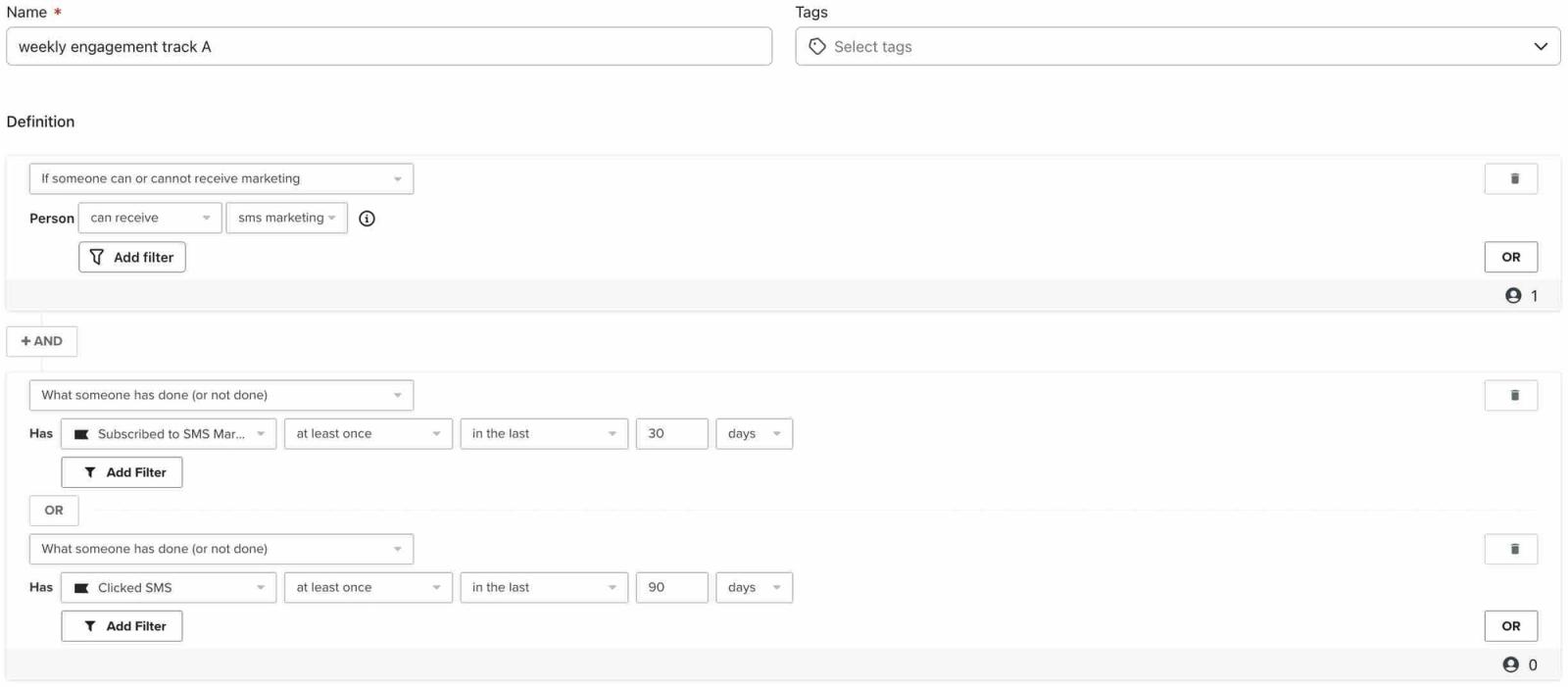
Recommendation: Send to this group every week.
Track B: medium engagement
This group includes subscribers who clicked an SMS in the last 150 days but have not clicked in the last 90 days. Exclude new subscribers by requiring their subscription date to be at least 30 days ago.
For this segment, use the following conditions joined with AND:
- If someone can or cannot receive marketing > can receive > text message marketing
Click Add filter and select Subscribed. Click Add filter again and set subscribe date > at least > 30 days ago.
AND - What someone has done (or not done) > Clicked SMS > at least once > in the last 150 days
AND - What someone has done (or not done) > Clicked SMS > zero times > in the last 90 days
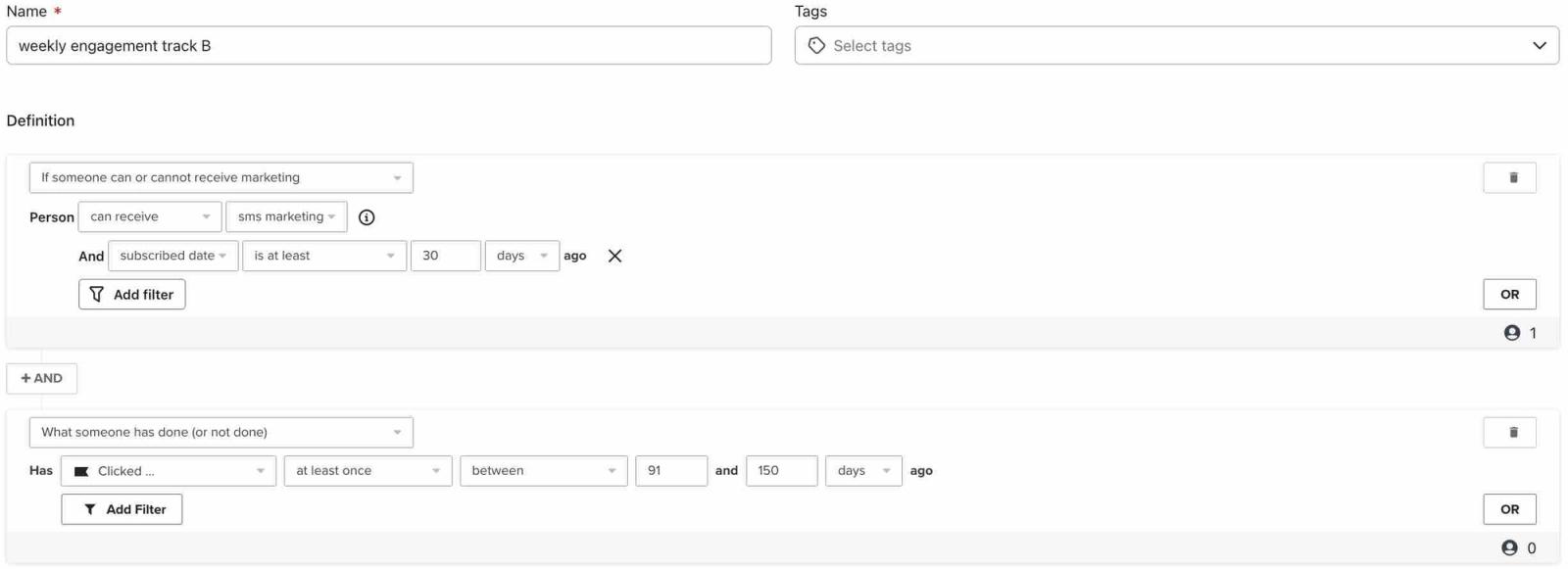
Recommendations:
- Send to this group every other week.
- Try to re-engage these subscribers, such as by:
- Offering a special coupon.
- Asking for their preferences (e.g., if they prefer email or what type of SMS message they want).
Track C: low to no engagement
For this weekly sending example, subscribers who opted in at least 30 days ago and have not clicked an SMS in the past 150 days belong in Track C. Exclude them from most campaigns.
For this segment, use the following conditions:
- If someone can or cannot receive marketing > can receive > text message marketing
Click Add filter and select Subscribed. Click Add filter again and set subscribe date > at least > 30 days ago.
AND - What someone has done (or not done) > Clicked SMS > zero times > in the last 150 days
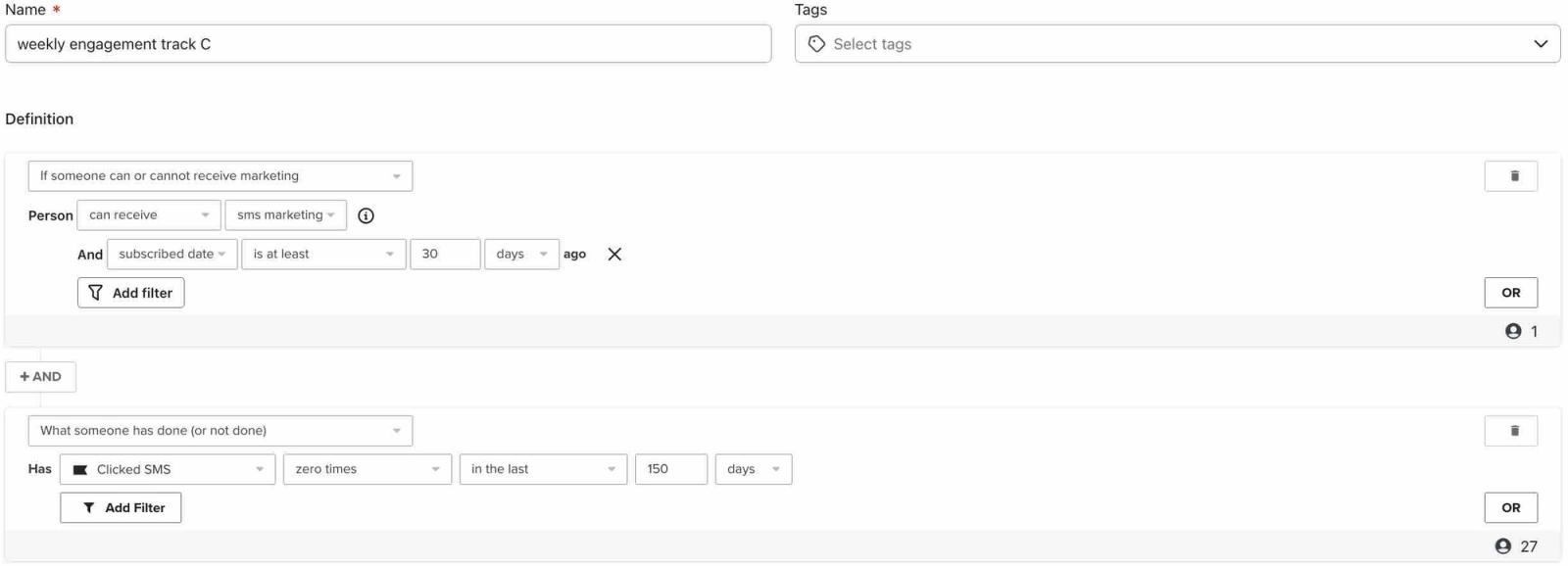
Recommendations:
- While you should exclude these profiles from most of your campaigns, send to them at least 1 time per month to keep the contacts warm. Additionally, consider including them in more important sends like:
- Your biggest sales (e.g., Black Friday/Cyber Monday).
- Large or exciting product launches.
- Use flows to send relevant SMS messages to this group between occasional campaigns.
- You may want to use a segment-triggered flow to add a profile property for people who enter Track C more than once. Set Re-entry criteria to Allow re-entry and save the trigger settings. Use the property in a separate segment so Track C still includes people becoming unengaged for the first time. Learn more about segment-triggered flows.
Adjust the tracks for a different sending schedule
The table below shows how the conditions for Track A may change depending on your sending schedule.
Engagement criteria for track A | Sending schedule | |||
|---|---|---|---|---|
Twice a week | Weekly | Every other week | Monthly | |
Subscribed to SMS in the last | 30 days | 30 days | 60 days | 90 days |
Clicked SMS in the last | 60 days | 90 days | 120 days | 150 days |
If you change Track A’s windows, update Tracks B and C too. Keep new subscribers out of both tracks, and use Track A’s click window for Track B’s zero-click condition. Choose a longer click window for Track B’s at-least-once condition and Track C’s zero-click condition, using the same length for both.
Use your tracks in campaigns
For each SMS campaign, select the appropriate track segments under Send to. To leave a track out of a broader audience, add it under Don't send to. For example, include Track B every other week and Track C only in your occasional sends. Finish setting up and scheduling the campaign; creating the segments does not schedule messages automatically. Learn more about excluding segments from campaigns.
SMS error segment
In addition to following a sending schedule based on SMS engagement, you can create an SMS error segment to capture profiles experiencing delivery errors. Exclude this segment from most campaigns on an ongoing basis to maintain strong deliverability and make better use of your SMS spend.
Additional resources
- Recommended SMS segments reference
Learn how to create segments that will level up your SMS marketing strategy. Segmentation allows you to better understand your audience and send targeted messages in Klaviyo.
- How to clean SMS lists
Learn about list cleaning for SMS, including why list cleaning is important, how to list clean, and when to clean your lists.
- SMS marketing strategies for all levels [+12 Pro tips]