How to use RFM groups for targeted advertising
You will learn
Learn how to improve your customer retention strategy with RFM segmentation by re-engaging customers at risk of churning. By analyzing Recency, Frequency, and Monetary metrics, you can identify customers who may be drifting away from your brand. You can create targeted ad campaigns designed to re-engage these profiles to maintain their interest and loyalty to your brand.
Before you begin
Advanced KDP and Personalization include RFM analysis and are separate from Klaviyo’s standard marketing application. You can access RFM analysis with a paid plan or an active trial for one of these products. Head to our billing guide to learn about how to purchase these plans.
Your account needs enough purchase data to calculate RFM groups before you can use these examples. Check the RFM report requirements if Current RFM group is unavailable.
For the Recent browsers example, set up onsite tracking so Klaviyo can record Active on Site events for identified visitors.
Identify profiles for targeted advertising
RFM segments can be used to identify profiles that are good candidates for targeted advertising. Use these steps to create either example below:
- Navigate to Lists & segments, then select Create > Segment.
- Name your segment in the builder or, if a Create segment panel appears, enter the name there and click Create segment to open the builder.
- Add the conditions from one of the examples below, then click Create segment in the segment builder to save it.
Recent browsers
Create the following segment of profiles in the Needs attention or At risk RFM group that have recently browsed your website.
- Properties about someone > Current RFM group equals Needs attention
OR - Properties about someone > Current RFM group equals At risk
AND - What someone has done (or not done) > Person has Active on Site at least once in the last 90 days
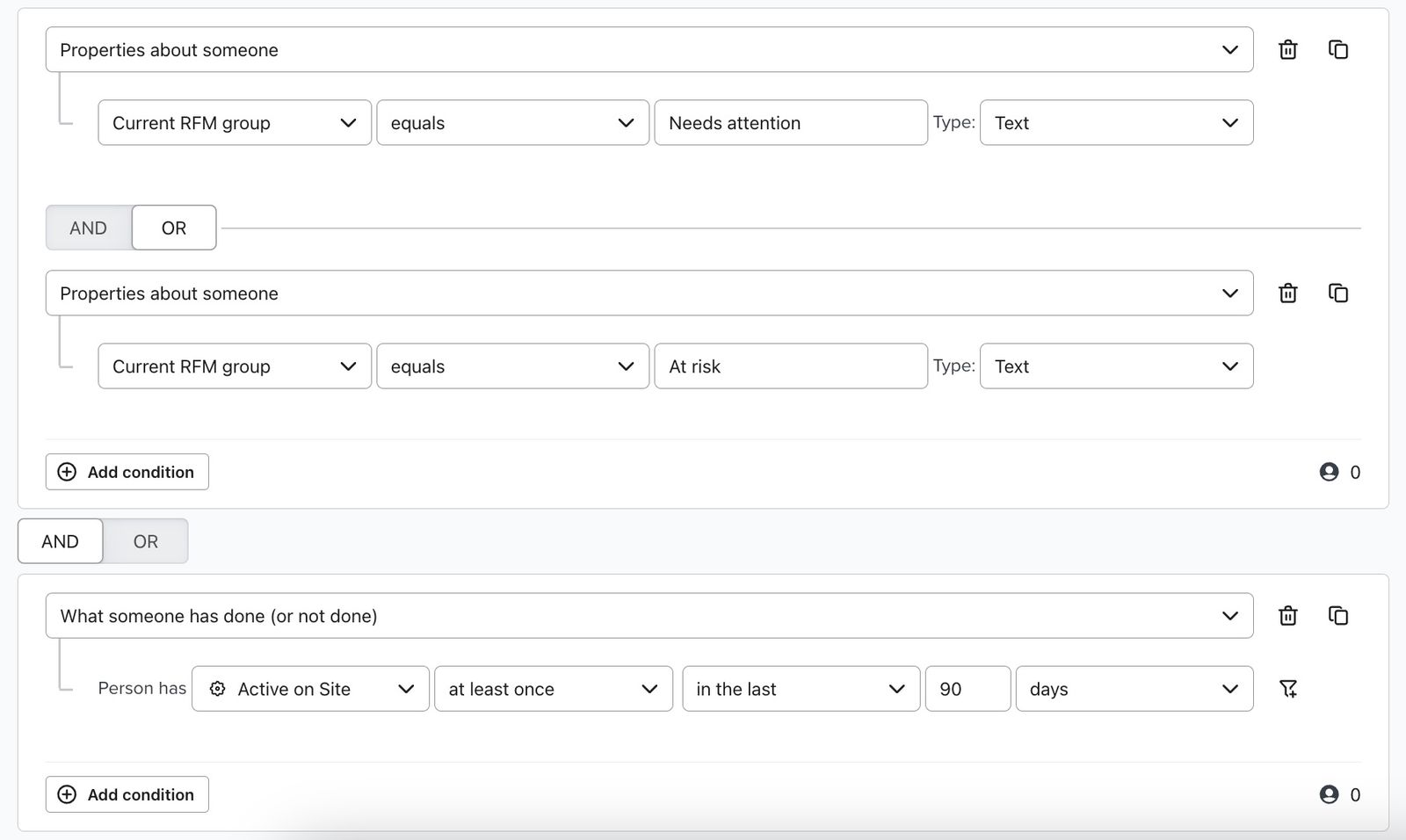
After creating this segment, you can sync the audience to your advertising platform to re-engage customers with targeted advertising before they lapse to the Inactive RFM group.
No recent email opens
Create the following segment of profiles in the Needs attention or At risk RFM group with no recorded email opens in the last 30 days. This does not confirm that they received an email during that period.
- Properties about someone > Current RFM group equals Needs attention
OR - Properties about someone > Current RFM group equals At risk
AND - What someone has done (or not done) > Person has Opened Email 0 times in the last 30 days
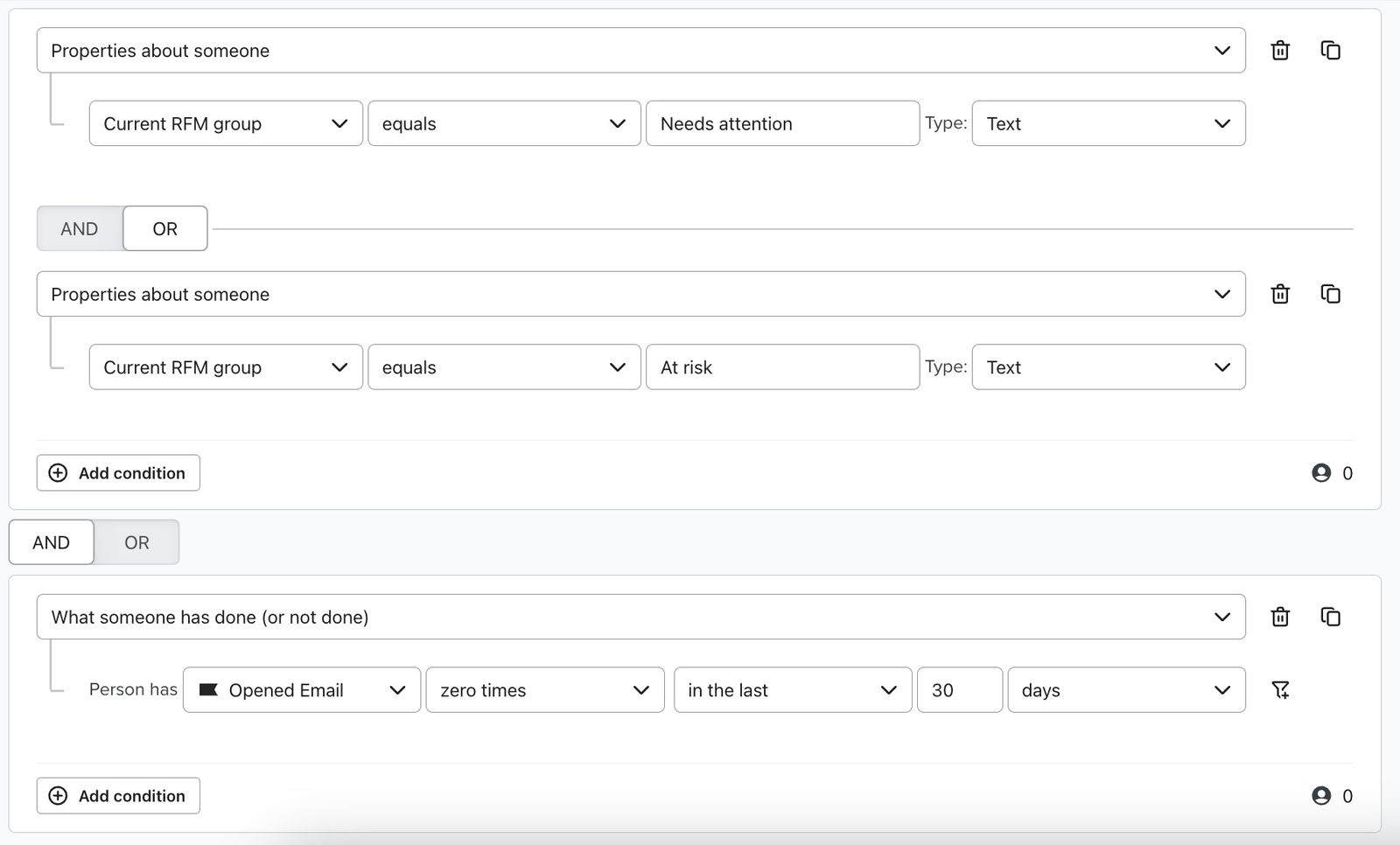
After creating this segment, you can sync the audience to your advertising platform to re-engage with recent offers or updates related to your brand.
Sync a segment to your advertising platform
Before syncing, connect your advertising platform using the guide for Meta Ads, Google Ads, or Pinterest Audiences. Each guide covers setup and audience requirements.
Owners, Admins, and Managers can manage audience syncs.
- In Lists & segments, open the 3-dot menu beside your segment and select Linked integrations.
- Set your advertising platform’s toggle to Active, then select the audience you want to sync with.
- Click Save to save the audience sync settings.
In your advertising platform, use the synced audience to target your ad campaign.
Outcome
You’ll be able to use these audiences in advertising platforms (e.g., Meta or Google Ads) to re-engage customers and nurture your relationship with them.
Additional resources
- Getting started with Meta Ads
Learn how to integrate Meta Ads with Klaviyo. The advertising integration with Meta provides two main features:
- Getting started with Google Ads
Learn how to integrate Google Ads with Klaviyo. This integration allows you to automatically:
- Getting started with Pinterest Audiences
Learn how to integrate Pinterest Audiences with Klaviyo. This integration allows you to automatically: