Understanding attribution model types
You will learn
Learn about how Klaviyo’s different attribution models work, including how to enable linear attribution on your account and how attribution is calculated.
Before you begin
Advanced KDP and Personalization are not included in Klaviyo’s standard marketing application, and a subscription is required to access the associated functionality. Head to our billing guide to learn about how to purchase these plans.
By default, Klaviyo uses a co-operative last-touch attribution model. Advanced KDP and Personalization customers can choose between last-touch and linear attribution.
You need permission to edit attribution settings. You can save up to 3 changes to attribution settings in 30 days.
How to update your attribution model
To update your attribution model:
- Open the account menu, then select Settings > Attribution.
- In the Attribution model card, select Last touch or Linear from the dropdown menu.
- Click Save.
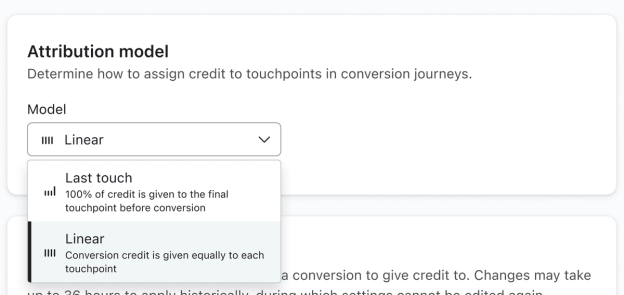
Once saved, the change applies to historical and future attribution data. It can take up to 36 hours for reports in your account to update. You cannot edit attribution settings again until that update is complete.
Last-touch attribution model
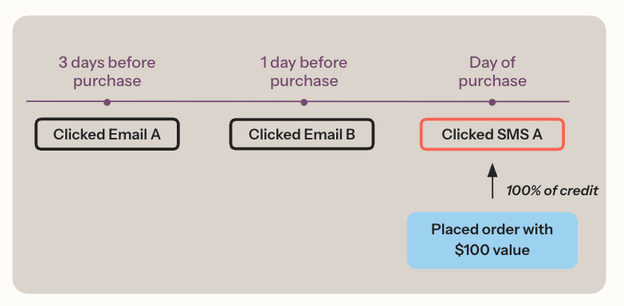
A last-touch attribution model gives credit to the final qualifying touchpoint before a conversion. It helps you understand which touchpoints most often precede conversions.
Last-touch model example
In the last-touch model below, a customer places an order with a $100 value after interacting with 2 emails and an SMS. Assuming all 3 messages qualify for attribution, the SMS message receives all the credit (i.e., $100 of attributed value) because it was their final touchpoint before the conversion, even though the emails may have played a role in the recipient’s decision to purchase.
Linear attribution models
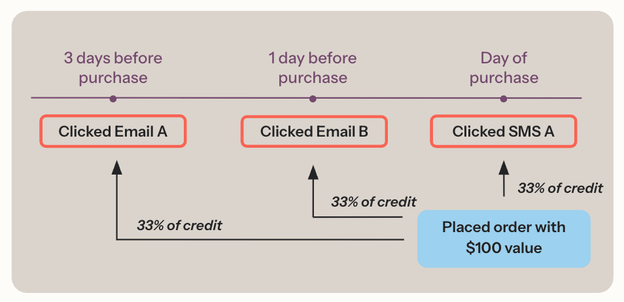
A linear attribution model gives an equal share of attributed revenue to each qualifying touchpoint leading to a conversion. Meanwhile, a Last touch model applies all the revenue credit to the final qualifying touchpoint before a conversion. In reporting, conversion counts and unique converters still use last-touch attribution even when you select Linear.
Linear attribution provides a view of the qualifying touchpoints leading up to a conversion. It assigns equal credit to those touchpoints. It does not measure their individual influence on the purchase.
Customers often have multiple touchpoints before a conversion, and more than 1 may influence their decision to purchase. An attribution model that accounts for these touchpoints can help you understand interactions at different stages in the conversion cycle and focus your marketing on the journey leading up to a conversion.
For a message touchpoint to be considered in the linear attribution model:
- The interaction type must be enabled in your attribution settings, and the interaction must not be excluded by those settings.
- The message must be received within the configured lookback window for a channel.
- The interaction event must occur for that message within the configured lookback window.
Learn how to configure your attribution settings.
Linear model example
In the linear model below, a customer places an order with a $100 value after interacting with 2 emails and an SMS. Assuming these are the only 3 qualifying touchpoints, each receives a third of the revenue credit (i.e., about $33 of attributed value).
Additional resources
- Understanding Klaviyo message attribution
Learn about Klaviyo's event and message attribution or the ability to review which of your messages or channels led to customer actions.
- How to change your attribution model
Learn how to adjust your attribution lookback window settings, remove bot clicks and Apple Privacy opens from attribution, and preview attribution model changes.