リピート購入者セグメントを作成する方法
推定 1 分で読めます
|
更新日 2025年7月7日 0:00 EST
このページで学べること
リピート購入者セグメントを作成する方法を確認します。これにより、アカウント内で初回購入後にブランドから再度購入した顧客を把握できます。これにより、お客様の購買行動に関するインサイトを得て、それに応じてターゲット設定できます。
リピート購入者セグメントを作成する
開始する前に、ストアの注文データがKlaviyoに同期されていることをご確認ください。セグメントを作成する際には、その外部連携の注文の確定メトリックを使用してください。
- [オーディエンス] > [リスト & セグメント] に移動します。
- [作成] をクリックします。
- [セグメント] を選択します。
- セグメントに名前を付けてください。セグメントを作成パネルが表示されたら、そこで名前を入力し、セグメントを作成をクリックしてビルダーを開きます。それ以外の場合は、ビルダーの上部で名前を編集します。
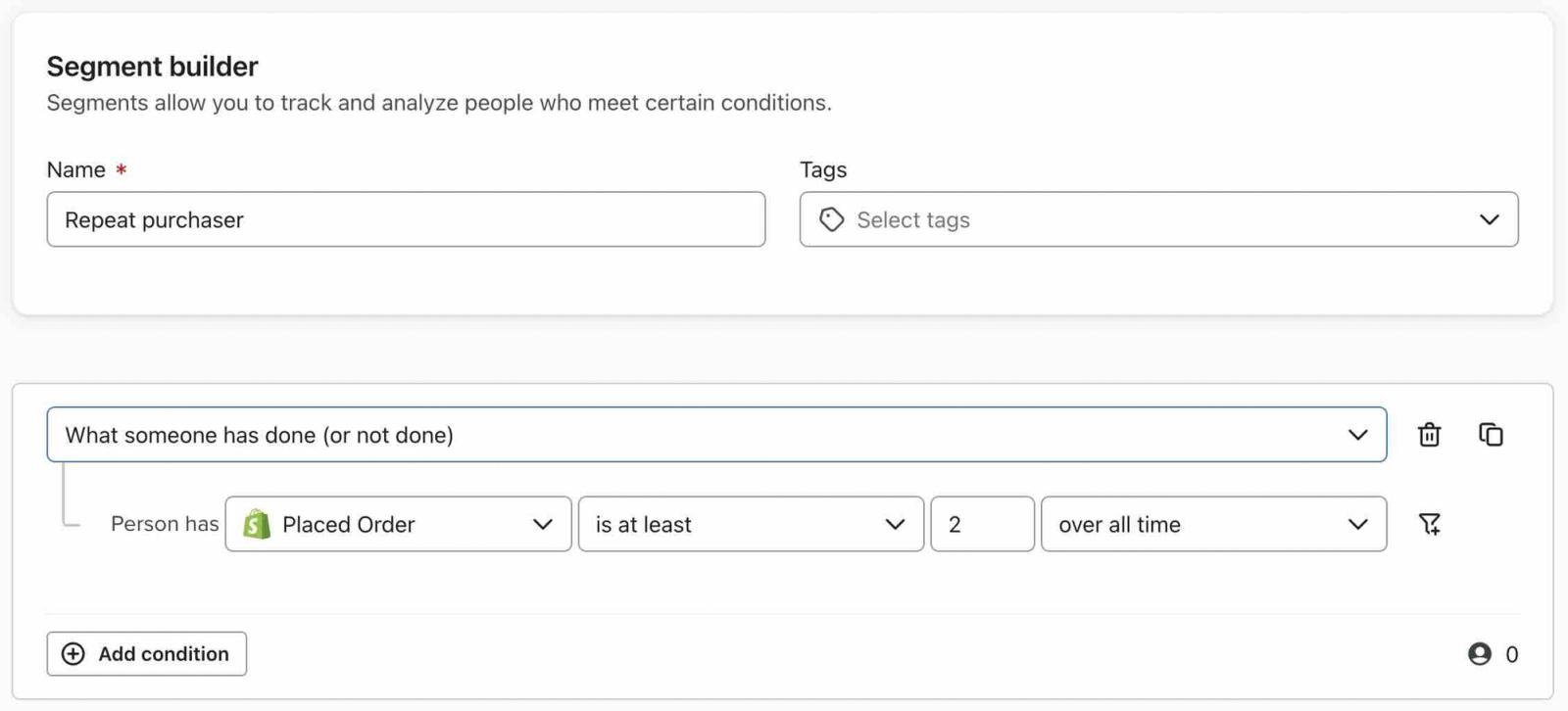
- 次の定義でセグメントを作成します。
顧客行動履歴(実行・未実行)> 注文の確定が > 全期間に > 少なくとも 2 - 定義(以下の任意のターゲティング条件を含む)を確認し、セグメントを作成をクリックしてセグメントを保存してください。
Klaviyo を使い始めたばかりで、セグメンテーションのヒントが必要ですか?セグメントのスタートガイドをご覧ください。
追加のターゲティングのオプション
- このセグメントをより限定的にする
VIP 顧客セグメントを作成する場合、またはこのセグメントをより限定的にしたい場合は、対象にとなるのに必要な購入回数を調整します。たとえば、「注文の確定が全期間に少なくとも 4」という条件で調整できます。 - 特定の期間内の顧客をターゲティング
期間を調整することもできます。たとえば、購入アクティビティを全期間に設定する代わりに、過去X時間、X日、またはX週間に一定回数購入した顧客を絞り込めます。 - 特定の商品を繰り返し購入した人のみを含める
特定の商品を繰り返し購入した人、または特定のカテゴリから繰り返し購入した人を絞り込むために、フィルターを追加できます。注文の確定条件の横にあるフィルターアイコンをクリックし、外部連携で提供されているプロパティと値を選択してください。たとえばShopifyでは、Items containsを使用し、商品名を選択してください。 - 他の条件を追加して、よりターゲットを絞り込みましょう
特定のリストにも含まれるリピート購入者のセグメントを作成するには、条件を追加をクリックし、ANDで購入条件に結合します。登録リストを選択し、isを選んで、リストを選択します。顧客プロパティまたは行動に基づく条件を追加して、このセグメントをさらにターゲット設定できます。
その他のリソース
- より高度なセグメンテーションに関するレファレンス
顧客ベースに関するインサイトを提供し、パーソナライズされた購読体験を作成できる、効果的かつ高度なセグメンテーション戦略をご紹介します。
- クロスセル セグメントの作成方法
クロスセルメッセージの対象者を厳選するために、特定の商品を購入したものの、関連商品の購入には至っていない顧客グループの作成方法をご紹介します。たとえば、ビデオゲーム機を購入した顧客がいる場合、その顧客を対象に、まだ購入していない人気のビデオゲームに関するコンテンツを配信することが可能です。
- 最近カート放棄したユーザーのセグメントを作成してターゲット設定する方法
最近カゴ落ちしたサイト訪問者を特定し、マーケティング チャネル全体でターゲットにする方法を学びましょう。例えば、最近カゴ落ちしたユーザーのセグメントを作成し、Facebook カスタムオーディエンスに同期してサイトへの再訪を促したり、ウェブサイトから離脱しようとしている買い物客をターゲティングする離脱意図ポップアップを作成したりできます。カゴ落ちメールのように、カートに残された具体的な商品を動的に表示することはできませんが、使用する文言と CTA によって、置き去りにされた商品を思い出してもらうことは可能です。
この記事は役に立ちましたか?
この記事へのフィードバックは、上記のボタン・記入欄よりご提供ください。 サポートへの連絡方法.