サードパーティの商品レビュー フローを作成する方法
このページで学べること
フロー メッセージを使用して、最近の購入に関するフィードバックをお客様に依頼する方法をご確認ください。これは、ソーシャル プルーフを構築し、ブランドに対するお客様のエンゲージメントを高めるための優れた方法です。
商品レビューのメールを送信するには、Klaviyo の組み込みの商品レビュー/クロスセル フローを出発点として使用するか、ゼロから独自に構築できます。
Klaviyo レビューをご利用の場合は、Klaviyo レビュー フローを使用してレビューをリクエストする方法をご覧ください。
Klaviyo はメール内の商品レビューをサポートしていないため、お客様は受信した商品レビューのメール内で直接レビューを投稿できません。
サードパーティーと Klaviyo レビューの比較
どのレビュー プラットフォームをご利用の場合でも、Klaviyo を使用してレビュー依頼を送信できます。このリソースでは、サードパーティのレビュー プラットフォームに関する手順を提供します。
Klaviyo レビューと他のツールの大きな違いは、レビュー依頼のタイミングです。他のレビューツールでは、注文が発送されたときにフローをトリガーし、その後、荷物が到着するまでの時間を確保するために待機を追加する必要があります。Klaviyo では、荷物が配達されたタイミングに基づいてレビュー依頼を送信できるため、配達が遅れている顧客にレビュー依頼を送ってしまう心配がありません。
Klaviyo でサードパーティのレビュー フローを構築する
サードパーティのレビューアプリを使用して Klaviyo でレビューフローを作成するには、次の手順を実行します:
- Klaviyo で、[フロー] タブに移動します。
- [フローを作成] をクリックします。
- フローライブラリで 商品レビュー / クロスセル テンプレートを検索します。
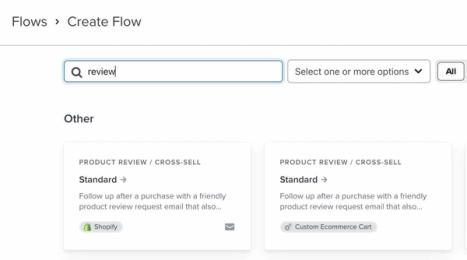
- トリガー メトリックとして [注文のフルフィルメント] を選択します。
- なるべく、荷物が到着した後にレビュー依頼が送信されるよう、平均配達時間よりも長い待機時間(例:14 日)を使用してください。
- フローに問題がなければ、ライブに設定します。
顧客をページ上のレビュー エリアにリンクします。
Klaviyo のテンプレートレビュー フローでは、アンカーリンクを使用します。その結果、メール内のリンクがクリックされると、ウェブページ上のレビューを送信できる特定の場所に直接移動するため、下にスクロールして探す必要がありません。
テンプレートフローでは #reviews アンカーを使用していますが、これは調整できます。以下の手順は、使用しているEコマースの外部連携によって若干異なる場合があることに注意してください。
サイトの商品ページのコードのテンプレート エディタを開きます。コード内で商品レビューが表示される箇所までスクロールします。ここに、次のコードを貼り付けます:
<a id="reviews"></a>
これは識別子として機能するため、誰かが #reviews アンカーのある商品ページへのリンクをクリックすると、正しい位置に到達します。
サードパーティのレビュー アプリ
Klaviyo は、Judge.me や REVIEWS.io など、複数のプロダクトレビューアプリと連携しています。これらのアプリのいずれかをKlaviyoに連携させたい場合は、詳細についてリンク先のページをご確認ください。
その他のリソース
- アップセリングまたはクロスセルフローを作成する方法
購入後に、類似または関連する商品をクロスセルまたはアップセリングするために、お客様にフォローアップできるフローの作成方法をご覧ください。Klaviyo には、組み込みの商品レビュー/クロスセル フローに加えて、新規顧客およびリピート顧客向けのサンキューフローが用意されており、これらをアップセリングまたはクロスセル フローとして再利用できます。
- 補充フローの作成方法
一定の期間内にお客様が繰り返し購入する商品を販売している場合に、ライフサイクルのさまざまな段階にいる顧客を育成できる補充フローの作成方法を学びましょう。既存の購入データを確認することで、お客様と商品の確立された購入サイクルを特定し、補充フローを設定して購入者を対象に、親しみやすく適切なタイミングのリマインダーを送信できます。
- サンセットフローの作成方法
ブランドに対するエンゲージメントがなくなった顧客を段階的に除外するように設計されたサンセットフローの設定方法をご確認ください。このフローは、ビジネスをウィンバックするための最後の手段として使用し、その後、反応がないユーザーは削除するか送信抑制できます。また、この推奨されるサンセット セグメント定義が、セグメント ライブラリ内の事前構築済みサンセット(メール)セグメントにどのように接続されているかも確認できます。これにより、リストをクリーンに保ち、非アクティブな顧客が Klaviyo の請求プランに影響するのを防げます。
- レビューリクエストの送信タイミングを調整する方法
最近のお客様にレビュー依頼を送信するタイミングをカスタマイズする方法をご確認ください。この設定は Shopify を使用している場合にのみ調整できます。WooCommerce を使用している場合、レビュー依頼のタイミングはフルフィルメント日に基づくものに限られます。