Understanding toll-free number rejection
You will learn
Learn why a toll-free number might have been rejected for verification, and what you may be able to do if this happens.
About toll-free number rejection
Klaviyo uses a wireless carrier partner to verify toll-free numbers. This service will either approve the number or reject it.
If the number is rejected, you will not be able to send SMS or MMS from that number. Wireless carriers will not deliver messages for a rejected toll-free number.
A toll-free verification request can be rejected for reasons such as:
- Unable to verify business (i.e., the site is not live/able to be viewed)
- Content requires age-gating or is always prohibited
- Missing or invalid opt-in information, privacy policy, or mobile terms of service.
To check your rejection reason, go to Settings > Text message > Sender information and select Resolve next to the rejected number.
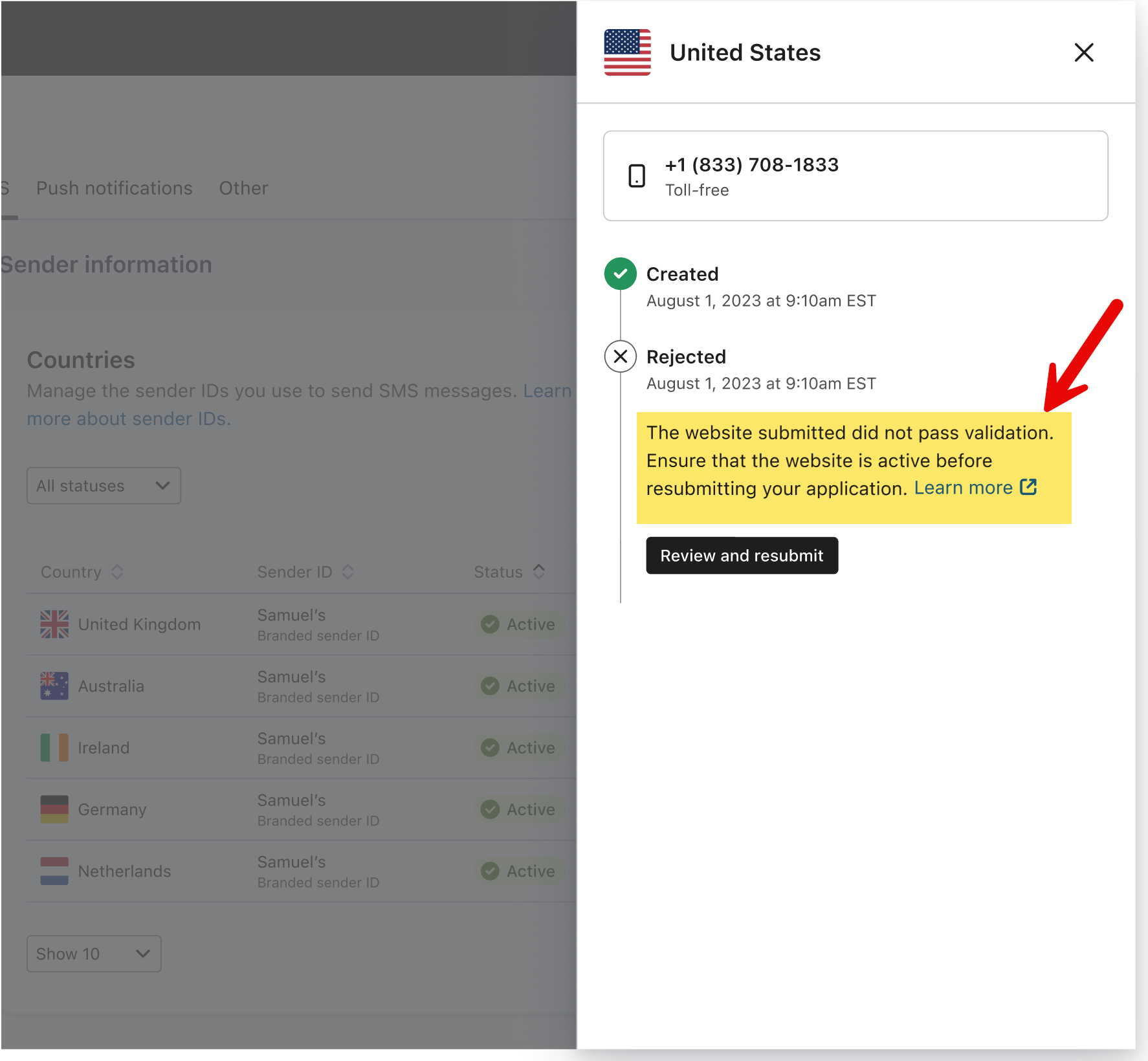
Unable to verify business
The main reasons for this rejection are that your:
- Website is not live or is password protected at the time of the verification review.
- Business country does not match the country of the business registration.
- Business address is not valid or entered incorrectly.
- Business phone number isn't a valid phone number or isn't directed to your business.
- Business email address goes to an alias and not a specific person at the business (e.g., marketing@abc.com is not allowed, but john.smith@abc.com is).
- Dedicated business email domain does not align with the brand's website. Free personal emails like @gmail and @yahoo are not accepted by carriers. Agency or other third-party email addresses that do not align with the brand's website will be rejected.
Why will I be rejected if my website isn't live?
The verification process checks that your business is active and legitimate and meets the content requirements for toll-free SMS. If your website isn’t live yet, there’s no way to perform these checks. Thus, the toll-free number will be rejected for verification.
Content is prohibited or requires age-gating
Certain use cases are either not allowed on SMS or require the proper age-gating processes.
If your industry is completely prohibited, we recommend that you try other marketing channels, such as email, ads, etc. Unfortunately, your messages will not be delivered, and you won’t benefit from favorable returns on your SMS marketing efforts. This is true for Klaviyo, as well as other SMS providers.
If you are an alcohol brand, you can use a toll-free number for SMS in the US with age-gating. Age-gated SMS is not supported on toll-free numbers in Canada.
Firearms and tobacco brands must use a short code to send age-gated SMS in the US. Toll-free numbers are not supported for these use cases.
Refer to the requirements in our age-gating guide to check eligibility by industry, country, and sending number.
What to do if your verification request is rejected
To resubmit, you need permission to manage sending numbers. If Register again is disabled, ask a user with that permission to submit the request.
If your verification request is rejected, follow these steps:
- Go to Settings > Text message > Sender information and select Resolve next to the rejected number. Review the rejection reason.
- Check whether your content is allowed for toll-free SMS and whether it requires age-gating (discussed above).
- If your content is prohibited even with age-gating, you will not be able to use SMS with Klaviyo.
- If your industry requires a different sending number, use that number type instead of resubmitting your toll-free request.
- For alcohol-related content in the US, make sure your website and SMS opt-in process have the required age gates before resubmitting.
- Review your website by checking that:
- It's published.
- It can be reviewed without a password or login.
- Check that your legal business name, address, country, phone number, email address, and any business registration details you provided are correct.
- If needed, use the email address of a specific person at your business, with a domain that matches your business website.
- Correct any opt-in, privacy policy, or mobile terms of service issues identified in the rejection reason. Make sure the links provided for review are publicly accessible.
- Select Register again to open the form. Enter your corrected company contact details and select Next.
- Review and correct your business details, complete any remaining fields, then select Submit request.
Klaviyo confirms that your request has been submitted. Wait until your number is verified before sending SMS or MMS.
If you cannot resolve the rejection, contact Klaviyo Support.
Additional resources
- Understanding toll-free number verification
Learn about toll-free number verification, including what it means to be verified and how this works in Klaviyo.
- Understanding content age-gating for SMS
Learn about age-gating content and why it’s important for SMS marketing. Here, we provide an overview of age-gating for SMS, including what is required and which industries require it.
- Understanding SMS and MMS prohibited content
Learn about which content is not allowed for SMS marketing.