Understanding text message quiet hours in flows
Learn about Klaviyo quiet hours for Text messaging flows.
For US and Canadian recipients, flow quiet hours use the phone number’s area code unless a usable profile time zone is available and profile-based location is enabled for the account. This helps prevent text messages from sending during quiet hours. When using the area-code option, you can also enable state-level quiet hours in the US.
For recipients outside the US and Canada, flows use the country’s default time zone unless a usable profile time zone is available and profile-based location is enabled for the account. Examples of country defaults include Australian Eastern Time in Australia and the UK and Ireland’s respective local time zones.
Important: Selecting Profile location does not guarantee that every flow recipient’s profile time zone will be used. Where profile-based location is available for flows, a usable profile time zone takes precedence; otherwise, Klaviyo uses the phone number’s area code for US and Canadian recipients and the country default for other recipients. Selecting Eastern time zone uses the country default instead of a profile or area-code time zone.
Quiet hours allow you to avoid sending your text messages during non-preferred hours of the day to your subscribers. This way, you can send text messages during reasonable hours of the day (not when they are sleeping or at other inconvenient times).
This also allows you to more easily comply with telemarketing laws and regulations.
Understanding the importance of Text Messaging quiet hours
Since text messages are typically viewed as more intrusive, it’s important to send them at legally compliant times.
Some countries (such as the US and UK) limit the hours when you can send text messages
In general, send in your recipient’s local time and avoid sending:
- Before 8 a.m.
- After 9 p.m.
Some states have stricter rules that may prohibit sending before 9 a.m. or after 8 p.m. Klaviyo’s state-level quiet hours setting helps you automatically comply with these requirements.
Country | Quiet hours |
*United States Canada United Kingdom Ireland Germany Netherlands Australia New Zealand | Before 8 a.m. After 9 p.m. |
**France | Before 8 a.m. After 10 p.m. All Sundays Public holidays |
* For the US, most of the country is covered by the TCPA, which allows sending from 8 a.m. to 9 p.m. However, several states (such as Florida) have enacted mini-TCPAs for their state and limit sending to between 8 a.m. and 8 p.m.
** Quiet hours in France are enforced by wireless carriers. This means that you may legally be allowed to send Sundays, but your messages won’t be delivered. The carriers may also decide to filter your other messages if you continue to send outside of the quiet hours.
When you’re planning to send a text message, consider the experience of the recipient. For example, sending a confirmation message immediately after a customer makes a purchase, or replying instantly to a text inquiry provides a great customer experience.
Examples of messages to avoid sending during quiet hours
You should not send any non-transactional flow messages during these “non-business” or quiet hours. Examples of these types of non-transactional messages include:
- Back in stock notifications.
- *Welcome series messages.
- *An exception is the first message, which is considered a subscription confirmation unless it contains marketing content.
- Messages that include marketing content, like an order confirmation with pictures of promotions or links to other products.
We recommend that quiet hours also be used on all non-essential flows, including non-essential transactional flows (like order and shipping updates), which customers wouldn’t expect to get at odd hours.
Quiet hours in Klaviyo
Klaviyo won't deliver messages during quiet hours for French recipients, including campaign messages. The only exception is the first message of a text message welcome series and Shopify post-purchase flows.
Depending on your location, there are 2 options for quiet hours in Klaviyo:
- Use Profile location (default). For flows, a usable profile time zone can take precedence where profile-based location is available for the account. Otherwise, quiet hours use the phone number’s area code for US and Canadian recipients and the country default for recipients elsewhere. With the area-code option, you can also enable state-level quiet hours in the US.
- Use eastern timezone
This bases quiet hours for a country on its eastern time zone (for example, Eastern Time in the US and Canada, Australian Eastern Time in Australia, Greenwich Mean Time in the UK and Ireland). Brands often use this option with extended hours (like 8 p.m.–11 a.m.) for the most conservative compliance approach.
Note: If you use the Eastern time zone setting, Klaviyo adjusts for Texas’s rules by limiting text flow messages to 11 a.m.–8 p.m. ET Monday–Saturday and 2 p.m.–8 p.m. ET on Sundays. This corresponds to Texas’s sending hours of 9 a.m.–9 p.m. Monday–Saturday and 12 p.m.–9 p.m. Sunday, with a conservative buffer applied for compliance.
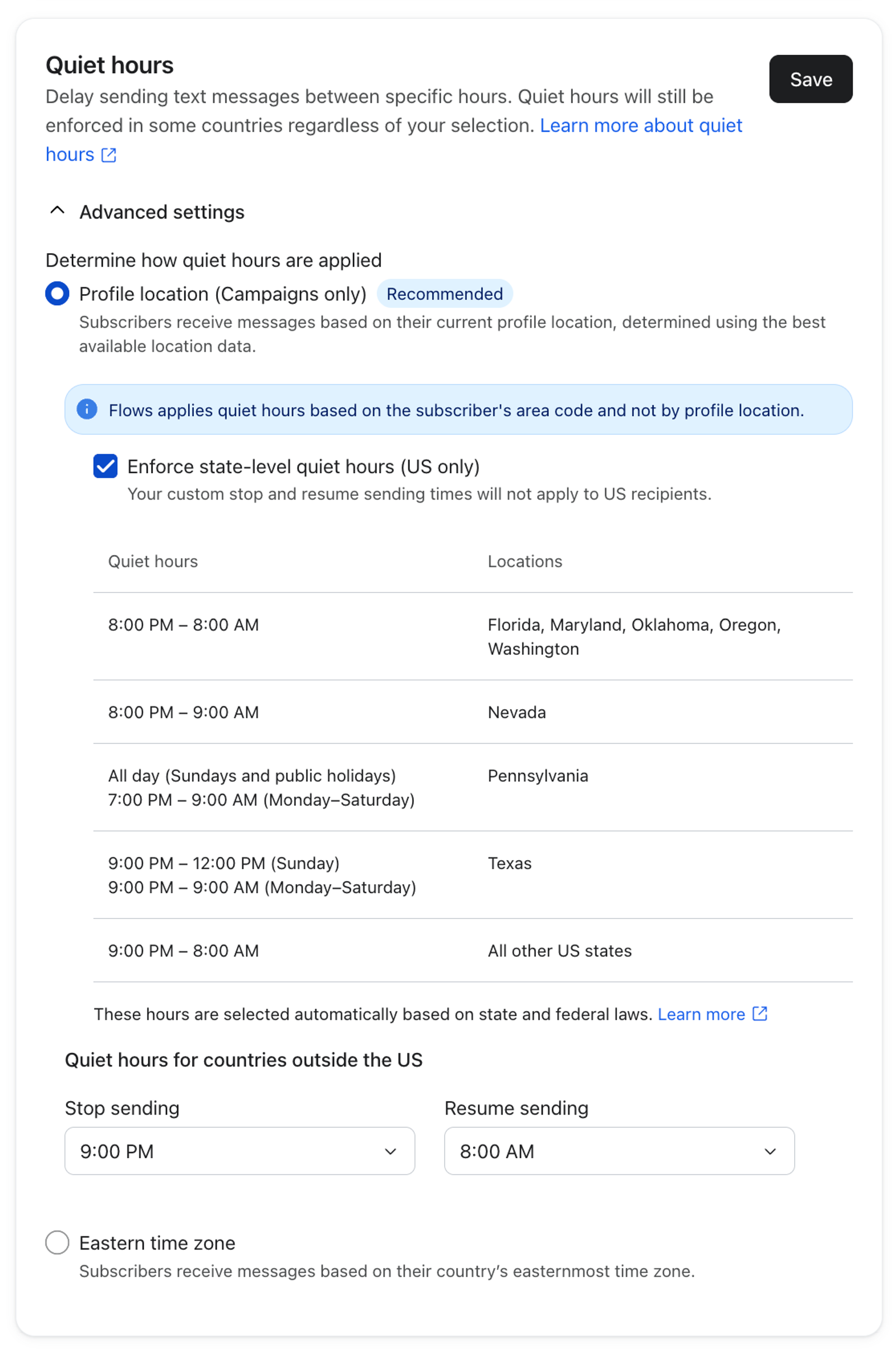
In Pennsylvania, quiet hours apply all day on Sundays and public holidays. Pennsylvania follows these public holidays:
- New Year’s Day
- Martin Luther King Jr. Day
- Presidents’ Day
- Good Friday
- Memorial Day
- Flag Day
- Juneteenth
- Independence Day
- Labor Day
- Columbus Day
- Election Day
- Veterans Day
- Thanksgiving Day
- Christmas Day
If you send to recipients in Alaska or Hawaii, either use quiet hours by area code or adjust the hours so that you aren’t sending between 8 p.m. and 2 p.m. ET.
Should I use phone number area code or eastern time zone?
- Profile location
For flows, a usable profile time zone can be used where profile-based location is available for the account; otherwise, US and Canadian recipients use the phone number’s area code. Choose this option if you want to enable optional state-level quiet hours in the US. - Eastern time zone.
The most conservative option. It uses the eastern time zone in each country (e.g., Eastern Time in the US and Canada). This minimizes risk if subscribers are traveling or if their area code doesn’t reflect their current location, but reduces available sending hours (often 8 p.m.–11 a.m.). The 8 p.m.–11 a.m. ET quiet hours window lines up as 5 p.m.-8 a.m. PT, thus providing the broadest coverage to comply with US laws.
What happens if I use area codes and have subscribers outside the US and Canada?
Phone number area codes are used for flow recipients in the US and Canada when a usable profile time zone is not available or profile-based location is not enabled for the account.
For recipients outside the US and Canada, flows use a usable profile time zone where profile-based location is available for the account; otherwise, they use the country’s default time zone.
Transactional messages
By default, messages marked as transactional do not have quiet hours enabled. If you want to use quiet hours, you can enable this setting for any transactional message.
For France, quiet hours do not apply to transactional messages or the first message in an SMS welcome flow; however, this only applies if your flow uses the Subscribed to Text Messaging Marketing metric as a trigger.
Keyword auto-replies
Quiet hours do not apply to messages that involve Klaviyo default keyword auto-replies (e.g., the message that is sent automatically when someone texts Yes, Stop, Help, etc.).
For any custom subscribe keyword, quiet hours do apply.
Smart Sending
Quiet hours differ from Smart Sending, but your quiet hours settings might affect Smart Sending.
Both quiet hours and Smart Sending are checked at send time, not the time you scheduled the message. However, quiet hours are checked before Smart Sending.
For example, say someone just received a text message. Then, they get triggered for another SMS during quiet hours. In this case, Klaviyo:
- Checks that the message falls during quiet hours.
- Delays the message until quiet hours are over.
- Once quiet hours are over, checks the Smart Sending window.
- If enough time has passed (i.e., the message falls outside the Smart Sending window), Klaviyo sends the message.
- If not enough time has passed, Klaviyo skips the message.
Daylight savings hours changes
Daylight savings time (DST) applies for each respective region and country as it occurs.
For example, if you are sending to recipients in the US, starting the second Sunday in March at 2 a.m., Klaviyo automatically switches to EDT, and starting the first Sunday of November will switch to using EST. Thus, Klaviyo will match the correct local time in accordance with daylight savings time.
You can see these changes in your text message settings as they update.
Enable or disable quiet hours for a flow message
To turn off quiet hours for a particular text message, follow these steps. Mandatory quiet hours in some countries, including France, still apply even when you turn off this setting:
- Click on the text message in the flow.
- In the details panel, scroll down to the Settings section.
- Click the checkbox next to Enable text message quiet hours.
- Click Save at the bottom of the details panel.
- You can always change your global Text Message quiet hours settings by clicking Text message settings.
Quiet hours are checked at message send time. For example, say you have quiet hours enabled so messages can only send between 11 a.m. and 8 p.m. If at 7:05 p.m., you change the quiet hours to start at 7 p.m., any messages that were about to go out will now wait until 11 a.m. the next morning.
What happens when a recipient cannot be sent to yet
When quiet hours is enabled and the flow is live, any message scheduled to go out during quiet hours will wait to send.
Recipients go into the Waiting queue and their message will wait to send until the next available sending time. While in this queue, recipients pause their journey in the flow (i.e., they don’t move past the text to any following splits, time delays, emails, etc.).
Once quiet hours are over, the flow sends the text message to the recipient, removes them from the Waiting queue, and allows them to continue in the flow.
The quiet hours setting is checked at message send time. If flow filters are being used, those will be checked and applied once the text message has been sent. More information on flow behaviors can be found in our guide on understanding how contacts move through a flow.
View recipients waiting due to quiet hours
In the left-hand sidebar for a flow message, you will see an Analytics (Last 30 Days) section. The line for Waiting activity will display how many recipients are waiting to receive this message.
If you click on this line, it will take you to the message’s Recipient Activity tab with the Waiting section automatically open. This section will show the number of people waiting to receive the message during their preferable hours that do not fall during quiet hours.
If you try to force a recipient through the Waiting queue by clicking Send Now or back-populating, quiet hours will still apply.
Additional resources
- How to change your quiet hour settings for SMS flows
Learn how to change your quiet hour settings in Klaviyo, including:
- Basics: SMS compliance
Get an overview of 7 important aspects of SMS compliance.
- Understanding Smart Sending in Klaviyo
Learn about Smart Sending, which allows you to limit the number of emails, SMS messages, or push notifications someone can receive within a set period of time.
- SMS marketing strategies for all levels [+12 Pro tips]