How to export campaign analytics
You will learn
Learn how to export a campaign's analytics. Exporting the analytics for your campaigns helps you review and measure the performance of your campaigns across email, SMS, push notifications, and WhatsApp.
Export campaign analytics
If your menu shows both Export analytics and Export analytics (legacy), select Export analytics to follow the steps below. The legacy export uses the previous single-channel CSV format.
- Navigate to the Campaigns tab.
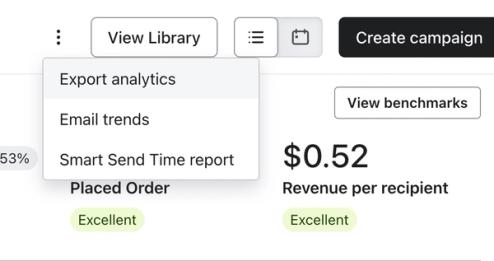
- Click the 3-dot Options menu next to View library.
- Select Export analytics.
- Complete the fields in the export modal:
- Select time range: Choose a preset time range or set a custom date range.
- Select tags: Optionally filter by campaign message tags.
- Select Channel(s): Choose one or more channels to include (Email, SMS, Push notification, WhatsApp). Only channels enabled on your account will appear.
- Include all A/B test message variations: Toggle on to include individual variation rows in the export.
- Click Export. The file will download automatically when it is ready.
Access past exports
To view and re-download exports from the last 30 days:
- Click your company name in the bottom-left corner of Klaviyo.
- Click Settings.
- Click Other.
- Click Downloads.
- Find the export, then click Download. If it shows Processing, wait for it to finish.
Information in the exported CSV
The resulting CSV file will contain the following columns (in order):
- Campaign ID
- Campaign message ID
- Campaign name
- Campaign message name
- Tag names
- Audiences list
- Message send date time
- Message send day of week
- Subject line
- Send channel
- Total recipients
- Count of unique conversions
- Rate of unique conversions
- Conversion value
- Revenue per recipient
- Average order value
- Unique opens
- Open rate
- Total opens
- Unique clicks
- Click rate
- Total clicks
- Unique unsubscribes
- Unsubscribe rate
- Total spam complaints
- Spam complaint rate
- Total deliveries
- Total bounced
- Bounce rate
For SMS campaigns, the columns relating to opens will always be 0, as SMS opens are not tracked in Klaviyo. The Subject line column will show a clip of the actual text message.
A/B testing analytics
For exports that include A/B test variations, you will see multiple rows for the same campaign. Each row contains data for a different variation.
For example, if you had a campaign that tested 2 variations, you will see 3 rows for this message:
- The first variation sent to the test group.
- The second variation sent to the test group.
- The winning variation sent to the rest of the recipients.
You can tell the difference between variations sent to the test group and the winning variation based on the send time.
For tests that used the option to personalize variations, you may see more rows since there is not a single winning variation for this option.
Additional resources
- Understanding available campaign analytics
Learn how to use Klaviyo's campaign reporting to gather insights on how your messages are performing and what happens after someone opens or clicks. Use these campaign analytics to dig deeper into website activity, checkouts started, and revenue that is directly attributabed to each message.
- How to export flow analytics
Learn how to export a CSV file of analytics for all or a specific set of flows. Exporting the analytics for a certain flow allows you to easily measure and review how successful a flow is. Further, you can analyze the data on a message by message basis, examining how each SMS or email is performing. In this article, we run through how to export a flow's analytics.