Understanding how date-based flows schedule recipients
You will learn
Learn how profiles enter date-based flows and what happens when a date is added or changed. For instance, what happens if someone is about to enter the flow, but the date is suddenly changed or deleted altogether? This article runs through what happens for date property-triggered flows when dates are added, updated, or deleted from a profile.
How profiles qualify for date-based flows
Klaviyo checks whether profiles qualify for a date-based flow daily, a full day in advance, and when a date is added or updated on a profile. A profile can enter when the applicable date falls within the flow’s timeline. For a flow that does not repeat, the day, month, and year must match; a future date such as 12/1/2030 will not cause the profile to enter before its scheduled time. For a flow that repeats monthly or yearly, Klaviyo uses the next applicable occurrence of the date. In a yearly flow, the year stored in the property does not prevent an earlier occurrence from qualifying, as explained below.
Date-based flows will only schedule recipients for messages that are set to Live or Manual status.
Because the flow checks a full day in advance, this means that once the flow is set to live or manual, it will only schedule recipients whose date property is a full day after its status changed.
For example, if you change a birthday flow from draft to live on March 1st:
- Someone whose birthday is on March 1st won't enter the flow.
- Someone whose birthday is on March 2nd might not enter the flow depending on what time it was set live.
- Someone whose birthday is on March 3rd or later will enter the flow.
The above applies to profiles with an existing and unchanged date property. If a date property is modified or added to a profile the same day it goes live, they will still enter the flow since the property change causes them to be checked. However, they may not receive the first email if they entered the flow after the email was scheduled to send.
Date properties with time
Sometimes date properties have a timestamp. For example: 2025-04-30 17:08:06. For the purposes of flow triggering, the attached time is ignored.
When Klaviyo triggers a flow, only the date that the profile should enter the flow is considered. After the date a profile should enter is known, any "start time restrictions" configured in the trigger settings are applied (start at 9 a.m., etc).
Timezones
Date flows are always triggered from the point of view of the profile. This means that Klaviyo determines the date a profile should enter a flow based on its timezone. If the profile does not have a timezone assigned to it, the account's timezone will be used.
Yearly repetition
If a date-triggered flow is set to repeat yearly, Klaviyo will evaluate whether the profile enters the flow based on the day and month rather than the exact year. For example, if a flow is set to repeat yearly on someone's birthday and their birthday is set to 01/01/1990, the flow will trigger every year on 01/01 (January 1st), regardless of the exact year.
This also applies to properties with a future date. If a profile property is set as 01/01/2030, and the flow is set to repeat yearly, it will trigger every year on 01/01, including years prior to 2030.
What happens when a date is added for a same-day send
When a date is added on the same day that a message is scheduled to go out, the subscriber will get the message only if they added it before the message’s send time.
For instance, let's say you have a birthday flow with an email that goes out at 12 p.m. in the recipient’s local time, and Sarah adds her birthday at 10 a.m. Since this is before the email is scheduled to go out, Sarah will get the message.
As for Jane, she adds her birthday at 1 p.m. — an hour after the email sent out. In this case, Jane won’t receive the email that was already sent. However, Jane will continue in the flow if:
- There are more messages or steps in the flow
- The messages or steps are scheduled for later than when they added the birthday (e.g., if another email is scheduled to go out a week later)
What happens when the date falls within a flow’s timeline
If the date falls within the timeline of the flow, Klaviyo will pull the profile into the flow and insert them at the appropriate point based on the timing established within the series, as illustrated in the example below.
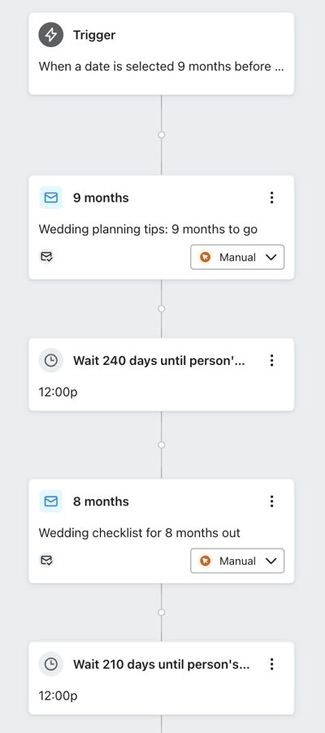
Say you have a wedding flow that starts nine months before someone's wedding. Every month leading up to their wedding date, you share content and products that may interest the bride or groom.
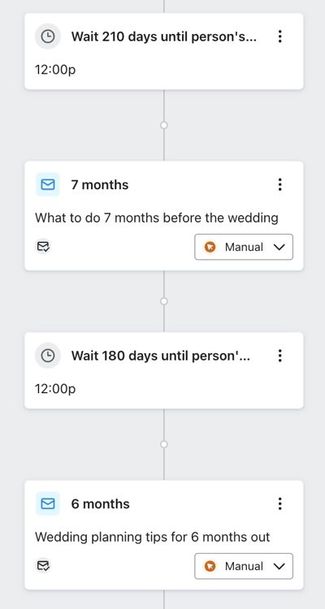
If you receive Jane Smith’s wedding date on February 1 and her wedding is 7 months away, Klaviyo will insert Jane at the Wait until 7 Months before person's Wedding point. She will be scheduled to receive the appropriate content; here, the “What to do 7 months before the wedding” email.
What happens when the date falls outside the flow’s timeline
If the date falls outside the timeline of a flow, or is deleted entirely, the profile will not be added to the flow at this time.
For instance, say you have a birthday flow that sends out a message on the actual date and then ends. In this case, the timeline for the entire flow is one day.
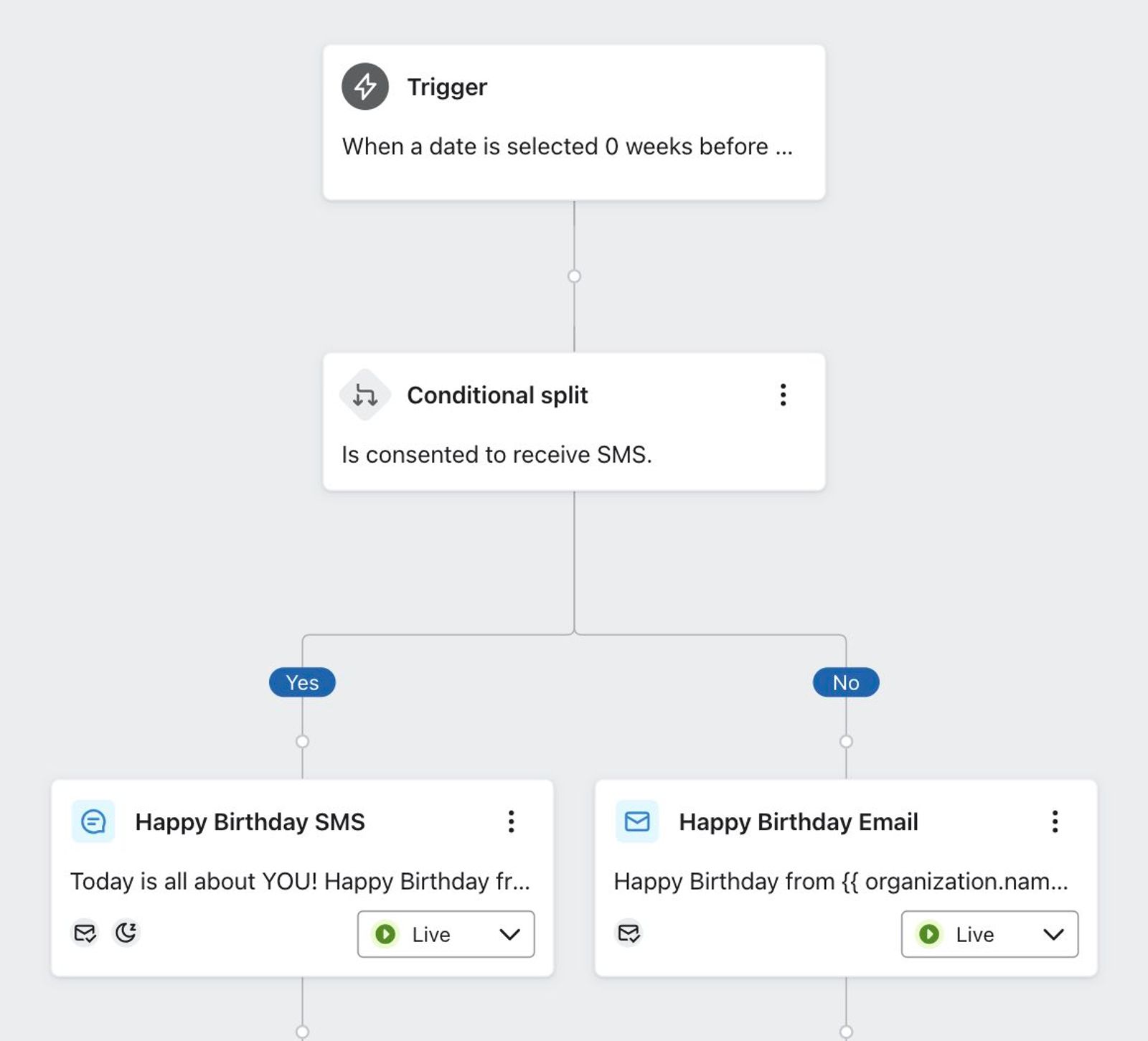
If Sarah Smith submits a form on February 1 and gives her birthday as June 1, she will not enter this birthday flow immediately. Instead, she will enter when the flow is scheduled to start for her birthday in June.
What happens when a date is updated in the middle of a flow
Before a date-based flow sends a scheduled message, Klaviyo checks whether the date property still matches the value that brought the profile into that occurrence of the flow. If the date changes or is deleted, messages scheduled for the previous date are skipped when they are evaluated. A qualifying new date can schedule the profile for another occurrence of the flow.
For instance, say that Jane from the example above is in the middle of a wedding flow.
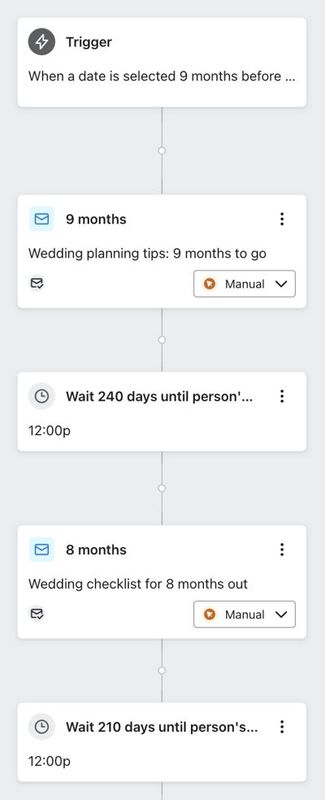
Originally, Jane’s wedding date is 5/1/2025, and she has received the message associated with the “Wait until 7 Months before person's Wedding” point. If she changes her date to 6/1/2025, she will not receive messages still pending for the May 1 occurrence. She may be scheduled for messages based on June 1 if that date falls within the flow’s timeline.
When the updated date qualifies for the flow, Klaviyo can schedule the profile for the new occurrence. This is useful for appointment-focused flows: if an appointment is rescheduled, messages that have not yet been sent can be scheduled around the new date rather than the old one.
In Jane’s case, the messages she receives for June 1 depend on where her new wedding date falls in the flow’s timeline. She may enter at a later point rather than restart from the beginning. If the new occurrence includes a message she already received for May 1, she may receive that message again.
Additional resources
Learn more about date-based flows: