Understanding how segment engagement reports can help you judge lead quality
You will learn
Learn how to use the Klaviyo segment engagement report to adjust your email habits and retain subscribers. Subscribers arrive at your website in a variety of ways, from typing out the URL directly to clicking into a social media ad; likewise, there are multiple types of forms through which they can opt in for marketing. With this influx of new subscribers, how do you know which will continue to buy? The segment engagement report allows you to analyze how engaged your subscribers are based on their actions and unique characteristics.
Before you begin
For a useful comparison, we recommend using at least 30 days of email activity. If you’re too new to Klaviyo, there may not be enough information to accurately assess engagement. To assess purchase behavior as well, integrate your Klaviyo account with an ecommerce platform to bring in order data.
Using reports to judge lead quality
Create a separate segment for each lead source using source information already stored on profiles, such as a source or campaign property. Keep the other conditions consistent so you can compare sources. To open each segment’s engagement report:
- Open Lists & segments and select the segment you want to analyze.
- Select the Engagement tab.
- If this is the first report for the segment, click Run Engagement Report. The results appear on the page when the report finishes.
Check Last Updated On before comparing results. To update an existing report, click the Refresh Data icon. You can refresh the report once every 24 hours.
Change your strategy
In this report, Open Rate and Click Rate use total opens or clicks divided by total delivered emails. Repeat activity counts, so these rates are not directly comparable to campaign rates based on unique activity. Treat the targets below as starting points and compare audiences with similar profile ages and sending patterns.
If your segment engagement report indicates a lack of engagement, consider changing your campaign strategy or audiences. Some examples of diminishing engagement include:
- Low open and click rates
In the Engagement over the last 30 days chart, Not engaged profiles received email but recorded no opens during that period. Profiles who received no emails are shown separately. You should aim to have an average open rate of 20% or higher; whereas, 10% or lower is cause for concern. You should also aim for a 4% click rate or higher, and anything under 1% is concerning. - Declining rates of purchases
The rate at which customers complete purchases is often product-specific. However, if you are sending to individuals who never purchase or purchased once and no longer interact with your emails or website, then these are signs of unengagement.
For more information on what qualities make a profile unengaged and how to win back these customers, head to our article on re-engagement campaigns.
With the release of iOS15, macOS Monterey, iPadOS 15, and WatchOS 8, Apple Mail Privacy Protection (MPP) changed the way that we receive open rate data on your emails by prefetching our tracking pixel. With this change, it’s important to understand that open rates will be inflated.
If your campaign analytics show a large number of iOS openers, we suggest identifying these affected opens in your individual subscriber segments.
Perhaps your content is distributed to too broad of an audience. Create a different segment to target a smaller, more reliable group of profiles and customize content to match their interests. Some new ideas may include: segmenting based on geographic location and creating a VIP segment based on previous purchase history, taking into account recency, frequency, and value of previous orders. Email more effectively by focusing on quality leads rather than quantity.
Alter your welcome series
It is important to identify which subscribers drop off quickly and why that might be. If you notice many subscribers disengage early on, vary your welcome experience by lead source. Experiment with different conversion incentives and identify which ones are driving unengaged subscribers who cause rapid drop-off and poor engagement rates.
The segment engagement report shows Open Rate, Click Rate, and Average Order Value for the past 30 days at the top.
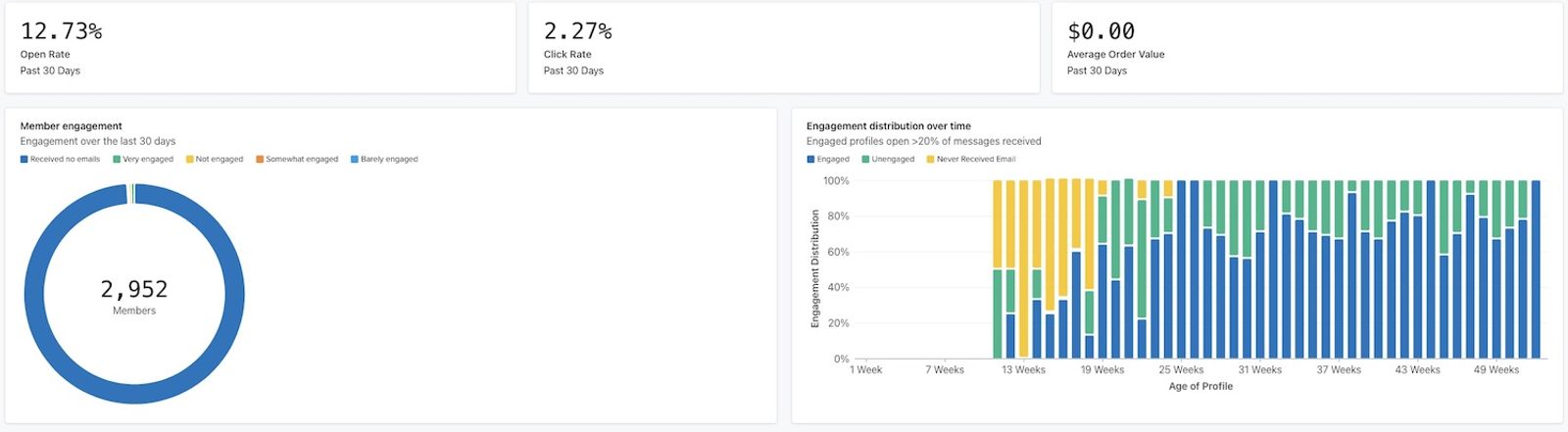
Use Open rate by age of profile to compare groups based on how long profiles have been in Klaviyo. For example, a lower rate for profiles aged 23 weeks identifies a group to investigate. It does not show that those same subscribers stopped engaging at week 23. Compare their lead sources and welcome experiences before changing your series.
If you see similar downward trends, try something different. Aim to win customer loyalty and build your brand in a sign-up form that then takes your audience through an engaging welcome series.
When you're analyzing customer engagement, ask the following questions:
- How long should my welcome series go on for?
- When should I begin a re-engagement campaign?
Think about how audience reactions answer these questions and make changes to reflect their engagement trends. With time and consideration, work toward retaining subscribers who engage with content and become avid fans of your brand.
Enhance your segments
To target engaged subscribers from a lead source, create a separate segment with behavioral criteria. Keep your original lead-source segment for analysis, since filtering out unengaged profiles changes the audience you’re measuring.
For example, combine a UTM source value of facebook, a UTM campaign value of prospecting, and at least 1 email open using AND conditions. Use these source properties only if they are already stored on your profiles. To target current engagement, choose a recent time window. An open at any time does not establish recent engagement.
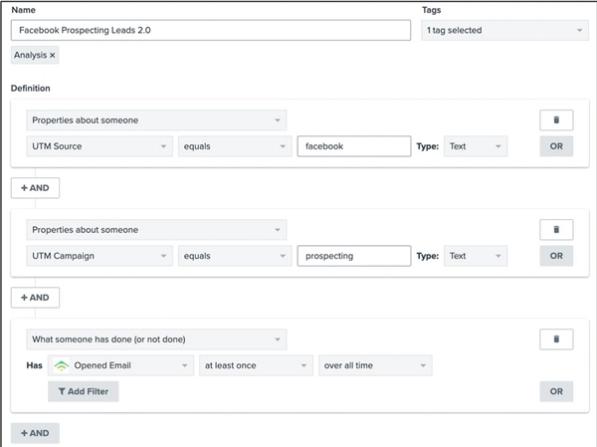
The more you define a segment, the better you will understand the customers within and target them with applicable campaigns. After changing your campaigns, compare results for your original lead-source segments to see whether engagement improves. A higher rate in a segment filtered for engagement alone does not show that lead quality improved.
Additional resources
- Understanding engagement reports for lists and segments
Learn how to analyze engagement reports for email lists and segments to understand how engaged your subscribers are. Engagement reporting can also help determine if you need to take additional steps, like list cleaning, to address engagement issues.
- Creating an effective acquisition strategy using signup forms