How to create customer persona segments based on activity
Learn how to use segmentation to create customer persona segments based on the actions they have taken. This allows you to send more relevant marketing communications so you can gain the most value from your audience.
Before you begin
In the next few sections, you will learn how to build segments based on different sets of actions customers have taken. While you shouldn't necessarily email all of these tiers, looking at the number of contacts in each can give you insight into how your audience is engaging with your emails. Additionally, you can remove the "is or is not in list" conditions if you would like to advertise to these segments on Facebook as well.
For email campaigns, include only subscribers who can receive email marketing. List membership alone does not confirm email consent. Use If someone can or cannot receive marketing > can receive > email marketing, then Add filter > Because person > subscribed. Keep this condition connected to your persona criteria with AND. Learn more in the segment conditions reference.
There are 2 types of behavior that you will want to look at:
- Engagement: includes things like browsing your website, or opening/clicking your emails
- Purchasing: how often someone buys from you, the amount they spend, and average order value
With the release of iOS15, macOS Monterey, iPadOS 15, and WatchOS 8, Apple Mail Privacy Protection (MPP) changed the way that we receive open rate data on your emails by prefetching our tracking pixel. With this change, it’s important to understand that open rates will be inflated.
To exclude MPP opens from engagement-based segments, filter each Opened Email condition so that Apple Privacy Open is false. Learn more about identifying these opens in your subscriber segments.
For both types of actions, there are 2 dimensions you should consider: recency and frequency. Recency is more powerful than frequency.
The definitions of recent, frequent, and monetary value should be customized for your business. For example, if you sell pianos online, it's highly unlikely that any of your customers purchased more than 3 times in a year. That said, here are some guidelines to start:
Engagement:
- Recent: within 3 months.
- Frequent: 3 times or more
Purchasing:
- Recent: Within 4 months.
- Not recent: 4 - 13 months ago
- Frequent: 3 times or more
- High Monetary Value: over the average order value for your customer base.
We use the AOV of $100 in all of the examples on this page. Replace this value with your own AOV.
Create a customer persona segment
Before building a purchase-based segment, make sure your store’s order data is syncing to Klaviyo. Use the purchase metric for that store, such as Placed Order. The time frames, purchase counts, and $100 AOV below are examples to adjust for your business.
- Open Lists & segments, then select Create > Segment.
- Enter a name for the segment. If a separate naming panel opens, click Create segment to continue to the builder.
- Add the conditions for the persona you want to create, using the examples below. Adjust the time frames and monetary values for your business, and include the email subscription condition if you plan to send email campaigns.
- Click Create segment to save the segment and populate its members.
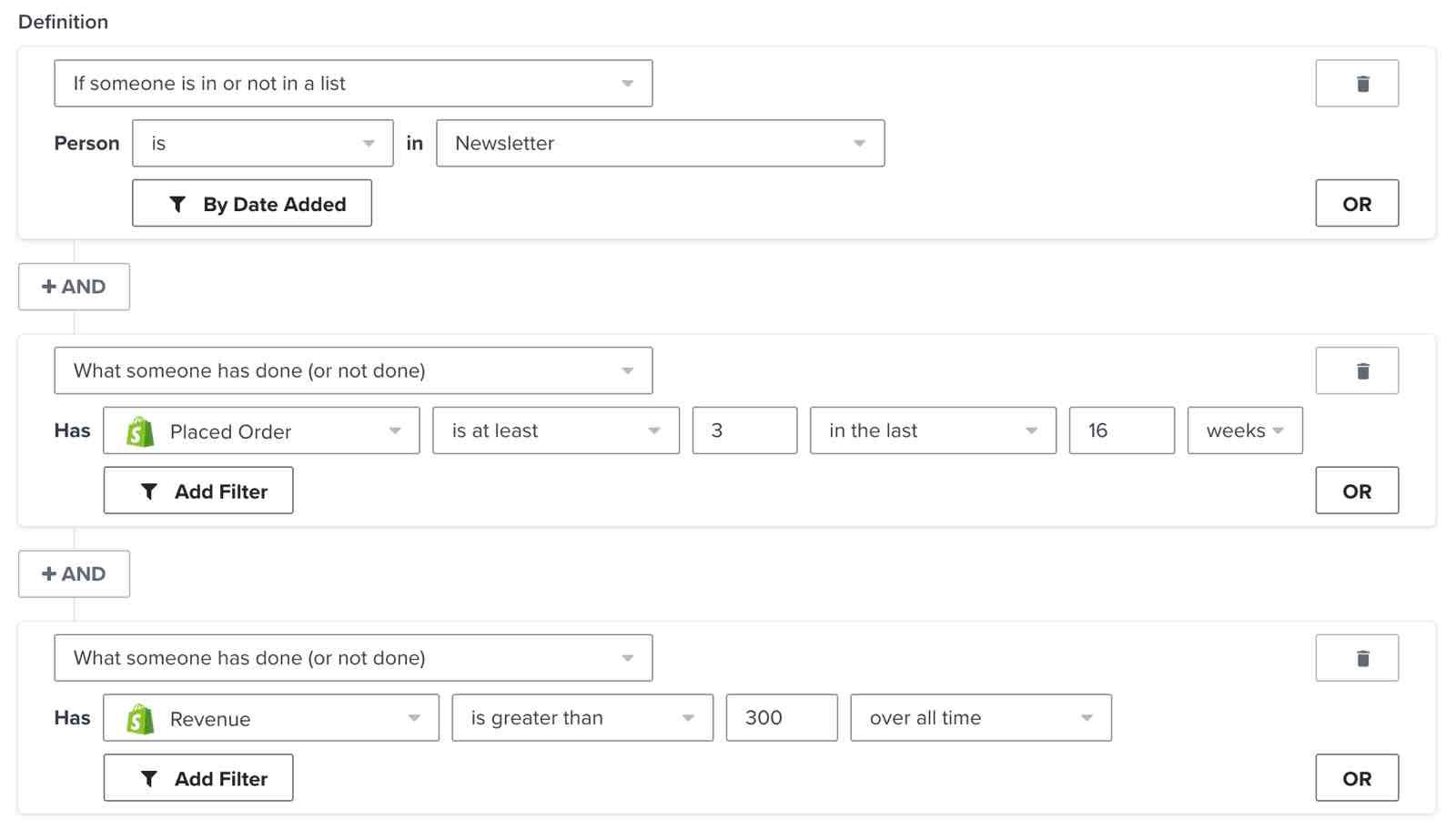
High rollers
These are your best customers. They purchase often, recently, and at a high monetary value. Your goal is to retain them by treating them like VIPs. You don't necessarily need to discount aggressively, but other perks and exclusivity go a long way.
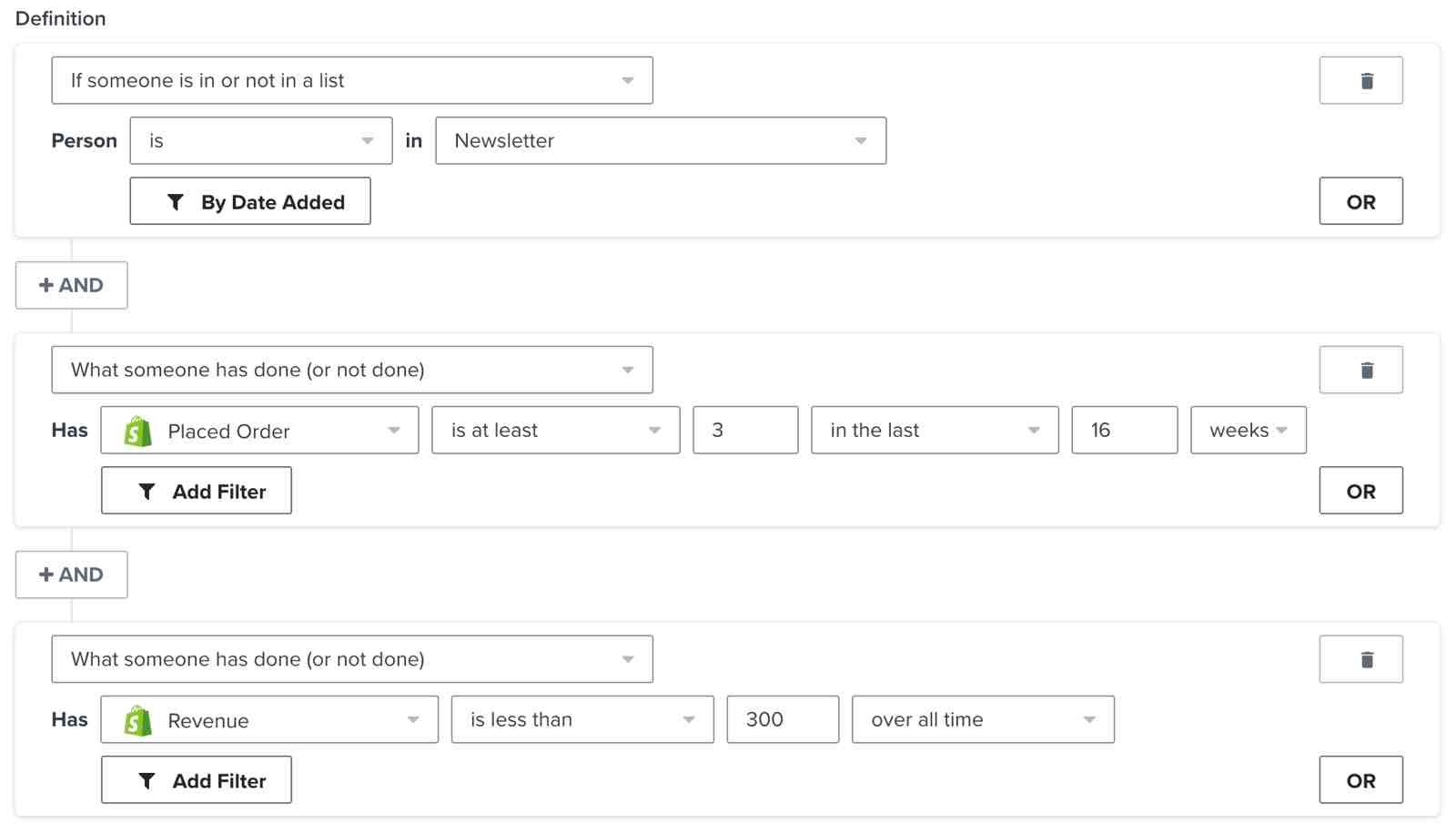
Brand enthusiasts
These are loyal customers. They purchase often and recently, but don't spend as much as your VIPs, so your goal is to increase their average order value. To do this, give them a reason to spend more. Try featuring related or complementary products and/or offering volume-based discounts.
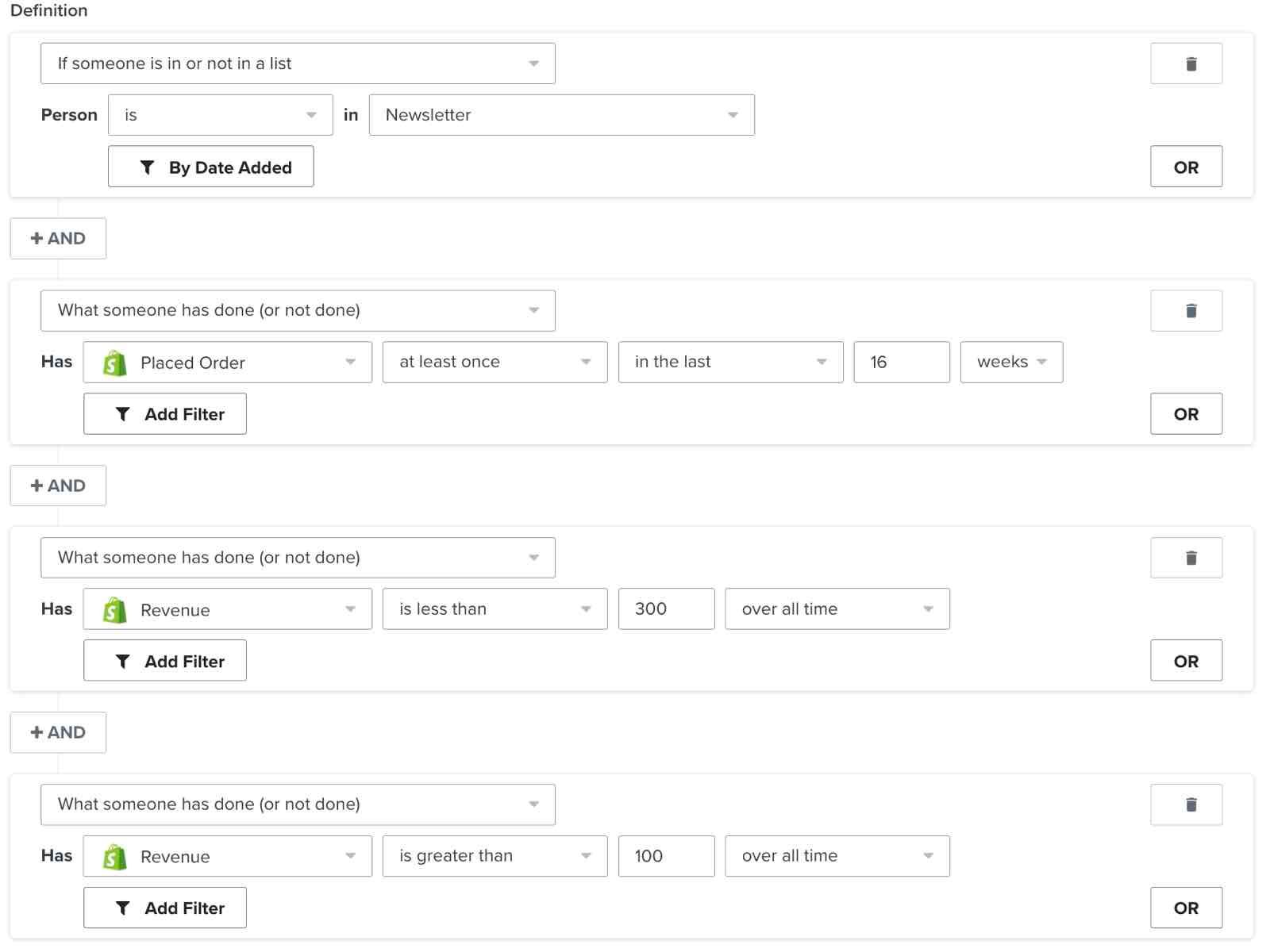
Potential high rollers
These customers have the potential to become some of your best customers; they purchased recently and at a high monetary value, but don't buy very often. To increase their purchase frequency, give them a reason to come back. Try teasing the perks of being a VIP, promoting related or complementary products, or sending them replenishment flows.
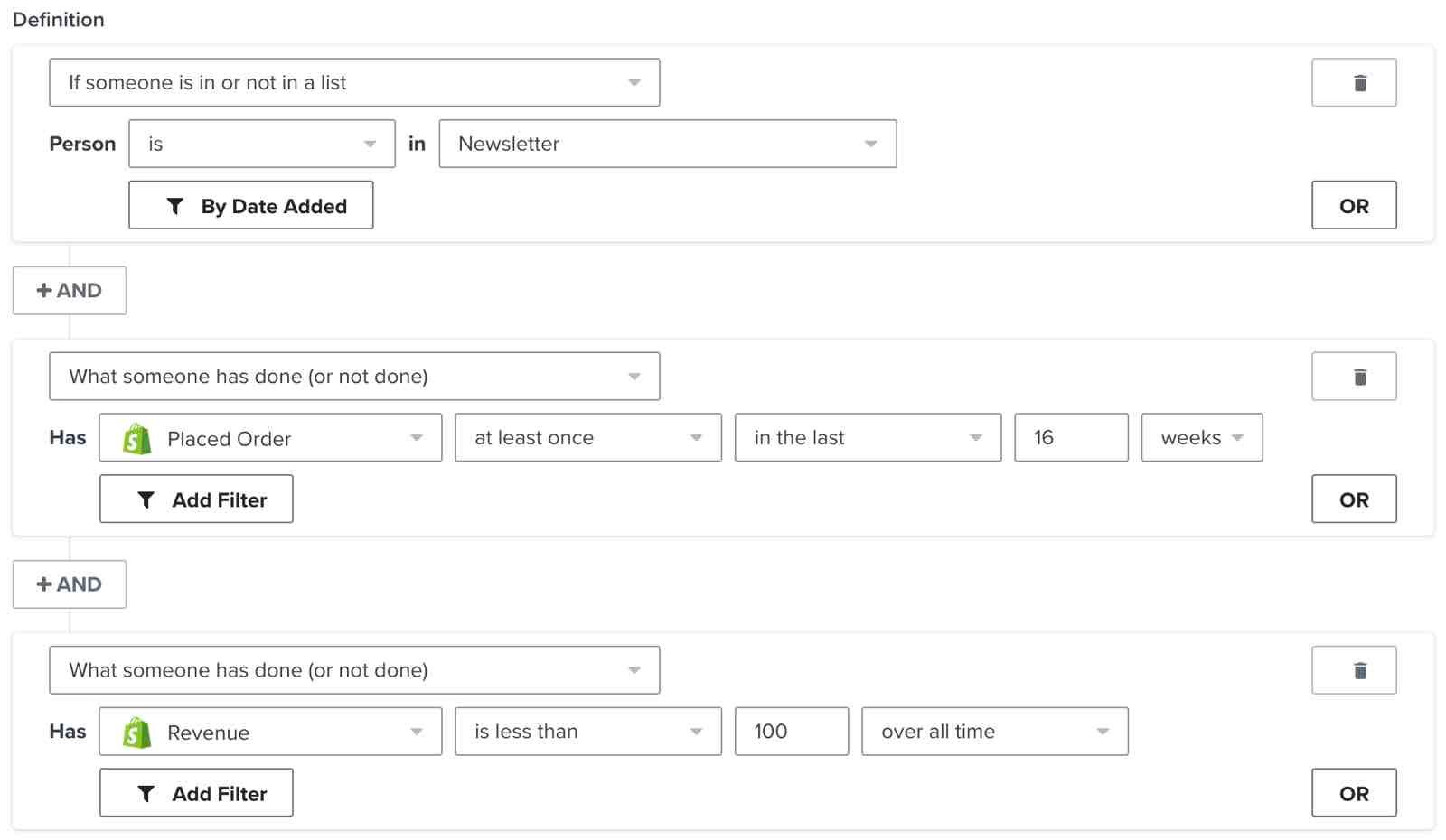
Potential brand enthusiasts
These customers purchased recently, but not frequently and not at a high monetary value. Focus on increasing their purchase frequency or average order value by striking while the iron is hot. Promote bestsellers and popular or related products.
Nearly theres
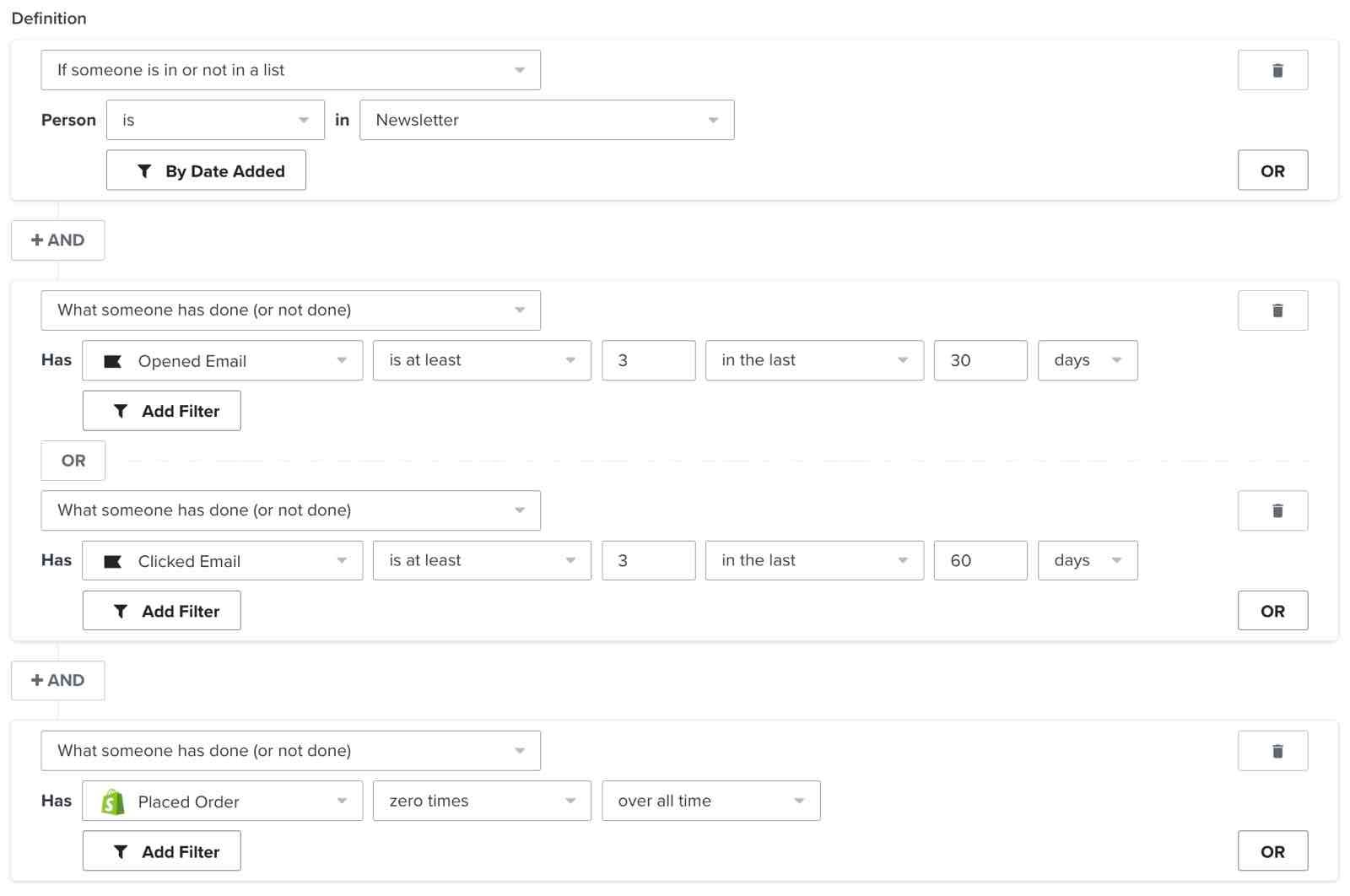
These are subscribers who open and click your emails often. They've also recently engaged with an email but never purchased. Your goal is to nudge them over the line to make their first purchase by giving them a good reason to buy. Remind them of what they're missing, sell value, and try incentivizing as a last resort.
Waiting for wows
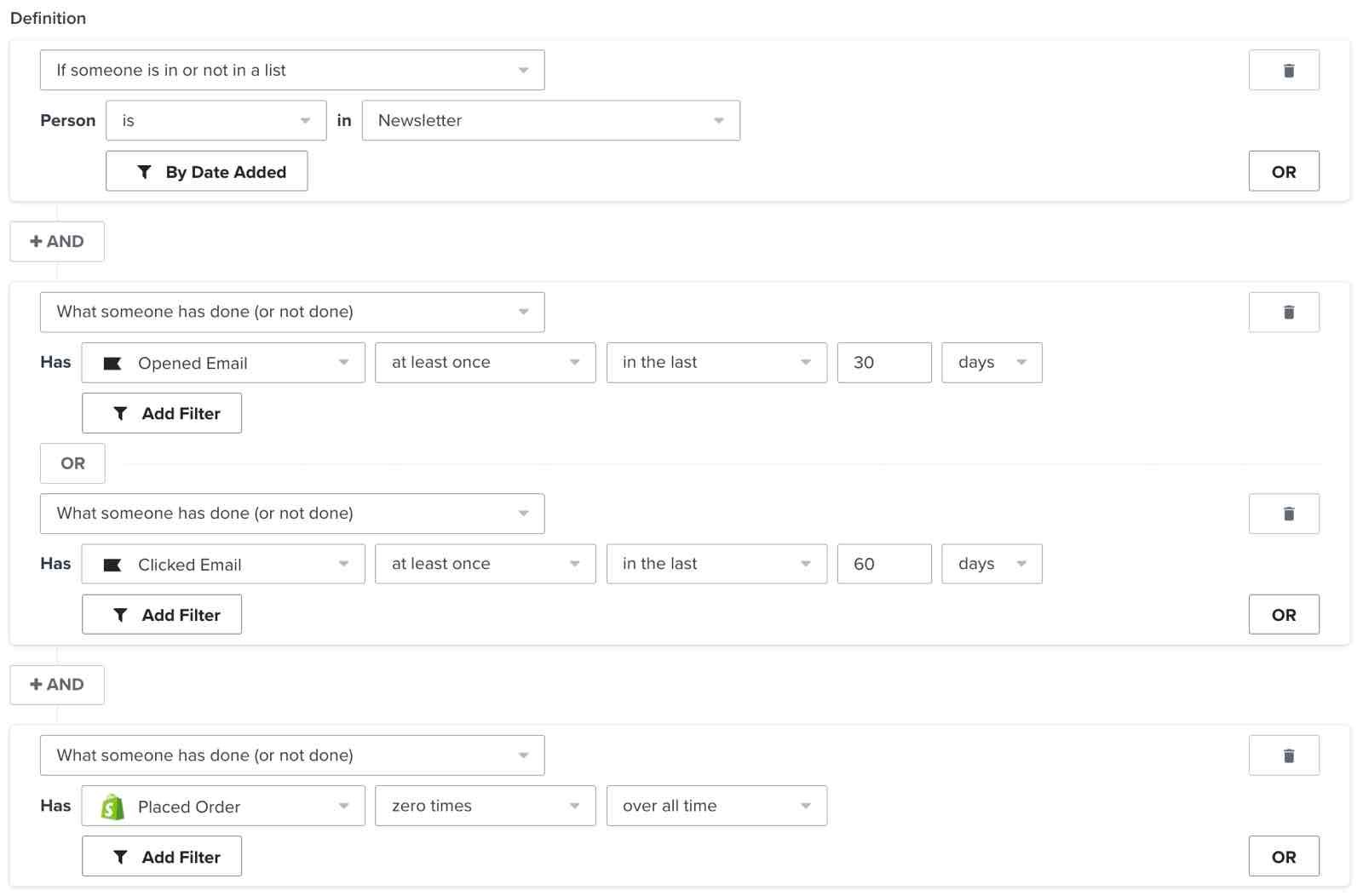
These are subscribers who have never purchased but recently engaged with at least 1 of your emails. Capitalize on their recent interest by trying "too good to pass up" offers and limited-time deals.
Espresso shot
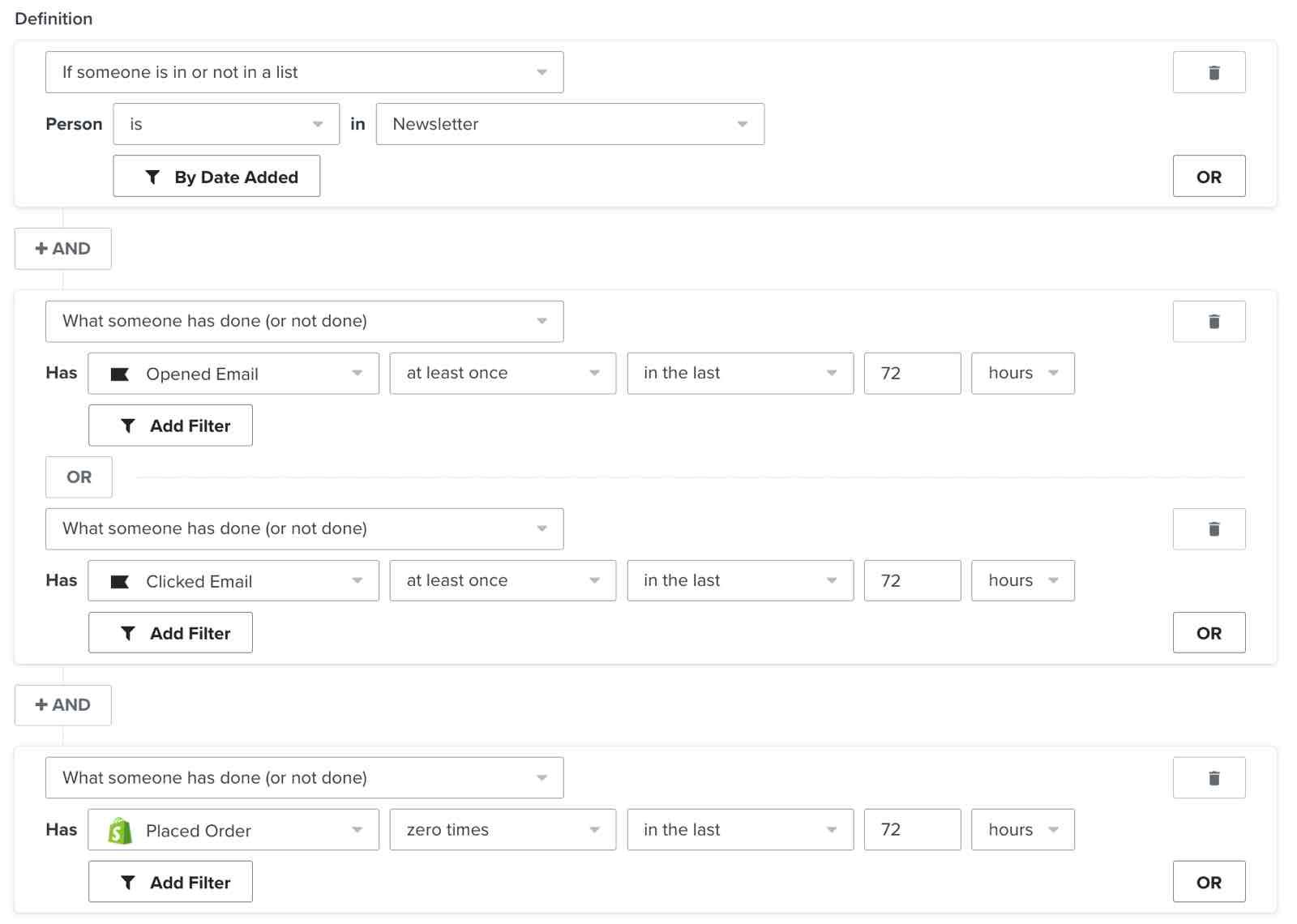
These customers have engaged with your emails recently, but haven't made a purchase. You can send a reminder email to this group a few days after a product launch or sale announcement to encourage a purchase.
Window shoppers
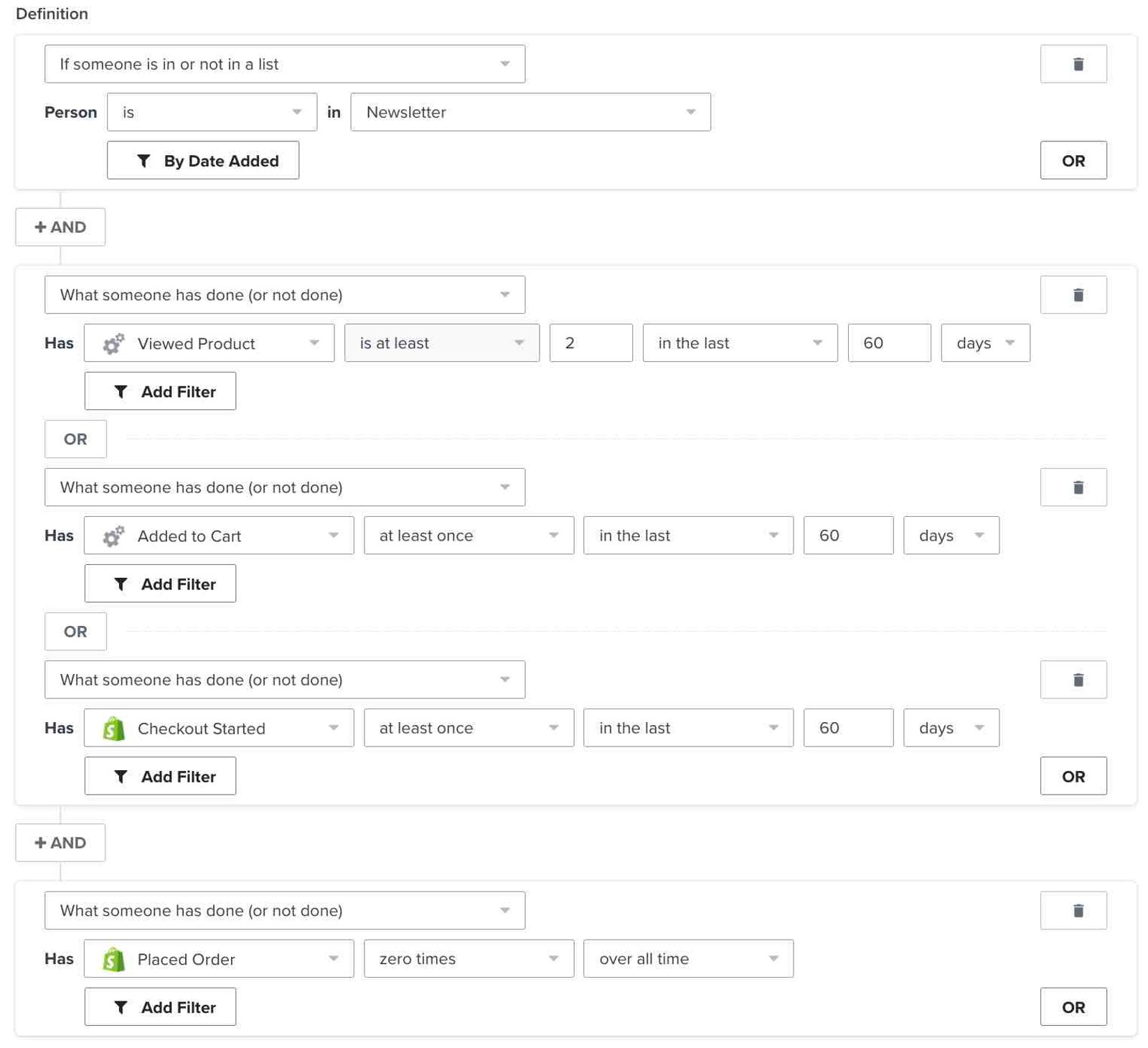
These customers have engaged with your marketing and show some desire or intent to purchase, but haven't made the leap yet. Consider sending them a campaign with social proof (like positive reviews or social media posts from your customers) to help convert them into first-time buyers.
For Shopify stores: Based on your Customer Privacy settings in Shopify, Klaviyo may not track onsite events for visitors to your Shopify store in the EU, EEA, UK and Switzerland, unless they have provided consent. Visitors whose onsite activity is not tracked cannot qualify based on those unrecorded events. A profile can still qualify based on other activity already recorded in Klaviyo.
Lapsed high rollers
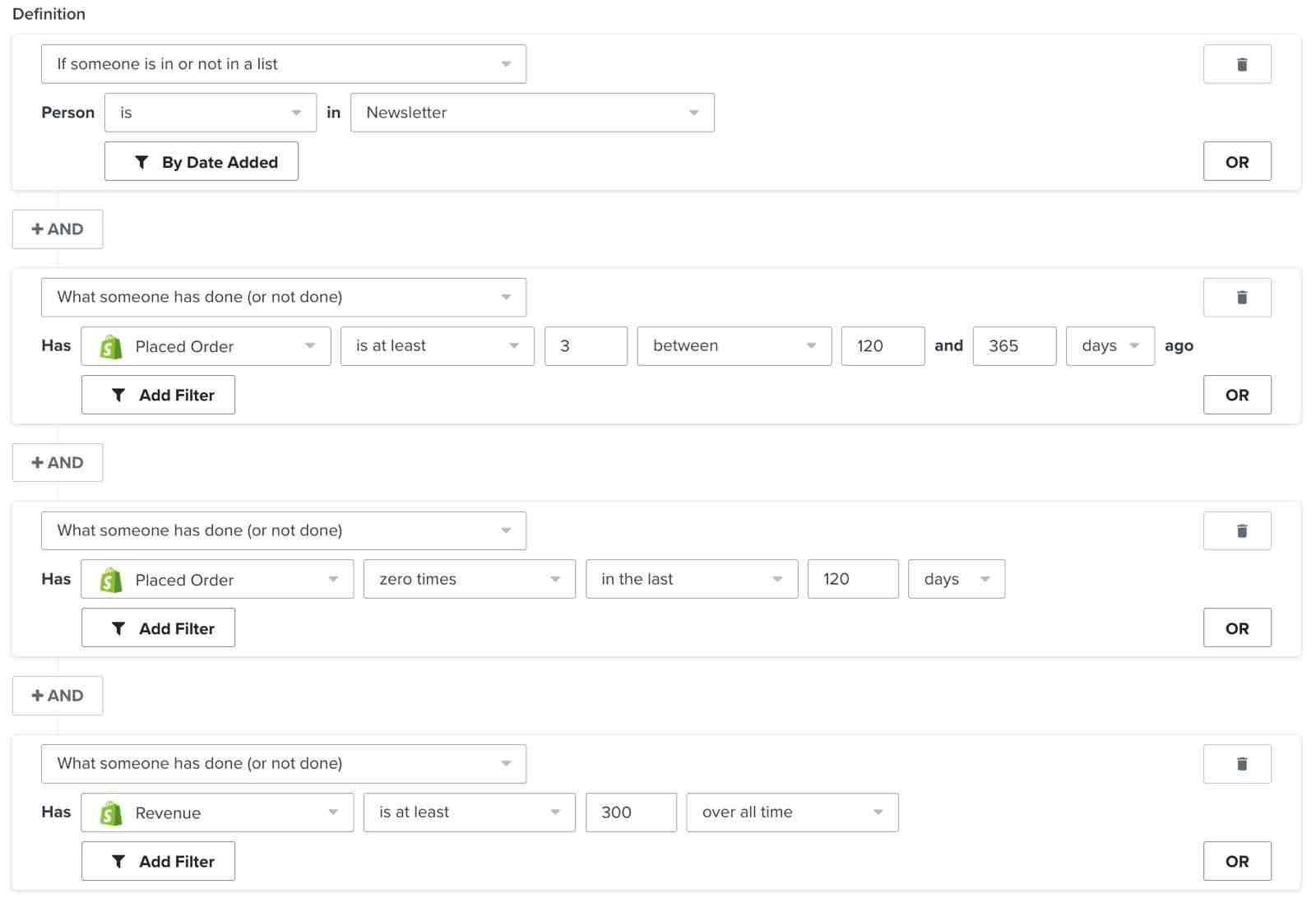
These are customers who have made many past purchases and spend a lot of money with you but haven't made a recent purchase. Win them back by telling them what's new with your business. This includes new releases relevant to what they've bought in the past, along with special offers to incentivize them to buy.
Lapsed enthusiasts
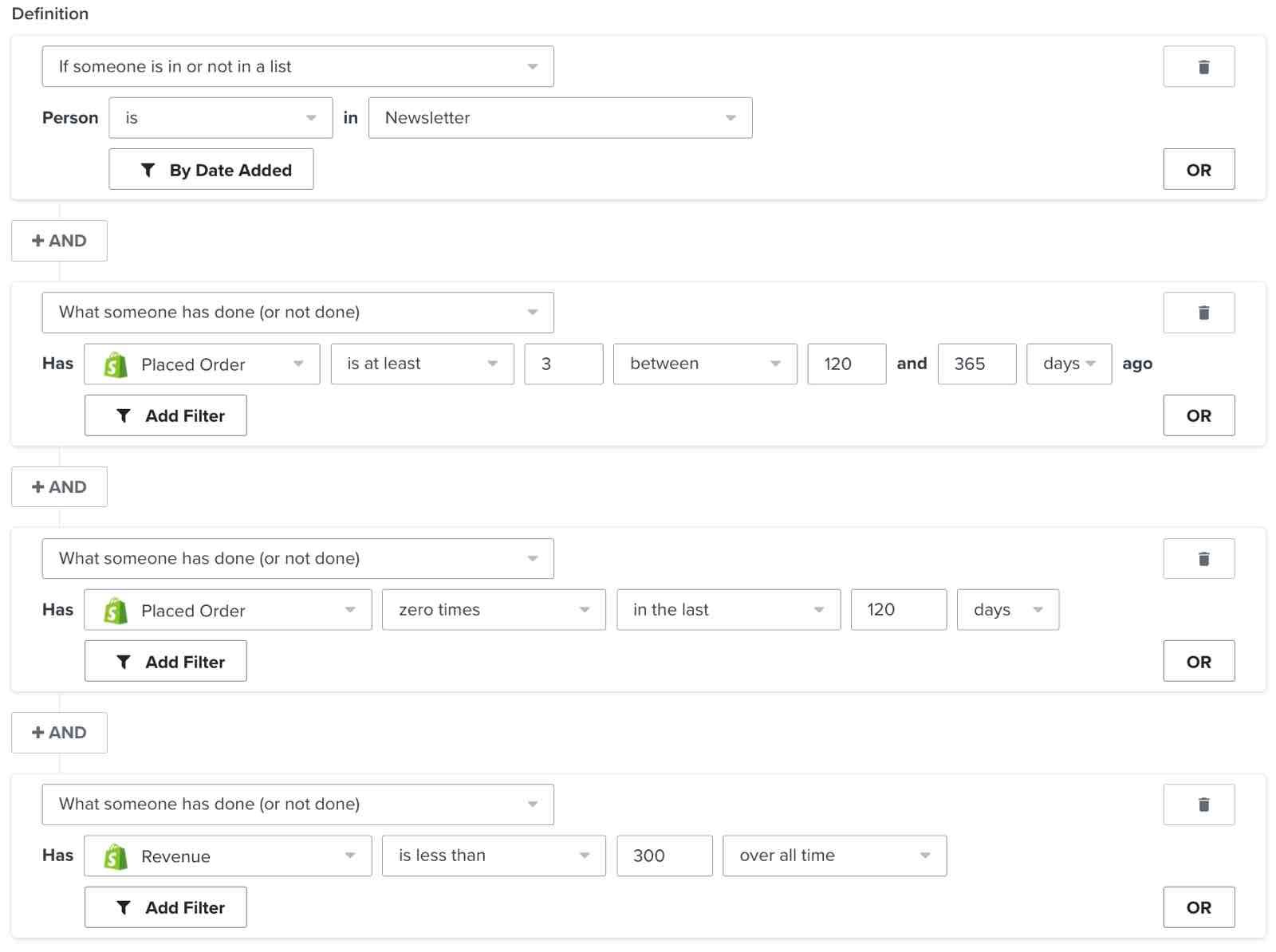
These customers used to purchase often, but haven't made a purchase recently. Experiment with sending winback campaigns, but be wary of low open rates.
One-hit wonders
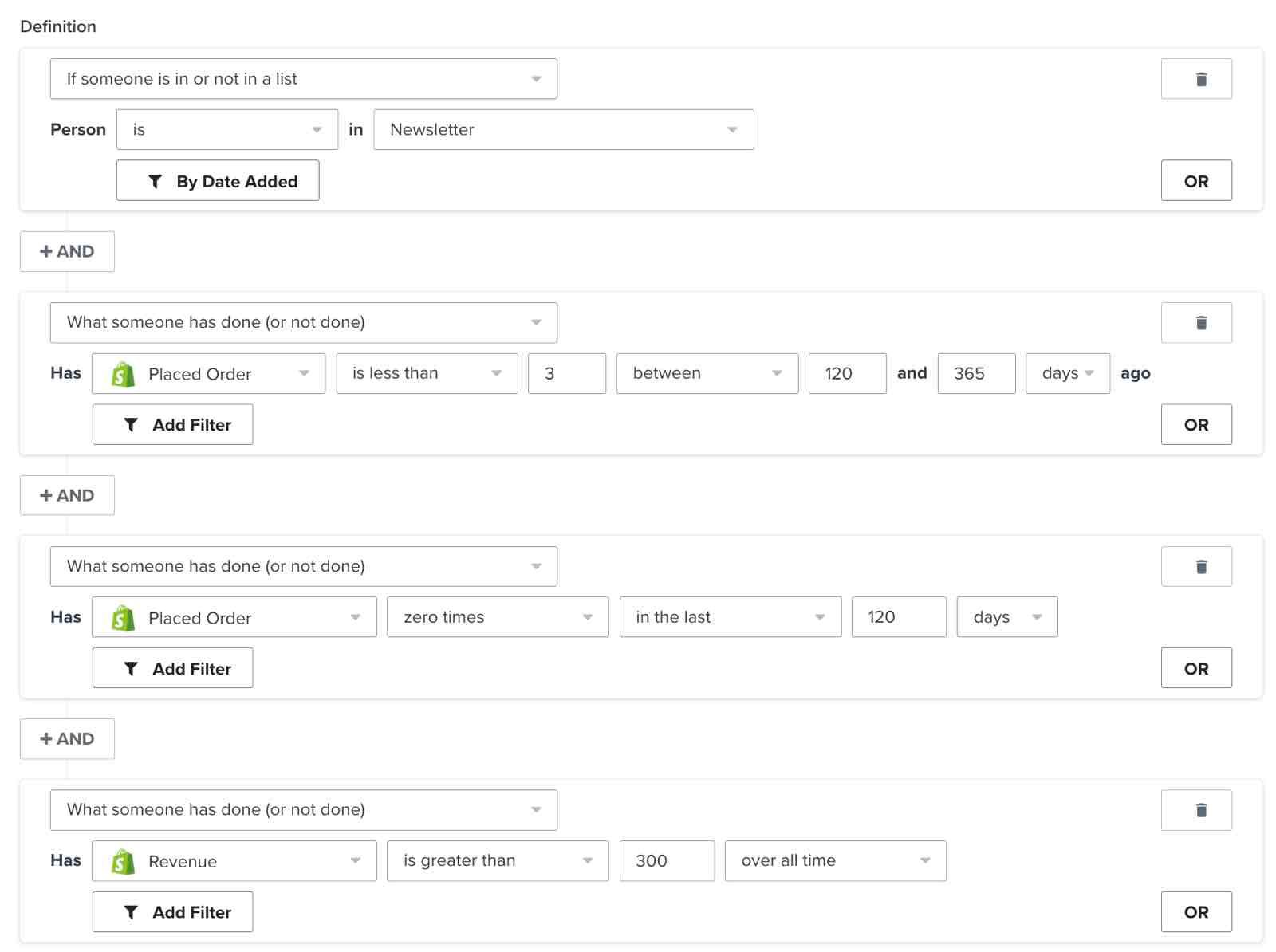
These are customers who haven't purchased recently and made fewer than 3 purchases, but at a high monetary value. Test winback campaigns against 50% of the segment or 1,000 contacts, whichever is larger.
First, build out the segment:
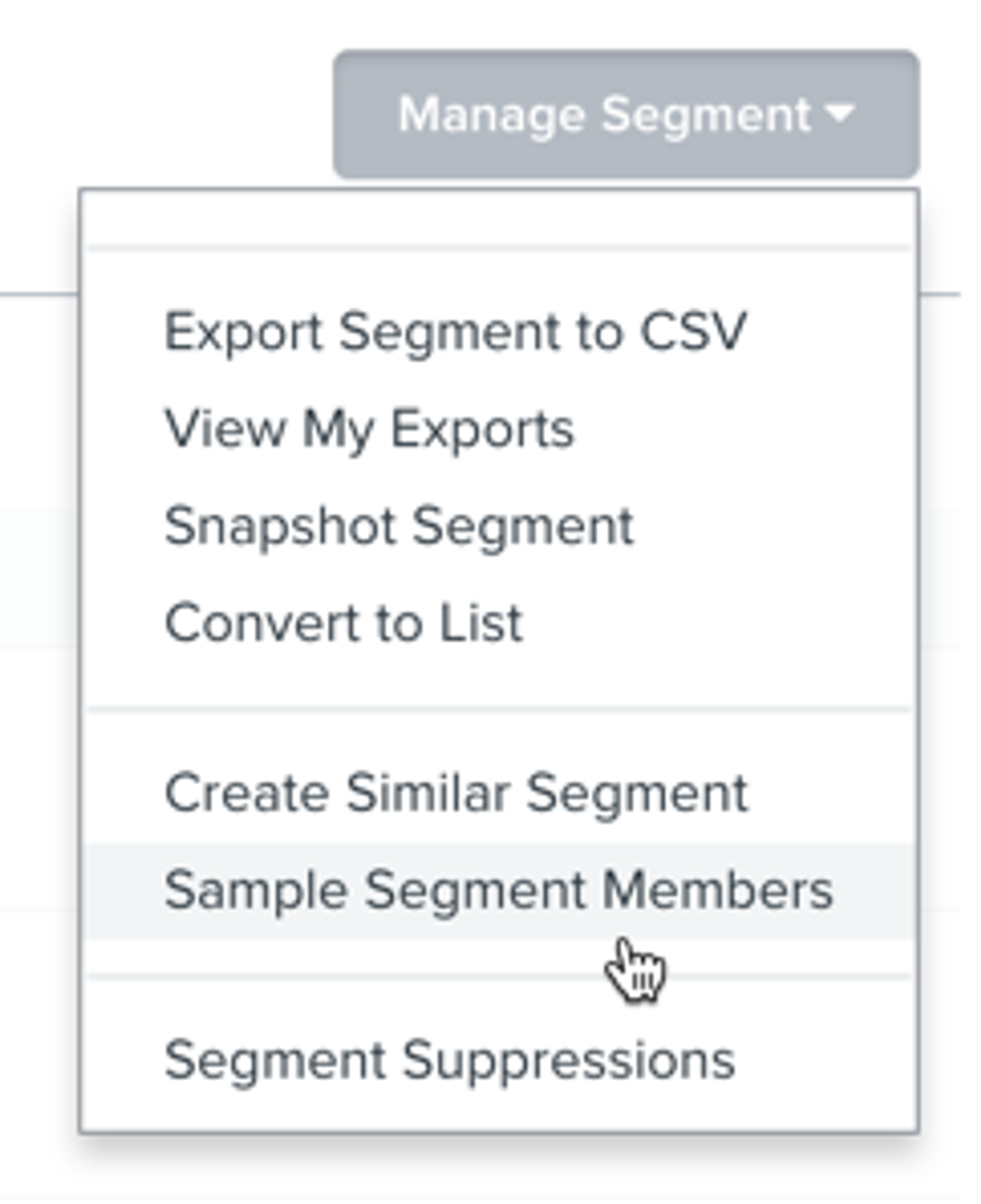
- Open the segment, then select Manage segment > Create random sample.
- Enter a List name. Calculate 50% of the segment’s members as a whole-number count. In Sample size, enter the larger of that count or 1,000, up to the segment’s total membership.
- Click Create list.
Send your test campaign to the new list containing the sampled profiles.
When emailing this sample, monitor your email deliverability before expanding to the rest of the segment. Monitor clicks alongside opens because MPP can inflate open rates. For this winback test, the minimum performance guidelines are:
- 10% or higher open rate
- Unsubscribe rate under 3%
- Spam complaint rate under 0.08%
These winback test guidelines are less strict than Klaviyo’s general email health targets: open rate above 33%, click rate above 1.2%, unsubscribe rate below 0.3%, and spam complaint rate below 0.01%. Consider these general targets when evaluating all 3 winback tests in this article.
Just passing throughs
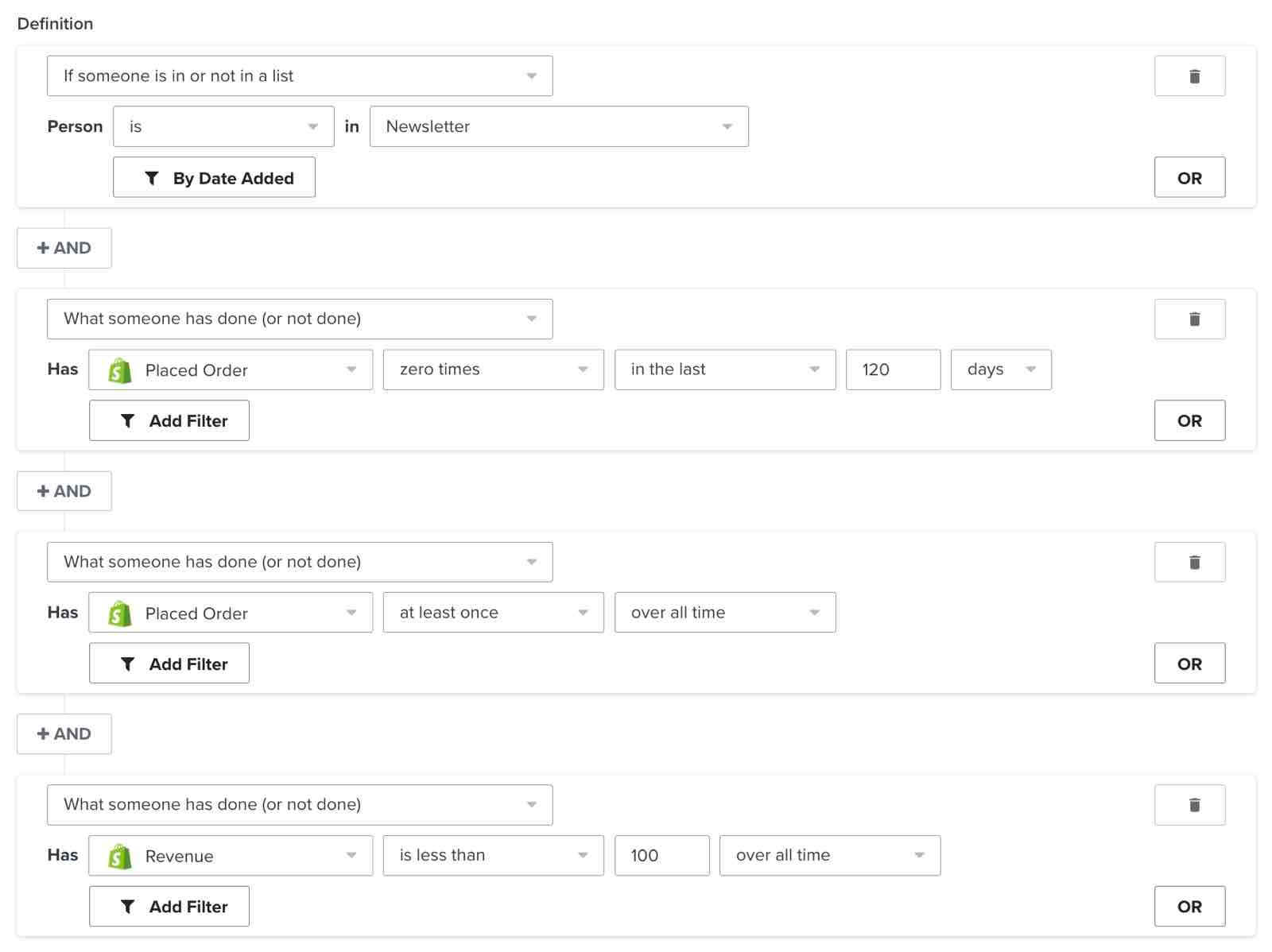
These customers purchased 1 or 2 times 6–13 months ago, and at a low monetary value. Test winback campaigns against 25% of the segment or 1,000 contacts — whichever is larger.
First, build out the segment:
- Open the segment, then select Manage segment > Create random sample.
- Enter a List name. Calculate 25% of the segment’s members as a whole-number count. In Sample size, enter the larger of that count or 1,000, up to the segment’s total membership.
- Click Create list.
Send your test campaign to the new list containing the sampled profiles.
When emailing this sample, monitor your email deliverability before expanding to the rest of the segment. Monitor clicks alongside opens because MPP can inflate open rates. For this winback test, the minimum performance guidelines are:
- 10% or higher open rate
- Unsubscribe rate under 3%
- Spam complaint rate under 0.08%
False starts
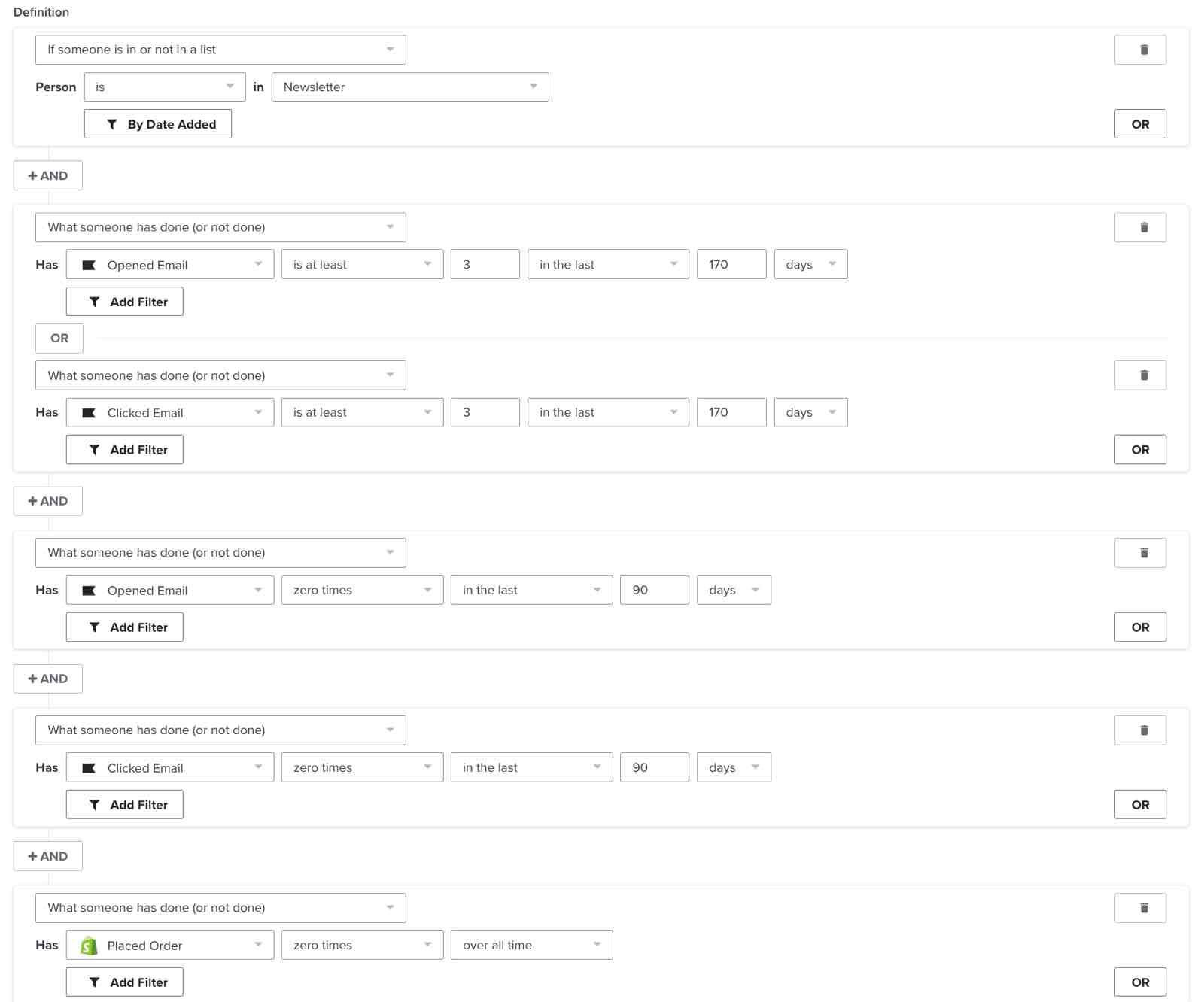
These customers have not recently opened or clicked an email from you but used to do so frequently. Test winback campaigns against 10% of the segment or 1,000 contacts — whichever is larger.
First, build out the segment:
- Open the segment, then select Manage segment > Create random sample.
- Enter a List name. Calculate 10% of the segment’s members as a whole-number count. In Sample size, enter the larger of that count or 1,000, up to the segment’s total membership.
- Click Create list.
Send your test campaign to the new list containing the sampled profiles.
When emailing this sample, monitor your email deliverability before expanding to the rest of the segment. Monitor clicks alongside opens because MPP can inflate open rates. For this winback test, the minimum performance guidelines are:
- 10% or higher open rate
- Unsubscribe rate under 3%
- Spam complaint rate under 0.08%
Dead weight
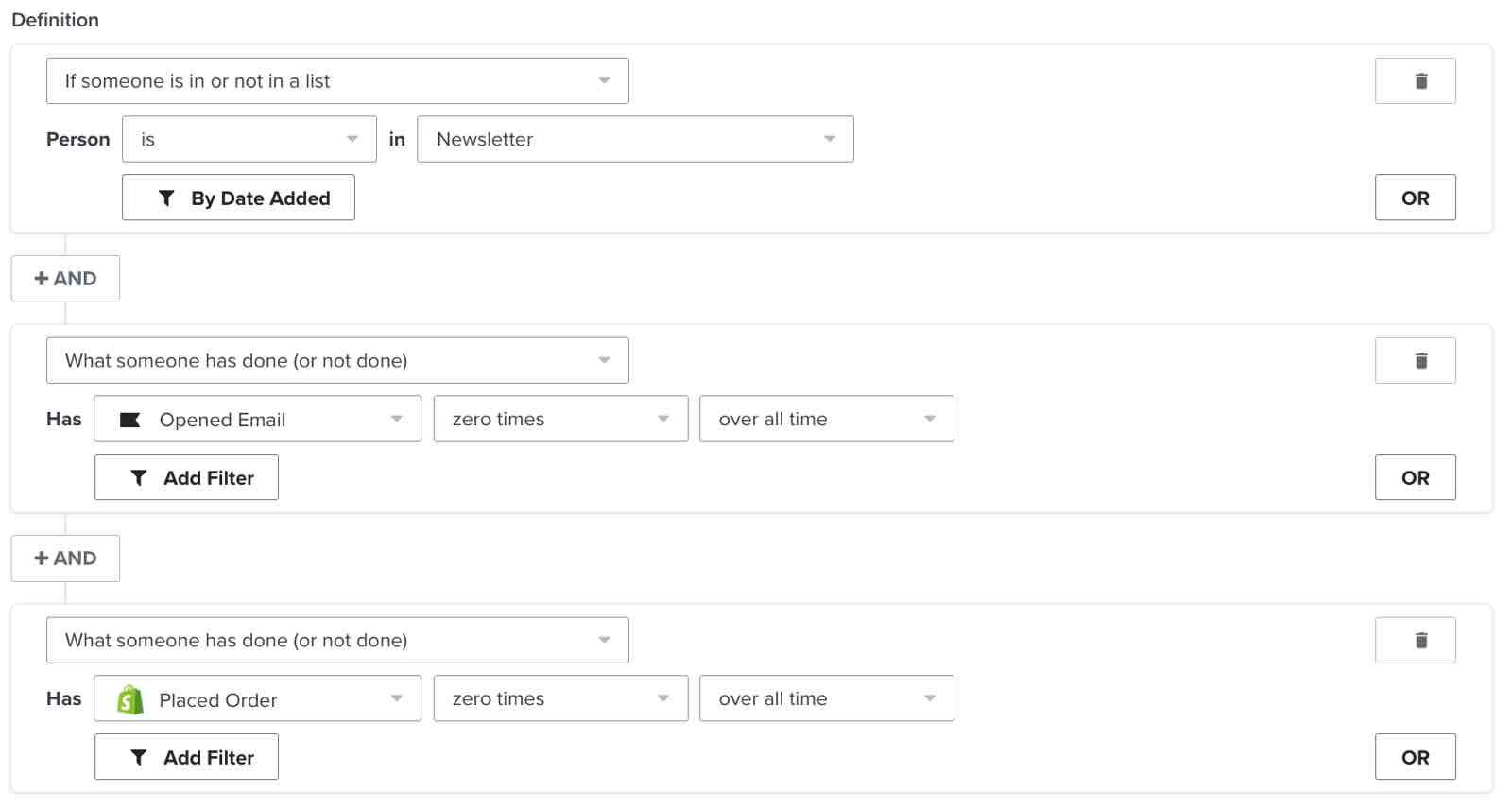
These are subscribers who haven't purchased or engaged recently. Exclude them from regular email campaigns. Consider a final re-engagement attempt through a sunset flow, then suppress those who still do not engage. Learn more about list cleaning.
Additional resources
- Segment conditions reference
Learn more about segment conditions, including how to filter your conditions and more. When building segments in Klaviyo, conditions are the building blocks that you customize to either include or exclude certain sectors of your audience. In a nutshell, profiles will only appear in your dynamic segments when they meet the specific conditions you make when creating the segment.
- How to enable advanced targeting on Facebook and Instagram
Learn how to enable advanced targeting on Facebook and Instagram. Advanced targeting strategies can engage your customers creatively, targeting them on multiple channels.
- Advanced segmentation reference
Learn effective advanced segmentation strategies that provide insights into your customer base and create highly personalized experiences for your subscribers.
- Creating a sending schedule based on email engagement reference
Learn how to create a sending schedule based on customer engagement. This is key to achieving strong open rates and maintaining a positive relationship with your subscribers. Sending too often to unengaged profiles will hurt your sender reputation, whereas sending too infrequently to engaged customers is leaving money on the table. It's best to achieve a happy medium through the use of segments and sending schedules. In this article, you'll learn how to segment subscribers into engagement tracks that will inform your sending habits.