Troubleshooting the funnel analysis report
You will learn
Learn why funnel analysis cards may show lower counts than you expect when you combine events from different sources or change their order.
Advanced KDP and Personalization are separate from Klaviyo’s standard marketing plans. Funnel analysis is available with either product, including during an active trial. Head to our billing guide to learn about how to purchase these plans.
Funnel analysis counts profiles that complete your selected steps in order, rather than the total number of times each event occurs. Each later step includes only profiles that completed the preceding steps.
Before comparing counts, check the report’s date range, any segment and step filters, and the Completion window (optional). The completion window limits the time between the first and last steps. See Getting started with the funnel analysis report for instructions on changing these settings.
Placing an onsite event before an event from another source
For example, you add Viewed Product as the first step in a checkout funnel, but the numbers of profiles reaching Checkout Started and Placed Order seem to have dropped significantly.
Klaviyo’s funnel analysis report allows you to combine events from different sources in order to visualize various customer journeys. However, when combining events from Klaviyo’s onsite JS tracking with events from an integration partner, it’s important to keep in mind how your shoppers are tracked across these different sources.
Examples of common events from an ecommerce platform include:
- Checkout Started
- Checkout Completed
- Placed Order
- Refunded Order
- Canceled Order
- Fulfilled Order
Examples of common events driven by Klaviyo.js include:
- Active on Site
- Viewed Product
- Custom events sent via
klaviyo.trackfrom the browser.
Klaviyo onsite tracking considerations
Klaviyo’s onsite tracking (Klaviyo.js) associates browsing events with profiles once visitors are identified in their browser. Learn how Klaviyo identifies site visitors. If Anonymous backfill is enabled, activity recorded before identification can also be added to the profile.
Common ways Klaviyo can identify a site visitor include:
- They click a tracked link in a Klaviyo email or SMS message to your website.
- They subscribe or opt in through a Klaviyo form.
- They log in to your site and you have installed custom tracking to identify logged-in users in Klaviyo. Installing Klaviyo.js alone does not add login identification.
For example, if you support a “guest checkout” experience on your website then you may have a significant list of customers whom Klaviyo has not yet cookied, which means you could be recording events like Checkout Started, Placed Order, Refunded Order etc., but are not recording events like Active on Site or Viewed Product.
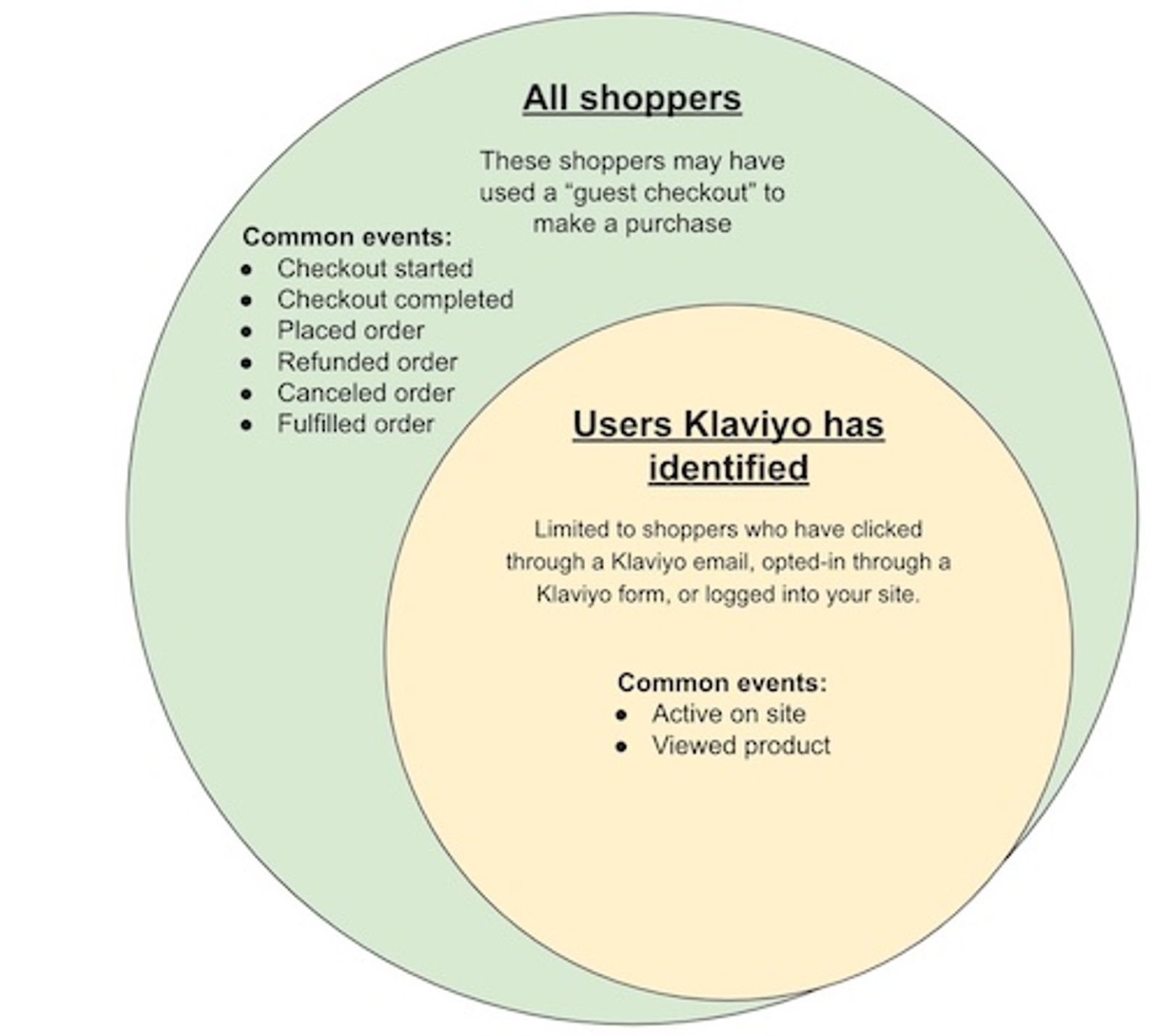
Consequently, when using the funnel analysis report, you may notice that fewer profiles reach an ecommerce step when you add a Klaviyo onsite event before it. The later step now includes only profiles with a recorded onsite event followed by the ecommerce event, within the report’s date range, filters, and completion window. A shopper can place an order without qualifying for this sequence if their earlier onsite activity was not recorded.
Additionally, even fully identified shoppers may use different devices and browsers, use ad blockers that prevent onsite tracking from firing, or reside in a country/locale that prevents or blocks cookies. These behaviors can also contribute to a gap between onsite tracking coverage and the server-side tracking supported by integration partners.
Anonymous backfill does not require an Advanced KDP subscription. When enabled, it stores onsite events in a shopper’s browser and adds the saved events to their profile once they are identified. Browser storage limits or cleared data can prevent events from being recovered, so backfill can reduce, but not eliminate, gaps in onsite tracking. Learn more about anonymous visitor activity backfill. To change this setting, you need permission to edit data settings:
- Go to Settings > Data to open the Tracking page.
- Under Onsite identification, select Anonymous backfill if it is off, then click Save.
Using Viewed Product and Active on Site events together
For example, you see a drop in Viewed Product counts when you add Active on Site in a preceding funnel step.
It is not recommended to combine Active on Site and Viewed Product events within the same funnel chart because these events are fired asynchronously. This means that when a user visits your website, we may record a Viewed Product event before an Active on Site event, or vice versa. Since this behavior is inconsistent, it can provide a misleading view of shopper behavior when visualized in a funnel diagram, which relies on a logical sequence of events.
For example, you see a large drop in Active on Site counts when you add Viewed Product in a preceding funnel step.
As noted above, it is not recommended to combine these events within the same funnel chart. You may notice a larger drop in Active on Site counts when Viewed Product precedes it in a funnel.
Klaviyo records Active on Site once per session. A session ends after 1 hour of inactivity and can last longer if the shopper stays active. Viewed Product events can be recorded multiple times per session. This means that if a Viewed Product event is recorded after the initial Active on Site event, a user will need to return after their session expires in order to record an Active on Site event after the Viewed Product event. Hence, fewer profiles may reach Active on Site when you order your funnel this way.
Additional resources
- Getting started with the funnel analysis report
Learn how to use funnel analysis reporting to review a customer’s journey with your brand and where they may potentially drop off before an action or conversion. Knowing more about where a customer may drop off is helpful in understanding where you can optimize your marketing funnel.
- Getting started with Klaviyo onsite tracking
Learn about the different ways that Klaviyo can support onsite tracking on your ecommerce site. There are 2 key types of onsite tracking:
- Understanding cookies in Klaviyo
Learn more about how Klaviyo uses cookies as a part of our web tracking to gather information and help improve conversion rates and email performance. This article explains the specific cookie we use and its purposes so that you understand how customers are tracked. This information helps you understand how Klaviyo gathers data, and how this may impact customer privacy and compliance laws.