Troubleshooting skipped profiles in email campaigns
You will learn
Learn the possible reasons why a campaign wasn't sent to everyone in the list(s) or segment(s) you sent it to. When you review a campaign's analytics, you may notice that it did not send to your complete list or segment.
Suppressed and unsubscribed profiles (email)
If a profile becomes globally suppressed or unsubscribes from email marketing, they are not automatically removed from every list they belong to. With global unsubscribes enabled, unsubscribing from any email prevents further email marketing from your account, including emails sent to lists. Hard bounces and manual suppression can also prevent profiles from receiving email marketing.
List membership, email consent, and suppression status are separate. Removing a manual suppression does not resubscribe an unsubscribed profile. If someone explicitly asks to receive your email marketing again, resubscribe them. Deliverability suppressions, such as those caused by hard bounces, are not removed by resubscribing. Learn more about managing subscriptions and suppressions.
For example, your email list may have 500 people on it, but 5% of those people may be globally suppressed. Klaviyo excludes those 25 profiles from the campaign, leaving at most 475 possible recipients. Other skip reasons can reduce the number sent further.
To find list members who cannot receive email marketing, use the segment builder with these 2 conditions:
If someone is in or not in a list > Person is in [Choose List]
AND
If someone can or cannot receive marketing > Person cannot receive > email marketing
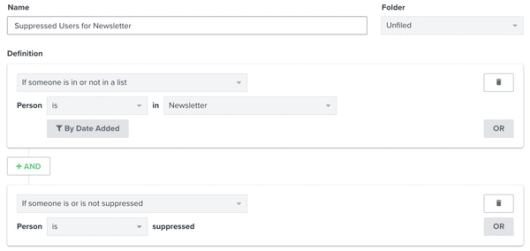
Name the segment and click Create segment, then review its profiles. This shows who cannot receive email marketing now; it does not recreate the audience at the time a past campaign was sent.
Find out how to remove suppressed profiles from a list.
Recipient activity: skipped recipients
Skipped-recipient data is available only for campaigns sent on or after April 15, 2026. For earlier campaigns, the Skipped view shows that the data is unavailable; it does not mean that no profiles were skipped.
From Campaigns, open the sent campaign to view its Overview report.
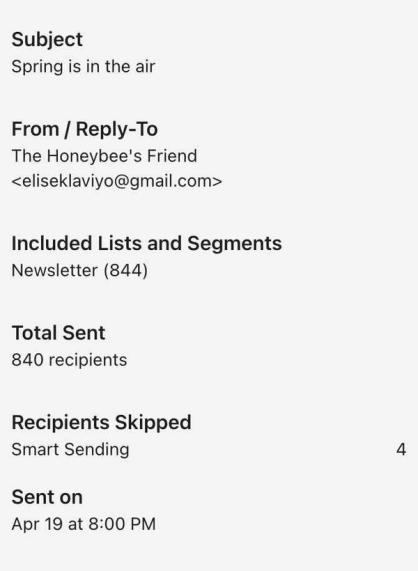
For email campaigns, Overview includes the subject, sender email, lists or segments, and send date and time. SMS campaigns show messaging usage instead of sender email details. To view skipped profiles:
- Select Recipient activity, then Skipped.
- Select a reason from the Type dropdown to see the affected profiles.
If your email campaign has Smart Sending enabled, this view shows profiles skipped because they received another email within the applicable Smart Sending window. Receiving an SMS does not trigger an email Smart Sending skip. Profiles may also be skipped if they have a missing or invalid email address.
Here are the key reasons why someone may not have received your campaign despite being on the send list:
- User Has Unsubscribed
With global unsubscribes enabled, someone who unsubscribes from email marketing won't receive future marketing emails. This does not unsubscribe them from SMS. - User Has Marked an Email as Spam (email only)
If someone complains that an email from you is spam, they won't receive any more emails from you to keep your email deliverability strong. - Emails to User Have Hard Bounced (email only)
If an email to someone hard bounces (this happens most often when the email address is invalid) they won't receive any more emails from you to keep your email deliverability strong. - User Has an Invalid Email (email only)
If someone is on your send list, but their email address proves to be invalid, your email will not be successfully delivered. Certain role-based email addresses (shared email addresses, often used by groups within an organization rather than an individual) are automatically skipped in Klaviyo for this reason. - User Was Manually Excluded
If you've manually excluded certain people from receiving your emails or SMS, we won't message them. - Smart Sending
If someone has already received another message through the same channel within the applicable Smart Sending window, and Smart Sending is enabled for your campaign, they will be skipped. - Skipped: Over Email Limit
If sending is blocked because your account has reached its email send limit, campaign emails can be skipped. - Lack of Funds (SMS only)
If your funds run out before a campaign finishes sending, anyone who hasn't yet received the campaign will be skipped. - Suspicious Email
The email address associated with this profile has historically led to bounces and is suspected of being fake or inactive.
Scheduled campaigns and target send lists
When scheduling an email campaign, you may see Determine recipients at send time (or Determine recipients at start of sending for optimized send times). This controls when Klaviyo finalizes the campaign audience.
If you turn this option off, Klaviyo determines recipients when you schedule the campaign. When scheduling a campaign that won't be sent for several days or weeks, your target list or segment may grow or shrink during that time.
If this option is on, Klaviyo finalizes recipients once, shortly before the first messages go out. Later changes to list or segment membership do not update that campaign's audience, even if delivery continues across time zones. Unsubscribes and suppressions can still prevent a send.
Additional resources
- How to resend emails in Klaviyo
Learn about the two methods for resending flow and campaign emails in Klaviyo.
- How to export campaign analytics
Learn how to export a campaign's analytics. Exporting the analytics for your campaigns helps you review and measure the performance of your campaigns across email, SMS, push notifications, and WhatsApp.