Understanding message conversion tracking
You will learn
Learn how conversion tracking works for email, SMS, and mobile push messaging and how to edit these settings. For each campaign and flow sent, Klaviyo automatically tracks conversions. This allows you to analyze the performance of your marketing channels and their individual success.
What is conversion tracking?
A conversion is an action you want to measure, such as placing an order. Klaviyo attributes that action to a message when an eligible touchpoint, such as an email open, link click, SMS delivery, or push open, meets your attribution window settings.
Conversion metrics can include Placed Order, Fulfilled Order, and Ordered Product, as well as actions such as Started Checkout or Viewed Product. Opening an email is a message interaction used for attribution, rather than an order or checkout conversion.
For new accounts, the default attribution windows are 5 days for email opens and clicks, 5 days for SMS clicks, 12 hours for SMS deliveries, and 24 hours for push opens. You can review and change your account’s windows in Settings > Attribution.
Note that the default Klaviyo email, SMS, and push messaging attribution windows may differ slightly from other platforms and vendors.
You can change attribution settings up to 3 times in 30 days. Changes apply to historical and future attribution data and can take up to 36 hours to finish. You cannot edit the settings again while that update is in progress. For more options, see how to change your attribution model.
To change your attribution windows:
- Open your account menu and select Settings > Attribution.
- In Attribution windows, expand a channel. Select the touchpoints you want to include and adjust each Time frame using Days or Hours.
- Select Save.
How does conversion tracking work?
There are a few important notes about conversion tracking:
- Multi-channel or cooperative attribution
If you are using more than one marketing channel, Klaviyo looks at each individual channel's (SMS or email) attribution window. From here, it is determined if either of those channels should get revenue attribution at the time of purchase. For example, if an SMS attribution window has closed, but the email attribution window is still open, and the customer interacted with email during that time period, attribution will go to the email. - Eligible message touchpoints
Email opens and clicks, SMS deliveries and clicks, and push opens can count toward attribution when enabled in your settings. Apple Mail Privacy Protection (MPP) opens can count unless you exclude them from attribution. Learn about MPP opens and how to adjust your attribution settings. - Conversion period tracking
The conversion period begins when a subscriber receives a message. Only follow-up actions that occur within the conversion period or attribution window count. - Conversion period timing
For both email and SMS, Klaviyo looks at message attribution per day. As a result, whatever day you send a message will be the day where attributed rates and conversions are counted. For example, if you email all recipients on a Friday and they open this email on both Friday and Saturday, those opens will be attributed to Friday. - Conversion reporting
Reports that group results by message send date can include conversions that happen later, within the attribution window. Selecting a single send date does not shorten that window. Recent messages still need time to collect conversions, so allow the window to pass before comparing final performance. Learn how message attribution affects analytics reports.
Why does Klaviyo track conversions in this way?
Klaviyo calculates conversions from events received through a built-in integration or the API. It can connect a message interaction on one device with a later purchase on another when both are associated with the same profile. For example, someone might read an email on their phone and buy from their laptop. Email open tracking still uses a pixel, as explained below.
You do not need to decide in advance which metric you want to focus on for conversion tracking. When reviewing performance, you can choose from the conversion metrics available in your account.
For example, an ecommerce business wants to know the number of purchases that occurred because of an email. However, if they're interested in how many people viewed at least one product page or started a checkout after receiving an email, they can view this conversion data as well. This allows them to compare the impact of different campaigns across different performance standards.
Email conversion tracking
When email open tracking is enabled, Klaviyo adds a tiny, invisible tracking pixel to your email. By default, the pixel is placed at the bottom, and you can change its position. Loading the pixel records an open; clicks are tracked through the email’s links. Open and click tracking are separate from your conversion window. If open tracking is turned off, those opens are not recorded and cannot be used for open-based attribution.
Learn how to edit the location of your tracking pixel in your account’s settings.
Potential open discrepancies
It is possible for a recipient to click an email without a recorded open. For instance, this may happen if they click a link before an email loads completely. Apple Mail Privacy Protection (MPP) may also account for opens that are not made by the subscriber themselves.
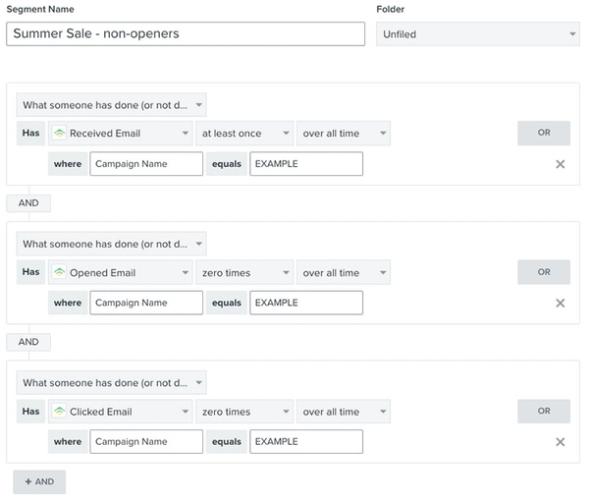
When building a non-opener segment, include both open and click conditions so you do not classify someone who clicked without a recorded open as unengaged. These conditions do not by themselves exclude MPP opens. To exclude those opens from attribution, adjust your attribution settings.
Klaviyo tracks click activity by adding unique tracking information to each URL. As a result, when hovering over a link in a Klaviyo email you may see the URL begin with the example below. Note that this may look slightly different depending on if your account has dedicated click tracking setup.[unique-account-identifier].trk.klaviyomail.com
SMS conversion tracking
For new accounts, the default SMS attribution windows are 5 days for clicks and 12 hours for deliveries. You can edit these windows separately in Settings > Attribution.
SMS attribution can use a delivery or a click when that touchpoint is enabled and qualifies within its configured window. A delivery does not prove that the recipient read the SMS. An eligible action, such as placing an order, can be attributed to that message without a click when delivery attribution is enabled.
Note that in order to track SMS click conversions for a profile, you will need to have sent an SMS message with a link and links must use the Klaviyo link shortener. When setting up your SMS messages, it’s important to have the option checked for Automatically shorten links to ensure you are using the default tracking.
Keep in mind that Klaviyo connects attribution to a customer's interaction with both channels at the time of purchase or action. Learn more about multi-channel attribution and how email and SMS attribution works together.
If you see unattributed conversions, review your enabled touchpoints and attribution windows. Choose windows that reflect how long your customers take to act after a message, rather than extending a window solely to increase attributed conversions.
Push conversion tracking
By default, Klaviyo sets a 24-hour attribution (also called conversion) window for push notifications. You can review and edit your account’s push window in Settings > Attribution.
Attribution for push occurs when a recipient taps on a notification (i.e., opens the push) and then takes another action (such as placing an order) within the attribution window. Thus, the attribution window is the number of hours after a push notification is opened in which Klaviyo will attribute a conversion to that message.
Keep in mind that Klaviyo considers eligible touchpoints across push, SMS, and email. With the default Last touch model, it credits the last eligible touchpoint that meets the attribution window settings.
Multi-channel conversions
What happens when you send messages via multiple channels? Which message will the conversion be attributed to?
Klaviyo’s default Last touch model gives credit to the most recent eligible touchpoint before a conversion, using the configured attribution windows. That touchpoint can be an email open or click, an SMS delivery or click, or a push open, depending on your settings.
Accounts with Personalization or Advanced KDP can also use Linear attribution to share revenue credit across eligible touchpoints. See Understanding attribution model types for details. The example below uses Last touch, a 5-day email window, and a 24-hour push window.
For example, let’s say that:
- A customer receives and opens an email on day 1.
- The same customer receives and opens a push notification on day 2.
If the customer buys the product on day 3, the conversion will be attributed to the push notification. The push is the “last touch” and, as long as the purchase happens within the 24-hour window, the revenue will be credited to that notification.
However, say the customer buys a product on day 4. In this case, the conversion will be attributed to the email. Since the purchase is outside the push conversion window, it can’t be attributed to push. However, the purchase does fall within the email window, so Klaviyo will attribute the conversion to the email.
Email and SMS website tracking
Klaviyo’s web tracking associates onsite events with known profiles. If anonymous visitor tracking is enabled, it can also save activity before a visitor is identified and add that activity to their profile after identification. Learn about anonymous visitor activity backfill.
There are a few different ways Klaviyo identifies a site visitor for web tracking purposes:
- Website tracking enabled
With Klaviyo’s web tracking snippet on your website, Klaviyo can identify and cookie visitors who click through a tracked message link. For email links, turn on email-to-website tracking. SMS links use the Klaviyo link shortener to include the tracking information. - Subscriber opt-in
When someone has, at some point, subscribed/opted-in through a Klaviyo form, web tracking code will cookie this person at the time of opt-in.
To change email-to-website tracking, go to Settings > Email > Tracking, select or clear Turn on email-to-website activity tracking, and select Save. Learn more about email-to-website tracking.
For email-to-website tracking, Klaviyo adds an encrypted _kx parameter to links when that setting is enabled. Tracked SMS links can also include this parameter. Klaviyo’s web tracking uses it to identify the profile that clicked through to your website.
This parameter is automatically appended and should not affect link load times. However, if a URL uses query parameters to trigger a file download, the added _kx parameter can cause the download link to break. Configure your server to ignore _kx. For email links, you can instead turn off email-to-website tracking using the steps above; this applies across your account, not just to one campaign. Learn more about the _kx parameter. The example below shows how it appears in a URL:
http://example.com/?_kx=J8fjcn003Wy6b-3ILNlOyZXabW6dcFwTyeuxrowMers%3D.McN66
Potential discrepancies between Klaviyo and Google Analytics
Klaviyo and Google Analytics can report different conversion totals and assign credit differently because they use different event sources, attribution models, and windows. Klaviyo receives conversion events through your integrations or the API. Google Analytics measures the events sent to it from your website or app.
For example, a customer might open an email on their phone, then visit your store directly on a laptop and purchase. Klaviyo can credit the email if the recorded open and purchase are linked to the same profile and qualify within the attribution window. Google Analytics can record the purchase without crediting the email. Similarly, an SMS delivery can qualify for credit when delivery attribution is enabled, even without a click. Learn more about Klaviyo message attribution.
Use Klaviyo’s conversion analytics to evaluate message performance, and compare attribution settings and event sources when reconciling results with Google Analytics.
Appending UTM tracking to messages
You can add UTM parameters to links in campaign and flow messages, including email and SMS. You can customize your account’s UTM tracking parameters and override them for an individual message.
When UTM tracking is enabled, utm_source and utm_medium are included. You can also enable utm_campaign, utm_id, and utm_term. The values below are the current defaults; saved account settings and custom message settings can differ.
Emails
- Source
Klaviyo - Medium
email - Campaign
Campaign name, when utm_campaign is enabled
SMS messages
- Source
Klaviyo - Medium
sms - Campaign
Campaign name, when utm_campaign is enabled
Flows
- Source
Klaviyo - Medium
Message type, such as email or sms - Campaign
Flow message name, when utm_campaign is enabled
For a custom example, suppose you have a welcome series flow named "Welcome Series", and the first email is named "Intro to our Brand" with the flow email ID A12bc3. If you choose Flow name for utm_source, Message type for utm_medium, and Flow message name (flow message id) for utm_campaign, the values will be:
- Medium
email - Source
Welcome Series - Campaign
"Intro to our Brand (A12bc3)"
Klaviyo’s 5 built-in UTM parameter names are utm_source, utm_medium, utm_campaign, utm_id, and utm_term. Their values are not automatically lowercased. Use consistent capitalization to avoid splitting your Google Analytics results across values such as Email and email.
Additional parameters
You can turn on utm_id and utm_term in Settings > Other > UTM tracking. The options below are examples of values you can select; they are not limited to these parameters. Select Save after changing your account settings.
Emails
- ID
You have the option to include campaign ID, campaign name with campaign ID, external ID, Klaviyo profile ID, or link text or alt text. - Term
You have the option to include external ID, Klaviyo profile ID, or link text or alt text.
SMS
- ID
You have the option to include campaign ID, campaign name with campaign ID, external ID, or Klaviyo profile ID. - Term
You have the option to include external ID or Klaviyo profile ID.
Flows
- ID
You have the option to include flow ID, flow message name with flow message ID, external ID, Klaviyo profile ID, or link text or alt text. - Term
You have the option to include external ID, Klaviyo profile ID, or link text or alt text.
Link text or alt text is available for email flow messages, but not SMS flow messages.
Additional resources
- How to change your attribution model
Learn how to adjust your attribution lookback window settings, remove bot clicks and Apple Privacy opens from attribution, and preview attribution model changes.
- Understanding Klaviyo message attribution
Learn about Klaviyo's event and message attribution or the ability to review which of your messages or channels led to customer actions.
- Getting started with Klaviyo onsite tracking
Learn about the different ways that Klaviyo can support onsite tracking on your ecommerce site. There are 2 key types of onsite tracking:
- Understanding UTM tracking in Klaviyo
Learn what UTM tracking is, how it works, and how you can use it in your Klaviyo messages to gain a deeper understanding of your marketing performance.