Understanding the information section of a profile
Learn about the information section of a profile in Klaviyo, which contains details such as when and how the profile found you and the last time they were active.
What information is available
Open a profile, select the Details tab, and scroll to Information. This section contains the following information:
- The Klaviyo-assigned First active and Last active dates
- How they found you and how they found you recently
- Profile details, such as identifiers, location, and timezone, when available
- The date and time the profile was created
- The date and time the profile was updated
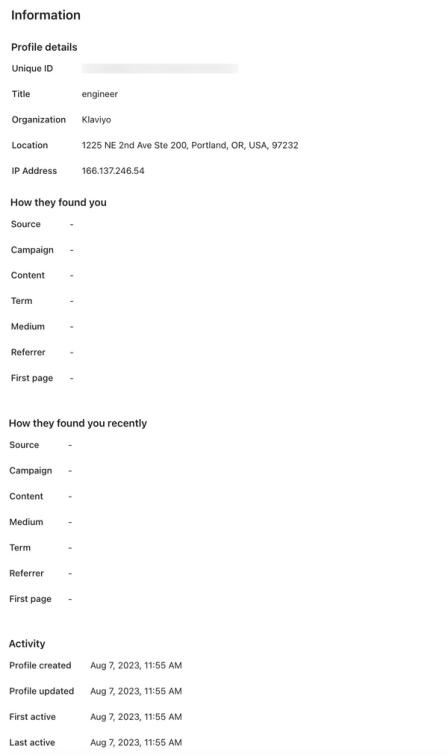
Custom properties appear in a separate Custom properties section on the Details tab. Learn more in the profile properties reference.
First active and last active
First active and Last active are dynamic properties that reflect when a profile interacted with your brand through a tracked active event.
These calculated values are used in flows, segments, and the public APIs. They are refreshed periodically as active events are processed.
- First active: This is the timestamp of the earliest recorded active event for a profile.
- Last active: This is the timestamp of the most recent recorded active event for a profile.
Active vs. passive events
Klaviyo distinguishes between events that represent direct customer engagement ("active") and those that reflect a system action or passive delivery ("passive").
Active events
Active events are used to calculate the first and last active dates. These include:
- All customer-defined event types.
- Klaviyo-defined events that represent a direct action (e.g., Viewed Product, Added to Cart, Placed Order).
Passive events (excluded)
Events that do not update the first active or last active properties include system-level and passive delivery events such as:
- Email delivery events (e.g., Received Email and Bounced Email).
- Messaging relay or receipt events (e.g., Received Push, Received Text Message, Received WhatsApp, Relayed Text Message, and Sent Message).
- Push bounces and automated text responses (e.g., Bounced Push, Bounced Silent Push, and Received Automated Response Text Message).
If someone is manually uploaded to a list, this does not set the first active date. Even if this person receives a message, this property is not created. This property is only set if the person either:
- Opens or clicks a message.
- Takes an action that is tracked by Klaviyo.
The first active date can be before their profile created date. This happens when someone first engaged with your organization before you created your Klaviyo account, but Klaviyo was able to sync historical activity through an integration (with your previous email service provider, for example). In this case, the first active date is set as the contact's earliest recorded active event.
How they found you
To collect How they found you information, set up web tracking on your website. Klaviyo must also be able to identify the visitor.
Source identifies where the contact came from when Klaviyo first recorded their visit. It can contain the utm_source value from the landing-page URL, a referring website or search engine, or (direct). Campaign contains the utm_campaign value when supplied. When the landing-page URL has no UTM parameters, Klaviyo classifies Campaign as:
- (direct)
The person either entered your site URL directly in their browser or Klaviyo doesn't have a referring site to identify. - (referral)
The person came from another website by clicking a link on that site. - (organic)
Klaviyo recognized a search-engine referral with a search term. The search engine appears under Source.
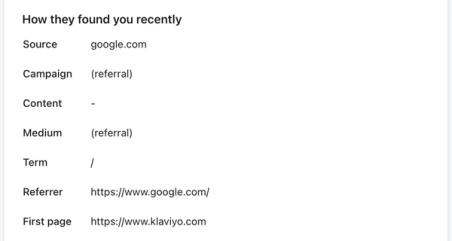
In the example above, this particular contact was referred from Google, meaning they landed on the website after clicking through a Google search.
Campaign, Medium, Content, and Term fields use the corresponding UTM parameters when they are present in the landing-page URL. These parameters can come from email, SMS, ads, or other links:
- Campaign, utm_campaign
This is the campaign name or other value assigned to this parameter. - Medium, utm_medium
The channel through which you sent this content; e.g., email or SMS. - Term, utm_term
This is an optional UTM parameter that marketers can set to track paid search terms. - Content, utm_content
This is an optional UTM parameter that marketers can set to differentiate between ads.
For example, when UTM tracking is enabled for a Klaviyo campaign or flow and someone follows a link to your website for the first time, Klaviyo can record the values below. Account settings and custom message settings determine the values; the current defaults are:
- utm_source
Klaviyo. You can choose another value, such as the list or segment name for a campaign. - utm_medium
The message type, such as email or SMS. Saved custom settings can use a different value. - utm_campaign
The campaign name for a campaign, or the message name for a flow, when this optional parameter is enabled.
Learn how to add UTM tracking to campaigns and flows.
For a visit classified as (referral), (direct), or (organic) under Campaign, Klaviyo does not populate built-in UTM properties, such as UTM Source, from that visit’s referral information. The Information section can still display referral details for these visits.
The First page property will contain the URL of the first page the contact visited after navigating to your website.
Use UTM Source in the segment builder to segment by a tracked UTM source. This property can reflect a later visit, so it may differ from Source under How they found you. To segment by Campaign under How they found you, use Initial Source.
How they found you keeps the first recorded referral information. How they found you recently shows more recent referral information as Klaviyo tracks later visits.
Profile updated and profile created
The Profile created date represents the date a profile was created. As explained above, this date may or may not align with the First active date:
- If someone engages with your organization for the very first time and this activity is synced in real time to Klaviyo, the First active and Profile created dates can be identical.
- The Profile created date reflects the date this person's profile was created by Klaviyo.
- However, if someone engages with your organization for the first time before you start using Klaviyo but you sync or import historic data, Klaviyo backdates a contact's First active date (if this date is available).
- If someone is imported into Klaviyo but there's no tracked activity, there can be a Profile created date but no First active date.
The Profile updated date and time indicates the last time the profile itself was updated, and the Last active date and time matches the time of the latest recorded active event on the profile.
Additional resources
- Profile properties reference
Learn about the difference between custom and Klaviyo properties, how to use them to track information about your subscribers, how to remove them, best practices, and more.
- Understanding active email profiles in Klaviyo
Learn about active email profiles, including how they differ from suppressed email profiles, and how you can contact the people represented by these profiles.
- How to delete, merge, and export a profile
Learn how to delete, merge, and export profiles in Klaviyo in order to keep your account organized. For general information about profiles, head to our article on profiles in Klaviyo.