ボットクリックを追跡するためのカスタムレポートの設定方法
Klaviyo のカスタムレポートを使用して、メール内のボットクリックや非人間によるクリックをトラッキングして分析する方法をご確認ください。
ボットクリックは、メールに悪意のあるフィッシングリンクが含まれていないことを確認するために、受信トレイプロバイダー、モバイルキャリア、またはサードパーティのセキュリティソフトウェアによって実行される場合があります。ただし、これらのクリックは人によって行われるものではないため、誤ったエンゲージメントデータを生み、マーケティング戦略を歪める可能性があります。カスタムレポートでボットクリックをフィルタリングすることで、こうした機械主導のクリックによる影響の合計を確認できます。
カスタムレポートを設定する
ボットクリックを検出するには、シングルメトリックレポートにフィルタを追加する必要があります。ボットクリック機能を有効にしている場合は、キャンペーンレポートとフローパフォーマンスレポートにボットクリックフィルタは必要ありません。
- [分析] > [カスタム レポート] に移動します。
- あらかじめ用意されたレポートを選択するか、いちから独自のレポートを作成するかを選べます。どちらの方法でも、ボットクリックのフィルターを追加できます。
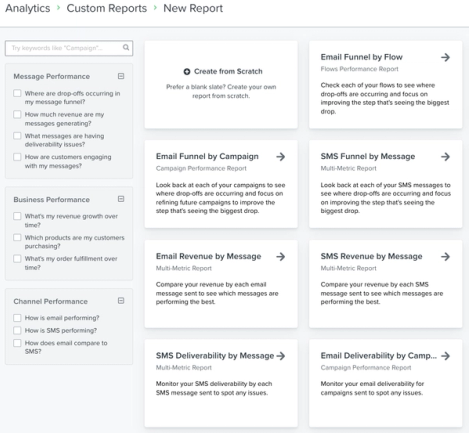
シングルメトリック レポート
- 既存のレポートまたは新しい シングルメトリック レポート内で、グループ または フィルター フィールドをクリックしてドロップダウンを表示します。ボットクリック プロパティは、クリックメトリックでのみ使用できます。
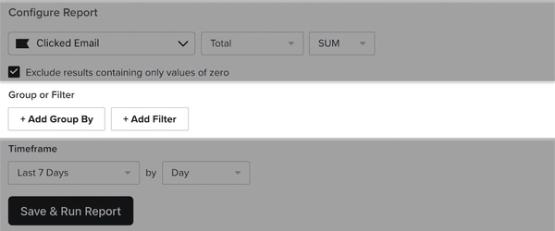
- ドロップダウンからボットクリックのプロパティを検索または見つけて選択してください。
- 任意:+ フィルターを追加オプションを選択した場合、Bot Click equals が True、False、または両方になっていることを確認してください。
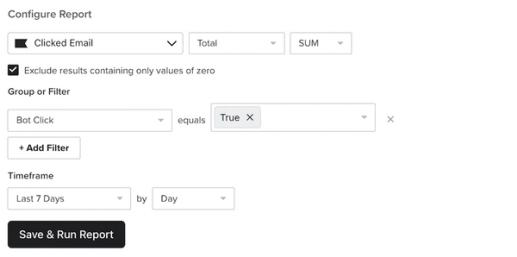
- レポートにこれ以上変更がない場合は、[保存してレポートを実行] をクリックしてください。
データの確認とエクスポート
ボットクリックフィルターを追加したら、データをプレビュー、スケジュール、または未加工データとしてエクスポートできます。後で確認するためにレポートをスケジュールするか、CSV としてエクスポートすることを選択した場合、CSV ファイルには、関連付けられたボットクリック用の新しい列が含まれます。
単一メトリックレポートでは、データのエクスポートに「ボットクリック」というラベルの列が表示されます。ボットクリックが「True」の場合、そのメッセージは機械によるクリックであったことを意味します。
その他のリソース
- Klaviyo でカスタムレポートを始める
Klaviyo のカスタムレポートを使用して、各マーケティング チャネルと個々の商品またはサービスにわたってビジネスの健全性をモニタリングする方法を学びます。これらのレポートを使用すると、データを活用して顧客行動の傾向を明らかにし、一貫したマーケティング戦略に沿ってチームの足並みをそろえ、新たなインサイトに基づいて行動することでビジネスを成長させることができます。Klaviyo のレポート作成を始めたばかりですか?機能別レポートの詳細を確認し、Klaviyo のアナリティクス ツールの概要をご覧ください。
- Apple Mail Privacy Protection(MPP)の開封を追跡するためのカスタムレポートの設定方法
Klaviyo のカスタムレポートで、人為的に水増しされた Apple Mail の開封を追跡および分析する方法をご覧ください。2021年9月に iOS15、macOS Monterey、iPadOS 15、WatchOS 8 がリリースされた際に、Apple は新しい機能である Mail Privacy Protection(MPP)もリリースしました。Apple Mail のユーザーは、Apple Mail の使用中に MPP へのオプトインを選択できます。MPP は、トラッキング ピクセルを事前取得することで、Klaviyo がメールの開封率データを受け取る方法を変更します。その結果、一部の Klaviyo Analytics では、メールの開封数が実際より高く表示される可能性があります。MPP に明示的にオプトインしている購読者の場合、Apple Mail アプリを使用してデバイスに配信されたメールは開封率に影響が出ます(例:MPP にオプトインしている Gmail アカウントを Apple Mail に接続している場合でも、影響を受ける開封に該当します)。「Apple Privacy Open」として表示されるメール開封は、実際にメールを開いたかどうかに関係なく、MPP が有効になっているデバイスを使用している購読者からのものです。MPP が有効な場合、実際の人による開封と自動的な開封を区別する方法はありません。
- デフォルトのアカウント、メール、リストの設定について
タイムゾーン、UTM トラッキング、メール、リストに関して、Klaviyo アカウントで事前設定されている設定について学びます。ビジネスのモデルやニーズに応じて、これらのデフォルトを変更したい場合があります。この記事では、これらのデフォルトのアカウント設定が何であるかを学びます。