Using Composer responsibly (AI disclosure)
Important: This article is for general information only and is not legal advice. Laws around AI-generated content vary by location and change often. This article reflects general guidance as of June 2026. Because requirements in this area are changing quickly, we recommend revisiting this guidance periodically and consulting your legal counsel for advice specific to your situation.
Composer helps you analyze your program and draft on-brand content faster. Because it uses generative AI, there are a few things you stay responsible for when you put that content in front of customers. This article walks through what to review, when to tell recipients that content was created with AI, and ready-to-use disclosure language you can copy.
You will learn
- Why you stay responsible for reviewing and approving AI-generated content
- When you may need to tell recipients that content was created with AI
- How rules around AI-generated people and likeness can apply to your campaigns
- How to disable Composer’s AI image editing and generation
- Ready-to-use disclosure language and where to place it
Your responsibility for AI content
Composer recommends, drafts, and QAs your work, but it does not send anything on its own. You review, edit, and approve everything before it goes live, and you own the final send.
Note: Content in Composer is generated by AI. Please review it and make sure everything looks right before you use or send it. You are ultimately responsible for the content of your messages, including any required legal and regulatory disclosures.
Composer is built to ground its output in facts from your Klaviyo account and connected brand sources, and to avoid referencing products or offers that don't exist. Even so, like any tool built on large language models, it can occasionally produce inaccurate content. Always review generated content, especially prices, discounts, product details, and any factual claims, before you use or send it.
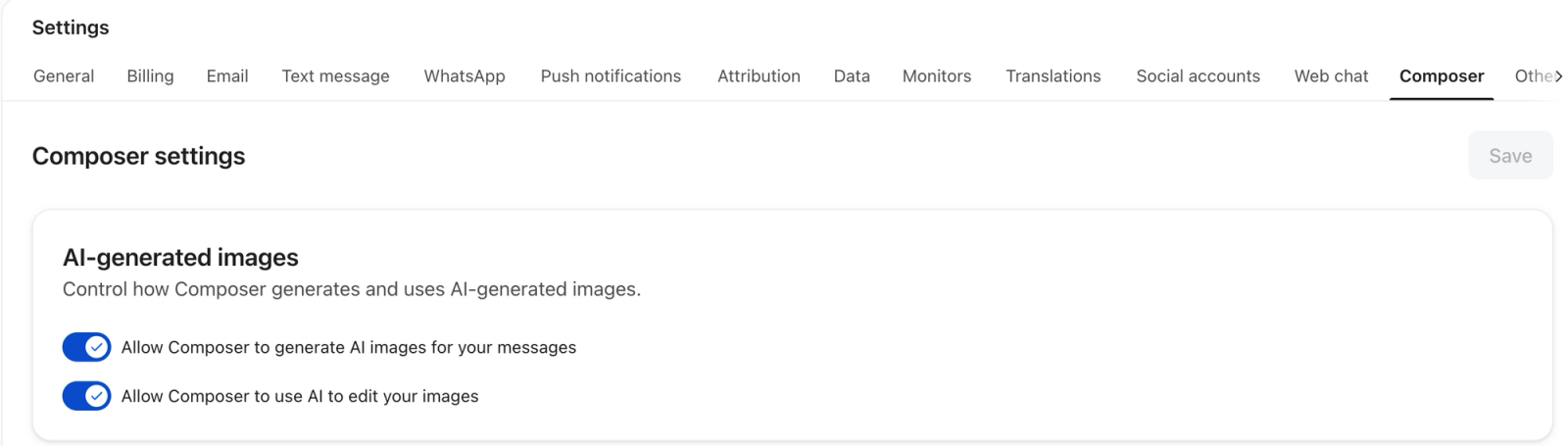
Disable Composer’s AI image editing and generation
You can separately disable Composer’s ability to generate new AI images and to use AI to edit your images. These settings apply across your account. You need permission to edit account settings to change them.
- Navigate to Settings > Composer.
- Under AI-generated images, turn off either or both controls:
- Allow Composer to generate AI images for your messages: controls the generation of new AI images.
- Allow Composer to use AI to edit your images: controls AI edits to existing images, such as changing a background or combining images. This is not limited to images that were originally generated by AI.
- Click Save and confirm that your settings have been saved.
Turning off AI image editing and generation does not prevent Composer from using existing images. You can still provide an image by uploading or linking it, or use an image from your account’s asset library.
When AI disclosure may be required or recommended
Disclosure requirements depend on where your recipients are. This section covers the major markets. If you send globally, read all of it — multiple rules may apply to the same campaign.
United States
The Federal Trade Commission (FTC) treats AI-generated marketing content under its rules against deceptive advertising. If AI created or substantially modified your advertising content (copy, images, testimonials, or endorsements) in a way that could mislead recipients into thinking it is human-created or depicts real people or real experiences, you may need to clearly disclose that AI was involved. This applies even when the underlying information — such as actual customer feedback — is real, but the wording or presentation was generated by AI.
A few practical takeaways:
- AI-generated testimonials and endorsements carry the highest risk. Do not present AI-written content as a real customer review or a personal endorsement of an experience that didn't happen. This includes AI-generated personas that act like influencers — these must be clearly identified as non-human, not presented as real people with real opinions.
- The safest approach is to disclose clearly and conspicuously whenever AI meaningfully shaped what the recipient sees, rather than trying to judge case by case.
- If your content is both sponsored and AI-generated, disclose both. These are separate obligations — a sponsorship disclosure alone is not enough if AI also created or substantially shaped the content.
- Disclosures should be easy to notice at normal viewing size, not buried in fine print.
As a practical rule, disclosure may be needed when omitting the AI involvement would be likely to mislead a reasonable consumer, especially for synthetic people, endorsements, testimonials, product demonstrations, or content that implies real experiences.
New York requires a conspicuous disclosure in certain advertisements that include a “synthetic performer.” A synthetic performer is a human likeness created by AI that is not based on a real, identifiable person, for example an AI-generated model in a product email or promotional campaign. If your campaigns include AI-generated human figures and may reach recipients in New York, plan to include a clear disclosure.
There is also a broader New York rule that requires disclosure whenever AI substantially generated your advertising content, not just when it includes AI-generated people. Both requirements are now in effect.
European Union
The EU AI Act introduced transparency requirements that apply to marketing content sent to EU audiences. In practice, this means two things:
- Your recipients must be told when content was artificially created or manipulated by AI. A clear, visible disclosure in the message itself satisfies this.
- AI-generated images, video, and audio must also carry embedded technical identification — markers built into the file itself that identify it as AI-generated.
Klaviyo handles this technical marking for images created through Composer. If you bring in AI-generated assets from other tools, check that the identification data is still intact — avoid running those files through additional processing or conversion steps before importing them, as that can strip the embedded markers out.
Note: Across all markets, the safest default is to disclose clearly and consistently whenever AI meaningfully shaped what your recipients see. That approach holds up well regardless of which jurisdiction's rules apply.
Content rules that apply everywhere
Beyond disclosure, a few rules apply regardless of where you are sending.
Don't create fabricated testimonials
Do not send AI-generated content that reads as a customer review, testimonial, or personal endorsement of an experience that didn't actually happen. A common example to avoid is a synthetic, AI-generated person appearing to vouch for a product ("I love these track pants").
This also means: do not present AI-generated content as a real customer review even when the underlying sentiment is real. If AI wrote the words, say so. This is the highest-risk area across all major markets, so keep testimonials and endorsements grounded in real customers and real experiences.
Likeness, copyright, and IP
Using AI to create content does not exempt you from copyright, trademark, or right-of-publicity law.
- Do not use AI to depict real, identifiable people without their permission. For example, you cannot put a recognizable public figure into a promotional image.
- Do not use AI to generate content that copies protected or branded material you don't have rights to use.
- Be aware that AI-generated content may not be protected by copyright the way traditionally created content is. If owning your campaign assets matters to your business — for example, if you want to reuse or license them — talk to your legal counsel about what level of human creative input is needed to establish ownership.
When in doubt, treat AI-generated images and copy the same way you would treat any other asset: make sure you have the rights to use what's in them.
Keep AI provenance metadata intact
Keep AI provenance metadata intact
In a growing number of markets, preserving embedded AI identification information in your images and other media is not just good practice — it's becoming a legal requirement. When you use Klaviyo's AI-generated images, we handle the technical side of this. Some AI-generated images carry hidden, machine-readable information that identifies them as AI-generated. When you use AI images in your messages, avoid running them through tools that re-process or re-encode the image in a way that strips out this information before you send.
In short: don't remove the AI provenance data that comes with an AI-generated image.
Ready-to-use disclosure language
Choose disclosure language that accurately describes what AI created or changed in your message. You can copy a matching example below or write your own clear, conspicuous wording. In particular, only describe people as people who do not exist if the images depict fictional, AI-generated people rather than AI-edited images of real people.
AI disclosure language by scenario | ||
Option | When to use it | Example disclosure text |
|---|---|---|
Option 1: AI copy or non-human imagery | Use this when AI generated copy or non-human imagery such as product shots or abstract visuals. Use the second example only if your message contains both AI-generated copy and images. | "This message was created with AI assistance." or “This message contains AI-generated copy and images.” |
Option 2: Images of fictional, AI-generated people | Use this when your message includes images of fictional, AI-generated people who do not exist. Do not use this wording for AI-edited images of real people. | "This message contains AI-generated content, including images of AI-generated people who do not exist." |
Option 3: Short-form (SMS, WhatsApp, or space-constrained messages) | Use this when space is tight, such as in an SMS or WhatsApp message. Place it prominently, for example at the start of the message. Choose wording that matches the content: only mention images if they are included, and AI-generated people if fictional people appear. | “AI-generated content.” With images: “AI-generated content, including images.” If fictional, AI-generated people appear: “Includes AI-generated people.” |
Option 4: Your own wording | You can also write your own disclosure in your own words, as long as it's clear and conspicuous. | (Your own clear, conspicuous wording.) |
Note: Place disclosures clearly and conspicuously, not buried in fine print. These examples are not a guarantee of legal compliance. Confirm the right wording and placement for your business with your own legal counsel.
Where to place disclosures
How you place a disclosure matters as much as the wording. Follow these placement rules:
- Email: Place the disclosure in a clearly visible position, near the top of the email or in a footer that is visually distinct. Do not bury it in legal fine print at the very bottom.
- SMS or WhatsApp: Place the disclosure at the start of the message, before the main content.
- Font size: The disclosure must be at least the same size as the surrounding body text, so it's noticeable at normal viewing size.
- Persistence: The disclosure must remain visible throughout the message. Do not place it only on a landing page or behind a click.
Additional resources
- Start with getting started with Composer.
Meet Composer, Klaviyo's AI marketing agent. See what it can analyze, audit, and create, including campaigns, flows, and segments, and how credits work.
- See how to create campaigns with Composer.
Create email, push, SMS, and MMS campaigns with Composer, Klaviyo's AI marketing agent. Brief a goal, review and edit the draft, and approve before sending.
- Read about Composer credits and billing.
Learn how Composer credits work: your 90-day free access, what each action costs, how rollover works, and how to track usage in Klaviyo.