Getting started with Discount Affinity
Discount Affinity is in Preview for selected Personalization accounts. If your account is included, it's already on. To ask about access, contact your customer success manager or contact support.
Discount Affinity shows how often each customer has bought with a discount compared with your typical customer. Use it to keep discounts away from customers who usually pay full price, and to save your best offers for customers who usually buy on a deal.
Before you begin
- A Personalization (formerly Marketing Analytics) or Advanced KDP plan
- An account in the Discount Affinity preview
- Orders from Shopify, WooCommerce, BigCommerce, Magento 1, Magento 2 (Adobe Commerce), PrestaShop, or Salesforce Commerce Cloud
- At least 100 orders in the last 2 years where Klaviyo can tell whether a discount was used, with some discounted and some at full price
Understand the four values
Klaviyo compares how often each customer used a discount in the last 2 years with how often your typical customer does, so you get a useful mix whether you discount often or rarely.
Value | Reason shown on the profile |
|---|---|
Deal seeker | Uses discounts more than your typical customer |
Mixed buyer | Uses discounts a typical frequency |
Full-price buyer | Uses discounts less than your typical customer |
Unknown | Not enough orders |
Values are based on past orders, so a Full-price buyer can still use a discount. A customer with 1 or 2 orders leans toward your store's typical rate. Unknown is usually your largest group, and it shrinks as customers place orders.
Where to use Discount Affinity
Where | What you can do |
|---|---|
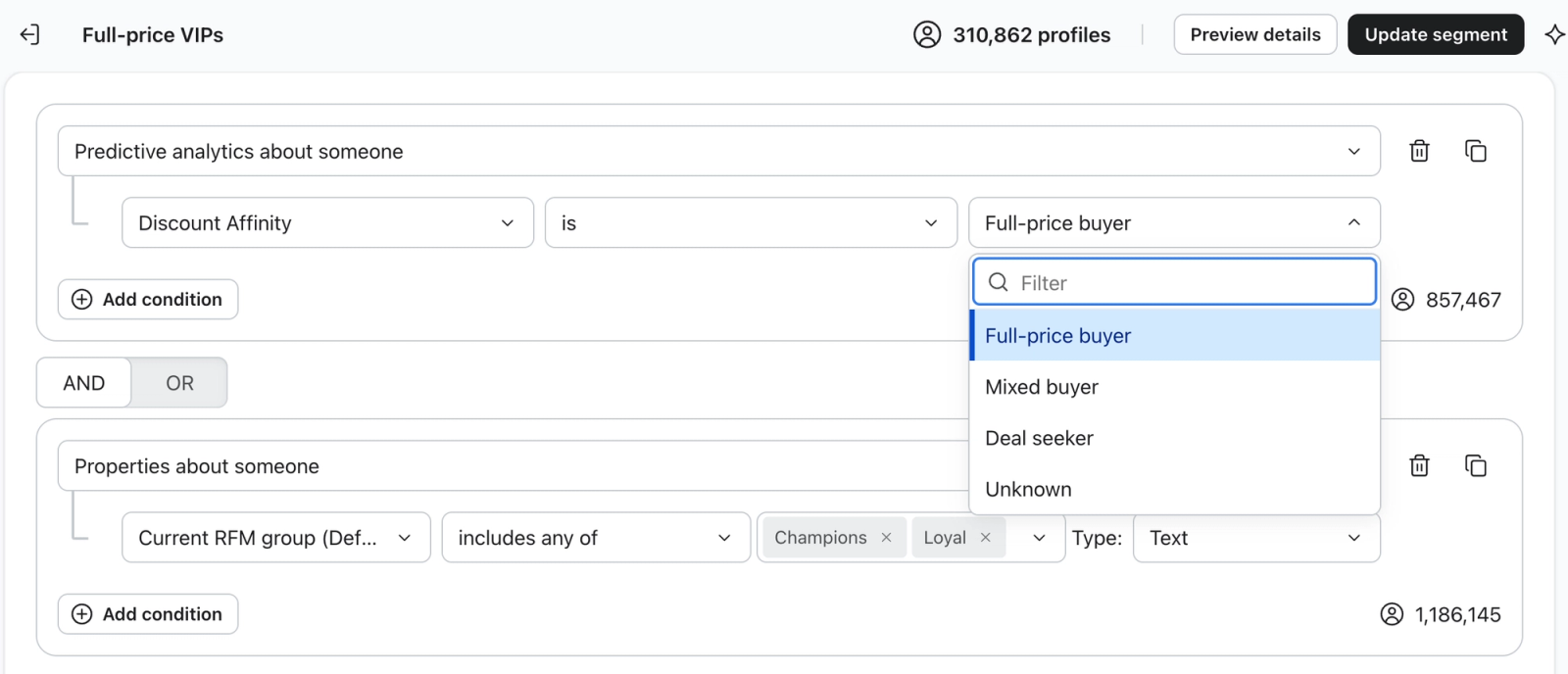
Segments and campaigns | Add a Discount Affinity condition, combine it with any other condition, and send to or exclude the segment. |
Starter segments | Use or edit Deal seekers and Full-price buyers, which Klaviyo creates automatically in Lists & segments. |
Flows | Use it in profile filters and splits, or trigger a flow when someone joins a Discount Affinity segment. |
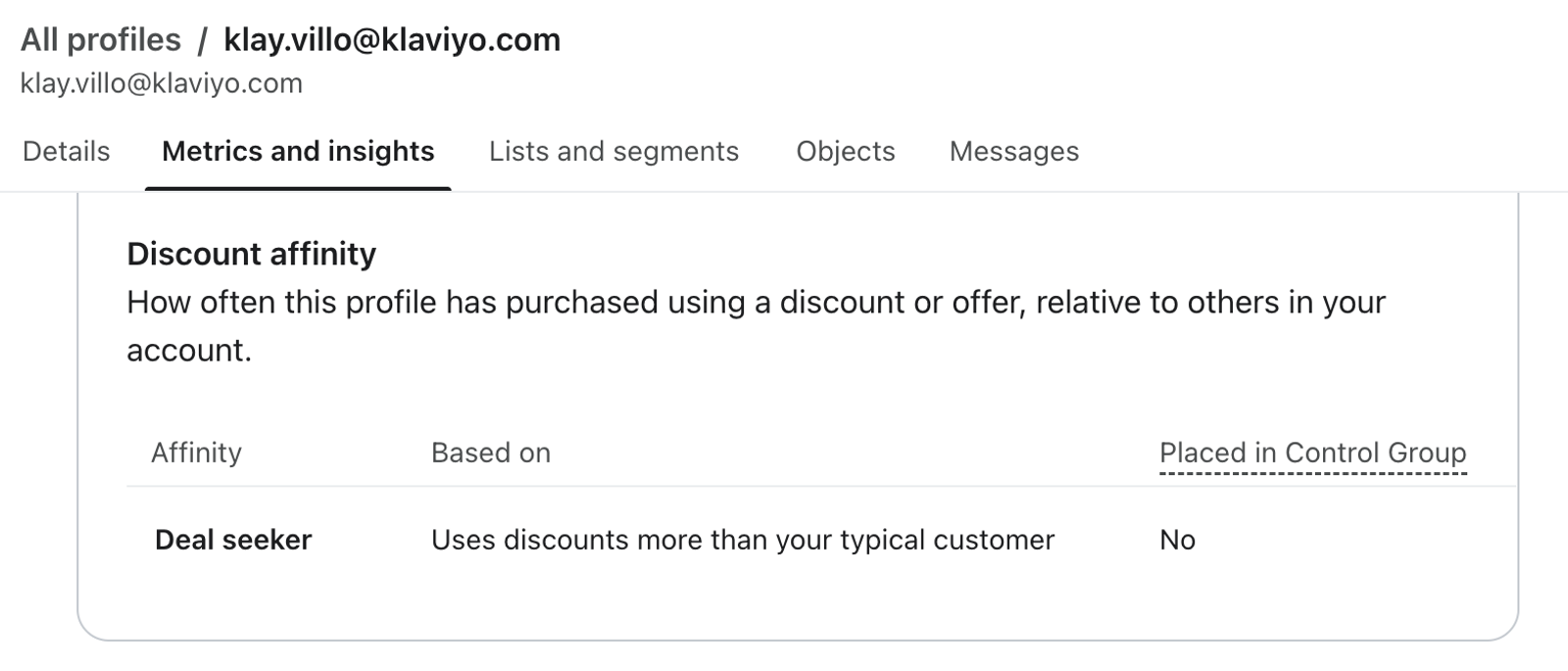
Profiles | See the value and its reason in the Metrics and insights tab. |
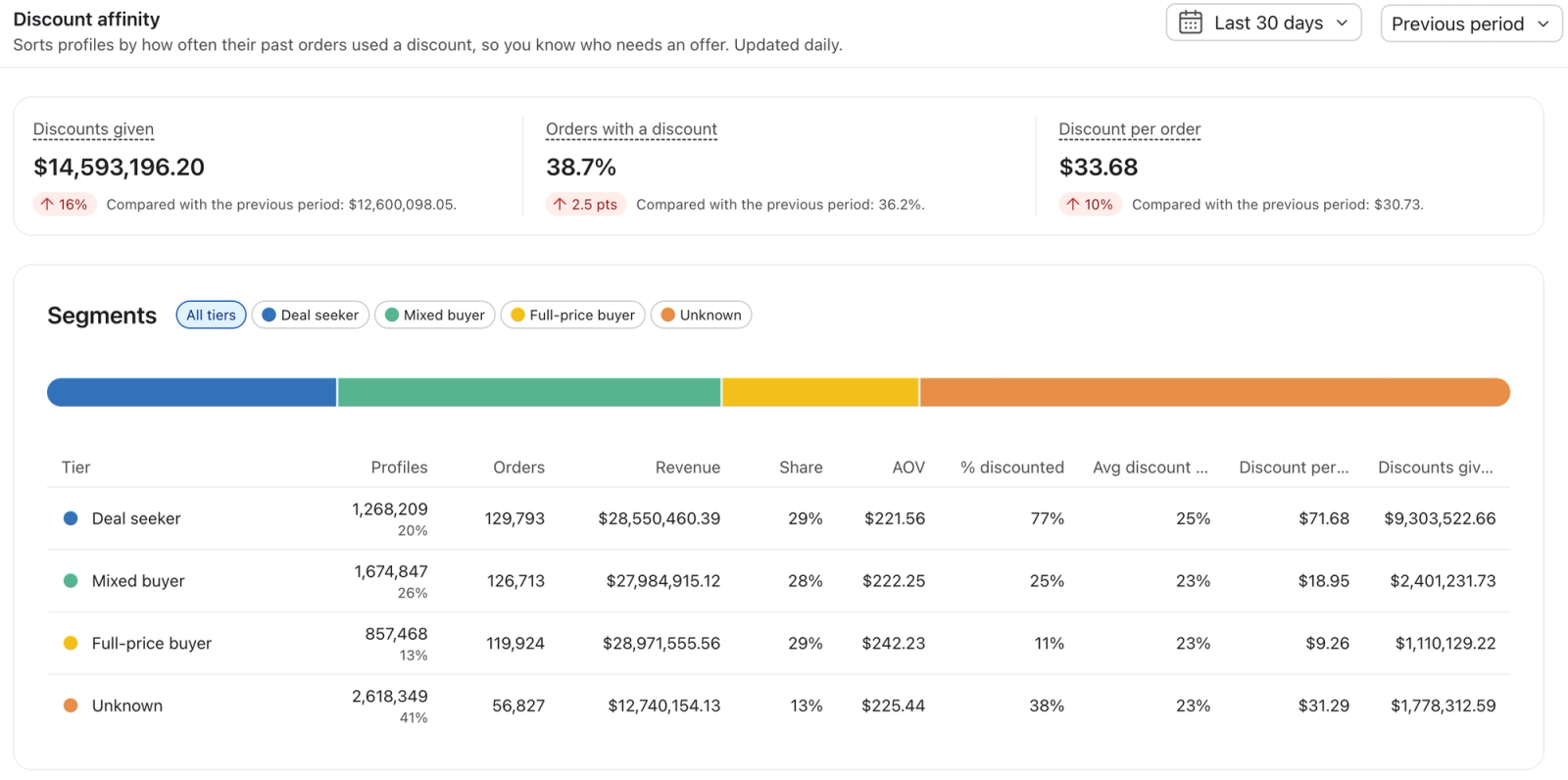
Personalization overview | On Personalization Overview > Discount Affinity page, see discounts given, orders, average discount value, and customer lifetime value (CLV) for each affinity group. |
Exports | Find a Discount Affinity column in list and segment exports. |

Create a Discount Affinity segment
- Go to Audience > Lists & segments.
- Click Create new > Segment.
- Under Definition, choose Predictive analytics about someone > Discount Affinity.
- Choose is or is not, then a value.
- Add any other conditions, then click Create segment.
Split a flow by Discount Affinity
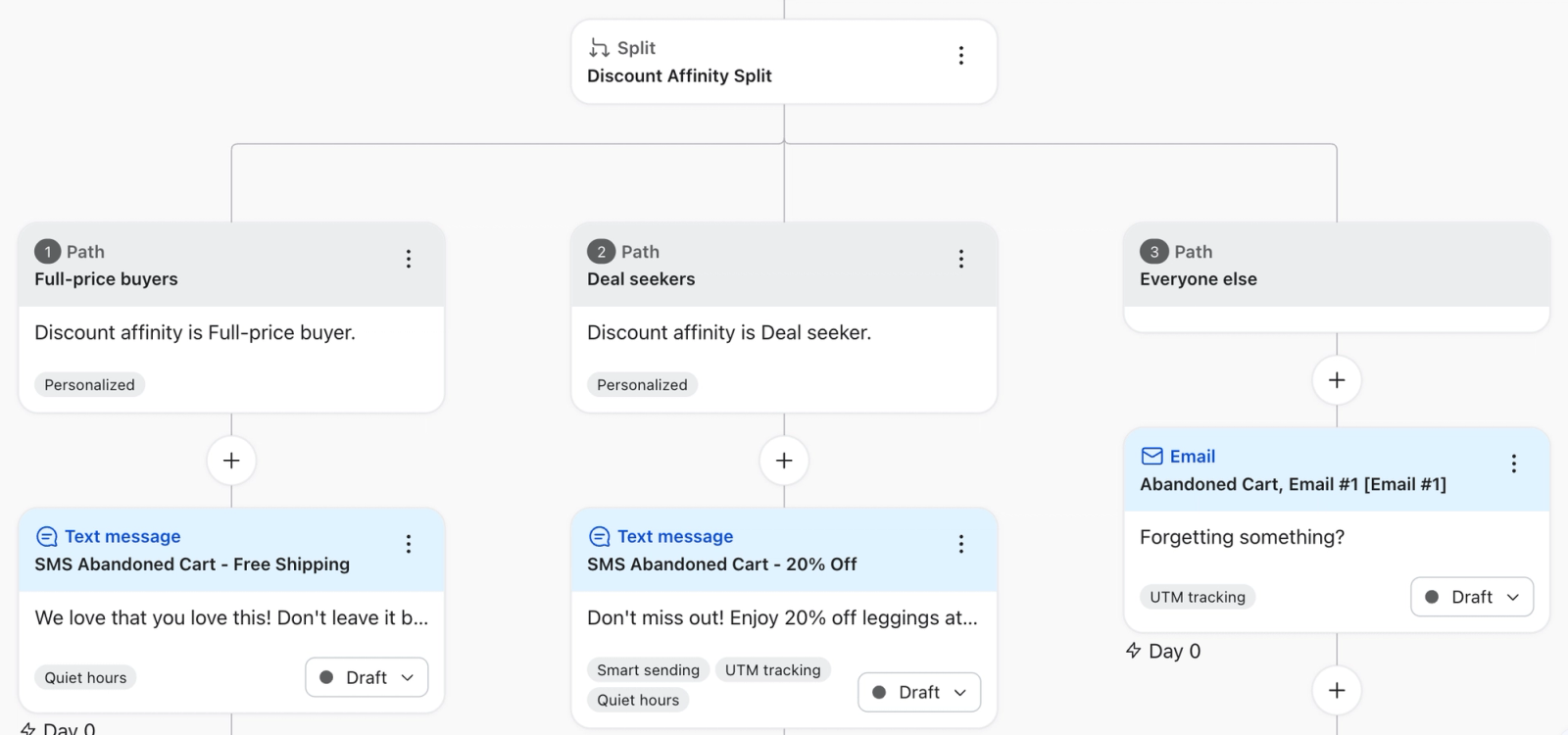
Add a Split and create a path for each value you want to treat differently. Paths are checked in order. For example, in an abandoned cart flow:
- Discount Affinity is Full-price buyer: a reminder with a light offer or no offer at all
- Discount Affinity is Deal seeker: a reminder with your strongest discount.
- Everyone else, including Unknown: your standard reminder.
How the control group works
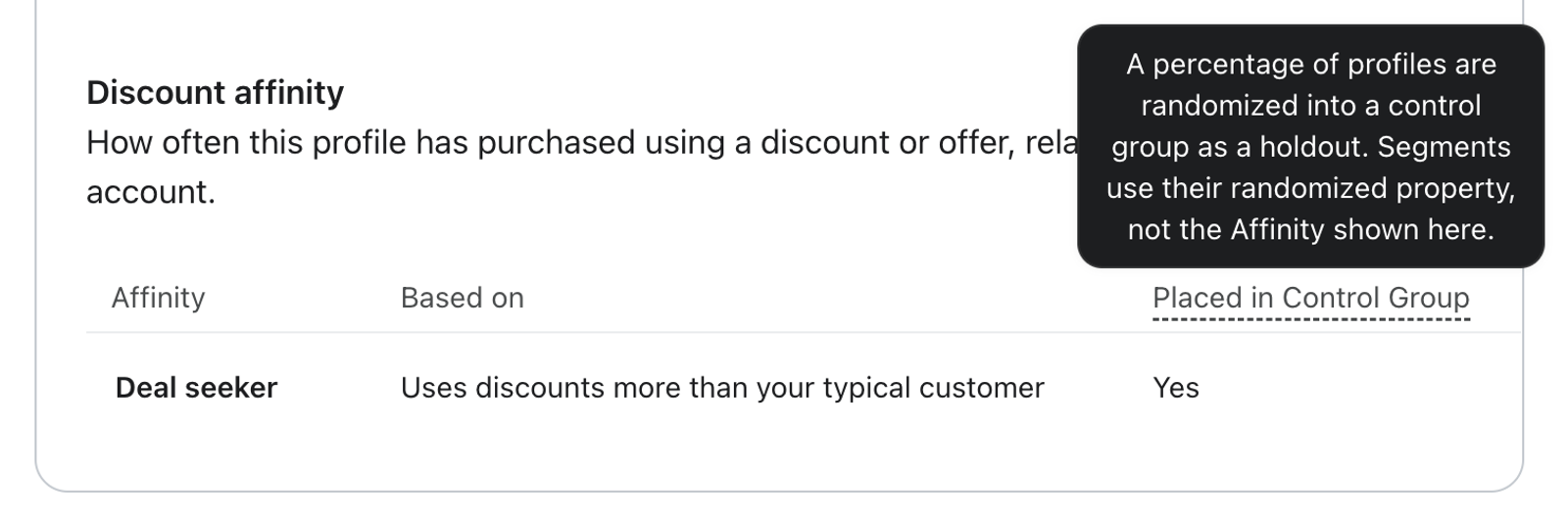
To measure results, Klaviyo puts a small percentage of profiles in each beta account in a control group. Everywhere except the profile page, these profiles use a randomized value. Segment sizes still match your actual mix.
The profile page shows the actual value with a Control group label, which is why a profile can sit in a segment that doesn't match its profile page. You can't turn off the control group during the beta.
What counts as a discount
An order counts as discounted when the order records a discount, whatever its purpose or size. Klaviyo reads discounts from orders only, so the offers in your messages don't affect values.
Discount | Counts? |
|---|---|
Discount codes, percent or amount off, any size | Yes |
Automatic promotions, including buy-one-get-one and free gifts recorded as a discount | Yes |
Staff, point-of-sale, price-match, and sales channel discounts, like TikTok Shop | Yes |
Welcome and first-order offers | Yes |
Loyalty, VIP, and member discounts | Yes, when recorded on the order. Points used as payment don't count. |
Bundle, subscription, and volume pricing | Only when recorded as a discount |
100%-off orders, including replacements | Yes |
Free shipping | Depends on your integration |
Sale, compare-at, and markdown prices | No |
Gift cards and store credit | No |
A discount code with no discount amount | No |
If your store runs sales mostly by lowering product prices, customers who shop your sales can show as Full-price buyers. Check a few profiles in your Full-price buyers segment before you exclude it from an offer.
Free shipping by integration
- Shopify: Counts, including free shipping recorded at $0 or earned over a spend threshold.
- WooCommerce: Counts when a coupon applies it.
- Magento 2 and BigCommerce: Counts only when the order records a discount amount.
- Salesforce Commerce Cloud: Doesn't count. Line-item price adjustments do.
Discount Affinity reporting
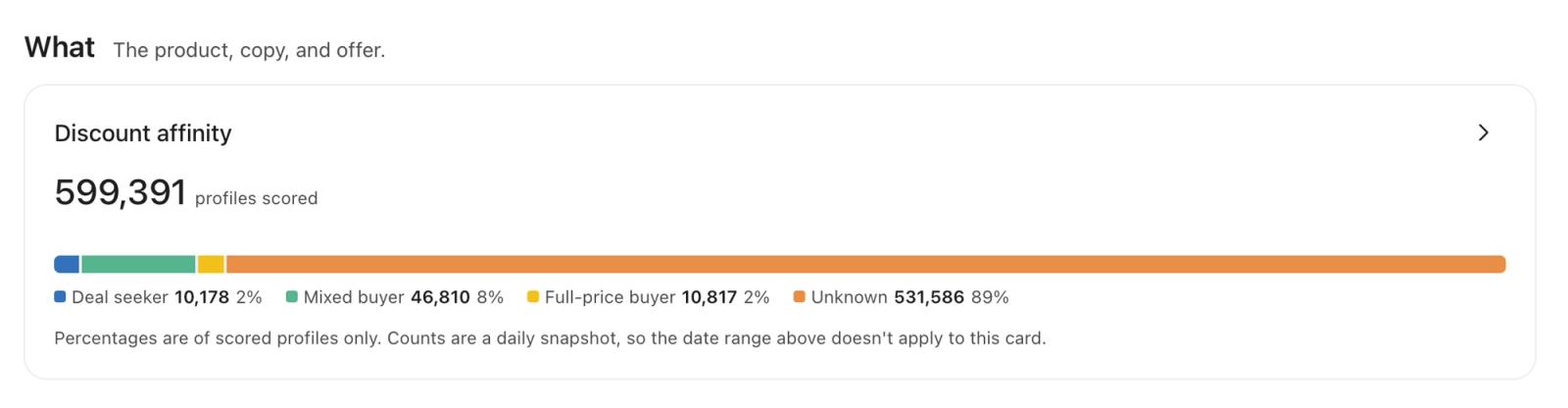
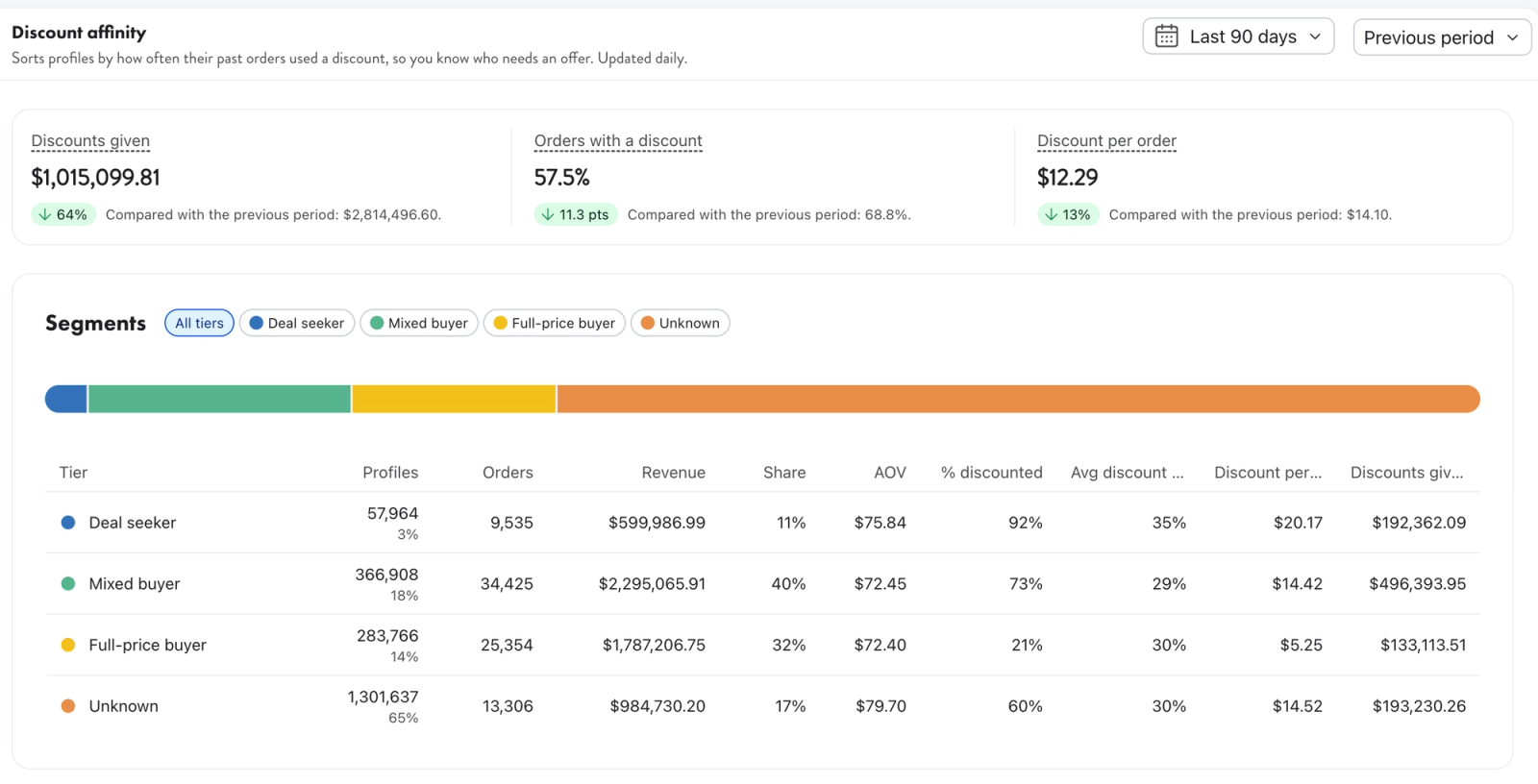
Understand how your profiles are grouped into discount affinities, and the behavior and values of each group like total discounts given, percentage of orders with a discount and average discount value.
You can find your Discount Affinity dashboard by navigating to Personalization > Overview and clicking > on right side of the Discount Affinity card.
Best practices
- Exclude Full-price buyers from discounted sends, and send them the same message without the code, or a less aggressive discount.
- Decide what Unknown gets. It's usually most of your list, so keeping it on your standard offer is a safe default.
- Save your deepest offer for Deal seekers.
- Pair with RFM groups. Full-price buyers who are Champions or Loyal are a good audience for early access.
- Watch for welcome codes. To reach repeat deal seekers, add a condition for more than 1 order.
Things to know
- Values update once a day. A new order affects a value about 2 days after it's placed. New profiles show Not scored yet until the next update.
- Suppressed and unsubscribed profiles don't get a value and match neither is nor is not, so segments won't add up to your total profiles.
- Orders on a different profile don't count. Refunded or canceled orders count as first placed.
- You can't yet change the cutoffs, the 2-year window, or what counts as a discount.
- Accounts hosted in Klaviyo's EU data center aren't part of the beta.
- Developers can read values from the Profiles API.