Understanding how to create a list using converted profiles
You will learn
Learn how to create a static list of profiles who converted from 1 or more previously sent campaigns. Use these lists to send targeted upsell and cross-sell campaigns or exclude profiles who converted from follow-up sends.
This is a one‐time population: the list is a snapshot of converters at the time you create it and does not update automatically with new conversions. Currently, attribution data like attributed message (ex. the message an order was attributed to) is not available in segmentation, and the differences between lists and segments can be found here
Adding converted profiles to a list
Before adding profiles to an existing list, review any flows triggered by that list. Newly added profiles can enter those flows.
- Navigate to Audience > Lists & segments.
- Select the list you want to add your contacts to (e.g., Newsletter).
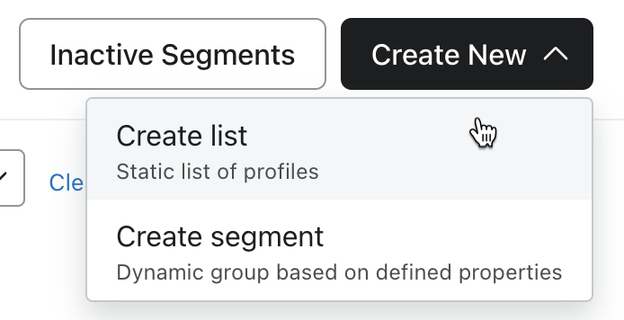
- If you want to create a new list, select Create > List, enter a name, and click Create list.
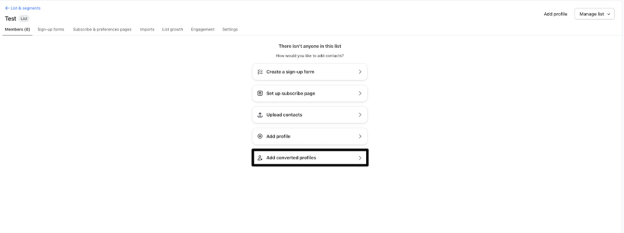
- If the list is empty, click Add converted profiles.
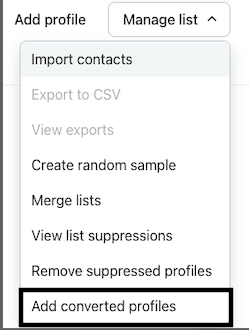
- If the list already has profiles, select Manage list > Add converted profiles instead.
- Select the Conversion metric you want to use. For example, select Placed Order to include profiles whose purchases were attributed to the selected campaigns.
Use Date range to filter campaigns by send date and Channels to filter by channel. The date range defaults to the last 30 days, so expand it to find older campaigns.
- Select 1 or more campaigns. The preview updates to show the approximate number of profiles who converted. Duplicate profiles are resolved when profiles are added, and profiles already in the list are not added again.
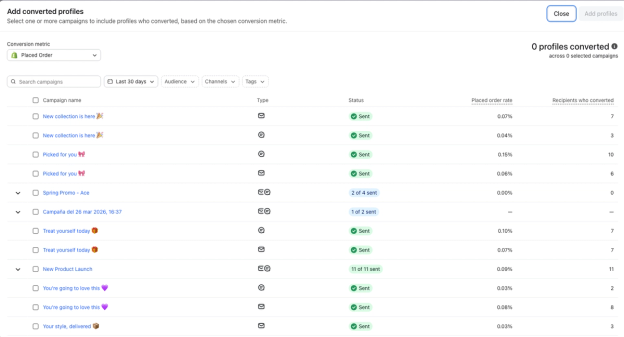
- When you are finished selecting campaigns, click Add profiles. Profiles may take a few minutes to appear. Wait for processing to finish before using the list for a campaign.
Example use cases
Here are a few common patterns for this feature:
- Exclude converters from follow‐up sends
- Create a list of profiles who converted from your BFCM campaign.
- Exclude that list from future reminder or sale campaigns so you don’t keep pushing the same offer to people who already purchased.
- Create a cross‐sell audience
- Build a list of profiles who converted from a specific product-launch campaign.
- Use that list as the audience for a follow‐up campaign highlighting accessories, refills, or complementary products.
- Re‐engage high‐intent converters
- Create a list of profiles who converted from “winback” or “back‐in‐stock” campaigns.
- Use this list in a flow or campaign journey designed to move them toward a higher-value purchase or subscription.