How to use Customer Hub with Shopify Markets
You will learn
Learn how to integrate Shopify Markets with Customer Hub to ensure your product information, currency, and pricing match the local "market" context your customer is browsing.
Requirements
- You must have a Shopify store with Shopify Markets configured.
- You must have Klaviyo Customer Hub installed and active.
Overview
If you use Shopify Markets to sell in multiple regions, Customer Hub can automatically adapt to your customers' locations and show them the appropriate product information for that market.
By integrating with Shopify Markets, Customer Hub ensures that the product information, currency, and pricing displayed in the portal match the local context.
How it works
When a customer visits your site, Shopify detects their country and locale (often based on IP address or a currency selector). Customer Hub piggybacks on this detection.
When Shopify Markets support is enabled in Klaviyo, Customer Hub will:
- Localize Product Catalogs: Product names, descriptions, and availability will match the specific market settings in Shopify.
- Display Local Currencies: Orders, recent purchases, and product recommendations will display the correct currency and price for that specific market.
- Align with Onsite Language: The language displayed in the Hub will attempt to match the language currently active on your Shopify storefront.
Note: While Customer Hub supports localization, the AI Agent and Inbox features currently support English only.
How to set up Shopify Markets support
Shopify Markets support works automatically and seamlessly in Customer Hub, with no setup required. For existing customers with an older Shopify integration, you may want to confirm that you have given Klaviyo the right scope. Here's how to confirm:
- In Klaviyo, navigate to Service - Customer Hub
- On the dashboard if you see this warning, click "fix Shopify" and follow the instructions
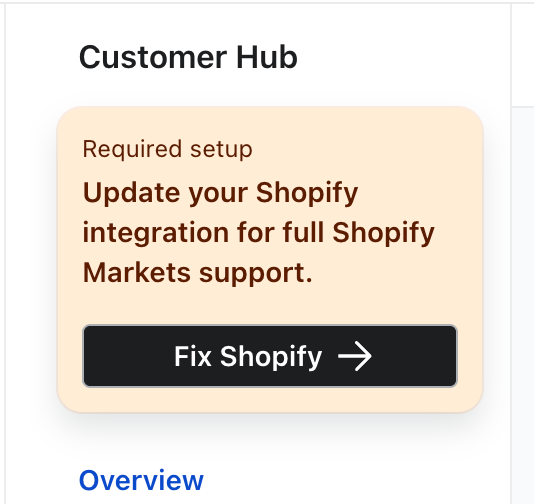

- If you do not see the warning, then your Shopify integration is already up-to-date, and Shopify Markets support is working properly.
If your Shopify integration is out of date, most of Customer Hub's functionality will still work with Shopify Markets (e.g. showing the correct translated product names, currency symbols, prices), but products may show in unavailable markets within Customer Hub, such as in recommendations, recently viewed, and favorited products.
Troubleshooting
Why is the wrong currency showing? Customer Hub relies on the window.Shopify.country and market context detected by your theme. Ensure your Shopify theme is correctly switching contexts when a user changes their region.
Why are some products missing in the Hub? If a product is not published to a specific market in your Shopify settings, it will not appear in the Customer Hub for customers in that region.