Guesty data reference
Learn what data syncs from Guesty to Klaviyo and where to view it. This includes reservation, guest, and message information. If you have not already, read our guide on getting started with Guesty for step-by-step instructions on integrating, before continuing with this article.
Sync frequency
When you integrate with Guesty, Klaviyo will sync all historic reservation and guest data. Going forward, reservation, message, and guest data sync in real time.
How to view your Guesty data
To view your Guesty data:
- Navigate to Analytics > Metrics.
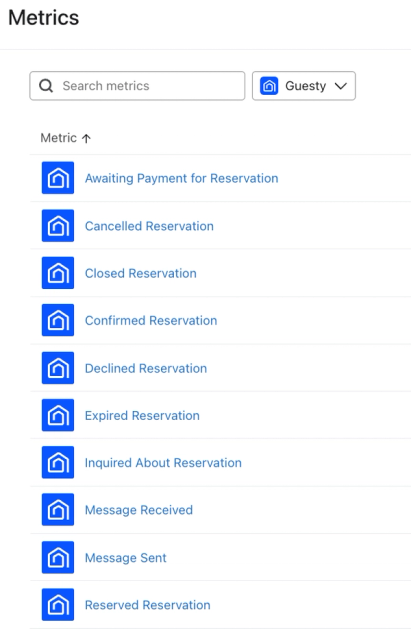
- Here, you can view all of the metrics in your account. The metrics with a Guesty icon represent all of the metrics synced from your Guesty integration.
- Use the Integration filter and select Guesty to view only Guesty metrics.
Reservation metrics
The following reservation metrics are synced from Guesty:
- Confirmed Reservation
When a guest’s reservation is confirmed in Guesty. - Cancelled Reservation
When a staff member or guest cancels a confirmed reservation. - Closed Reservation
When a staff member manually changes the status of Inquiry or Reserved to Closed to decline a reservation. - Declined Reservation
When a guest declines a reservation in Reserved status. - Expired Reservation
When the time to approve a Reserved reservation is over. - Reserved Reservation
When a guest requests to book a property. To make the reservation Confirmed, a staff member has to confirm it. - Inquired About Reservation
When a guest asks a general question but hasn’t submitted a formal booking request. - Awaiting Payment for Reservation
When a staff member has already confirmed a reservation but the guest's payment hasn't been processed yet.
For each of these metrics, the following top-level properties are synced to Klaviyo:
- Returning Guest
Whether the guest has ever made a reservation in the past (true/false). - Guests Count
The total number of guests on a reservation. - Number of Adults
The total number of adults on a reservation. - Number of Children
The total number of children on a reservation. - Number of Infants
The total number of infants on a reservation. - Reservation ID
The reservation ID from Guesty. - Inquiry ID
The Inquiry ID from Guesty for the Inquired About Reservation event. - Confirmation Code
A unique ID for a guest’s reference as confirmation the reservation is booked. - Reservation Status
The status of the reservation. - Check-in Date
The reservation check-in date in the listing’s local timezone, in YYYY-MM-DD format. - Check-in Date and Time
The reservation check-in date and time in UTC format (i.e., YYYY-MM-DDThh:mmTZD). - Check-out Date
The reservation check-out date in the listing’s local timezone, in YYYY-MM-DD format. - Check-out Date and Time
The reservation check-out date and time in UTC format (i.e., YYYY-MM-DDThh:mmTZD). - Nights Count
The total number of nights for a reservation. - Booking Source
Where the reservation originated from (e.g. Airbnb, VRBO, manual, etc.) - Accommodation Fare
The basic price of a reservation, calculated from the listing's base price. Equal to the sum of the nightly rates for the reservation dates. - Accommodation Fare Discount
The discount amount (if any) applied to the Accommodation Fare. - Currency
The type of currency used for the reservation. - Cleaning Fee
The total amount charged for cleaning. - Total Fees
The total amount of fees. - Total Taxes
The total amount of taxes. - Host Payout
The gross amount that the host is paid out on a reservation. - SubTotal Price
The subtotal price. - Balance Due
The amount due by the guest. - Payments Due
The amount of payments due by the guest. - Is Fully Paid
If the reservation is fully paid for or not. - Total Paid
The total amount already paid by the guest. - Total Refunded
The total amount refunded to the guest. - Listing ID
The ID of the property on the reservation. - Listing Address
The address of the property on the reservation. - Listing Thumbnail
The thumbnail image URL of the property on the reservation. - Listing Public Description Summary
The public description of the property on the reservation. - Listing Amenities
The amenities available on the property on the reservation. - Listing Nickname
The internal nickname of the property on the reservation. - Listing Title
The public listing title of the property on the reservation. - Listing Property Type
The listing’s property type. - Listing Room Type
The listing’s room type. - Listing Default Check-in Time
The default check-in time for the listing. - Listing Default Check-out Time
The default check-out time for the listing. - Listing Timezone
The listing's timezone. - Account ID
The Guesty account ID associated with the reservation.
Message metrics
Klaviyo syncs 2 metrics that reflect messages in Guesty:
- Message Sent
Message sent to a guest. - Message Received
Message received from a guest.
Message events require a valid email address. If Guesty only has an email address that Klaviyo excludes as an online travel agency (OTA) address, or only a phone number, Message Sent and Message Received events do not sync.
Message Sent
Each Message Sent metric synced to Klaviyo has the following properties:
- Reservation ID
- Confirmation Code
- Check-in Date
- Check-out Date
- Guest Name
- Guest ID
- Message Language
- Message Read
- Message Priority Rating
- Message Snoozed Until
- Message Conversation With
- Message Subject
- Message Type
Message Received
Each Message Received metric synced to Klaviyo has the following properties:
- Reservation ID
- Confirmation Code
- Check-in Date
- Check-out Date
- Guest Name
- Message Last Updated by Guest
- Message Platform
- Message Subject
- Message Priority Rating
- Created At
- Guest ID
- Last Modified
- Message Type
Reservation objects
Reservation objects require an updated Guesty integration with permission to sync objects. If needed, follow the steps to update your Guesty integration.
To view your Guesty reservation objects, navigate to Content > Objects.
For each reservation object, the following top-level properties are synced to Klaviyo:
- Value
The host payout for the reservation. - ProfileEmail
The guest’s email address, excluding OTA-masked email addresses. - ProfilePhoneNumber
The guest’s phone number. - GuestsCount
The total number of guests on a reservation. - NumberOfAdults
The total number of adults on a reservation. - NumberOfChildren
The total number of children on a reservation. - NumberOfInfants
The total number of infants on a reservation. - ReservationID
The reservation ID from Guesty. Used as the object ID. - InquiryID
The inquiry ID from Guesty. - ConfirmationCode
A unique ID for a guest’s reference as confirmation the reservation is booked. - ReservationStatus
The status of the reservation. - CheckInDate
The reservation check-in date. - CheckOutDate
The reservation check-out date. - CheckInDateAndTime
The reservation check-in date and time in UTC format (i.e., YYYY-MM-DDThh:mmTZD). - CheckOutDateAndTime
The reservation check-out date and time in UTC format (i.e., YYYY-MM-DDThh:mmTZD). - NightsCount
The total number of nights for a reservation. - ReturningGuest
Whether Guesty identifies the guest as a returning guest (true/false). - BookingSource
Where the reservation originated from (e.g. Airbnb, VRBO, manual, etc.) - AccommodationFare
The basic price of a reservation, calculated from the listing’s base price. Equal to the sum of the nightly rates for the reservation dates. - AccomodationFareDiscount
The discount amount (if any) applied to the accommodation fare. - Currency
The type of currency used for the reservation. - CleaningFee
The total amount charged for cleaning. - TotalFees
The total amount of fees. - TotalTaxes
The total amount of taxes. - HostPayout
The gross amount that the host is paid out on a reservation. - SubTotalPrice
The subtotal price. - BalanceDue
The amount due by the guest. - PaymentsDue
The amount of payments due by the guest. - IsFullyPaid
If the reservation is fully paid for or not. - TotalPaid
The total amount already paid by the guest. - TotalRefunded
The total amount refunded to the guest. - ListingID
The ID of the property on the reservation. - ListingThumbnail
The thumbnail image URL of the property on the reservation. - ListingPublicDescriptionSummary
The public description of the property on the reservation. - ListingAmenities
The amenities available on the property on the reservation. - ListingNickname
The internal nickname of the property on the reservation. - ListingTitle
The public listing title of the property on the reservation. - ListingRoomType
The listing's room type. - ListingPropertyType
The listing's property type.
Guest data
Klaviyo syncs guest data from Guesty when the guest has a valid email address or phone number. Klaviyo excludes email addresses masked by supported online travel agencies (OTAs). If the primary email is OTA-masked, Klaviyo uses a non-OTA alternate email when one is available. A guest with only an OTA-masked email can still sync as a profile if they have a valid phone number.
With object syncing enabled, when a guest’s primary email changes from missing or OTA-masked to a real email in Guesty (for example, at check-in), Klaviyo creates or updates their profile and syncs up to 100 of their most recently updated reservations as reservation objects, including past reservations.
Adding a real email only as an alternate address does not trigger this reservation backfill. The backfill does not create past reservation events. You can use the reservation objects in date-based segments and flows. Upcoming reservations continue to sync as usual.
We sync the following guest data to Klaviyo profiles:
- Phone number
- First name
- Last name
- Street
- City
- State
- Country
- Postal code
- Guesty ID
- Guesty Tags
- Guesty Interests
- Guesty Allergies
- Guesty Dietary Preferences
- Guesty Notes
- Guesty Additional Notes
- Guesty Preferred Language
- Guesty Hometown
- Guesty Gender
- Guesty Marital Status
- Guesty Pronouns
- Guesty Number of Kids
- Guesty Nationality
- Guesty Returning Guest
- Guesty Birthday
- Email consent for guests who accepted marketing in Guesty. For ongoing email consent updates, enable email subscriber syncing and select a destination list in your Guesty integration settings.
Please note that SMS consent is not synced from Guesty.
Additional resources
- Getting started with Guesty
Learn how to integrate Klaviyo with Guesty, a property management platform for short term rentals. Klaviyo syncs guests, booking, and messages from Guesty, which allow you to personalize your messaging to guests.