Understanding what a branded sending subdomain is
You will learn
When setting up a branded sending domain (also known as a dedicated sending domain), you choose an associated subdomain or prefix. This article explains how to choose a subdomain appropriate for your business, including when you set up multiple branded sending domains across different send types.
Understanding sending domain prefixes
A sending domain is the domain from which your emails are sent and appears in your email header. Each domain begins with a subdomain. For example, if your sending domain is send.helloworld.com, the subdomain is send.
You can choose any word as your subdomain, provided it is not already in use within your DNS (domain name system). However, choose a word that aligns with your brand and sending purpose. "Send" is the most common prefix for dedicated sending domains and is Klaviyo's recommended choice for marketing traffic, as it typically remains unused by other services within a DNS.
Sending domain prefix best practices
When setting your dedicated sending domain in Klaviyo, you add a subdomain under Sending domain during the setup process.
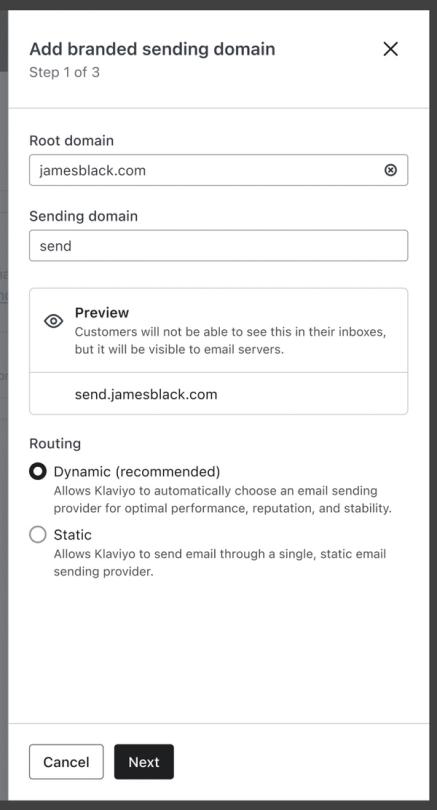
Keep these best practices in mind when choosing a subdomain:
- There can be no duplicate subdomains in your DNS
When you create a sending domain, it becomes its own unique web address. You can only use a subdomain once within your DNS, since you cannot have multiple pages with the same address. Check within your DNS registry to see if a given subdomain is available.
In Klaviyo, you can use the same subdomain for multiple accounts since it will all be attributed to that one domain in your DNS. For example, if you manage a US and UK account for a given brand, you can use the same sending domain for both. If you use one sending domain across multiple accounts, the CNAME or NS records should be the same, but each account will have a different TXT value and each TXT value needs to be added to the DNS record. - Your subdomain should suggest email sending
Though you can choose any word for your subdomain, choose one that implies email sending. Other users of your DNS can then easily identify your subdomain, which reduces the chances of another user deleting or editing it by mistake. When you review your DNS records in the future, you will see this subdomain and easily know that it is for dedicated sending.
For example, subdomains such as send.helloworld.com, emails.helloworld.com, or newsletter.helloworld.com can all work for marketing.
Avoid using mail as a subdomain. It is typically reserved for an inbox setup and often already used in DNS.
Choosing subdomains for multiple send types
If your account has more than one branded sending domain (for example, separate domains for marketing, transactional, and service traffic), each domain needs its own unique subdomain. They cannot share a subdomain because each subdomain has its own DNS records.
A common pattern is to use the canonical "send" subdomain for marketing and choose different subdomains for transactional and service traffic. For example:
- Marketing: send.helloworld.com
- Transactional: updates.helloworld.com or notifications.helloworld.com
- Service: support.helloworld.com or help.helloworld.com
You can choose any subdomains you like, as long as they're not already in use elsewhere on your DNS. Pick names that suggest the purpose of each domain so they're easy to identify later.
Additional resources
- How to set up a branded sending domain
Learn how to set up a branded sending domain (also known as a dedicated sending domain) so that when emails reach inbox providers, they will appear to come from your brand instead of Klaviyo.
- How to set up dedicated click tracking
Learn how to set up dedicated click tracking and best practices when doing so. Dedicated click tracking allows you to show your own domain on click tracking links rather than the default Klaviyo domain.
- Understanding email deliverability
Learn about email deliverability, including the steps you can take to establish a strong sender reputation so that your emails are delivered to the inbox.