How to use unique coupon codes in SMS and MMS messages
You will learn
Learn how to use unique coupons in your SMS/MMS messages so that you can send one-time-use coupons to your SMS subscribers and encourage them to make a purchase.
You cannot use unique coupon codes (also called dynamic coupons) in the SMS auto-responder.
Before you begin
There are several best practices for using unique coupon codes for SMS and MMS messages:
- Add more codes than strictly needed; having 50 extra coupon codes is recommended.
- Upload or generate coupon codes in advance; this process takes time, especially for a large number of codes, so it is best to do it 1 or 2 days before you start sending.
- If you upload your coupon codes and use them in a flow, check that you have a buffer of 50 codes on a routine basis.
- Use separate coupon codes for each campaign and flow. Having a different coupon code for each of your sends makes it easier to generate/upload the right number of codes as well as track where people saw the coupons.
- Allow for at least 5 extra characters in your SMS or MMS when you include a unique coupon.
Why should I leave space for more characters when using a unique coupon?
Anytime there is dynamic content involved (such as with a unique coupon), Klaviyo can only provide an estimate, not an exact character length, for the SMS.
Coupon code length varies by integration and can include a prefix or suffix. The preview uses a placeholder rather than an actual code. For example, if an SMS is estimated at 160 standard characters and the actual coupon code is 2 characters longer than the placeholder, it will send as 2 SMS instead of 1, costing more credits. Leave room for the full code, including any prefix or suffix.
Add coupon codes to Klaviyo
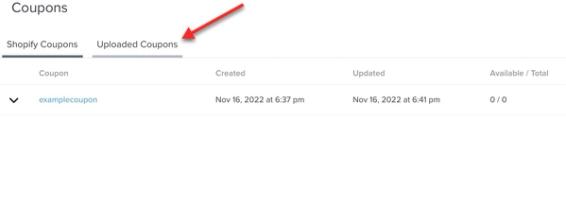
The process for creating a unique coupon code for SMS is the same as for email. Klaviyo can generate these codes for Shopify, Magento 1, Magento 2, WooCommerce, and PrestaShop.
For all other ecommerce integrations, including BigCommerce, you can generate the coupons outside of Klaviyo and then upload the coupon codes to your account.
Send an SMS campaign with a coupon
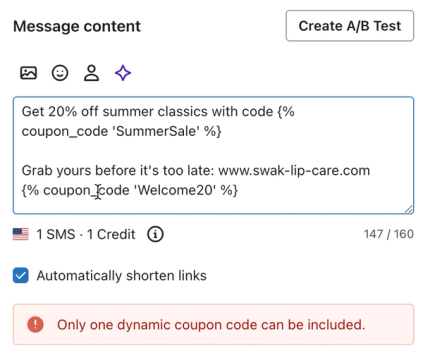
For SMS or MMS campaigns, use uploaded coupon codes or Shopify coupons with a specific expiration date or a 1-year expiration. Shopify coupons that expire a set number of days or hours after sending, and coupons generated for Magento 1, Magento 2, WooCommerce, or PrestaShop, are for flows. Generate or upload enough codes before scheduling your campaign. Only 1 unique coupon can be added to a single SMS message.
- Navigate to Campaigns.
- Click Create campaign.
- Name the campaign. If prompted for a campaign type, select Single channel. Select Text message, then click Continue.
- Choose your recipients, then click Next to open the message editor.
- Build out your message in the Content screen. To add the coupon code, include the following template tag. Remember to change "CouponName" to the name of your coupon:
{% coupon_code 'CouponName' %}
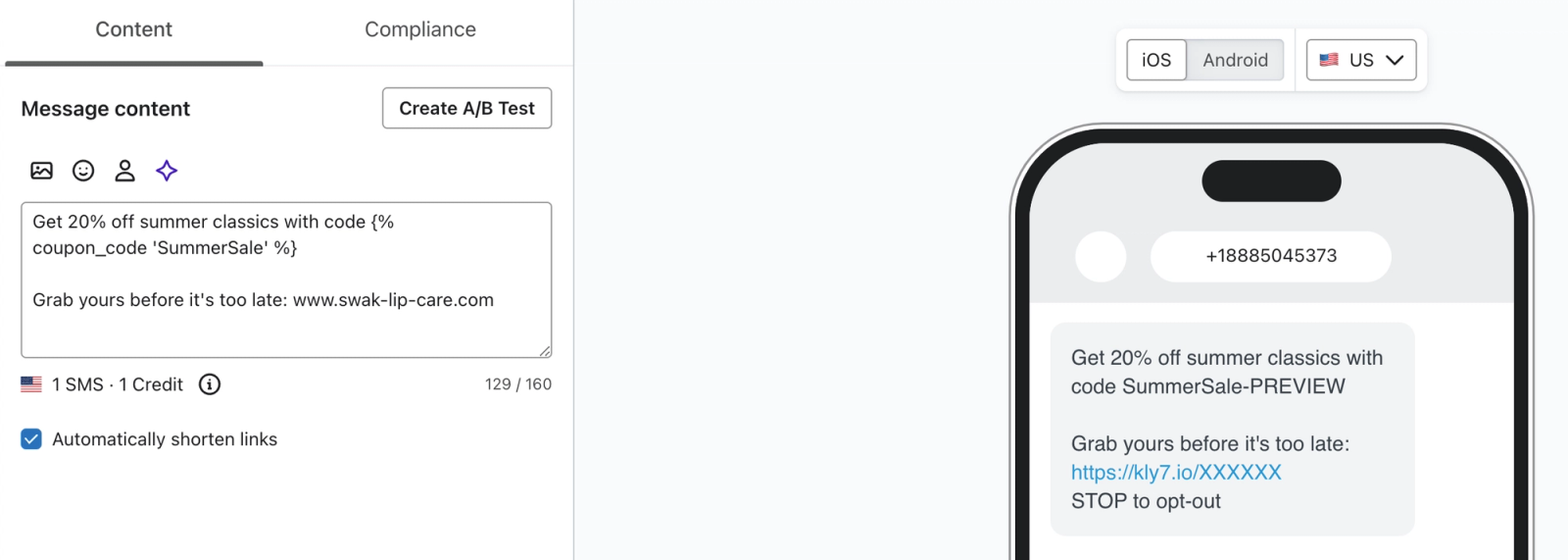
The coupon will appear differently when sent to a subscriber than in the preview window. Displaying an actual coupon within preview would use one of your coupon codes. To avoid this, you’ll instead see the name of the coupon code followed by “-PREVIEW.”
The example below shows how the preview will appear for a coupon named “SummerSale”.
After configuring the content, click Next.
Klaviyo will check that the coupon has enough codes for the recipients, and you won’t be able to send until you have enough for all of your recipients. It is a best practice to add more coupon codes than you need in case you’re scheduling the campaign to send later and more people join the list or segment you’re sending to.
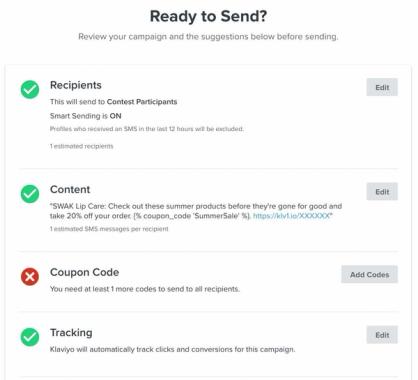
Once you’ve confirmed you have enough coupon codes, schedule the SMS campaign or send it immediately.
Use coupon codes in SMS flows
By default, flow messages that use the same coupon send the same code to a recipient while that code is unexpired. For instance, an SMS and an email with the same 20% off coupon can send the same code. For Shopify and Magento coupons, the Reissue code when setting controls whether a new code is issued after redemption, so check that setting before relying on the same code across messages.
To add a coupon code to an SMS message in a flow:
- Navigate to the flow and select the SMS message where you want the coupon. In the Content section, click Edit.
- Next, add the following snippet to the message, replacing CouponName with the name of your coupon:
{% coupon_code 'CouponName' %}
Click Next to save your message and return to the flow.
It’s important to have enough coupons available for flows. Unlike campaigns, flows do not have a review stage where you can check that you have enough. Live flow messages send automatically as people qualify. If you run out of uploaded codes, Klaviyo skips the message for recipients who need a new code.
For Shopify, Magento 1, Magento 2, WooCommerce, and PrestaShop coupons used in flows, Klaviyo automatically generates codes as needed. The number of codes generated and the timing depend on the integration. If you use uploaded coupons, you must upload more codes yourself, so routinely check the number available.
Error messages
If a coupon does not work in an SMS campaign or flow, check these common issues:
The first error is that Klaviyo cannot find the coupon code matching the coupon name. For instance, if the name is missing a number, spelled incorrectly, etc. In this case, check that the name you inputted is the same as the one in Coupons.
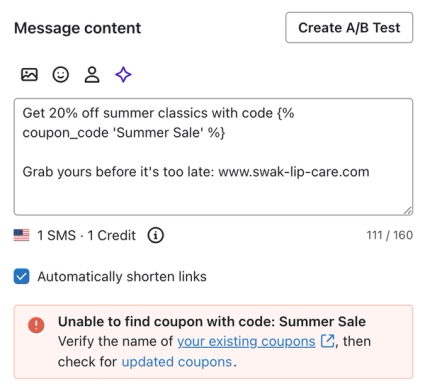
The second type of error is that the template tag is formatted incorrectly. For example, it may be missing quotation marks or brackets. Make sure that the tag is formatted as:
{% coupon_code 'CouponName' %}
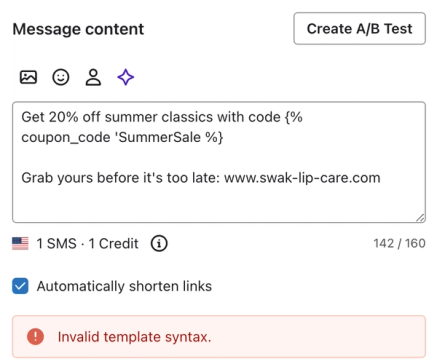
You will also receive an error if you have multiple coupons in a single text. Only 1 unique coupon is allowed per SMS, so check that you haven’t used 2 different ones by accident.
Additional resources
- Getting started with coupon codes in Klaviyo
Learn how to create and upload unique and static coupon codes in Klaviyo to incentivize customers to engage with your brand. Offering an incentive can help you improve the customer experience, resulting in higher sales and increased lifetime value.
- How to create and send an SMS campaign
Learn how to create and send an SMS campaign in Klaviyo. Note that the process is almost exactly the same for MMS campaigns. The only difference is that you add an image or GIF during the content creation stage.
- SMS marketing strategies for all levels [+12 Pro tips]