How to create a value-based lookalike audience in Meta Ads
You will learn
Learn how to create a value-based lookalike audience in Meta Ads using CLV (customer lifetime value) data from Klaviyo. When you export a list or segment from Klaviyo, you can upload it as a Meta custom audience and use it as the source for a lookalike audience. Including CLV data helps Meta find new people similar to your highest-value customers.
Before you begin
You need permission to export profiles in Klaviyo, such as access through an Owner, Admin, or Analyst role.
In Meta, you need admin or advertiser permissions on the ad account and a source audience with at least 100 people. See Meta's lookalike audience requirements.
Please note that CLV data will only be available to export when you meet the following requirements:
- At least 500 customers have placed an order. This does not refer to active profiles, but the number of people who have actually made a purchase with your business. If the CLV section is on a profile but is blank, this means we don't have enough data on that individual to make a prediction.
- You have an ecommerce integration (e.g., Shopify, BigCommerce, Magento, etc.) or use our API to send placed orders.
- You have at least 180 days of order history with the current integration and have orders within the last 30 days.
- You have at least some customers who have placed 3 or more orders.
You can read more about predictive analytics in Klaviyo as well as our guide to segmenting by CLV.
Export your CLV segment
- Open Lists & segments, then select a segment you want to export depending on your business and advertising goals; for example, a VIP segment.
- Select Manage segment > Export to CSV. For more export options, see How to export a list or segment to a CSV file.
- On the Export Review screen, include the Email and Total Customer Lifetime Value properties. You can include more properties as well if you'd like. Check the details in Meta's documentation.
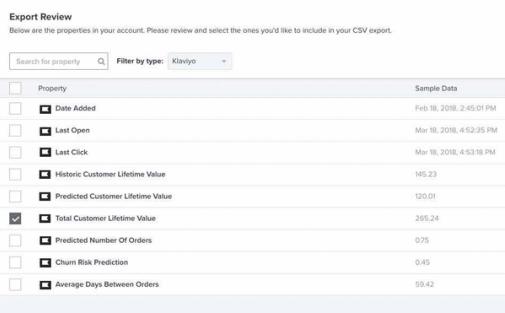
- Click Start Export. When the export finishes, your segment will download to your computer as a CSV file. Use this CSV in the next section when creating a source custom audience in Meta.
Create a source custom audience
- Log in to your Meta ad account and follow Meta's instructions for creating a customer value custom audience. Use the CSV you exported from Klaviyo.
- Choose a customer list as the source and indicate that your file includes customer value.
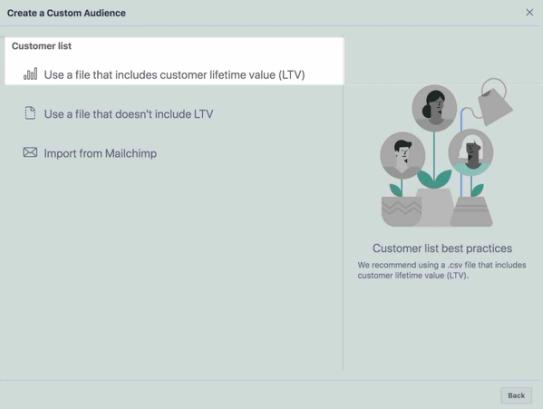
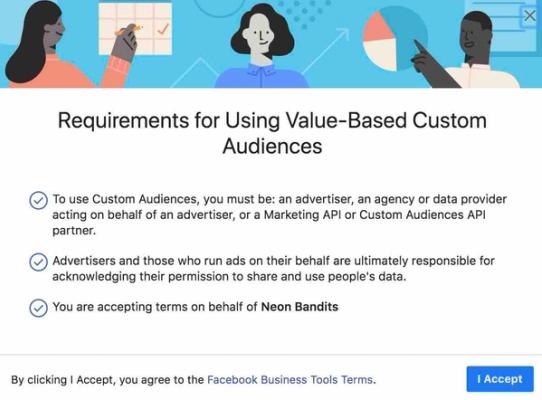
- Review and accept Meta's terms for value-based audiences if prompted.
- Upload your CSV file and name your audience.
- Choose Total Customer Lifetime Value as the customer value column to map your Klaviyo Total CLV to Meta's customer value.
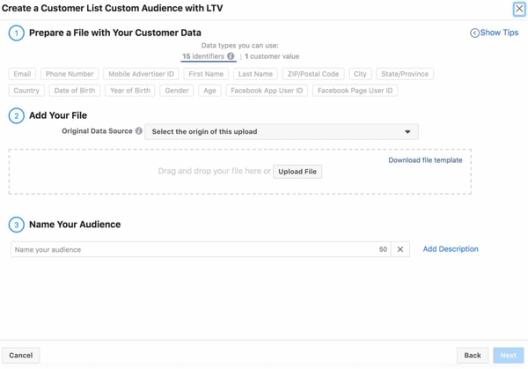
- Review the mapping for your customer identifiers, including Email, and resolve any errors before completing the upload. Once your source audience is created, use it to create a lookalike audience in the next section.
Create a value-based lookalike audience
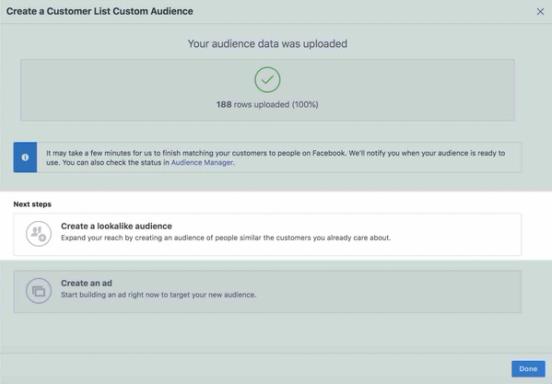
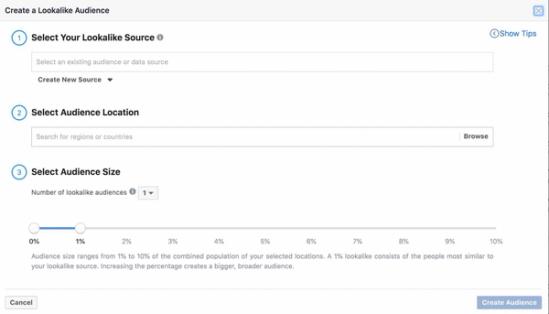
- Choose the custom audience with CLV values that you created in the previous section as your lookalike source.
- Choose your audience size and complete audience creation. Set the audience location in your ad set when you use the lookalike audience.
- Your audience will appear in Meta with the status Populating until it is Ready. Read more about creating a value-based lookalike audience in Meta's documentation.
Connecting a source custom audience through Klaviyo
When you integrate a Klaviyo list or segment to a source custom audience, new profiles added to the list or segment are synced to the Meta custom audience. You can sync a Klaviyo list or segment to a source custom audience.
If you connect a list or segment to a custom audience through Klaviyo, CLV information is not automatically passed over to Meta. New customers added to your list or segment in Klaviyo will be synced over to Meta, but because we do not natively support passing over CLV data, these customers will be added to your source custom audience with a default CLV value. This could potentially skew the customers added to any value-based lookalike audiences connected to your source audience. Use a fresh CSV export whenever you need to provide updated Klaviyo CLV values to Meta.
Outcome
You've now learned how to create a value-based lookalike audience in Meta Ads using Klaviyo CLV.
Additional resources
- How to enable advanced targeting on Facebook and Instagram
Learn how to enable advanced targeting on Facebook and Instagram. Advanced targeting strategies can engage your customers creatively, targeting them on multiple channels.
- Grow your business with Klaviyo's Meta Ads integration (Klaviyo Academy course)