Understanding the opt-out options for an SMS message
Learn about the 2 opt-out options for an SMS: unsubscribe instructions or unsubscribe link. This article describes both options, including how they work and when each can be used.
It’s always important to include a way for recipients to opt out of SMS in your messages. In addition to being a best practice for any marketing channel, it is required for SMS in most countries. Some countries also require that you provide a way to opt out in every SMS you send.
About Klaviyo’s opt-out options for SMS
Klaviyo includes 2 built-in ways for SMS recipients to unsubscribe within a message:
- Unsubscribe instructions
- Unsubscribe link
Only 1 of these options is included in a single SMS at any given time. Klaviyo selects the built-in opt-out option based on whether your sending number can receive replies. See the table below for details.
Sending number for this option | *Number of characters | Able to be turned off in Klaviyo | |
Unsubscribe instructions | Toll-free numbers Long codes Short codes that can receive replies | 20 characters by default, including the line break | Yes |
Unsubscribe link | Sending numbers that cannot receive replies, including branded sender IDs | Varies; check the message preview | No |
* The exact character counts may vary. You can edit the unsubscribe instructions under Settings > Text message > Sender information. The length of an unsubscribe link depends on whether you use the default Klaviyo domain or an active branded custom link. A branded Klaviyo subdomain does not change the unsubscribe link’s domain.
When a customer unsubscribes via either option, it automatically removes consent for both transactional and promotional SMS. Currently, your subscribers cannot opt out of only transactional or only promotional SMS.
Why are unsubscribe instructions not available for branded sender IDs?
Unsubscribe instructions rely on the subscriber texting a keyword to your brand’s number. However, branded sender IDs cannot receive incoming messages. Even if a subscriber tries to text you STOP, the branded sender ID will never receive this message. Thus, unsubscribe instructions simply don’t work for branded sender IDs.
Always preview your message to check the character count if you are using a branded sender ID and have any other number type. Unless you specifically filter or segment by country, a single message may use an unsubscribe link for some recipients and instructions for others. This alters the character count and possibly causes you to use more credits than expected.
The opt-out options are always toggled on by default for every SMS campaign and flow message in Klaviyo.
Why can’t I turn off the unsubscribe link?
Many countries have strict rules that require companies to add a way to opt out in every SMS. Sending numbers that can receive replies support STOP as a way to unsubscribe. Branded sender IDs and other one-way senders cannot receive these replies, so recipients need an unsubscribe link.
To protect users, Klaviyo automatically adds the unsubscribe link to messages sent from numbers that cannot receive replies, including branded sender IDs.
Unsubscribe instructions
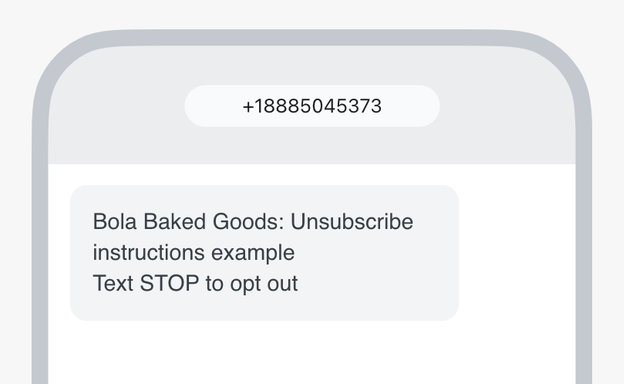
In Klaviyo, the unsubscribe instructions provide recipients with a keyword they can text to opt out of SMS.
As a best practice, include opt-out instructions in every SMS campaign and flow message.
By default, the unsubscribe instructions are: “Text STOP to opt-out”.
Unsubscribe instructions:
- Are not available for branded sender IDs.
- Can be edited.
- Stay the same for every recipient (i.e., it is not automatically translated to other languages).
For anyone using a toll-free number, if a subscriber unsubscribes using the keyword “STOP,” they must resubscribe using the keyword UNSTOP or START. Otherwise, wireless carriers will block messages to the recipient’s number, even if that person has opted back in using a form, other keyword, etc.
Edit the unsubscribe instructions
You need permission to edit account settings to change the unsubscribe instructions.
Changing these instructions can change the character count and credit usage of flow messages and scheduled campaigns that include them. Check the affected message previews before they send.
- Select your account name in the lower left.
- Navigate to Settings > Text message > Sender information.
- Scroll down to the Text message add-ons section.
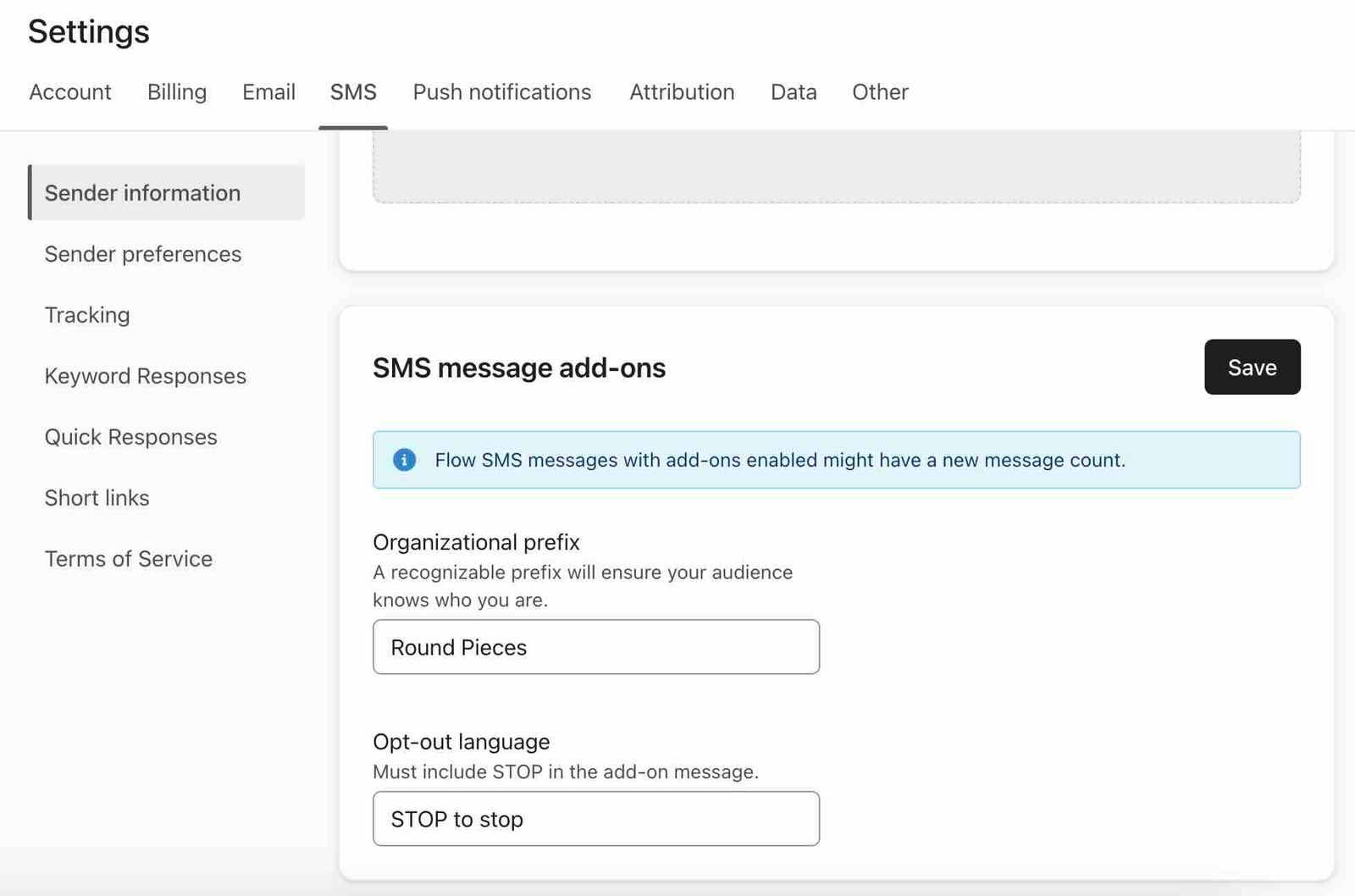
- Edit Opt-out language. Keep “STOP” in uppercase and do not include links.
- Click Save.
Once you save, it will update the unsubscribe instructions in SMS flow and scheduled campaign messages that have unsubscribe instructions enabled.
Unsubscribe link
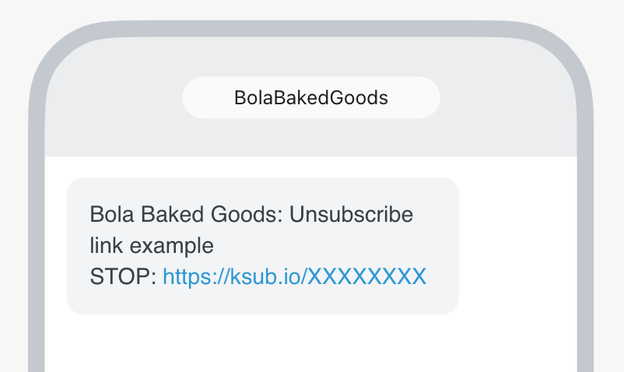
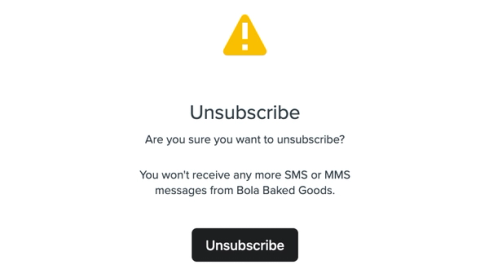
The unsubscribe link allows recipients to click a link to opt out of SMS. As soon as the recipient clicks the link, they are redirected to a page to confirm the opt-out via an Unsubscribe button. Please note that the customer will need to click the Unsubscribe button to opt out, not just click the link.
Klaviyo uses unsubscribe links for sending numbers that cannot receive replies, such as branded sender IDs. Keep in mind that unsubscribe links add more characters to the message compared to the default unsubscribe instructions.
This link:
- Is used for sending numbers that cannot receive replies.
- Does not count toward the message’s click rate.
- Uses fixed opt-out wording, such as “STOP,” that cannot be edited. The domain changes only if you use an active branded custom link.
Further, this link directs to a page that:
- Is translated automatically based on the browser’s settings. Supported languages include:
- English (default if browser language is not set or is not supported)
- French
- German
- Dutch
- Danish
- Finnish
- Hungarian
- Italian
- Japanese
- Korean
- Luxembourgish
- Polish
- Portuguese (Brazil and Portugal)
- Spanish (Spain and Mexico)
- Swedish
- Cannot be manually edited (i.e., you cannot change the text, colors, etc.)
Below is an example of the page users are linked to when they select the unsubscribe link.
Additional resources
- Basics: SMS compliance
Get an overview of 7 important aspects of SMS compliance.
- Understanding the SMS organizational prefix
Learn about the organizational prefix for SMS messages, including what it is, how to change it, when it’s enforced, and more.
- How to configure your opt-out keyword settings
Learn how to control when an opt-out keyword results in an unsubscribe.
- How to add a dynamic image to a text message
Learn how to add a dynamic image to an MMS message in Klaviyo.