How to segment SMS subscribers by country
Estimated 1 minute read
|
Updated Mar 18, 2026, 12:00 AM EST
You will learn
Learn how to group your SMS subscribers by their country.
Why segment SMS subscribers by country?
When your SMS program stretches across multiple countries, you run into differences in language, compliance laws, quiet hours, and more.
To better target SMS subscribers in a certain country, create a segment using the country code for their phone number. This groups subscribers by the country associated with their phone number, which may differ from their current location.
Create SMS segments using a number's country code
- Navigate to Audience > Lists & segments.
- Click Create > Segment.
- Enter a descriptive segment name, such as Canada SMS subscribers. If you’re in the Create segment panel, click Create segment to open the builder.
- Include the condition:
If someone can or cannot receive marketing > can receive > text message marketing - Add a second condition and join it to the first with AND:
Properties about someone > Phone Number > country code is in. Select the country for this segment. For the Canada example below, select Canada (+1).
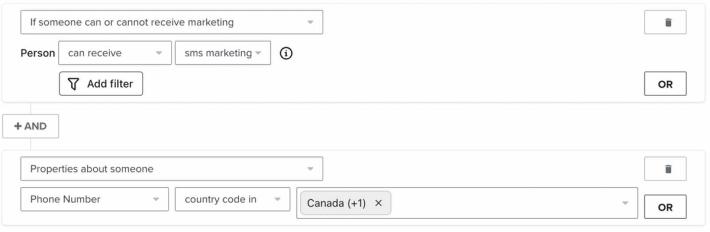
- Click Create segment to save your segment.
- Repeat steps 1–6 for every country where you have SMS subscribers.
Additional resources
- Find more best practices for sending SMS to multiple countries.
- Learn about local SMS compliance laws
- See other SMS segments you can use to personalize and target subscribers
Was this article helpful?
Use this form only for article feedback. Learn how to contact support.