How to strengthen your sender reputation for a specific country
You will learn
Learn best practices to strengthen your sender reputation if you are seeing deliverability issues limited to specific countries. With the campaign deliverability tab, you can see campaign-specific performance by country.
If your deliverability issues are not limited to specific countries, see our guide on repairing your sender reputation.
Before you begin
If you're a brand new sender, it is important to establish a good reputation upfront before diagnosing any issues related to sending to specific countries. This will allow you to gradually send to a broader audience while maintaining a good reputation and high open rates. However, if you've damaged your sending reputation, these best practices will help you get back on track and rebuild engagement.
Strengthening your sender reputation for a specific country
As a multinational brand, you may observe different engagement patterns across your customers in different regions. Including recipients from low-performing countries in your usual sends can negatively impact your deliverability.
The key engagement rates to keep track of are:
- Open rates
- Click rates
- Bounce rates
- Spam complaint rates
- Unsubscribe rates
If you are seeing issues with these key deliverability performance metrics in specific countries, you can isolate these subscribers so you can target them with different content than your usual sends.
To improve your sender reputation in a country that is not performing well, you’ll need to do the following for your next 3-5 marketing campaigns:
- Exclude all subscribers in the low-performing country from your regular campaign sends.
- Create a segment of subscribers in the country who have recently engaged with your emails and send to this segment separately.
How to exclude subscribers in a specific country from regular campaigns
If you have a main list that you are planning to email, create a segment based on this list that excludes subscribers from the country experiencing performance issues. Open the segment builder using these steps, then add the conditions below:
- Navigate to Audience > Lists & segments and select Create > Segment.
- Name the segment. If a naming panel opens, select Create segment to open the segment builder.
- If someone is in or not in a list > Person is in [insert list name],
AND - Properties about someone > Country doesn’t equal [insert country]
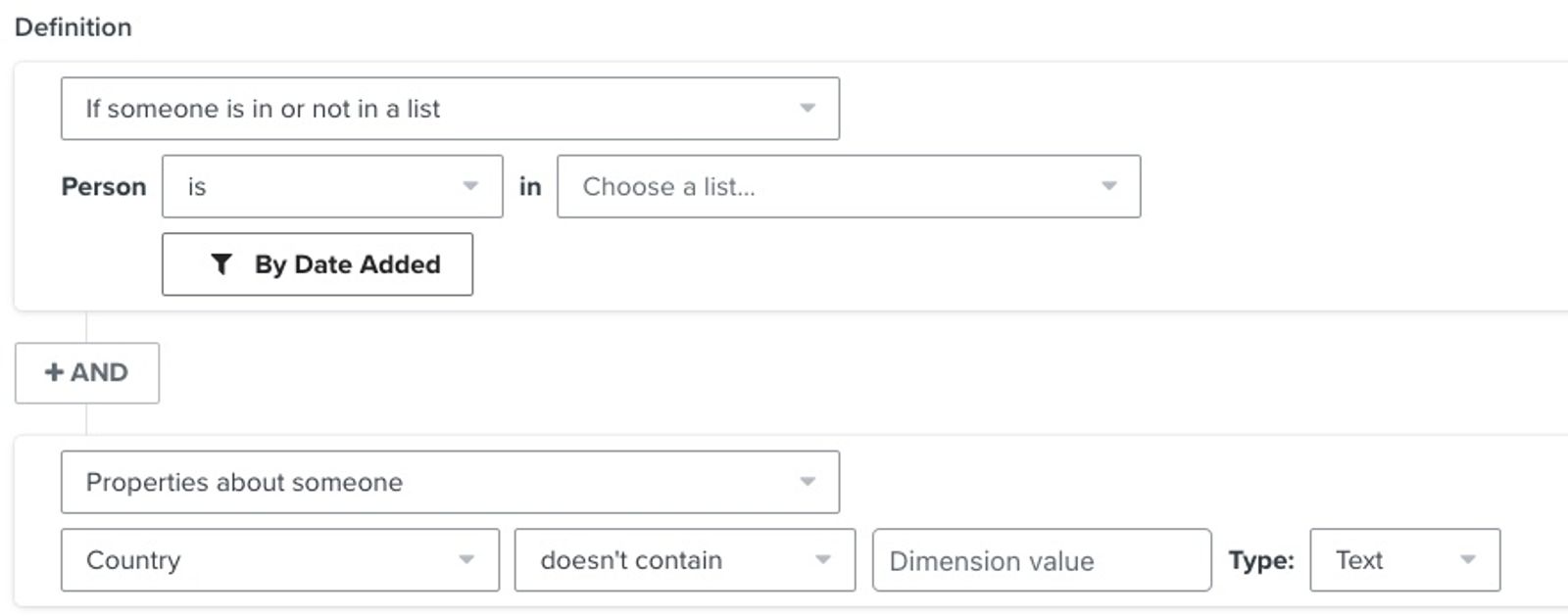
Alternatively, if you have an existing segment that you plan to target with a campaign, edit its definition and add the following condition to exclude all subscribers from the country:
- AND
Properties about someone > Country doesn’t equal [insert country]
Select Create segment for a new segment or Update segment after editing an existing one. For your regular campaign, select this segment under Send to instead of the original, unfiltered list or segment. Adding the original audience as well can include the country again.
After isolating subscribers in the low-performing country, wait until you've sent to engaged audiences for at least 3 weeks and your deliverability performance has improved before trying to regain inactive subscribers. If you try to send a campaign to these inactive profiles before attempting to improve your sender reputation, it's likely that this campaign will end up in spam for most recipients. Once your reputation has improved, consider creating a winback flow to reach out to unengaged profiles.
How to build an engaged segment of subscribers from a specific country
Now that you excluded all subscribers in a country from your regular sends, you can isolate the engaged customers located there and send to them separately.
Create a separate segment of profiles in the low-performing country who have recently engaged with your emails. Use the segment builder steps above, then add the conditions below.
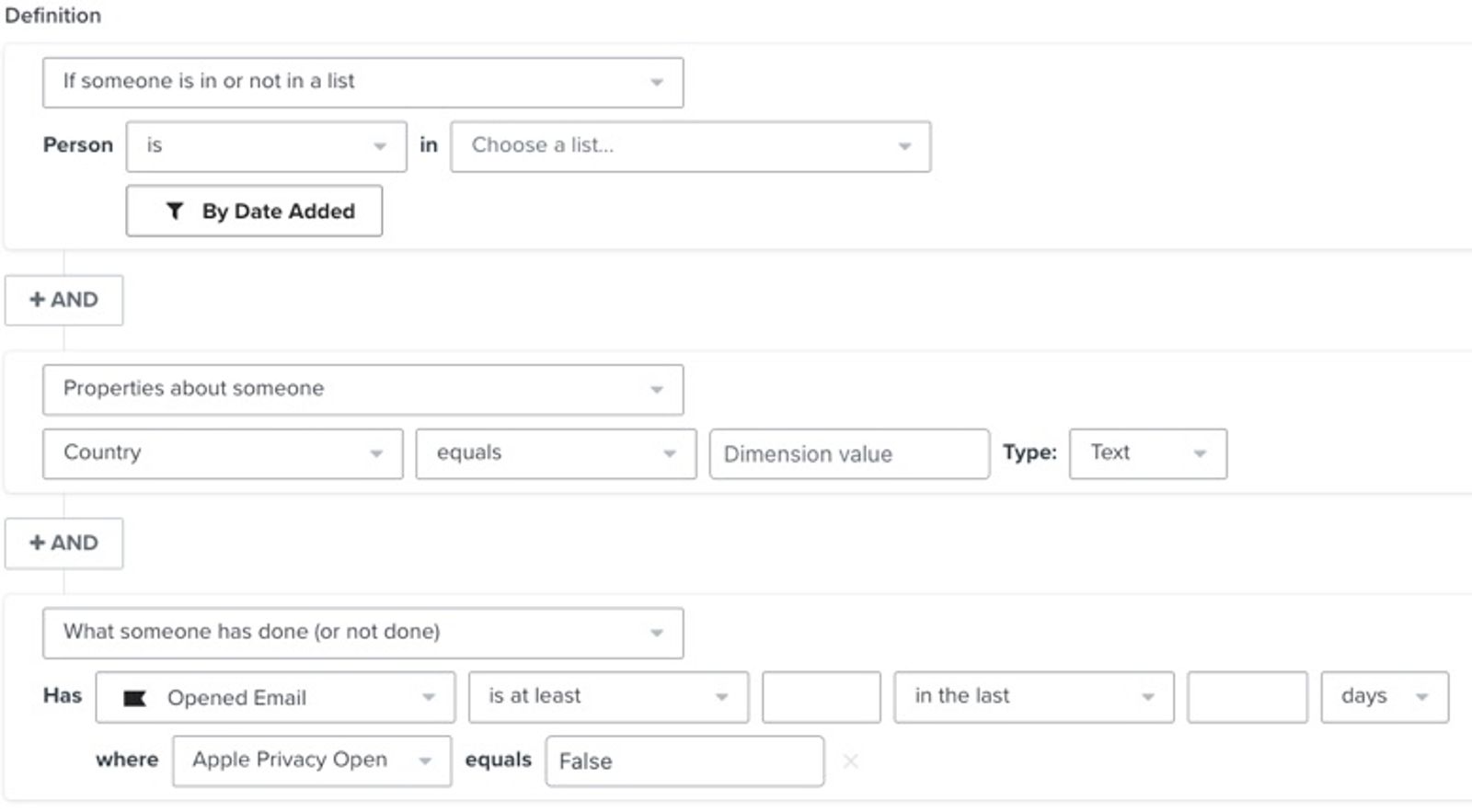
When repairing reputation, it is important that you contact the right engagement cohort based on how often you send. Use the segment structure below, paired with the values that match your sending practices. Replace the first X with the minimum number of opens and the second X with the number of days for your sending frequency and week below. Keep the Apple Privacy Open filter set to False so only qualifying opens count. Review the country’s deliverability metrics after each campaign before broadening the audience.
- If someone is in or not in a list > Person is in [insert list name],
AND - Properties about someone > Country equals [insert country]
AND - What someone has done (or not done) > has Opened Email at least X times in the last X days
Where Apple Privacy Open equals False
If you send daily
- Week 1: Send to Very Highly Engaged audience with 5 or more opens in the last 30 days
- Week 2: Send to Highly Engaged audience with 3 or more opens in the last 30 days
- Week 3+: Send to Engaged audience with 1 or more opens in the last 30 days
If you see a drop in performance, you can go back to Highly or Very Highly to repair your reputation again.
If you send 3 times per week
- Week 1: Send to Very Highly Engaged audience with 5 or more opens in the last 60 days
- Week 2: Send to Highly Engaged audience with 3 or more opens in the last 60 days
- Week 3+: Send to Engaged audience with 1 or more opens in the last 60 days
If you see a drop in performance, you can go back to Highly or Very Highly to repair your reputation again.
If you send 2 times per week
- Week 1: Send to Very Highly Engaged audience with 5 or more opens in the last 90 days
- Week 2: Send to Highly Engaged audience with 3 or more opens in the last 90 days
- Week 3+: Send to Engaged audience with 1 or more opens in the last 90 days
If you see a drop in performance, you can go back to Highly or Very Highly to repair your reputation again.
If you send weekly
- Week 1: Send to Very Highly Engaged audience with 5 or more opens in the last 180 days
- Week 2: Send to Highly Engaged audience with 3 or more opens in the last 180 days
- Week 3+: Send to Engaged audience with 1 or more opens in the last 180 days
If you see a drop in performance, you can go back to Highly or Very Highly to repair your reputation again.
If you send monthly
- Week 1: Send to Very Highly Engaged audience with 5 or more opens in the last 275 days
- Week 2: Send to Highly Engaged audience with 3 or more opens in the last 275 days
- Week 3+: Send to Engaged audience with 1 or more opens in the last 275 days
If you see a drop in performance, you can go back to Highly or Very Highly to repair your reputation again.
If you typically send to a segment, create a separate segment with the same original targeting conditions for the engaged audience. Use Country equals [insert country] instead of the Country doesn’t equal condition used for your regular sends, and add the engagement condition below. Keep the segment for your regular sends excluding the country.
- Properties about someone > Country equals [insert country]
AND - What someone has done (or not done) > has Opened Email at least X times in the last X days
Where Apple Privacy Open equals False
Select Create segment to save the separate engaged segment. For a separate campaign to the low-performing country, select only this engaged segment under Send to. Keep your regular campaigns targeted to the segment that excludes the country.
With the release of iOS15, macOS Monterey, iPadOS 15, and WatchOS 8, Apple Mail Privacy Protection (MPP) changed the way that we receive open rate data on your emails by prefetching our tracking pixel. With this change, it’s important to understand that open rates will be inflated.
Use the Apple Privacy Open filter in both engaged segment examples above to exclude automatic MPP opens. This filters open events; it does not exclude a subscriber who also has enough qualifying opens with Apple Privacy Open set to False. Learn more about identifying MPP opens in your subscriber segments.
For complete information on MPP opens, visit our iOS 15: How to Prepare for Apple’s Changes guide.
If you attempt to re-engage unengaged subscribers and are unsuccessful, we recommend suppressing them or otherwise ensuring they remain isolated from your main sending list moving forward.
Additional resources
- Understanding which warming process to use in Klaviyo
Learn how to choose the right warming process in Klaviyo, so you can establish a strong initial sender reputation and be viewed favorably by inbox providers.
- How to set up a branded sending domain
Learn how to set up a branded sending domain (also known as a dedicated sending domain) so that when emails reach inbox providers, they will appear to come from your brand instead of Klaviyo.