How to identify iOS15 Mail Privacy Protection opens
You will learn
Learn how to identify Apple’s Mail Privacy Protection (MPP) opens in your Klaviyo segments, including how to build segments that aren’t inflated by these automatic opens. Head to Klaviyo’s blog to learn more about iOS15 and MPP.
By using the Apple Privacy Open flag (which is set to either True or False for every open event), you can differentiate MPP opens from true recipient engagement.
The Apple Privacy Open flag is available for Opened Email events occurring on or after November 20, 2021. Opens before this release may not include this information in their metadata.
Identify MPP opens
Open events contain a property called Apple Privacy Open, which is either True or False for all open events. If Apple Privacy Open is True, it means the message was opened on a device with MPP turned on. Therefore, the open event may be attributable to Apple’s MPP, and doesn’t necessarily reflect a true email open. In these cases, the message could have been opened by the inbox or by a recipient, and there’s no way to differentiate between the two.
If Apple Privacy Open is False, then the open event can be attributed to a recipient opening and viewing your message on a device without Apple’s MPP feature enabled.
To add an Apple Privacy Open condition to a segment, use this condition:
- What someone has done > Opened Email
- Click Add Filter and add the rule where Apple Privacy Open equals True/False (depending on your use case)

The sample segments below offer examples of how you can use this property in your own account.
Remove MPP openers from your engaged segment
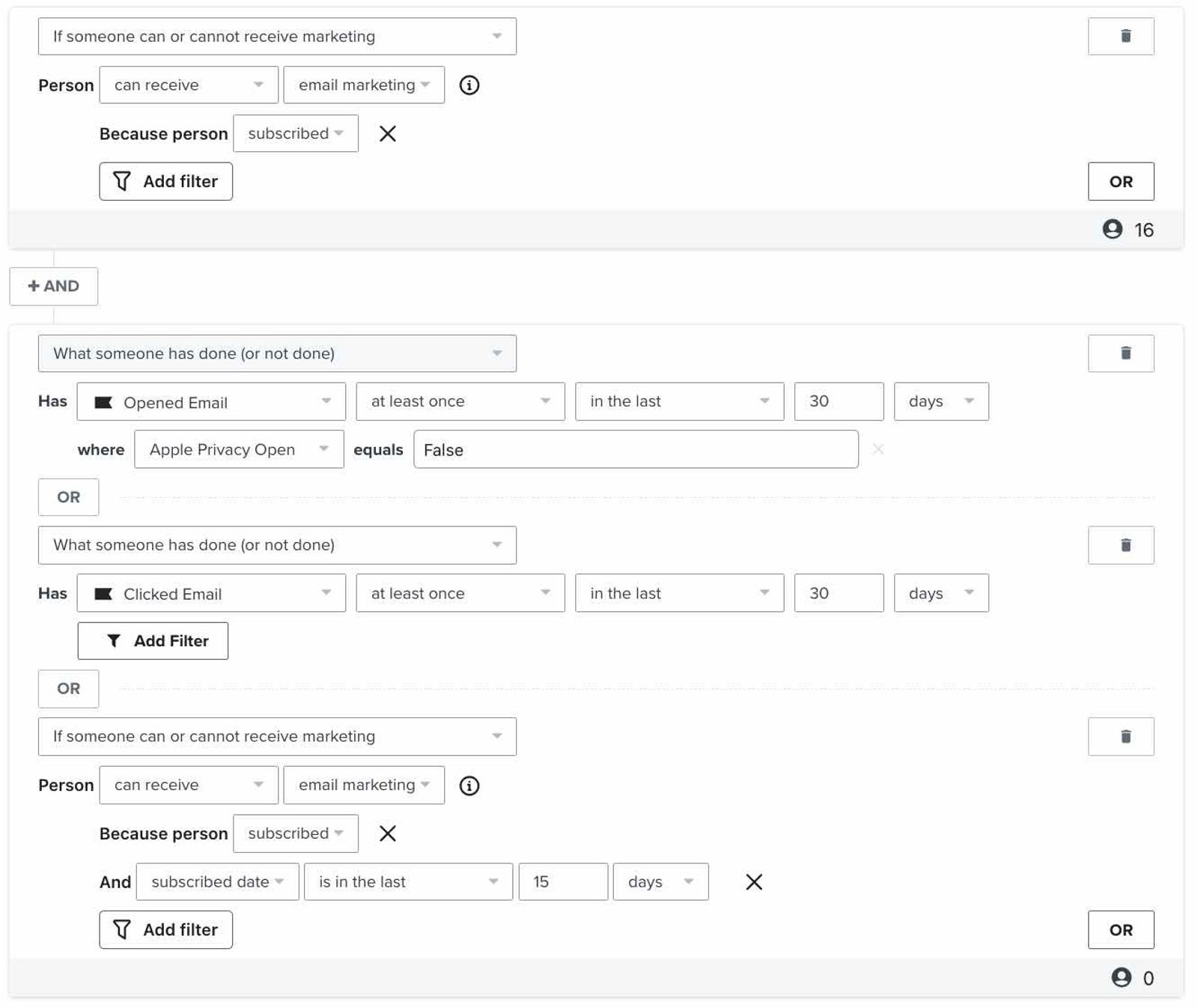
If your engaged segment follows the recommendation in our article How to Create an Engaged Segment, you can exclude MPP opens by adding the filter where Apple Privacy Open equals False to the Opened Email criteria. The segment below includes all subscribers who have opened or clicked an email in the last 30 days (excluding MPP opens) or subscribed in the last 15 days.
Find all MPP openers
If you’d like to see the total number of profiles that are impacted by MPP, use the segment below. This segment will include anyone who has had the MPP feature enabled in their Apple Mail account since Klaviyo began tracking Apple Privacy opens.
Identify unengaged MPP openers
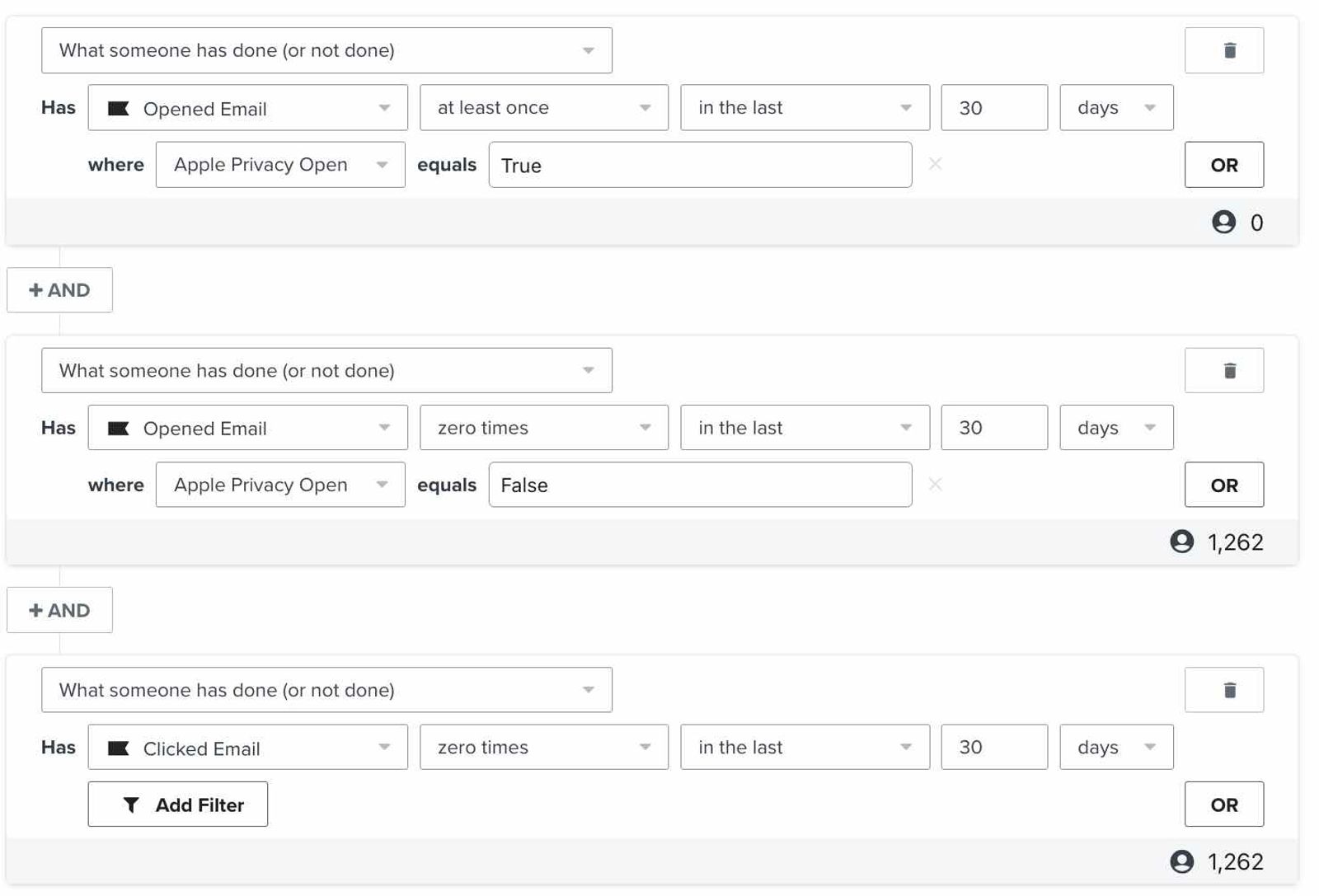
Use the segment below to identify profiles with Apple Privacy opens who have not directly engaged with your messages recently (either by opening an email on device without MPP, or by clicking an email on any device). Consider excluding this segment from your campaign sends.
About MPP opens
With the release of iOS15, Monterey, WatchOS8, and iPadOS8, Apple Mail users have the option to turn on MPP. When one of your recipients has this feature turned on, all images in the messages they receive will be preemptively loaded, whether the recipient opens the email or not.
Because opens are tracked when a tracking pixel (a small, nearly-invisible image) is loaded, this causes a false open event to be tracked in Klaviyo. This, in turn, artificially inflates your open rates and makes it harder to identify subscribers who are truly engaged.
Klaviyo identifies these Apple Privacy opens so you can exclude them from engagement criteria in your segments and see which recipients are truly engaging with your messages.
If a subscriber has set up multiple inboxes (e.g., a Gmail inbox and an Apple Mail inbox) for the same email address, you may see both Apple Privacy opens and true open events (i.e., Opened Email events with Apple Privacy Open set to False) for the same message.
Additional resources
- Understanding how segments update
Learn how segments (i.e., dynamic groups of profiles in Klaviyo) update. Most segments update in close to real time, and profiles move in and out of segments based on whether or not their interactions with your brand match the conditions you set. Once you create a segment, it pulls members from all people in your account based on the definition you establish.
- How to configure custom reports to track Apple Mail Privacy Protection (MPP) opens
Learn how to track and analyze artificially inflated Apple Mail opens in Klaviyo custom reports.With the release of iOS15, macOS Monterey, iPadOS 15, and WatchOS 8 in September 2021, Apple also released their new feature Mail Privacy Protection (MPP). Apple Mail users can choose to opt into MPP while using Apple Mail. MPP changes how Klaviyo receives open rate data for your emails by pre-fetching our tracking pixel, and thus causing some Klaviyo analytics to show potentially higher email opens.For your subscribers that have specifically opted into MPP, any email delivered to their device using the Apple Mail app will see open rates affected (e.g., connecting a Gmail account to Apple Mail that has opted into MPP would still fall under affected opens). Anything email open showing as an “Apple Privacy Open” comes from a subscriber using a device with MPP enabled, whether or not they have opened the email. We have no way of distinguishing between a true human open and an automated open when MPP is enabled.