Understanding identity resolution transformations in Klaviyo
You will learn
Learn how to activate and manage identity resolution transformations in Advanced KDP to merge duplicate profiles caused by email typos. These transformations build on Klaviyo’s standard identity resolution functionality by checking profiles with different email addresses and overlapping identifiers.
Advanced KDP is not included in Klaviyo’s standard marketing application, and a subscription is required to access the associated functionality. Head to our billing guide to learn how to purchase this plan.
During an Advanced KDP trial, you can download a preview of potential merges, but you cannot activate automatic profile merging.
Identity resolution transformations vs. identity resolution
Klaviyo natively offers identity resolution that consolidates customers’ interactions across multiple channels under a single record. This standard identity resolution in Klaviyo uses deterministic profile merging, resolving the identities of different profiles that share a common identifier—most often, a unique email address—based on the existing data in your account.
Meanwhile, the identity resolution transformations within Advanced KDP build upon this deterministic merging functionality by exploring profiles with different email addresses but other overlapping identifiers such as the same phone number.
Identity resolution transformations
The first available identity resolution transformation offered as part of Advanced KDP is aimed at reducing the number of duplicate profiles for a contact due to misspellings or typos in the email address. In the future, Klaviyo will offer additional merge logic, such as deduplicating profiles that exist due to the use of email aliases, as well as probabilistic merging based on shared first name, last name, address, and more.
Email typo merge can be turned on or off and does not require you to configure matching rules.
Activate email typo merge
Profile merging is a permanent action. Any profiles merged from an identity resolution transformation cannot be un-merged.
To activate email typo merge:
- Navigate to Data management > Transformation.
- Select the Identity resolution tab.
- Select Activate on the Email typo merge card to open the confirmation panel.
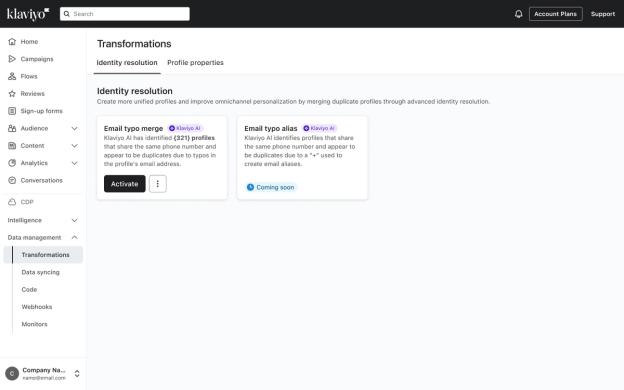
- Select Download preview in the panel and review the profiles that would be merged before you activate the rule. If no potential merges were found, the preview download is unavailable.
- If prompted, enter the number shown in the confirmation prompt, then select Activate.
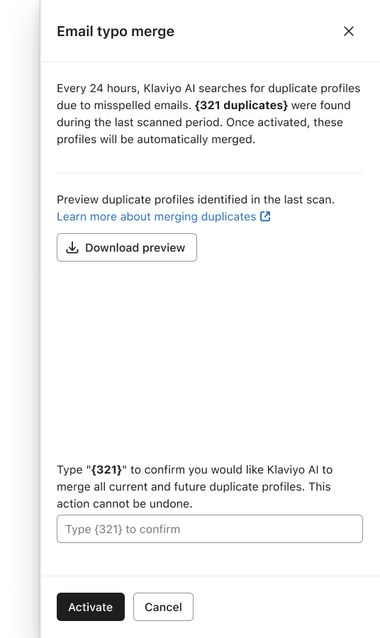
Once activated, you’ll see an Active status for the transformation on the Identity resolution tab. Activation schedules automatic merging; the status does not mean that the initial merges have finished.
Deactivate email typo merge
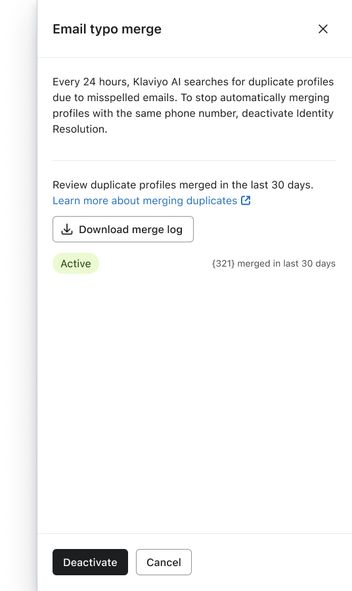
Deactivating the transformation stops future automatic merges. It does not undo completed merges.
- On the Identity resolution tab, select Deactivate on the Email typo merge card.
- Select Deactivate in the confirmation panel.
Merge log
The download is unavailable when the log is empty. Before the initial merge run, you’ll see Download preview instead.
To download a record of the profile merges performed by email typo merge:
- On the Identity resolution tab, open the three-dot menu on the Email typo merge card.
- Select Download merge log to export the CSV.
You can also select Deactivate on the card to open the panel, then select Download merge log there without confirming deactivation.
The CSV contains merges from the last 30 days with the following information:
- Source profile ID
The Klaviyo ID of the source profile. - Source email
The email address of the source profile. - Source external ID
The external ID of the source profile. - Source phone number
The phone number of the source profile. - Destination profile ID
The Klaviyo ID of the destination profile. - Destination email
The email address of the destination profile. - Destination external ID
The external ID of the destination profile. - Destination phone number
The phone number of the destination profile. - Merged at
The timestamp for the profile merge.
Identity resolution transformation methods
Email typo merge is available. Email alias merge is a planned transformation that is not yet released.
Email typo merge
Email typo merge identifies profiles that share the same phone number and appear to be duplicates due to a typo in an email address. For example, 2 profiles might share a phone number and have the addresses example@klaviyo.com and exampke@klaviyo.com because a customer mistyped their email when signing up for a marketing list. A difference before the “@” alone is not enough to trigger a merge: in this example, the exampke@klaviyo.com profile must also be suppressed due to an invalid or bounced email or manual suppression, and the example@klaviyo.com profile must not have any of these suppressions. Once activated, email typo merge automatically merges profiles that meet the conditions below.
Merge logic
For 2 profiles to be merged by the email typo deduplication transformation, they must meet the following conditions:
- The profiles must share the same phone number.
- The email addresses of the profiles differ only by 1 character.
- The email difference is a recognized domain typo, or the profile being merged is suppressed due to an invalid or bounced email or manual suppression.
Klaviyo uses the following rules to determine whether to merge the profiles and which profile to retain:
- If 1 profile is suppressed due to an invalid or bounced email or manual suppression, it can be merged into the other profile, provided the other profile has none of these suppressions. The other profile is retained as the destination.
- If both profiles are suppressed for any of these reasons, Klaviyo does not merge them.
- If neither profile has any of these suppressions:
- If 1 email has a recognized domain and the other has a typo in that domain (e.g., gmail.com vs. gnail.com), Klaviyo retains the profile with the recognized domain.
- If Klaviyo cannot identify a recognized domain and a corresponding typo, it does not merge the profiles.
Events from the source profile, including email events such as Received email and onsite events such as Viewed product, are copied to the destination profile.
Email alias merge
This feature is not yet released, but is coming soon.
Email alias merge identifies profiles that share the same phone number and appear to be duplicates due to a “+” used to create email aliases. For email providers that support plus addressing, an alias adds a “+” and a tag before the “@” and delivers emails to the primary account’s inbox.
For example, 2 profiles could share a phone number and have the addresses example@klaviyo.com and example+marketing@klaviyo.com. With a provider that supports plus addressing, emails sent to example+marketing@klaviyo.com arrive in the inbox for example@klaviyo.com.
With this transformation, the profile with a plus-addressed alias (a “+” and tag before the “@”) will be merged into the corresponding primary profile.
Additional resources
- Getting started with Advanced KDP
Learn more about using Advanced KDP (Klaviyo data platform) to gather robust customer insights across all your marketing initiatives. Advanced KDP enables more advanced data management, manipulation, and analysis. It also provides actionable strategies to employ across each of your individual audiences and your business as a whole.
- Understand data transformation in Klaviyo
Learn about the data transformation tool in Klaviyo, and how you can use it to make your data more useful.