How to segment using average order value (AOV)
You will learn
Learn how to segment using average order value (AOV). AOV is the total monetary value of your conversions (orders) divided by the number of conversions (orders that took place). You can use AOV to create segments for high and low value customers. Then, use these segments to create targeted messaging based on your subscribers' shopping habits.
AOV will only populate in Klaviyo if you have a Placed Order metric in your account.
Target your high and low value customers
After calculating your AOV, use this number to add a condition to a segment to target either high value or low value customers. For this example, we will use an AOV of $100 within the Predictive analytics about someone condition.
To target high value customers (e.g., customers with an AOV of above $100), add the following condition to your segment:
Predictive analytics about someone > Average Order Value > is greater than > 100

To target low value customers (e.g., customers with an AOV of below $100), add the following condition to your segment:
Predictive analytics about someone > Average Order Value > is less than > 100

To target medium-value customers (e.g., customers with an AOV between $50 and $150), add the following condition to your segment:
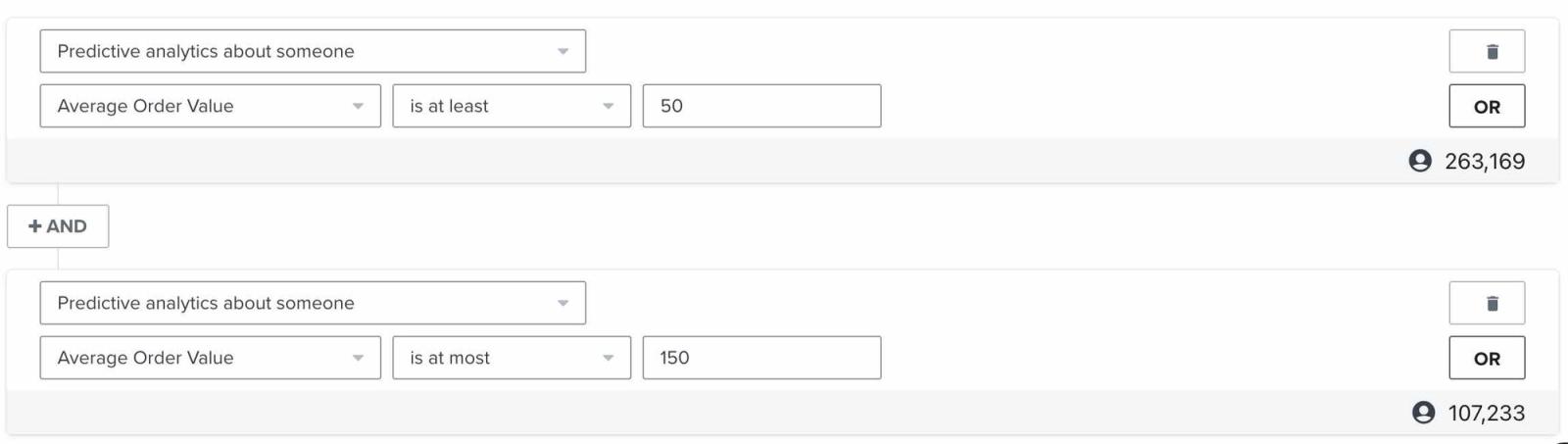
By adding these conditions to a segment, you limit the group to only include those with high, medium, or low value purchases. Then, target these segments accordingly with content that reflects this shopping behavior. For example, you can offer sales and deals for low value customers and show new releases that may be on the pricier end to high value customers.
Additional resources
- How to calculate average order value (AOV)
Learn how to calculate your average order (AOV) or the total monetary value of your conversions (orders) divided by the number of conversions (orders that took place). Calculating your average order value (AOV) can be helpful when you want to add a condition to your segments to target high value or low value customers.
- How to create customer persona segments based on activity
Learn how to use segmentation to create customer persona segments based on the actions they have taken. This allows you to send more relevant marketing communications so you can gain the most value from your audience.
- How to segment by customer lifetime value (CLV)
Learn how to create a customer lifetime value (CLV) segment and export any key CLV information. CLV is part of Klaviyo's predictive analytics and can be a powerful tool to use in segmentation. It is the total amount, both past and predicted, that a customer will purchase from your brand over time. CLV segments allow you to group customers based on this amount so that you can send them relevant content and trigger segment-based flows. For example, you can use historic CLV to build a VIP welcome flow or use predicted CLV to send targeted campaigns to customers who will likely spend a certain amount over the course of a year.