How to edit the location of your tracking pixel
You will learn
Klaviyo tracks when a customer opens an email using a clear pixel. By default, the pixel is located at the bottom of your emails but you can adjust its placement. If you send very large messages, then choosing to have this pixel at the top of your emails instead of the bottom can improve open tracking that is otherwise cut or clipped by some inbox providers.
For more information on why we use tracking pixels, head to Understanding message conversion tracking.
Looking for guidance on tracking pixel regulations, like France’s CNIL or Italy’s Garante requirements? See Email tracking pixel regulations (CNIL, Garante, and beyond): Managing your open tracking settings.
Edit the location of your tracking pixel
You can set the location of the tracking pixel in your emails manually.
- To do so, click into your account menu and select Settings.
- Choose Email > Tracking.
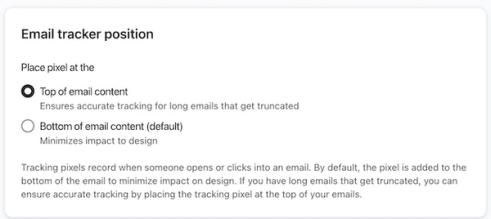
- Scroll down to the section called Email Tracker Position.
Click the radio button next to which option you prefer for placement, either to have the Klaviyo tracking pixel appear at the top or bottom of your emails. By default, the pixel will appear at the bottom of your emails.
By moving the tracking pixel to the bottom of your email, you could risk your email getting clipped and not tracking properly. It is advised to keep this at the top of your email if possible. In contrast, if you choose to move the pixel to the top of your message, you will see some extra spacing added that you cannot adjust. Since open tracking relies on a clear pixel, this will automatically add padding to function.
Additional resources
- Understanding message conversion tracking
Learn how conversion tracking works for email, SMS, and mobile push messaging and how to edit these settings. For each campaign and flow sent, Klaviyo automatically tracks conversions. This allows you to analyze the performance of your marketing channels and their individual success.
- Understanding cookies in Klaviyo
Learn more about how Klaviyo uses cookies as a part of our web tracking to gather information and help improve conversion rates and email performance. This article explains the specific cookie we use and its purposes so that you understand how customers are tracked. This information helps you understand how Klaviyo gathers data, and how this may impact customer privacy and compliance laws.
- Understanding UTM tracking in Klaviyo
Learn what UTM tracking is, how it works, and how you can use it in your Klaviyo messages to gain a deeper understanding of your marketing performance.