Understanding the timing of a flow
You will learn
Learn how the timing of a flow is not only important to knowing when a certain message will send, but also to gaining insight into the customer's experience. As you build out your flow, you will want to keep two different timing considerations top-of-mind:
- The time between components (as represented by time delays)
- Timeline of each component from the trigger
In this article, we go over both considerations so you can better understand the timing of a flow's components.
Time between components
Each flow represents a targeted customer experience. In order to build a series with timely touchpoints, it is important to think about the timing of each action in your flow relative to the activity or behavior that set the flow in motion.
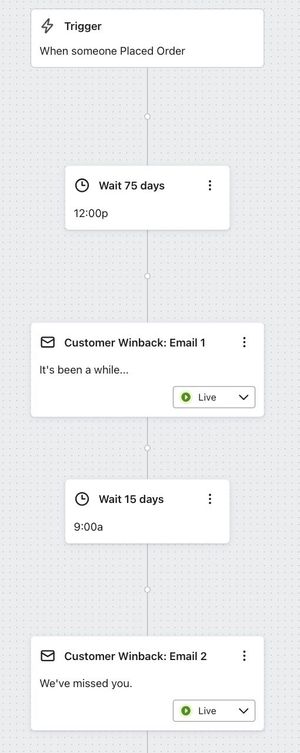
For example, in a winback flow triggered by a purchase, you may place a 75-day delay before the first email and another 15-day delay before the second. Add the delays along the path to see that the first email is scheduled about 75 days after the purchase and the second about 90 days after it. These are approximate elapsed times: if you configure a delay to wait until a specific time of day or day of the week, the actual time between the trigger and each email can differ. Learn more about configuring time delays.
Also consider where a time delay sits relative to a split. If a path depends on an action someone might take after entering the flow, such as placing an order, put the delay before the split to give them time to take that action. The split checks the conditions when the profile reaches it, then sends the profile down a matching path. A split based on data already available from the trigger does not need that wait. For more details, read our article on how to use time delays near splits.
Additional resources
- How to add a time delay to a flow
You will learn how to add a time delay component within the flow builder which is used to create delays (or wait periods) between messages or other components in your flow series.
- Understanding flow branching
Learn how flow branching helps you personalize flows so that you can send individuals down different paths depending on what you already know about them.
- Understanding time delays near splits
Learn when to place time delays before a split, and when to place them after.