How to collect reviews from past orders
You will learn
Learn how to queue up recent purchases for review requests while getting started with Klaviyo Reviews. This guide covers requesting reviews for eligible orders from before you started using Klaviyo Reviews. Orders fulfilled after setup are handled by your review request flow.
This process can only be completed 1 time, and must be completed within 60 days of starting to use Klaviyo Reviews. A maximum of 1,000 orders can receive retroactive review requests. If you have more than 1,000 orders in the selected time period, the oldest 1,000 will be used. If you select the option to collect reviews from past orders during the initial setup of Klaviyo Reviews, you will not be able to repeat this process later.
Who will receive a review request?
Verified review requests are sent using a flow triggered by the Klaviyo Reviews Ready to review event. This event fires for a profile several days after an order is either fulfilled or delivered, based on your reviews settings and ecommerce platform. Normally, these events are created in real time as fulfillments and deliveries occur. When you collect reviews from past orders, Klaviyo retroactively looks back at recent fulfillments and deliveries to generate these events.
The tables below show when Ready to review events are triggered. Your flow’s message status, filters, and any time delays affect whether and when review requests are sent.
Review requests for Shopify
When you opt to collect reviews from past orders, a Ready to review event will fire in the following scenarios:
Scenario | When the Ready to review event is triggered (relative to when you request reviews from past orders) |
Fulfilled order event occurred between 8 and up to 30 days before you set up Klaviyo Reviews. | Immediately |
Order fulfilled and delivered before (<8 days) starting Klaviyo Reviews. | 8 days after fulfillment. |
Order fulfilled before (<8 days) starting Klaviyo Reviews, but delivered after. | Triggered based on settings; default is 7 days after delivery. If shipment metrics aren’t available, the event is triggered 8 days after fulfillment. The 8-day timeline is not customizable. |
Order fulfilled after starting Klaviyo Reviews. | Based on your selected fulfillment or delivery trigger and delay. If you use delivery as the trigger, the default is 7 days after delivery, with a separate fallback delay after fulfillment when shipment metrics aren’t available. |
Review requests for WooCommerce
When you opt to collect reviews from past orders, a Ready to review event will fire in the following scenarios:
Scenario | When the Ready to review event is triggered (relative to when you request reviews from past orders) |
Fulfilled order event occurred between 8 and up to 30 days before you set up Klaviyo Reviews. | Immediately |
Order fulfilled less than 8 days before starting Klaviyo Reviews. | 8 days after fulfillment. |
Order fulfilled after starting Klaviyo Reviews. | Triggered based on settings; default is 7 days after fulfillment. |
Before you begin
This process is often completed during your Klaviyo Reviews setup. If you did not choose this option during setup, you can add past orders to your review flow now. Before you begin:
- Make sure your review request flow is configured before starting these steps. Set its messages to Live for automatic sending. A flow in Manual also lets you start this process, but you must approve its messages before they send.
- Import reviews from your previous provider to avoid sending requests to anyone who has already submitted a review.
Request reviews from past orders
- Navigate to Reviews.
- Select Reviews settings > Review requests (or Requests and replies, if shown).
- In the Request reviews from past orders card, click Get started.
If you don’t see this card, you either completed this step already (e.g., when you set up Klaviyo Reviews), or you’ve been using Klaviyo Reviews for more than 60 days.
- If you have not yet imported reviews from your previous provider, you’ll be prompted to import them now.
- Enter a Request period (how far back Klaviyo should look for fulfilled orders). Choose 1–30 days before your Klaviyo Reviews setup date, then check the date range shown in the dialog.
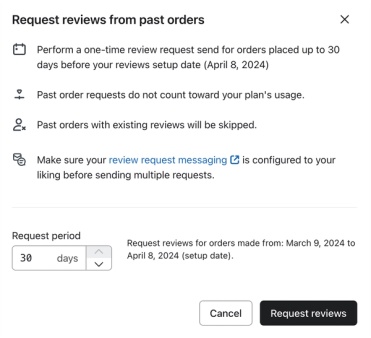
- Click Request reviews.
Ready to review events will begin firing immediately for up to 1,000 eligible orders. As additional orders become eligible, they will trigger additional Ready to review events.
How billing works for requesting reviews from past orders
Reviews requested from past customers do not count towards your Klaviyo Reviews plan.
Outcome
After completing this process, eligible past orders are queued for Ready to review events according to the timing above. Review requests are sent through your flow, so their timing also depends on the flow’s delays and message status. Reviews and related analytics update as customers submit reviews.
If you’d like to send a review request to someone outside of the lookback window, you can manually request a review from an individual.