OpenTable data reference
You will learn
Learn what data syncs from OpenTable to Klaviyo and where to view it. This includes data related to reservation creation, confirmation, completion, and cancellation, as well as reservation objects, POS orders, and guest information.
If you have not already, read our guide on getting started with OpenTable for step-by-step instructions on integrating, before continuing with this article.
Klaviyo syncs email addresses and email consent from OpenTable. While phone numbers are synced, SMS consent is not.
Sync frequency
When you integrate with OpenTable, Klaviyo syncs 2 years of historical reservation data and all of your OpenTable guest profiles. Going forward, reservations sync in real time, and guest and order data sync every 30 minutes.
How to view your data
To view your OpenTable data:
- Click the Analytics dropdown in the left-hand navigation sidebar.
- Select Metrics. Here, you can view all of the metrics in your account. The metrics labeled “OpenTable” represent all of the metrics synced from your OpenTable integration.
- Filter this view to see OpenTable metrics by using the filter selector next to the search bar and select OpenTable.
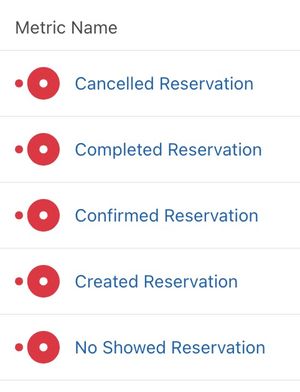
To view your OpenTable Reservation objects, navigate to Content > Objects.
Metrics
For each reservation metric, a $value property will be added if you are also using a POS system, e.g., Square, Toast, Lightspeed, etc. and have that POS connected to OpenTable. The value is the total spend on the guest's check. If your POS is not connected to OpenTable, $value and POS Data will not sync.
Timestamp properties such as Seated Time and Done Time are only included once the reservation has reached that stage.
Created Reservation
This event occurs when a reservation is made through OpenTable, whether by the guest or by the restaurant.
- Created Date The timestamp of when the reservation was created in UTC format, i.e., YYYY-MM-DDThh:mmTZD.
- Scheduled Time The timestamp of the scheduled reservation date in UTC format, i.e., YYYY-MM-DDThh:mmTZD.
- Confirmation ID The confirmation number of the reservation in OpenTable.
- Table Number The table number associated with the reservation, assigned by the restaurant in OpenTable.
- Party Size The party size specified by the guest.
- Visit Tags Any tags associated with the visit such as those related to specific types of service or seating, e.g., birthday, anniversary, window seating, etc.
- Reservation Origin The source of the reservation, i.e., Phone, Walk-in, or Web.
- Guest Request Any requests specified by the guest during the reservation process.
- Table Category The table category associated with the reservation, assigned by the restaurant in OpenTable, e.g., Bar, Hightop, Outdoor, etc.
- Server The name of the server associated with the reservation.
- Added To Waitlist The timestamp of when the guest was added to the waitlist in UTC format, if they were.
- Arrived Time The timestamp of when the guest arrived at the restaurant in UTC format.
- Seated Time The timestamp of when the guest was seated in UTC format.
- Done Time The timestamp of when the guest's reservation was marked as done in UTC format.
- POS Data The guest's check details, if your POS is connected to OpenTable: Check IDs, POS Subtotal, POS Tax, POS Tip, and POS Total.
- Currency Code The currency code associated with the reservation if the reservation required payment.
- Restaurant ID The ID of the restaurant associated with the reservation.
- Restaurant Name The name of the restaurant associated with the reservation, as entered in your OpenTable integration settings.
Confirmed Reservation
This event occurs when a guest confirms the reservation through OpenTable.
- Created Date The timestamp of when the reservation was created in UTC format, i.e., YYYY-MM-DDThh:mmTZD.
- Scheduled Time The timestamp of the scheduled reservation date in UTC format, i.e., YYYY-MM-DDThh:mmTZD.
- Confirmation ID The confirmation number of the reservation in OpenTable.
- Table Number The table number associated with the reservation, assigned by the restaurant in OpenTable.
- Party Size The party size specified by the guest.
- Visit Tags Any tags associated with the visit such as those related to specific types of service or seating, e.g., birthday, anniversary, window seating, etc.
- Reservation Origin The source of the reservation, i.e., Phone, Walk-in, or Web.
- Guest Request Any requests specified by the guest during the reservation process.
- Table Category The table category associated with the reservation, assigned by the restaurant in OpenTable, e.g., Bar, Hightop, Outdoor, etc.
- Server The name of the server associated with the reservation.
- Added To Waitlist The timestamp of when the guest was added to the waitlist in UTC format, if they were.
- Arrived Time The timestamp of when the guest arrived at the restaurant in UTC format.
- Seated Time The timestamp of when the guest was seated in UTC format.
- Done Time The timestamp of when the guest's reservation was marked as done in UTC format.
- POS Data The guest's check details, if your POS is connected to OpenTable: Check IDs, POS Subtotal, POS Tax, POS Tip, and POS Total.
- Currency Code The currency code associated with the reservation if the reservation required payment.
- Restaurant ID The ID of the restaurant associated with the reservation.
- Restaurant Name The name of the restaurant associated with the reservation, as entered in your OpenTable integration settings.
Completed Reservation
This event occurs when a guest's reservation is marked as done at the restaurant.
- Created Date The timestamp of when the reservation was created in UTC format, i.e., YYYY-MM-DDThh:mmTZD.
- Scheduled Time The timestamp of the scheduled reservation date in UTC format, i.e., YYYY-MM-DDThh:mmTZD.
- Confirmation ID The confirmation number of the reservation in OpenTable.
- Table Number The table number associated with the reservation, assigned by the restaurant in OpenTable.
- Party Size The party size specified by the guest.
- Visit Tags Any tags associated with the visit such as those related to specific types of service or seating, e.g., birthday, anniversary, window seating, etc.
- Reservation Origin The source of the reservation, i.e., Phone, Walk-in, or Web.
- Guest Request Any requests specified by the guest during the reservation process.
- Table Category The table category associated with the reservation, assigned by the restaurant in OpenTable, e.g., Bar, Hightop, Outdoor, etc.
- Server The name of the server associated with the reservation.
- Added To Waitlist The timestamp of when the guest was added to the waitlist in UTC format, if they were.
- Arrived Time The timestamp of when the guest arrived at the restaurant in UTC format.
- Seated Time The timestamp of when the guest was seated in UTC format.
- Done Time The timestamp of when the guest's reservation was marked as done in UTC format.
- POS Data The guest's check details, if your POS is connected to OpenTable: Check IDs, POS Subtotal, POS Tax, POS Tip, and POS Total.
- Currency Code The currency code associated with the reservation if the reservation required payment.
- Restaurant ID The ID of the restaurant associated with the reservation.
- Restaurant Name The name of the restaurant associated with the reservation, as entered in your OpenTable integration settings.
Cancelled Reservation
This event occurs when a guest cancels a reservation through OpenTable.
- Created Date The timestamp of when the reservation was created in UTC format, i.e., YYYY-MM-DDThh:mmTZD.
- Scheduled Time The timestamp of the scheduled reservation date in UTC format, i.e., YYYY-MM-DDThh:mmTZD.
- Confirmation ID The confirmation number of the reservation in OpenTable.
- Table Number The table number associated with the reservation, assigned by the restaurant in OpenTable.
- Party Size The party size specified by the guest.
- Visit Tags Any tags associated with the visit such as those related to specific types of service or seating, e.g., birthday, anniversary, window seating, etc.
- Reservation Origin The source of the reservation, i.e., Phone, Walk-in, or Web.
- Guest Request Any requests specified by the guest during the reservation process.
- Table Category The table category associated with the reservation, assigned by the restaurant in OpenTable, e.g., Bar, Hightop, Outdoor, etc.
- Server The name of the server associated with the reservation.
- Added To Waitlist The timestamp of when the guest was added to the waitlist in UTC format, if they were.
- Arrived Time The timestamp of when the guest arrived at the restaurant in UTC format.
- Seated Time The timestamp of when the guest was seated in UTC format.
- Done Time The timestamp of when the guest's reservation was marked as done in UTC format.
- POS Data The guest's check details, if your POS is connected to OpenTable: Check IDs, POS Subtotal, POS Tax, POS Tip, and POS Total.
- Currency Code The currency code associated with the reservation if the reservation required payment.
- Restaurant ID The ID of the restaurant associated with the reservation.
- Restaurant Name The name of the restaurant associated with the reservation, as entered in your OpenTable integration settings.
No Showed Reservation
This event occurs when a guest is not checked in for their reservation at the restaurant after the specified reservation time.
- Created Date The timestamp of when the reservation was created in UTC format, i.e., YYYY-MM-DDThh:mmTZD.
- Scheduled Time The timestamp of the scheduled reservation date in UTC format, i.e., YYYY-MM-DDThh:mmTZD.
- Confirmation ID The confirmation number of the reservation in OpenTable.
- Table Number The table number associated with the reservation, assigned by the restaurant in OpenTable.
- Party Size The party size specified by the guest.
- Visit Tags Any tags associated with the visit such as those related to specific types of service or seating, e.g., birthday, anniversary, window seating, etc.
- Reservation Origin The source of the reservation, i.e., Phone, Walk-in, or Web.
- Guest Request Any requests specified by the guest during the reservation process.
- Table Category The table category associated with the reservation, assigned by the restaurant in OpenTable, e.g., Bar, Hightop, Outdoor, etc.
- Server The name of the server associated with the reservation.
- Added To Waitlist The timestamp of when the guest was added to the waitlist in UTC format, if they were.
- Arrived Time The timestamp of when the guest arrived at the restaurant in UTC format.
- Seated Time The timestamp of when the guest was seated in UTC format.
- Done Time The timestamp of when the guest's reservation was marked as done in UTC format.
- POS Data The guest's check details, if your POS is connected to OpenTable: Check IDs, POS Subtotal, POS Tax, POS Tip, and POS Total.
- Currency Code The currency code associated with the reservation if the reservation required payment.
- Restaurant ID The ID of the restaurant associated with the reservation.
- Restaurant Name The name of the restaurant associated with the reservation, as entered in your OpenTable integration settings.
Placed Order
This event occurs when a guest's POS order is synced from OpenTable. This requires your POS to be connected to OpenTable.
- Check IDs The IDs of the POS checks associated with the order.
- Confirmation ID The confirmation number of the reservation associated with the order.
- Items The names of the items ordered.
- Modifiers Any modifiers applied to the items ordered.
- Item Count The total number of items ordered.
- Currency Code The currency code of the order.
- Restaurant ID The ID of the restaurant associated with the order.
- Restaurant Name The name of the restaurant associated with the reservation, as entered in your OpenTable integration settings.
Ordered Product
This event occurs once for each item on a guest's POS order. For example, an order with 3 of the same item will have 3 events.
- Name The name of the item.
- Modifiers Any modifiers applied to the item.
- Item Comment Any comment on the item.
- Currency Code The currency code of the order.
- Restaurant ID The ID of the restaurant associated with the order.
- Restaurant Name The name of the restaurant associated with the reservation, as entered in your OpenTable integration settings.
Reservation objects
Klaviyo syncs Reservation objects from OpenTable, linked to the guest's profile. Use them to build date-based flows (like reservation reminders) and segments (like guests with an upcoming reservation).
- ID The reservation ID from OpenTable. Used as the object ID.
- State The current status of the reservation, e.g., Confirmed, Done, or Cancelled.
- CreatedDate The timestamp of when the reservation was created in UTC format.
- ScheduledTimeThe timestamp of the scheduled reservation date in UTC format.
- PartySize The party size specified by the guest.
- TableNumber The table number associated with the reservation.
- TableCategory The table category associated with the reservation, e.g., Bar, Hightop, Outdoor, etc.
- VisitTags Any tags associated with the visit, e.g., birthday, anniversary, etc.
- Origin The source of the reservation, i.e., Phone, Walk-in, or Web.
- GuestRequest Any requests specified by the guest during the reservation process.
- VenueNotes Any notes the restaurant added to the reservation.
- OpenTableNotes Any notes OpenTable added to the reservation.
- Server The name of the server associated with the reservation.
- AddedToWaitlistTime The timestamp of when the guest was added to the waitlist in UTC format.
- ArrivedTime The timestamp of when the guest arrived in UTC format.
- SeatedTime The timestamp of when the guest was seated in UTC format.
- DoneTime The timestamp of when the reservation was marked as done in UTC format.
- Value The total spend on the guest's check, if your POS is connected to OpenTable.
- Tip The tip on the guest's check, if your POS is connected to OpenTable.
- CheckID The IDs of the POS checks associated with the reservation.
- Items The names of the items ordered.
- Modifiers Any modifiers applied to the items ordered.
- ItemCount The total number of items ordered.
- CurrencyCode The currency code associated with the reservation.
- RestaurantID The ID of the restaurant associated with the reservation.
- RestaurantLocation The name of the restaurant, as entered in your OpenTable integration settings.
Synced guest data
In addition to the metrics Klaviyo syncs from OpenTable, Klaviyo will also create a unique profile for every guest that we sync. A guest needs an email address or phone number to sync. When we sync contact information, there are also certain custom properties that may get added to each Klaviyo Profile. You can use these properties in segments and in flows. Here are the properties that are automatically synced from OpenTable:
- First Name
- Last Name
- Phone
- Address
- Birthday
- OpenTable Birthday Day
- OpenTable Birthday Month
- OpenTable Birthday Year
- Opentable Anniversary
- OpenTable Anniversary Day
- OpenTable Anniversary Month
- OpenTable Anniversary Year
- OpenTable Guest IDs
- OpenTable Restaurants Visited
- OpenTable Tags
- OpenTable Notes
- OpenTable Notes Special Relationship
- OpenTable Notes Food And Drink
- OpenTable Notes Seating
- OpenTable Date First Visit
- OpenTable Date Last Visit
Klaviyo syncs email consent from OpenTable. Guests who opted in to email marketing in OpenTable are subscribed to the list you selected in your integration settings. While phone numbers are synced, SMS consent is not.