How to create a segment of VIP customers
You will learn
Learn how to identify VIPs from your customer base using Klaviyo segments, which can be useful if you run a rewards program or want to know who your most valuable customers are. Identifying and segmenting your VIP customers can help you build loyalty and a more personal relationship with some of your best customers, so you can increase their average order value and lifetime value as a customer.
Create a VIP segment
- Navigate to Audience > Lists & segments.
- Click Create > Segment. If you do not have any lists or segments yet, select the Segment card.
- Name your segment. If a Create segment panel opens, enter a Name and click Create segment to open the builder. Otherwise, edit the segment name at the top of the builder.
- Add one of the segment definitions below. Replace each blank with a spending or order threshold that fits your business.
- Click Create segment to save. Wait for the segment to finish populating before scheduling a campaign.
Segment conditions
There are 3 primary approaches to take when deciding who your VIP customers are:
- Big Spenders
Customers who have spent over X amount of money over Y amount of time. - Frequent Purchasers
Customers who have placed more than X orders over Y amount of time. - Blended
Customers who have placed more than X orders OR spent more than Y amount of money over Z amount of time.
It is important to include a time restriction when defining a VIP segment. Otherwise, you may capture inactive customers or customers who have simply been purchasing from you for a while (but aren't necessarily VIPs).
Depending on your integration, the spending option may be labeled Revenue or Placed Order Value. Both represent the monetary value of the underlying order events. Select the option for your store’s integration.
Big spenders
If Revenue or Placed Order Value is missing, check that order events with monetary values have synced to Klaviyo. For example, a new store may not have any order data yet.
Use the segment definition What someone has done (or not done) > Revenue > is greater than __ in the last 365 days. Use a revenue number that is slightly higher than your average customer's yearly spend.

Revenue is based on the value of the Placed Order or equivalent event synced through your integration. It is a spending option for that metric, not a separate metric you can export from Metrics.
Frequent purchasers
Use the segment definition What someone has done (or not done) > Placed Order > is greater than __ in the last 365 days. Use a number that is slightly higher than your average customer's number of orders per year.

Blended
Use Add condition to add a second condition, then join the conditions with OR: What someone has done (or not done) > Placed Order > is greater than __ in the last 365 days OR What someone has done (or not done) > Revenue > is greater than __ in the last 365 days. Use a number of orders and revenue that is slightly above average for a customer in a given year.
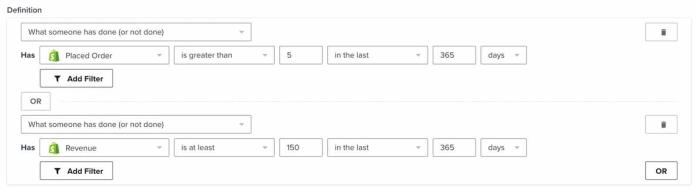
OR includes customers who meet either threshold or both. Use AND instead if customers must meet both thresholds to qualify as VIPs.
Content to send to VIPs
These purchase-based segments can include people who have not subscribed to marketing. Before using a VIP segment for email or SMS marketing, add the appropriate consent conditions. For a blended segment, make sure the consent requirement applies to both alternatives. Learn how to combine segment conditions.
Consider sending the following types of content to customers that fall into a VIP segment:
- Send them advance notice of new releases or promotions.
- Allow them to pick out their own bundle of 2+ products to receive 5% off the bundle.
- Invite them to share how they use their favorite products on social media in exchange for a free gift.
- Send them a survey to ask what more they would like to see from your marketing content.
- Send them a survey to ask what products or services they are most needing right now in your company’s product category.
These types of content reward VIP customers for their loyalty to your brand, and allow you to continue to maintain and nurture your relationship with them.
Additional resources
- How to create customer persona segments based on activity
Learn how to use segmentation to create customer persona segments based on the actions they have taken. This allows you to send more relevant marketing communications so you can gain the most value from your audience.
- Getting started with Meta Ads
Learn how to integrate Meta Ads with Klaviyo. The advertising integration with Meta provides two main features:
- Advanced segmentation reference
Learn effective advanced segmentation strategies that provide insights into your customer base and create highly personalized experiences for your subscribers.
- Guide to running a VIP program