メール内レビュー収集の使用方法
対応しているメール受信トレイで、顧客が直接レビューを書き込めるようにする方法をご覧ください。レビューを送信を選択すると、レビューを確認する、または不足している情報を入力するよう求めるウェブページが開きます。
この機能は現在、[レビュー] > [レビューの設定] > [一般]で言語が 英語に設定されているアカウントでのみご利用いただけます。
メール内レビュー収集を有効にする
- Klaviyo で、レビュー に移動します。
- レビュー設定を選択し、次にリクエストと返信(またはアカウントに応じてレビューリクエスト)を選択します。
- メール内レビュー収集カードで有効にするを選択し、表示されるモーダルで選択内容を確認してください。
メール内レビュー収集カードが表示されているものの、有効化ボタンがない場合は、この機能はすでに有効化されています。次のセクションに進んでください。
このステップを完了すると、Klaviyo はユニバーサルコンテンツブロックをアカウントに追加します。このブロックを、レビュー リクエスト フローのメールに追加する必要があります。
フロー メールにレビュー収集ブロックを追加する
このブロックは、Ready to review イベントによってトリガーされるフローでのみサポートされています。このブロックを他のフローまたはキャンペーンに追加すると、正しくレンダリングされません。
- レビュー依頼フローに移動してください。
- フローでメールテンプレートを開きます。
- メールエディタでコンテンツ(またはコンテンツを追加)を開き、次にユニバーサルを選択してください。
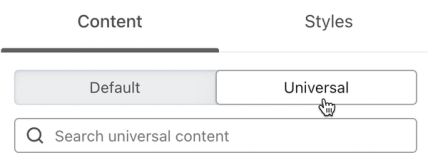
- In-email review collection - Klaviyo Reviews を検索します。
- メール内レビュー依頼ブロックをメールにクリックしてドラッグします。
- メッセージから前の星評価ブロックを削除します。
- 変更が保存されるまで待ってから、終了をクリックしてください。
メール内のレビュー依頼ブロックを編集する前に、まずそのコピーを保存してください。元のフォームを復元するには、保存したコピーまたは以下のコードを使用してください。このブロックを編集するにはコードを直接編集する必要があり、開発者またはコードに精通したマーケターにのみ推奨されます。
メール内レビューのブロックコード
メール内レビュー収集ブロックの元のバージョンに戻す必要がある場合は、以下の好みのコードスニペットをコピーし、専用の HTML ブロックに貼り付けます。
レビューの見出しなし
<div class="kl_reviews__email_submission" style="display: block; margin: auto; padding: 24px;"><!--[if !mso]><!--><form action="{{ event.review_link }}" method="GET">
<h4 class="kl_reviews__email_submission__header" style="font-weight: bold;">Rating</h4>
<table class="kl_reviews__email_submission__ratings" style="width: 100%; margin-bottom: 32px;">
<tbody>
<tr>
<td style="width: 20%;"><input id="rating1" style="display: block; cursor: pointer; margin-bottom: 8px;" name="rating" type="radio" value="1"> <label style="display: block; cursor: pointer;" for="rating1">1 ★</label></td>
<td style="width: 20%;"><input id="rating2" style="display: block; cursor: pointer; margin-bottom: 8px;" name="rating" type="radio" value="2"> <label style="display: block; cursor: pointer;" for="rating2">2 ★</label></td>
<td style="width: 20%;"><input id="rating3" style="display: block; cursor: pointer; margin-bottom: 8px;" name="rating" type="radio" value="3"> <label style="display: block; cursor: pointer;" for="rating3">3 ★</label></td>
<td style="width: 20%;"><input id="rating4" style="display: block; cursor: pointer; margin-bottom: 8px;" name="rating" type="radio" value="4"> <label style="display: block; cursor: pointer;" for="rating4">4 ★</label></td>
<td style="width: 20%;"><input id="rating5" style="display: block; cursor: pointer; margin-bottom: 8px;" name="rating" type="radio" value="5"> <label style="display: block; cursor: pointer;" for="rating5">5 ★</label></td>
</tr>
</tbody>
</table>
<h4 class="kl_reviews__email_submission__header" style="font-weight: bold;">Your review</h4>
<textarea class="kl_reviews__email_submission__content" style="display: block; width: 99%; height: 120px; border: 1px solid #d9d9d9; border-radius: 4px; margin-bottom: 32px; font-size: 16px;" name="content">​</textarea> <button class="kl_reviews__email_submission__submit" style="display: block; width: 100%; border-radius: 2px; background-color: #000; color: #fff; cursor: pointer; border: none; height: 50px; font-size: 16px; margin-bottom: 32px;" type="submit"> Submit review </button></form><!--<![endif]-->
<h4 class="kl_reviews__email_submission__fallback" style="text-align: center; font-weight: bold;">Having trouble with the form?</h4>
<a class="kl_reviews__email_submission__fallback_link" href="{{ event.review_link }}" style="display: block; text-align: center; cursor: pointer; font-size: 14px; font-weight: 400;">Write review on the web</a>
</div>レビューの見出し付き
<div class="kl_reviews__email_submission" style="display: block; margin: auto; padding: 24px;"><!--[if !mso]><!--><form action="{{ event.review_link }}" method="GET">
<h4 class="kl_reviews__email_submission__header" style="font-weight: bold;">Rating</h4>
<table class="kl_reviews__email_submission__ratings" style="width: 100%; margin-bottom: 32px;">
<tbody>
<tr>
<td style="width: 20%;"><input id="rating1" style="display: block; cursor: pointer; margin-bottom: 8px;" name="rating" type="radio" value="1"> <label style="display: block; cursor: pointer;" for="rating1">1 ★</label></td>
<td style="width: 20%;"><input id="rating2" style="display: block; cursor: pointer; margin-bottom: 8px;" name="rating" type="radio" value="2"> <label style="display: block; cursor: pointer;" for="rating2">2 ★</label></td>
<td style="width: 20%;"><input id="rating3" style="display: block; cursor: pointer; margin-bottom: 8px;" name="rating" type="radio" value="3"> <label style="display: block; cursor: pointer;" for="rating3">3 ★</label></td>
<td style="width: 20%;"><input id="rating4" style="display: block; cursor: pointer; margin-bottom: 8px;" name="rating" type="radio" value="4"> <label style="display: block; cursor: pointer;" for="rating4">4 ★</label></td>
<td style="width: 20%;"><input id="rating5" style="display: block; cursor: pointer; margin-bottom: 8px;" name="rating" type="radio" value="5"> <label style="display: block; cursor: pointer;" for="rating5">5 ★</label></td>
</tr>
</tbody>
</table>
<h4 class="kl_reviews__email_submission__header" style="font-weight: bold;">Your review</h4>
<textarea class="kl_reviews__email_submission__content" style="display: block; width: 99%; height: 120px; border: 1px solid #d9d9d9; border-radius: 4px; margin-bottom: 32px; font-size: 16px;" name="content">​</textarea>
<h4 class="kl_reviews__email_submission__header" style="font-weight: bold;">Review headline</h4>
<input class="kl_reviews__email_submission__headline" style="display: block; width: 99%; height: 36px; border: 1px solid #d9d9d9; border-radius: 4px; margin-bottom: 32px; font-size: 16px;" name="headline" type="text">
<button class="kl_reviews__email_submission__submit" style="display: block; width: 100%; border-radius: 2px; background-color: #000; color: #fff; cursor: pointer; border: none; height: 50px; font-size: 16px; margin-bottom: 32px;" type="submit"> Submit review </button></form><!--<![endif]-->
<h4 class="kl_reviews__email_submission__fallback" style="text-align: center; font-weight: bold;">Having trouble with the form?</h4>
<a class="kl_reviews__email_submission__fallback_link" href="{{ event.review_link }}" style="display: block; text-align: center; cursor: pointer; font-size: 14px; font-weight: 400;">Write review on the web</a>
</div>メール内レビュー ブロックについて
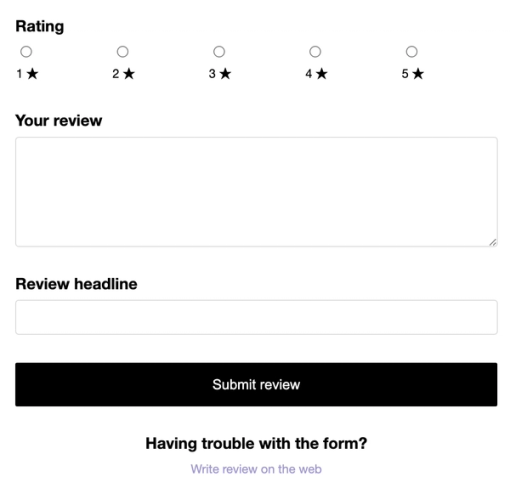
メール内レビュー・ブロックには、評価とレビューのコンテンツフィールドが含まれており、有効化すると見出しフィールドも含まれます:
- レビュー評価
1~5 つ星を選択するラジオ ボタンのオプション - レビュー内容
レビュー内容の自由記述フィールド - レビューの見出し
レビューの見出しまたはタイトル用の自由記述フィールド(メール内レビュー収集を有効にする際、レビュー送信ページエディタでレビューの見出しが有効になっている場合に含まれます)
これらのフィールドをカスタマイズするには、ブロックのコードを編集する必要があります。画像のアップロードとカスタム質問は、メールフォームには含まれていません。
制限事項
この機能はHTML <form>要素に依存しており、すべての受信トレイプロバイダーでサポートされているわけではありません。受信者がフォーム要素に対応していない受信トレイでレビューリクエストメールを開いた場合、ウェブでレビューを書くリンクを使用してレビューを送信できます。
レビュアーが評価またはレビュー本文を空欄のままにした場合、または見出しや最小文字数の要件を満たしていない場合は、入力済みの情報が反映された状態でウェブフォームが開き、レビューを完了できます。
メール内レビュー収集では、カスタム質問はサポートされていません。カスタム質問がある場合、レビュー担当者は特定のシナリオでのみそれらを表示します。
- 商品に対して必須のカスタム質問がある場合、メール内レビュー フォームを送信するとウェブフォームが開き、レビュー担当者はレビューを送信するためにそれらの質問に回答する必要があります。部分的に送信されたレビューは保存されません。
- 必須ではないカスタム質問があり、レビューが他の送信要件も満たしている場合、レビュアーは受信トレイから送信した後に成功ページが表示されます。任意の質問はスキップされます。レビュアーは、送信前にメールでウェブでレビューを書くを選択するか、商品ページにアクセスしてレビューを書くをクリックすることで、それらに回答できます。
達成できること
これらの手順を完了すると、対応している受信トレイを使用している顧客はメール内でレビューを入力できます。レビューを送信を選択すると、ウェブページでレビューが確認されるか、必要な情報の入力を完了できます。
その他のリソース
- レビューのパフォーマンスを把握する
Klaviyo でレビュー分析(レスポンス率、平均評価など)を監視して理解する方法をご確認ください。これらの分析は、レビュー依頼フローが意図したとおりに機能しているかを理解し、顧客の商品に対する反応を追跡するうえで重要です。
- 顧客レビューへの対応方法
お客様が残したレビューへの返信方法をご覧ください。返信内容は公開されるため、今後の購入者はこの情報を参考にして購入判断を行えます。