이메일 내 후기 수집을 사용하는 방법
지원되는 이메일 받은편지함에서 고객이 직접 리뷰를 작성하도록 설정하는 방법을 알아보세요. 리뷰 제출을 선택하면 리뷰를 확인하거나 누락된 정보를 완료해 달라고 요청하는 웹 페이지가 열려요.
현재 이 기능은 리뷰 > 리뷰 설정 > 일반 에서 언어가 영어 로 설정된 계정에서만 사용할 수 있어요.
이메일 내 후기 수집 사용 설정
- Klaviyo에서 리뷰로 이동하세요.
- 리뷰 설정을 선택한 다음 요청 및 답글 (또는 계정에 따라 리뷰 요청)을 선택하세요.
- 이메일 내 리뷰 수집 카드에서 사용 설정을 선택한 다음, 표시되는 모달에서 선택 사항을 확인해 주세요.
이메일 내 리뷰 수집 카드가 표시되지만 활성화 버튼이 없다면, 이 기능이 이미 활성화된 상태이므로 다음 섹션으로 진행해 주세요.
이 단계를 완료하면 Klaviyo에서 계정에 범용 콘텐츠 블록을 추가해요. 리뷰 요청 플로우의 이메일에 이 블록을 추가해야 해요.
플로우 이메일에 리뷰 수집 블록을 추가하세요
이 블록은 검토 준비 완료 이벤트에 의해 트리거되는 플로우에서만 지원됩니다. 이 블록을 다른 플로우나 캠페인에 추가하면 올바르게 렌더링되지 않아요.
- 리뷰 요청 플로우로 이동해 주세요.
- 플로우에서 이메일 템플릿을 여세요.
- 이메일 편집기에서 콘텐츠 (또는 콘텐츠 추가)를 연 다음 범용을 선택하세요.
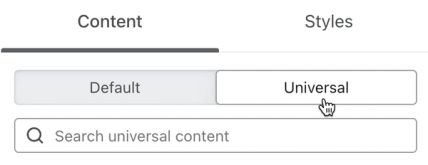
- 인메일 리뷰 수집 - Klaviyo 리뷰를 검색하세요.
- 이메일 내 리뷰 요청 블록을 클릭한 다음 드래그하여 이메일에 넣어 주세요.
- 메시지에서 이전 별점 평가 블록을 삭제해 주세요.
- 변경 사항 저장이 완료될 때까지 기다린 다음 종료를 클릭하세요.
이메일 내 리뷰 요청 블록을 수정하기 전에 먼저 사본을 저장 해 주세요. 원래 형태로 복원하려면 저장한 사본 또는 아래 코드를 사용해 주세요. 이 블록을 편집하려면 코드를 직접 수정해야 하며, 개발자 또는 코드에 익숙한 마케터에게만 권장돼요.
이메일 내 리뷰 블록 코드
이메일 내 리뷰 수집 블록을 원래 버전으로 되돌려야 한다면, 아래에서 원하는 코드 조각을 복사한 다음 전용 HTML 블록에 붙여넣어 주세요:
후기 헤드라인 없음
<div class="kl_reviews__email_submission" style="display: block; margin: auto; padding: 24px;"><!--[if !mso]><!--><form action="{{ event.review_link }}" method="GET">
<h4 class="kl_reviews__email_submission__header" style="font-weight: bold;">Rating</h4>
<table class="kl_reviews__email_submission__ratings" style="width: 100%; margin-bottom: 32px;">
<tbody>
<tr>
<td style="width: 20%;"><input id="rating1" style="display: block; cursor: pointer; margin-bottom: 8px;" name="rating" type="radio" value="1"> <label style="display: block; cursor: pointer;" for="rating1">1 ★</label></td>
<td style="width: 20%;"><input id="rating2" style="display: block; cursor: pointer; margin-bottom: 8px;" name="rating" type="radio" value="2"> <label style="display: block; cursor: pointer;" for="rating2">2 ★</label></td>
<td style="width: 20%;"><input id="rating3" style="display: block; cursor: pointer; margin-bottom: 8px;" name="rating" type="radio" value="3"> <label style="display: block; cursor: pointer;" for="rating3">3 ★</label></td>
<td style="width: 20%;"><input id="rating4" style="display: block; cursor: pointer; margin-bottom: 8px;" name="rating" type="radio" value="4"> <label style="display: block; cursor: pointer;" for="rating4">4 ★</label></td>
<td style="width: 20%;"><input id="rating5" style="display: block; cursor: pointer; margin-bottom: 8px;" name="rating" type="radio" value="5"> <label style="display: block; cursor: pointer;" for="rating5">5 ★</label></td>
</tr>
</tbody>
</table>
<h4 class="kl_reviews__email_submission__header" style="font-weight: bold;">Your review</h4>
<textarea class="kl_reviews__email_submission__content" style="display: block; width: 99%; height: 120px; border: 1px solid #d9d9d9; border-radius: 4px; margin-bottom: 32px; font-size: 16px;" name="content">​</textarea> <button class="kl_reviews__email_submission__submit" style="display: block; width: 100%; border-radius: 2px; background-color: #000; color: #fff; cursor: pointer; border: none; height: 50px; font-size: 16px; margin-bottom: 32px;" type="submit"> Submit review </button></form><!--<![endif]-->
<h4 class="kl_reviews__email_submission__fallback" style="text-align: center; font-weight: bold;">Having trouble with the form?</h4>
<a class="kl_reviews__email_submission__fallback_link" href="{{ event.review_link }}" style="display: block; text-align: center; cursor: pointer; font-size: 14px; font-weight: 400;">Write review on the web</a>
</div>후기 헤드라인 포함
<div class="kl_reviews__email_submission" style="display: block; margin: auto; padding: 24px;"><!--[if !mso]><!--><form action="{{ event.review_link }}" method="GET">
<h4 class="kl_reviews__email_submission__header" style="font-weight: bold;">Rating</h4>
<table class="kl_reviews__email_submission__ratings" style="width: 100%; margin-bottom: 32px;">
<tbody>
<tr>
<td style="width: 20%;"><input id="rating1" style="display: block; cursor: pointer; margin-bottom: 8px;" name="rating" type="radio" value="1"> <label style="display: block; cursor: pointer;" for="rating1">1 ★</label></td>
<td style="width: 20%;"><input id="rating2" style="display: block; cursor: pointer; margin-bottom: 8px;" name="rating" type="radio" value="2"> <label style="display: block; cursor: pointer;" for="rating2">2 ★</label></td>
<td style="width: 20%;"><input id="rating3" style="display: block; cursor: pointer; margin-bottom: 8px;" name="rating" type="radio" value="3"> <label style="display: block; cursor: pointer;" for="rating3">3 ★</label></td>
<td style="width: 20%;"><input id="rating4" style="display: block; cursor: pointer; margin-bottom: 8px;" name="rating" type="radio" value="4"> <label style="display: block; cursor: pointer;" for="rating4">4 ★</label></td>
<td style="width: 20%;"><input id="rating5" style="display: block; cursor: pointer; margin-bottom: 8px;" name="rating" type="radio" value="5"> <label style="display: block; cursor: pointer;" for="rating5">5 ★</label></td>
</tr>
</tbody>
</table>
<h4 class="kl_reviews__email_submission__header" style="font-weight: bold;">Your review</h4>
<textarea class="kl_reviews__email_submission__content" style="display: block; width: 99%; height: 120px; border: 1px solid #d9d9d9; border-radius: 4px; margin-bottom: 32px; font-size: 16px;" name="content">​</textarea>
<h4 class="kl_reviews__email_submission__header" style="font-weight: bold;">Review headline</h4>
<input class="kl_reviews__email_submission__headline" style="display: block; width: 99%; height: 36px; border: 1px solid #d9d9d9; border-radius: 4px; margin-bottom: 32px; font-size: 16px;" name="headline" type="text">
<button class="kl_reviews__email_submission__submit" style="display: block; width: 100%; border-radius: 2px; background-color: #000; color: #fff; cursor: pointer; border: none; height: 50px; font-size: 16px; margin-bottom: 32px;" type="submit"> Submit review </button></form><!--<![endif]-->
<h4 class="kl_reviews__email_submission__fallback" style="text-align: center; font-weight: bold;">Having trouble with the form?</h4>
<a class="kl_reviews__email_submission__fallback_link" href="{{ event.review_link }}" style="display: block; text-align: center; cursor: pointer; font-size: 14px; font-weight: 400;">Write review on the web</a>
</div>이메일 내 후기 블록 정보
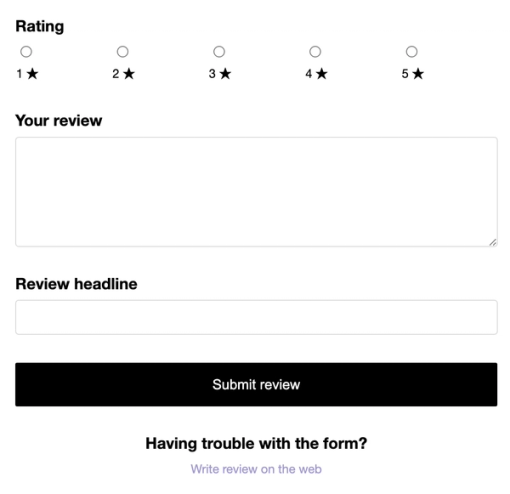
이메일 내 리뷰 블록에는 평점 및 리뷰 콘텐츠 필드가 포함되며, 활성화된 경우 헤드라인 필드도 포함돼요:
- 리뷰 평점
1~5개의 별을 선택할 수 있는 라디오 버튼 옵션 - 리뷰 콘텐츠
리뷰 콘텐츠를 입력할 수 있는 오픈 텍스트 필드 - 리뷰 헤드라인
리뷰 헤드라인 또는 제목을 입력하는 자유 텍스트 필드예요(이메일 내 리뷰 수집을 활성화할 때 리뷰 제출 페이지 편집기에서 리뷰 헤드라인을 사용하도록 설정한 경우 포함돼요).
이러한 필드를 맞춤 설정하려면 블록의 코드를 수정해야 해요. 이메일 양식에는 이미지 업로드와 맞춤 질문이 포함되지 않아요.
제한 사항
이 기능은 HTML <form> 요소를 기반으로 하며, 이는 모든 수신함 제공업체에서 지원되지 않아요. 수신자가 form 요소를 지원하지 않는 수신함에서 리뷰 요청 이메일을 열면, 웹에서 리뷰 작성 링크를 사용해 리뷰를 제출할 수 있어요.
검토자가 평점이나 리뷰 텍스트를 비워 두었거나 제목 또는 최소 단어 수 요구 사항을 충족하지 못한 경우, 웹 양식이 검토자가 입력한 정보가 채워진 상태로 열려서 리뷰를 마무리할 수 있어요.
이메일 내 리뷰 수집에는 맞춤 질문이 지원되지 않아요. 맞춤 질문이 있으면, 검토자는 특정한 상황에서만 해당 질문을 볼 수 있어요.
- 제품에 대해 필수 맞춤 질문이 있는 경우, 이메일 내 리뷰 양식을 제출하면 웹 양식이 열리며, 리뷰어는 리뷰를 제출하려면 해당 질문을 완료해야 해요. 부분적으로 제출된 리뷰는 저장되지 않아요.
- 필수가 아닌 맞춤 질문이 있고 리뷰가 다른 제출 요건도 충족하면, 리뷰어는 받은편지함에서 제출한 뒤 성공 페이지를 확인할 수 있어요. 선택 질문은 건너뛰어요. 리뷰어는 제출하기 전에 이메일에서 웹에서 리뷰 작성을 선택해 답할 수 있어요. 또는 제품 페이지로 이동해 리뷰 작성을 클릭할 수도 있어요.
결과
이 단계를 완료하면 지원되는 받은편지함을 사용하는 고객이 이메일에서 리뷰를 작성할 수 있어요. 고객이 리뷰 제출을 선택하면 웹 페이지에서 리뷰를 확인하거나, 필요한 정보를 모두 입력하도록 안내해요.
추가 자료
- Understanding reviews performance
Learn how to monitor and understand your reviews analytics in Klaviyo, including your response rate, average rating, and more. These analytics are important to understanding whether your review request flows are working as intended, and tracking your customers’ response to your products.
- How to respond to customer reviews
Learn how to respond to reviews left by your customers. Responses are public, so future shoppers can use this information to inform their buying decisions.